How to Replace a Kwikset Halo Battery Cover
Match the replacement cover to your Kwikset Halo lock, then remove the old cover gently and seat the new one before checking battery access. Work with the lock instructions nearby and avoid forcing clips or screws.
On this page (8 sections)
- How do you choose a Kwikset Halo battery cover replacement?
- What should you do before removing the old cover?
- How do you remove the Kwikset Halo battery cover?
- How do you install the new battery cover?
- What should you check after the replacement?
- What products can help with smart-lock access?
- What if the new cover still will not stay closed?
- What is the safest replacement decision?
A Kwikset Halo battery cover replacement should match your exact lock model and sit flush after the old cover is removed. Check the cover shape, mounting points, and battery access before you buy, then install it without forcing the tabs or screws.
The cover protects the battery compartment and helps keep the lock's interior assembly closed. A loose, cracked, or missing cover is a reason to inspect the lock before relying on it for daily entry.
How do you choose a Kwikset Halo battery cover replacement?
Choose a cover made for your exact Kwikset Halo model and finish. Halo locks can look similar while using different cover shapes, clips, or mounting points.
Start by recording the model name and any number printed on the lock or installation material. Compare the old cover with the replacement from several angles:
- Overall shape and length
- Battery compartment opening
- Screw or latch positions
- Interior and exterior orientation
- Finish and visible color
- Clearance around the lock body
A cover that looks close may still fail to latch. Don't drill new holes, trim the cover, or bend the lock body to make an uncertain part fit.
If you are still identifying the lock, Kwikset's official smart lock support can help you locate model instructions and troubleshooting information. Keep those instructions available during the replacement.
What should you do before removing the old cover?
Prepare the replacement, the correct screwdriver, and a safe place for the fasteners before opening the battery compartment. Keep the door open while you work so you aren't locked out if the lock needs a reset or battery check.
Take a photo of the old cover while it is still installed. The image can show the cover's direction, screw locations, and how the edges meet the lock body.
Have a small container ready for screws. Work over a clear surface where a dropped fastener cannot fall into the door gap or disappear under furniture.
If the lock is connected to an app, note its current status before starting. A cover change should not require you to change access codes, but checking the lock before work gives you a useful reference.
How do you remove the Kwikset Halo battery cover?
Release the cover using the model's normal latch or screws, then lift it away without pulling on wires or battery contacts. The exact release method differs by lock design, so follow the instructions for your Halo model.
Use the correct screwdriver size and keep the tool aligned with each screw head. Turn slowly to avoid stripping the fastener.
If the cover has a tab, press the tab in the direction shown by the instructions. Don't pry against the keypad, interior trim, or battery contacts.
Set the old cover aside and compare it directly with the replacement. Check that the replacement has the same orientation, latch points, and screw locations before installing it.
Can a Kwikset Halo battery cover replacement fit backward?
A replacement cover should install in only the intended direction and sit evenly against the lock body. If the edges do not line up, remove it and check the orientation instead of tightening the screws.
Look for gaps around the cover. A small, even seam may be part of the design, but a raised edge, loose corner, or visible battery compartment suggests a fit problem.
Don't use adhesive as a substitute for the correct cover. Glue can make future battery service harder and may interfere with the latch or other lock parts.
How do you install the new battery cover?
Place the new cover in its correct position, engage the latch or start the screws by hand, and tighten only until secure. The cover should remain stable without pressure on the batteries.
If the cover uses screws, start each one before tightening any of them fully. This helps keep the cover aligned with the mounting points.
If the cover uses clips, press evenly across the supported edges. A click can indicate that a tab is seated, but don't assume it is secure if one side still lifts.
After installation, run a finger around the cover's edge. Check that it is flush, the battery compartment is closed, and the keypad or interior assembly has not shifted.
What should you check after the replacement?
Test the lock with the door open before closing it. Confirm that the cover stays in place and that the lock responds normally to its keypad, thumb turn, key, or connected control method.
Check the battery status if your Halo model reports it. If the lock does not respond, inspect the battery orientation and contacts according to the instructions before assuming the cover caused the problem.
Run the locking and opening cycle several times with the door open. Then close the door and test again while watching for rubbing, unusual resistance, or incomplete locking.
For the battery process itself, see how to replace Kwikset Halo batteries. The cover and battery jobs are related, but a new cover will not fix weak batteries or damaged contacts.
What products can help with smart-lock access?
A replacement battery cover solves a physical lock problem. Other smart-lock accessories address remote access, a complete lock upgrade, or power for a wired doorbell, so choose based on the issue you are actually trying to solve.
The August Home Connect Wi-Fi Bridge connects an August Smart Lock to Wi-Fi and supports remote access, voice control through Amazon Alexa, Google Assistant, or Siri, and instant entry or exit alerts. It requires a North American outlet with 110-240 volt and works with iOS 9.0 or higher or Android 5.0 or higher.
Its white housing measures 1.5 x 2.4 x 2.4 inches, and the box includes 1 Connect and a Getting Started Guide. It is an accessory for an August Smart Lock, so it does not replace a Kwikset Halo cover or add power to a Kwikset lock.
For a broader look at connected entry hardware, read our guide to smart door locks. If you need general battery steps, see smart lock battery replacement.
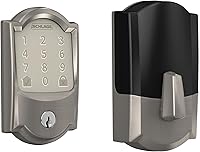
The Schlage Encode Smart WiFi Deadbolt Lock with Camelot Trim, Satin Nickel, is a complete keypad lock with built-in Wi-Fi. It supports up to 100 access codes, lock history, customizable notifications, Alexa and Google Home pairing, and a physical backup key.
It fits standard doors with 1-3/8 in to 1-3/4 in door thickness and a 2-3/8 in or 2-3/4 in backset. It uses 4 AA batteries, includes installation hardware and instructions, and has a fingerprint-resistant touchscreen with an auto-lock option.
This is a replacement-lock option, not a cover part. For Matter compatibility in a replacement lock, compare Yale smart locks with Matter support.
Read the door measurements carefully before choosing it, and compare its functions with your current lock's needs.
The Hardwired Transformer for Ring Wired Video Doorbells provides 120V AC 60 Hz input and 16V 30VA output. It is designed to replace an underpowered North American doorbell transformer and works with Ring Video Doorbell Wired, Wired Doorbell Plus, Video Doorbell Pro, and Video Doorbell Pro 2.
This transformer measures 2.34 x 2.55 x 1.92 inches and weighs 1.57 lb. It belongs in a wired doorbell power project, so don't use it as a power source for a battery-operated Kwikset Halo lock.
For a different smart-lock battery example, see eufy smart lock battery replacement. You can also compare the best batteries for smart locks before servicing a compatible lock.
What if the new cover still will not stay closed?
Remove the cover and recheck the model, orientation, and mounting points before trying another installation. A cover that will not stay closed may be the wrong part, have a damaged tab, or be meeting a damaged lock housing.
Inspect the battery compartment for a swollen or leaking battery, corrosion, loose contact, or obstruction. Follow the lock instructions for safe battery removal, and don't scrape contacts aggressively.
If the lock works but the cover remains loose, use the original cover as a shape reference and compare every edge. Do not leave the battery compartment exposed while waiting for a solution.
If your goal is to connect another brand of lock through a hub, our guide on how to connect Schlage Connect to Wi-Fi covers that separate setup. For patio-door compatibility questions, see Yale Assure Lock for Andersen patio doors.
What is the safest replacement decision?
Keep the Kwikset Halo battery cover replacement if it matches the lock, seats evenly, and stays closed during an open-door test. Return or replace it if the model, tabs, screws, or battery opening do not match.
Choose the August bridge for remote access to an August Smart Lock, the Schlage Encode for a complete Wi-Fi keypad deadbolt, and the Ring transformer only for the stated wired doorbell power need. For a Kwikset Halo cover, model matching matters more than adding unrelated smart-home hardware.
Frequently asked questions
How do I find the right Kwikset Halo battery cover replacement?
Match the replacement cover to your exact Kwikset Halo model, lock color, and cover shape before ordering. Compare the old cover's clips, screw locations, and battery access opening with the replacement.
If the model is unclear, check the lock label, installation guide, or Kwikset support before removing anything.
Can I replace a Kwikset Halo battery cover without removing the lock?
Usually, a battery cover can be changed from the lock body without removing the entire lock, but the exact steps depend on the Halo model. Keep the interior assembly supported, remove only the fasteners or tabs identified by the instructions, and stop if the cover does not release with light pressure.
What should I do if the new Kwikset Halo cover does not fit?
Do not force a cover that is too tight, loose, or misaligned. Recheck the model, orientation, latch points, and screw positions, then compare the replacement with the original cover.
A wrong model or damaged mounting point can leave the batteries exposed or prevent the lock from closing correctly.
Should I replace the batteries when changing the Kwikset Halo cover?
Replace the batteries if they are low, corroded, leaking, or already due for service, but follow the Kwikset Halo instructions for the approved battery type and installation order. A new cover protects the compartment, but it does not correct a battery, contact, wiring, or lock fault.