August Wi-Fi Smart Lock Review: Worth It? (November 2026)
The August Wi-Fi Smart Lock suits renters and homeowners who want remote access while keeping their existing deadbolt and keys. The August Connect bridge adds Wi-Fi to a compatible August Smart Lock, while Schlage and ULTRALOQ replace the deadbolt.
On this page (10 sections)
- What do August smart lock reviews show?
- August Home Connect Wi-Fi Bridge
- How does the August retrofit approach work?
- Schlage Encode Smart WiFi Deadbolt Lock
- ULTRALOQ Bolt SE Wifi Smart Deadbolt Lock
- August Wi-Fi Smart Lock versus full replacement locks
- What should you check before installing?
- How should you manage batteries and access?
- What is the best August alternative?
- Final verdict on August smart lock reviews
The August Wi-Fi Smart Lock is a strong choice for keeping your existing deadbolt and keys while adding remote access. It suits people who like the door they already have and do not want to change the outside hardware.
Its retrofit design separates it from full replacement locks such as the Schlage Encode and ULTRALOQ Bolt SE. Those models replace the deadbolt with their own hardware, while August works with the existing mechanism.
The August Home Connect Wi-Fi Bridge is the key Wi-Fi accessory in this setup. It connects a compatible August Smart Lock to Wi-Fi, so the lock can be controlled when you are away from home.
Bluetooth is also listed for the bridge, which can help with setup and use close to the door. The bridge needs a North American outlet with 110 to 240 volts, so placement matters from the start.
You will need an iOS or Android smartphone to use the app features. The bridge measures 1.5 x 2.4 x 2.4 inches and comes in white, so it is a small extra device in the home.
Voice control adds to the appeal for many households. The bridge supports Amazon Alexa, Google Assistant and Siri, which can make locking or opening part of a wider smart home routine.
The bridge does not replace the deadbolt on its own. Your August Smart Lock still does the physical work of locking and opening the door.
Keep the bridge plugged in and check that it can reach both the lock and your Wi-Fi network. This setup only makes sense if you already have, or plan to get, a compatible August Smart Lock.
For renters and owners who want to keep the current lock, that focus can be a clear advantage. Buyers who want a new keypad or fingerprint reader built into the deadbolt may fit a full replacement better.
What do August smart lock reviews show?
August smart lock reviews point to one main buying decision: do you want to keep your current deadbolt, or replace it with a complete smart deadbolt? August is the better fit when preserving the existing lock matters.
A retrofit design can be useful for renters, older homes and doors where you want the outside hardware to remain familiar. It can also suit people who have recently changed keys or who share the door with others who still use a physical key.
You still need to check whether your current deadbolt works with the August Smart Lock before ordering. Measure the door backset, cross bore and thickness, and confirm the deadbolt type, because a retrofit lock must operate the mechanism that is already fitted.
That check protects you from buying a bridge or lock for a door it cannot turn. It also helps you decide whether the bridge alone is enough, or whether a keypad would add useful code entry for guests and family.
Full replacement locks take a different approach. The Schlage Encode and ULTRALOQ Bolt SE remove the old deadbolt and fit a new one, so you get a fresh mechanism with its own keypad or fingerprint reader.
That can be better if the current deadbolt is worn, if you want a matched outside unit, or if you need built-in Wi-Fi without a separate bridge. It also means more measurement, more hardware to fit, and a bigger change to the door.
Daily use differs between the two paths. A retrofit keeps the key as a simple fallback, while a replacement lock may offer codes, fingerprints and app access from the outside unit itself.
Battery and power planning also differ. The August bridge uses outlet power, while the Schlage and ULTRALOQ use AA batteries, so you should check low battery warnings and keep spare batteries to hand.
For a broader look at features, installation choices and access methods, read our guide to smart door locks.
August Home Connect Wi-Fi Bridge
The August Home Connect Wi-Fi Bridge is best for adding remote access to a compatible August Smart Lock. It connects over Wi-Fi and Bluetooth, uses a North American outlet with 110–240 volts, and measures 1.5 x 2.4 x 2.4 inches.
August Home Connect Wi-Fi Bridge: Best for August retrofit owners

- Wi-Fi and Bluetooth
- Remote access
- Alexa, Google Assistant and Siri support
- 1.5 x 2.4 x 2.4 in
This bridge adds Wi-Fi and remote access to an August Smart Lock while the existing deadbolt and keys stay in place.
Pros
- Keeps the existing deadbolt
- Supports remote access
- Works with several voice assistants
- Compact white design
Cons
- Requires a compatible August Smart Lock
- Needs a North American outlet
- Does not replace the deadbolt
The bridge supports control through Amazon Alexa, Google Assistant and Siri. It also supports alerts when someone enters or exits the home, according to the product information.
Because this is a bridge, it isn't a replacement deadbolt. Your August Smart Lock remains the lock hardware on the door, and the existing deadbolt and keys remain part of the setup.
If you want keypad entry with this retrofit, check keypads for August locks.
Place the bridge where it can reach both the lock and the home's Wi-Fi network. The exact location matters because a nearby outlet may not provide the best wireless position.
The bridge is the most direct choice for an August retrofit system, but it adds another device and depends on having a compatible August Smart Lock. Check the August smart lock replacement parts guide if you need to identify hardware for an existing installation.
How does the August retrofit approach work?
The August approach uses a smart interior device and the existing exterior deadbolt. That means the outside appearance and physical key can stay familiar while the interior side gains app-based control.
Measure the door before buying any retrofit lock. Check the deadbolt type, backset, cross bore and door thickness, because a smart lock must physically operate the existing mechanism.
A retrofit lock can also reduce the amount of exterior hardware you need to change. That may matter in a rental, a multi-unit building or a home where the current exterior trim matches other doors.
The trade-off is that compatibility depends on the deadbolt already installed. A full replacement lock gives you a new matching mechanism, but it requires more careful measurement and removal of the old deadbolt.
Our guide to the best smart lock that fits over an existing deadbolt compares this type of retrofit design with other options.
Schlage Encode Smart WiFi Deadbolt Lock
The Schlage Encode is best for built-in Wi-Fi and keypad entry. It is a full replacement deadbolt with a touchscreen, app control, voice support through Alexa and Google Home, and up to 100 access codes.
Schlage Encode Smart WiFi Deadbolt Lock with Century Trim, Satin Nickel: Best for built-in Wi-Fi

- Built-in Wi-Fi
- Touchscreen keypad
- Up to 100 access codes
- Four AA batteries included
The Encode is a full keypad deadbolt with built-in Wi-Fi, so it does not need a separate bridge. It suits buyers who want a replacement lock with app control and physical key backup.
Pros
- Built-in Wi-Fi
- Up to 100 access codes
- One physical backup key included
- No hardwiring required
Cons
- Replaces the existing deadbolt
- Needs four AA batteries
- Door measurements must match
The Encode fits doors from 1-3/8 to 1-3/4 inches thick and supports 2-3/8 or 2-3/4 inch backsets. Measure those points before installation rather than assuming a standard door will fit.
It uses four AA batteries, includes a physical backup key and has a low-battery indicator on the lock touchscreen and in the Schlage Home app. The product information states up to six months of battery life with typical use.
Built-in Wi-Fi means you don't need a separate bridge for remote access. That makes the setup simpler in terms of extra hardware, although the Encode still replaces the existing deadbolt.
The Schlage is a better match if you want a touchscreen for code entry or need many access codes. It is less suitable if your priority is retaining the current exterior deadbolt and keys exactly as they are.
ULTRALOQ Bolt SE Wifi Smart Deadbolt Lock
The ULTRALOQ Bolt SE is best for fingerprint entry and several access methods. It supports fingerprints, passcodes, smartphone control, web access, eKeys, voice control and two mechanical keys.
ULTRALOQ Bolt SE Wifi Smart Deadbolt Lock, Supports Matter, Remote Control: Best for fingerprint entry
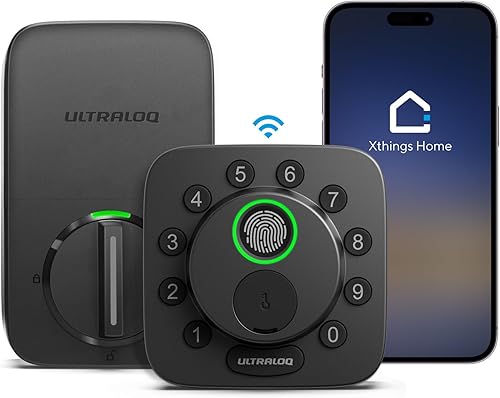
- Fingerprint, passcode and app entry
- Built-in Wi-Fi
- Matter over Thread support
- Up to 50 fingerprints and 50 access codes
The Bolt SE adds fingerprint entry, passcodes, app control and Matter support to a replacement deadbolt. It fits buyers who want several entry methods and are comfortable checking smart-home hub requirements.
Pros
- Fingerprint entry
- Built-in Wi-Fi
- Matter over Thread support
- Two emergency keys included
Cons
- Replaces the existing deadbolt
- Matter remote access needs a Thread Border Router
- Door sensor not included
The Bolt SE stores up to 50 fingerprints and up to 50 access codes. It uses built-in Wi-Fi and supports 2.4 GHz Wi-Fi only, so check your network setup before installation.
The product information states battery life of up to 18 months and identifies the lock as using four AA batteries. It also states that the batteries are not included, so plan for that before installation.
Matter over Thread adds another smart-home route, but remote Matter access requires a compatible Matter over Thread hub, also called a Thread Border Router. If you don't already have that equipment, the built-in Wi-Fi path is the simpler place to start.
The Bolt SE is a replacement deadbolt, not an August-style retrofit accessory. Its fingerprint reader may appeal to households that want fast local entry without sharing a code, while the two mechanical keys provide a physical backup.
August Wi-Fi Smart Lock versus full replacement locks
Choose August when retaining the existing deadbolt is the main goal. If you are choosing an entry device first, compare a smart lock and video doorbell.
Choose Schlage when you want a built-in Wi-Fi keypad, or ULTRALOQ when fingerprint access and Matter support matter more.
| Feature | August Connect setup | Schlage Encode | ULTRALOQ Bolt SE |
|---|---|---|---|
| Basic approach | Adds Wi-Fi to a compatible August Smart Lock | Replaces the deadbolt | Replaces the deadbolt |
| Wi-Fi | Bridge required | Built in | Built in |
| Keypad | Depends on August setup | Touchscreen keypad | Keypad |
| Fingerprint entry | Not stated | Not stated | Up to 50 fingerprints |
| Access codes | Not stated | Up to 100 | Up to 50 |
| Physical keys | Existing keys remain with the retrofit approach | One backup key included | Two mechanical keys included |
| Extra hub | August Smart Lock required | No extra accessory for Wi-Fi | Thread Border Router required for Matter over Thread |
The table shows why these products are not interchangeable. August focuses on retaining the current lock, while Schlage and ULTRALOQ offer complete replacement hardware with their own entry methods.
For another retrofit comparison, see our Aqara smart lock review. If you are considering a different ecosystem, our guide to a myQ front door smart lock explains the compatibility question to check first.
What should you check before installing?
Start with the door measurements and the lock type, then confirm the wireless requirements. A smart lock can have the right app features and still fail to fit the door.
For the August setup, confirm that your existing deadbolt is compatible and that you have a suitable outlet for the August Connect Wi-Fi Bridge. For Schlage and ULTRALOQ, measure the door thickness and backset before removing the current lock.
Plan the installation around access to the door and the inside lock hardware. Keep a physical key available while setting up app access, and don't discard the old hardware until the new lock works as expected.
Test basic operation from inside and outside the door after installation. Check the key, keypad or fingerprint method, app connection and any auto-lock setting before relying on remote access.
How should you manage batteries and access?
Battery planning is part of smart-lock ownership, even when remote access works normally. For eufy owners, see our eufy smart lock battery replacement guide.
Keep track of the battery type, low-battery warnings and the physical backup method for your specific lock.
The Schlage Encode uses four AA batteries and includes a low-battery indicator. The ULTRALOQ Bolt SE is also described with four AA batteries, but its product information says the batteries are not included.
The August bridge uses outlet power, but the August Smart Lock connected to it has its own power needs. Check the August smart lock batteries guide before choosing a replacement battery.
Keep access codes limited to people who need them, and remove temporary access when it is no longer required. For a rental or guest setup, write down who has access and review it when household arrangements change.
What is the best August alternative?
The Schlage Encode is the closest alternative for built-in Wi-Fi and keypad access. It avoids a separate Wi-Fi bridge, supports up to 100 access codes and includes one physical backup key.
The ULTRALOQ Bolt SE is the better alternative for fingerprint entry. It also supports up to 50 access codes, built-in Wi-Fi and Matter over Thread, but Matter remote access needs a compatible Thread Border Router.
Neither alternative preserves the existing deadbolt in the same way as the August retrofit approach. That difference should guide the choice before app features or voice assistants become the deciding factor.
Final verdict on August smart lock reviews
The August Home Connect Wi-Fi Bridge earns the highest score here because it supports the core reason to choose an August Smart Lock: keeping the existing deadbolt and keys while adding remote access.
Pick August if retrofit compatibility is your priority. Pick Schlage if you want built-in Wi-Fi with a touchscreen keypad, or choose ULTRALOQ if fingerprint entry and Matter support fit your home.
For the next step, compare the best renter-friendly smart lock options if you need to protect the current door hardware and keep installation changes limited.
Our score weighs specs, features and buyer feedback against what you're shopping for.
Frequently asked questions
Does the August Wi-Fi Smart Lock keep the existing deadbolt?
The August Wi-Fi Smart Lock setup is designed around a retrofit approach, so the August Smart Lock can work with the existing deadbolt and keys. The August Connect Wi-Fi Bridge adds Wi-Fi and remote access to a compatible August Smart Lock.
Confirm your deadbolt fit before buying.
Does August Smart Lock need Wi-Fi?
An August Smart Lock can use the August Connect Wi-Fi Bridge for Wi-Fi access and remote control. The bridge connects the August Smart Lock to Wi-Fi and requires a North American outlet with 110–240 volts.
Bluetooth is also listed as a connectivity protocol for the bridge.
What is the best alternative to August Smart Lock?
The Schlage Encode suits buyers who want a replacement deadbolt with built-in Wi-Fi, a touchscreen keypad and up to 100 access codes. The ULTRALOQ Bolt SE suits buyers who want fingerprint entry, passcodes and Matter support.
Both replace the existing deadbolt.
Can you use an August Smart Lock without a keypad?
Yes, the August setup can use smartphone control and the existing physical key because it works with the current deadbolt design. A separate keypad may help guests or family members who prefer code entry.
Compare the available August smart lock keypad options before choosing one.


