Which Replacement Parts Fit Your August Smart Lock?
The right August smart lock replacement parts depend on your lock generation and the part that failed. Match the adapter, mounting hardware or connectivity accessory to your existing lock before ordering.
On this page (9 sections)
- Which August smart lock parts usually need replacement?
- How do you identify the right August Smart Lock generation?
- Is August Connect a replacement part for an August lock?
- What should you check before buying an August adapter?
- When should you replace the whole lock instead?
- Is a retrofit replacement better for an existing deadbolt?
- How do August replacement parts compare with a new lock?
- What is the safest way to install replacement hardware?
- Which August smart lock replacement parts should you choose?
The right August smart lock replacement parts depend on your lock generation and the part that needs replacement. Identify the model first, then match the adapter, mounting hardware, battery compartment or connectivity accessory to that lock.
Start by finding the model name in the August app, on the original packaging or in your setup paperwork. That name will narrow the adapter shape and mounting parts you should look for.
August retrofit locks use the inside of your existing deadbolt, so a small hardware mismatch can stop the lock from turning the deadbolt correctly. The motor can still run while the deadbolt stays still if the connection is not seated right.
That is why a part that looks similar is not always a safe substitute. A wrong adapter may slip, bind or put pressure on the thumb turn and tailpiece.
If you are still comparing lock styles, start with our guide to smart door locks before buying replacement parts.
Use that broader comparison to decide whether you want a retrofit lock or a full deadbolt. It can also help you see which entry methods matter most for your household.
Many buyers find the model first and save time later. A clear match at the start is easier than ordering, returning and trying again.
Keep the existing screws, adapter and cover together while you check the fit. That way you can compare shapes directly instead of relying on memory.
If the problem is power, local keypad entry or remote access, the fix may not be physical hardware at all. Name the failure before you name the part.
This guide follows that order from identification to fit to final choice. It will help you buy only the component that matches your lock and your door.
Which August smart lock parts usually need replacement?
The most common replacement needs are the adapter, mounting hardware, batteries, keypad or Wi-Fi accessory. Each part solves a different problem, so one will not repair a fault caused by another.
A physical adapter transfers the motor movement to your existing deadbolt. It links the lock to the tailpiece, so wear here can make the whole unit feel dead.
Mounting hardware holds the lock in place. Loose screws or a worn plate can make a working motor feel weak or misaligned.
Batteries power the motor, while a keypad handles code entry. Flat batteries can look like a failed lock, and a keypad fault can happen even when the motor still turns.
A Wi-Fi bridge adds remote connectivity to a compatible August Smart Lock. It helps with phone control and voice access, but it does not move the deadbolt by itself.
The battery compartment and cover can also matter in daily use. A cracked cover or poor contact can interrupt power or let the unit sit unevenly on the door.
The exact adapter depends on the August generation and the deadbolt design. Do not assume an adapter made for one August model will fit another just because both use the August name.
Compare the shape of the existing adapter before you order. Key the new part to the tailpiece slot and the lock body, not to the brand name alone.
Mounting parts need the same care. Their hole positions, thickness and screw length must suit your door and your deadbolt.
Think about who uses each part every day. A keypad suits guests and family codes, while a bridge suits someone who checks the door from the office.
For a renter, a small hardware fix may be preferable to changing the whole lock. For an owner with several worn parts, a full replacement may be cleaner.
Matching the part to the fault is the fastest route to a fix. It also avoids adding a device that cannot solve the real problem.
How do you identify the right August Smart Lock generation?
Start with the model name, the lock's exterior shape and the hardware already attached to the deadbolt. The generation matters more than the color of the lock, because adapters and mounting parts are shaped for particular mechanisms.
Check these details before ordering:
- Find the model name in the August app, original packaging or setup paperwork.
- Remove the interior cover only if you can do so safely and without losing the existing screws.
- Compare the adapter and mounting plate with the replacement part's shape.
- Measure the door's backset, cross bore and thickness.
- Check whether the problem is physical or related to power, keypad access or Wi-Fi.
August's smart lock reviews can help you compare the fourth-generation model with other August options. For keypad compatibility, see our guide to the August smart lock keypad.
A replacement part should solve a known problem. If the motor turns but remote access fails, you may need connectivity help rather than a new adapter.
If the lock will not stay attached to the deadbolt, inspect the mounting hardware and adapter first.
Is August Connect a replacement part for an August lock?
August Connect is a Wi-Fi bridge, not a replacement adapter or mounting component. It connects an August Smart Lock to Wi-Fi so you can lock or open the door remotely and use voice control with Amazon Alexa, Google Assistant or Siri.
The bridge uses Wi-Fi and Bluetooth and requires a North American outlet with 110-240 volts. It works with iOS 9.0 or higher and Android 5.0 or higher smartphones.
You can lock or open the door from your phone when you are away from home. That helps if you need to let in a guest, check a delivery or confirm the door is locked at night.
Voice control is another reason people add this bridge. It connects to Amazon Alexa, the Google Assistant or Siri for hands free commands at home.
Its size is 1.5 x 2.4 x 2.4 inches, and it is white with a painted finish. The box includes 1 Connect and a Getting Started Guide.
Place it near the lock for a stronger link while keeping it plugged into a suitable outlet. A poor outlet location can hurt the signal even when the lock itself is fine.
The small size makes it easy to fit on a wall or an outlet near the door. It is not a lock body, so it does not change how the deadbolt feels by hand.
Choose this accessory when the lock physical parts are working and your main problem is remote access. It cannot replace the deadbolt adapter, interior lock body, screws or batteries.
If the motor will not turn the deadbolt, a bridge will not repair that fault. Check the adapter, mounting hardware and battery power first.
For battery guidance, see which batteries an August Smart Lock needs.
Care is simple because there is no battery to swap in the bridge itself. Keep the outlet accessible and check that the plug stays firm over time.
The bridge suits households that want phone access without changing the lock. It is less useful if your outlet is far from the door or your Wi-Fi signal is weak there.
Warranty coverage is listed as 1 year for US and CA customers. Keep your paperwork in case you need support with setup or a fault.
What should you check before buying an August adapter?
Check the adapter shape, deadbolt connection and lock generation before ordering. The adapter must transfer the August motor's movement to the thumb turn or tailpiece without slipping.
Measure the door's backset, cross bore and thickness as part of the fit check. These measurements are useful even when you are replacing only one small component because they confirm that the existing deadbolt is suitable for the lock hardware.
Also inspect the screws and mounting plate. A loose screw can look like a failed motor, while a damaged adapter can let the lock spin without moving the deadbolt.
If the August hardware is unavailable, compare a full replacement with other retrofit models in our guide to the best smart lock that fits over an existing deadbolt. A full lock change may be simpler than combining parts from different generations.
When should you replace the whole lock instead?
Replace the whole lock when the motor, interior body or control system has failed, or when you cannot confirm which August generation you own. A complete lock also makes sense when replacement hardware costs time and still leaves an old component at risk of failing.
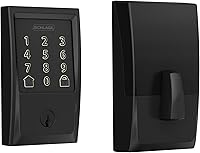
Schlage Encode is a satin nickel deadbolt with Century trim and a touchscreen keypad. It connects directly to Wi-Fi and works with the Schlage Home app, Alexa and Google Home.
It fits standard doors 1-3/8 to 1-3/4 inches thick with a 2-3/8 or 2-3/4 inch backset. Installation needs a screwdriver and does not require hardwiring.
The lock uses 4 AA batteries, which are included, and has 1 physical backup key.
The lock supports up to 100 access codes and includes customizable notifications, lock history and an auto-lock setting. Choose it when you want a complete keypad deadbolt with built-in Wi-Fi.
It is not an August replacement adapter, so it replaces the lock rather than repairing an August interior unit.
Is a retrofit replacement better for an existing deadbolt?
A retrofit replacement is useful when you want to keep the door's existing deadbolt arrangement, but a full deadbolt replacement can offer more entry methods. Choose based on the door fit and the access method you will use every day.
ULTRALOQ Bolt SE uses built-in Wi-Fi and supports Matter over Thread with a compatible Thread Border Router. Its access options include fingerprint ID for up to 50 fingerprints, up to 50 passcodes, smartphone control, a web portal, eKey or code sharing, voice control and 2 mechanical keys.
The lock is black, made from zinc alloy and rated IP65 for water resistance. It supports Android and iOS apps, works with Alexa, Google Assistant, Siri and Apple Home, and uses 2.4 GHz Wi-Fi.
The maker recommends keeping the router within 70 ft of the lock for connectivity.
The lock's dimensions are 2.95 x 1 x 2.95 inches. The box includes the lock, 2 emergency keys, an installation kit and a user guide.
Its door sensor is not included, and its batteries are not included.
Choose it when you want fingerprint entry or Matter support in a complete lock. Skip it as a direct August adapter replacement because it is a separate deadbolt system with its own installation hardware.
How do August replacement parts compare with a new lock?
August replacement parts cost less effort when one small component has failed and the rest of the lock works. A new lock offers a cleaner reset when the model is unknown, several components are worn or you want features the original system does not provide.
| Need | Best direction |
|---|---|
| Remote August access is missing | Add August Connect if the lock is compatible |
| The lock spins but does not turn the deadbolt | Check the generation-specific adapter |
| The lock is loose on the door | Inspect mounting hardware and screws |
| You want keypad entry | Compare a compatible August keypad |
| Several August parts are damaged | Consider a complete replacement |
| You want built-in Wi-Fi | Consider Schlage Encode |
| You want fingerprints or Matter over Thread | Consider ULTRALOQ Bolt SE |
A bridge keeps your existing August lock in place, but it adds another device near the door and requires a compatible outlet. Schlage Encode has built-in Wi-Fi, while ULTRALOQ adds several entry methods but requires a compatible Thread Border Router for Matter over Thread functions.
That trade off decides the best path for many homes. Keeping the August lock avoids a full swap, but the bridge adds a plug and another link in the chain.
Schlage Encode puts Wi-Fi inside the deadbolt itself. That can suit a door where you want fewer accessories to place and power.
ULTRALOQ Bolt SE takes a different route with fingerprint, passcode and app entry. It can suit a household that wants more ways in than a retrofit lock alone offers.
Matter over Thread needs a compatible Thread Border Router, so check your hub setup first. Without that hub, some smart home functions will not work as planned.
You can also compare other smart-home systems, such as the Yale Assure Lock with Zigbee or the Aqara Smart Lock U400 review, if your replacement decision includes broader home automation support.
Think about setup effort as well as features. A small August part can be quick when the fault is clear, while a new deadbolt may take more time but reset the whole system.
Daily use matters too. A bridge relies on outlet placement, while a built in Wi-Fi lock relies on the router signal reaching the door.
Entry methods should match your routine. A keypad helps guests, a fingerprint helps family members with full hands, and phone control helps remote checks.
Riders and renters may prefer the least invasive option that solves the fault. Owners who plan to stay longer may value a complete lock with a fresh start.
There is no single best choice for every door. The right option follows the fault, the door fit and the access style you use most.
What is the safest way to install replacement hardware?
Install replacement hardware with the door open so you can test the deadbolt without locking yourself out. Keep the original screws and adapter nearby until the new part works through a full locking cycle.
Use this basic process:
- Confirm the August model and the replacement part.
- Measure the door and compare the existing deadbolt connection.
- Open the door and remove the interior cover carefully.
- Replace only the damaged component first.
- Tighten the mounting hardware evenly without forcing the screws.
- Turn the thumb turn by hand to check for binding.
- Reinstall the batteries and run the lock's setup process.
- Test locking and opening with the door open.
- Close the door and test again only after the open-door test works.
Do not force an adapter onto the tailpiece. Resistance, scraping or uneven movement can point to a wrong part, a misaligned deadbolt or mounting pressure.
Which August smart lock replacement parts should you choose?
Choose August-specific hardware when you know the generation and only one physical part has failed. Choose August Connect when the lock works locally but needs Wi-Fi access.
That split keeps the repair focused. A matched adapter or mounting part fixes the physical fault, while a bridge fixes remote access.
Choose Schlage Encode for a complete Wi-Fi deadbolt with a touchscreen keypad, or ULTRALOQ Bolt SE for fingerprint, passcode and Matter-focused access.
Schlage Encode suits a full swap where you want built in Wi-Fi and code entry in one lock. ULTRALOQ Bolt SE suits a household that wants several entry methods plus Matter over Thread with a compatible hub.
The key rule is simple: identify the lock first, measure the door, then match the part to the actual failure.
Measure the backset, cross bore and thickness before you order replacement hardware. Those checks confirm the deadbolt can work with the lock parts you plan to use.
Compare the old adapter and mounting plate with the new part by shape. A close visual match is safer than a name match.
If the adapter and generation are unclear, replacing the entire lock may be more reliable than combining uncertain August smart lock parts.
A full lock gives you one matched set of hardware and one setup path. That can be simpler when parts are missing or worn across the unit.
For a single clear fault, a specific August part is often the tidy fix. For mixed faults, a complete lock can save repeat troubleshooting.
Keep the original hardware until the new part has passed a full test with the door open. That habit protects you from locking yourself out during setup.
Choose in that order and you will buy with confidence.
Frequently asked questions
What replacement parts fit an August Smart Lock?
The correct August smart lock replacement parts depend on the lock generation and the failed component. Match the adapter, mounting hardware, battery cover or connectivity accessory to your model before ordering.
A Wi-Fi bridge can add remote access, but it does not replace the lock's physical adapter or mounting parts.
Does August Connect replace an August Smart Lock adapter?
No. August Connect is a Wi-Fi bridge for connecting an August Smart Lock to Wi-Fi and adding remote access.
It does not replace the interior mounting plate, tailpiece adapter, batteries or other hardware used to attach the lock to your deadbolt.
Can I use a different smart lock instead of replacing August parts?
Yes, replacing the entire lock can make sense when the correct August hardware is unavailable or your lock generation is unclear. Schlage Encode includes built-in Wi-Fi, while ULTRALOQ Bolt SE offers built-in Wi-Fi and Matter over Thread support with a compatible Thread Border Router.
What should I measure before ordering August replacement hardware?
Measure the door's backset, cross bore and thickness before ordering replacement hardware. Also identify the August lock generation and compare the shape of the existing adapter and mounting parts.
These checks reduce the risk of buying a part that cannot fit your deadbolt.