Can You Use a Yale Assure Lock with Zigbee?
Some Yale Assure locks can use Zigbee, but only with the correct Yale Zigbee module and a compatible smart-home hub. The lock itself does not automatically support Zigbee without that module.
On this page (9 sections)
- How does Yale Assure lock Zigbee support work?
- Which Yale Assure locks can use Zigbee?
- What should you check before installing a Zigbee module?
- Is a Wi-Fi bridge a Zigbee replacement?
- Should you choose a Wi-Fi lock instead?
- Does a transformer help a Zigbee smart lock?
- How do you choose between Zigbee, Z-Wave, and Wi-Fi?
- What is the safest way to confirm compatibility?
- Final answer: can you use a Yale Assure lock with Zigbee?
A Yale Assure lock can work with Zigbee only when the lock accepts a compatible Yale Zigbee module and that module is paired with a supported hub. The lock body, keypad, and deadbolt do not make every Assure model Zigbee-compatible by themselves.
The first step is to identify the exact Yale Assure generation. Yale has used different network modules across its smart-lock range, so a module made for one lock may not fit another.
If you're comparing smart door locks, treat the module type as a core buying decision rather than a small accessory detail.
How does Yale Assure lock Zigbee support work?
The Zigbee connection comes from a removable network module inside the lock. The module provides the radio connection, while the Yale lock handles the keypad, motor, and physical locking action.
A compatible Zigbee module still needs a compatible hub. The hub acts as the bridge between the lock and your smart-home software, alarm system, or automation platform.
Before buying, record the lock's model and module information. Yale's official support site is the best place to confirm current compatibility guidance for your region and lock generation.
Zigbee is a local smart-home protocol, so it normally depends on a nearby hub rather than a direct Wi-Fi connection from the lock. That can suit homes already using a Zigbee security system, but it adds another compatibility check.
Which Yale Assure locks can use Zigbee?
Only Yale Assure models designed for interchangeable network modules can use Zigbee through a Yale Zigbee module. A lock with a different internal design may not accept that module.
Look for these details before ordering:
- The exact Yale Assure model and generation.
- The current module installed in the lock.
- The replacement module's stated lock compatibility.
- The hub or alarm platform you plan to use.
- The supported region and frequency for your location.
Do not assume that a Yale Assure lock with one wireless protocol can be changed to another without checking the module and firmware requirements. For a different wireless standard, see our guide to which Yale Assure lock works with your Z-Wave hub.
Does the Yale Assure Lock 2 use Zigbee?
The Yale Assure Lock 2 requires model-specific compatibility checking before you choose a network module. Its available accessories can differ from earlier Assure generations, so do not use an older module based only on the Yale name.
The Yale Assure Lock 2 Touch review can help you compare that model's design and access method. If your goal is remote access through Wi-Fi, review which Wi-Fi module fits your Yale Assure Lock before buying a replacement.
What should you check before installing a Zigbee module?
Confirm the module, hub, lock generation, and power state before opening the lock. A correct physical fit does not prove that the hub will expose every lock function.
Start by checking the lock manual and module instructions. Keep the door open during setup so you can test locking and opening without being locked out.
Pair the module close to the hub when possible. After pairing, test the keypad, manual thumb turn, remote lock command, and any alerts your hub is meant to provide.
A module change can also affect how the lock appears in your smart-home system. Remove the old device entry if the hub requires it, then pair the replacement module using the hub's normal inclusion process.
Do not force a module into the slot. If the contacts, cover, or connector do not line up, stop and confirm the exact lock model.
Is a Wi-Fi bridge a Zigbee replacement?
A Wi-Fi bridge is not a Zigbee module and cannot convert a Yale Assure lock into a Zigbee lock. It may provide remote access for a compatible lock from the same brand, but it does not solve Yale module compatibility.
The August Home Connect Wi-Fi Bridge connects an August Smart Lock to Wi-Fi and supports remote access, Bluetooth, voice control through Amazon Alexa, Google Assistant, or Siri, and a North American 110–240 volt outlet. It is not a Yale Assure Zigbee accessory.
Choose this type of bridge only when you have a compatible August Smart Lock and want that lock connected to Wi-Fi. It does not replace the Yale Zigbee module or make a Yale Assure lock compatible with August hardware.
Should you choose a Wi-Fi lock instead?
A Wi-Fi lock can be simpler when you want direct home-network access without a separate Zigbee hub. The trade-off is that the lock depends on its Wi-Fi setup and the manufacturer's app or supported integrations.
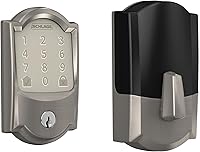
The Schlage Encode Smart WiFi Deadbolt Lock with Camelot Trim, Satin Nickel has built-in Wi-Fi, app control through the Schlage Home app, Alexa and Google Home support, a touchscreen keypad, and space for up to 100 access codes. It uses four included AA batteries and fits doors 1-3/8 in to 1-3/4 in thick with a 2-3/8 in or 2-3/4 in backset.
This Schlage lock is a different lock, not an upgrade module for Yale Assure. Choose it only if replacing the lock suits your door and you want its built-in Wi-Fi approach.
For another Yale comparison, see the best Yale Assure lock guide. If you need a lever format, compare the best Yale Assure lever lock options instead of assuming a deadbolt module will fit.
Does a transformer help a Zigbee smart lock?
A doorbell transformer does not power or connect a Yale Assure Zigbee lock. Yale Assure locks use their own lock power system, so a transformer intended for a wired video doorbell is a separate product category.
The Hardwired Transformer for Ring Wired Video Doorbells accepts 120V AC 60 Hz input and provides 16V 30VA output. It is designed to replace an underpowered North American doorbell transformer and support compatible Ring wired doorbells.
Do not connect this transformer to a Yale Assure lock unless Yale specifically instructs you to do so for your exact model. A doorbell power component cannot substitute for the lock's network module.
How do you choose between Zigbee, Z-Wave, and Wi-Fi?
Choose Zigbee when your existing hub supports the exact Yale lock and module. Choose Z-Wave when your home already uses a compatible Z-Wave controller, and choose Wi-Fi when direct network access or a built-in Wi-Fi lock fits your setup better.
Zigbee and Z-Wave both make the hub an important part of the purchase. Wi-Fi can remove the need for a separate lock-specific hub, but it does not remove the need to check the lock's app, network, battery, and door-fit requirements.
The right choice also depends on what happens if the hub or internet connection is unavailable. Keep a local keypad code, physical key, or manual entry method available according to the lock's design.
The Aqara smart lock review offers another comparison point if you are open to a different brand. For a Schlage lever format, see the guide to whether Schlage Encode Plus comes as a lever lock.
What is the safest way to confirm compatibility?
Match the exact lock model to the exact Yale module and hub before ordering. Do not rely on the word “Assure” alone, because the product family includes multiple generations and connection options.
Use this checklist:
- Read the model label on the lock or its original instructions.
- Identify the current network module.
- Confirm the replacement module names your lock model.
- Confirm that your hub supports Yale locks over Zigbee.
- Check the required region, frequency, and pairing process.
- Test the lock with the door open after installation.
If the lock has a Wi-Fi or Z-Wave module now, do not assume it can accept Zigbee. Module shape, firmware, hub support, and lock generation all matter.
Final answer: can you use a Yale Assure lock with Zigbee?
Yes, but only with a compatible Yale Zigbee module and a hub that supports that lock. A Wi-Fi bridge, a different brand's smart lock, or a doorbell transformer cannot turn an incompatible Yale Assure model into a Zigbee lock.
Pick Zigbee if it matches the hub already running your home security system. Pick Wi-Fi if you prefer a lock with built-in network access, and compare the exact Yale module before changing the lock's connection type.
Frequently asked questions
Can every Yale Assure lock use Zigbee?
No. Zigbee support depends on the exact Yale Assure model and the smart module installed inside it.
Check the lock generation and module type before buying anything.
A Zigbee module must also work with the hub or alarm system you plan to use.
Does a Yale Assure lock include a Zigbee module?
Not every Yale Assure lock includes Zigbee hardware. Some models use a removable network module, while others may come with Wi-Fi, Z-Wave, or another connection type.
Remove the interior cover only as directed by Yale and confirm the module label before replacing it.
Can I connect a Yale Assure Zigbee lock to any Zigbee hub?
No. A Zigbee radio does not guarantee compatibility with every hub.
Check whether the hub supports Yale locks, the required security features, and the exact lock module.
Pairing steps and available controls can vary between hubs.
Is Zigbee better than Wi-Fi for a Yale Assure lock?
Zigbee can suit a home that already uses a compatible hub for smart locks, sensors, and automations. Wi-Fi can be simpler when the lock connects directly to the home network.
The better choice depends on your existing hub, range, battery plan, and required controls.