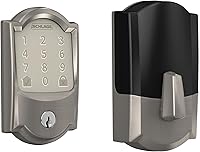
How to Replace Smart Lock Batteries
Smart lock battery replacement starts with identifying the battery type, opening or securing the door, and replacing every battery with fresh matching cells. Reconnect the cover, restore power, and test the lock from inside and outside.
On this page (9 sections)
- What should you do before smart lock battery replacement?
- How do you replace smart lock batteries?
- What should you check after replacing the batteries?
- What if the smart lock still does not work?
- Can a smart lock use rechargeable batteries?
- What should you do with old smart lock batteries?
- How do you avoid another low-battery lockout?
- Can a hardwired transformer help a smart lock?
- What is the safest smart lock battery replacement routine?
Smart lock battery replacement means removing the interior cover, taking out every old battery, installing a fresh matching set in the marked direction, and testing the lock before closing the job. Keep the door open during the first test so a power or alignment problem cannot leave you locked out.
Before you start, identify the lock model and battery type. A keypad deadbolt may use AA cells, while another smart lock may use a rechargeable pack or a different compartment design.
For a broader look at lock styles, see our guide to smart door locks.
What should you do before smart lock battery replacement?
Prepare the correct batteries, the lock's app, and an open door before removing the old cells. You may also need a screwdriver if your cover uses a retaining screw.
Check the lock's manual or battery compartment for the required size, count, and polarity. Do not guess based on the shape of another lock.
Our guide to the best batteries for smart locks can help you compare battery choices after you confirm your lock's requirements.
Open the door and leave it open. If your lock has a low-battery warning, note whether it appears on the keypad, in the app, or through a sound.
That gives you a useful check after the replacement.
Keep the old batteries together until the job is complete. You may need to compare their orientation with the markings inside the compartment, but do not reuse them if they are leaking, swollen, corroded, or damaged.
How do you replace smart lock batteries?
Open the inside cover, remove all old batteries, install the new cells in the marked direction, and secure the cover. The exact cover release varies by lock, so use light pressure and follow the model's instructions.
- Stand inside with the door open.
- Remove the interior battery cover or retaining screw.
- Take a photo of the battery direction if the markings are difficult to see.
- Remove every old battery.
- Check for corrosion, moisture, or damaged contacts.
- Install the complete fresh set with the positive and negative ends aligned.
- Refit the cover without pinching wires or forcing the housing.
- Wake the lock and wait for its normal startup behavior.
Do not mix new and used batteries. Do not press hard against a battery contact, and stop if a cell does not fit easily.
A forced battery can damage the compartment or make later removal difficult.
How do you replace eufy smart lock batteries?
Use the eufy model's own battery instructions because the compartment and battery format can differ between models. Keep the door open and test the lock locally before relying on app control.
The steps above describe the general process, but they do not replace model-specific instructions. For a model-focused walkthrough, read eufy smart lock battery replacement.
What should you check after replacing the batteries?
Test the lock manually first, then test keypad, app, and notification functions that you use every day. Keep the door open until the deadbolt moves smoothly in both directions.
Turn the thumb turn or interior control through a complete lock and open cycle. Then use the keypad or other exterior entry method.
Watch for delayed motor movement, repeated beeps, a flashing low-battery icon, or a cover that does not sit flush.
Open the lock's app and check its status. Confirm that it shows the lock as online or available if your model uses Wi-Fi or Bluetooth.
Try one remote action only after the local controls work.
Check an access code without closing the door. If you use auto-lock, confirm the setting remains enabled and choose a short test period.
Review alerts only after the basic lock movement works.
The August Home Connect Wi-Fi Bridge can help August Smart Lock owners connect a lock to Wi-Fi for remote access, voice control, and alerts. It uses Bluetooth and Wi-Fi, has a white finish, measures 1.5 x 2.4 x 2.4 in, and requires a North American outlet with 110–240 volt power.
Do not treat a bridge as a replacement for the lock's batteries. It supports the connection between an August Smart Lock and Wi-Fi, while the lock still needs its own approved power source.
What if the smart lock still does not work?
If the lock stays offline or the motor does not move after a battery change, check polarity, battery contact, cover fit, and bolt alignment before resetting anything. A reset can erase settings or access codes, so use it only when the manual recommends it.
Remove the cover and confirm that each cell is seated against the contacts. Look for corrosion or residue, but do not scrape contacts aggressively.
Replace damaged batteries rather than trying to make them work.
If the lock works with the door open but struggles when closed, check the deadbolt and strike alignment. A bolt rubbing against the frame can make the motor appear weak even when the batteries are fresh.
If the lock has no response at all, use its approved backup entry or emergency power method. Do not force the keypad, cover, or deadbolt.
The Schlage Encode Smart WiFi Deadbolt Lock uses 4 AA batteries, includes a low-battery indicator, and supports Wi-Fi control through the Schlage Home app. It fits doors 1-3/8 to 1-3/4 in thick with a 2-3/8 or 2-3/4 in backset.
Its battery compartment and setup still require the Schlage instructions. Measure the door fit before installation if you are considering a new lock, because battery replacement cannot correct a poor deadbolt alignment.
Can a smart lock use rechargeable batteries?
Use rechargeable batteries only when the lock manufacturer allows them and the battery type matches the lock's requirements. Rechargeable cells can have different voltage behavior and capacity from disposable cells, so compatibility matters more than convenience.
A rechargeable lock may use a dedicated battery pack rather than loose AA or AAA cells. If you want that arrangement, compare smart locks with rechargeable batteries before choosing a model.
For an August lock, check the exact model before buying cells or accessories. Our guide to August smart lock batteries covers the battery question separately.
What should you do with old smart lock batteries?
Remove old batteries promptly, keep them away from children and metal objects, and recycle or dispose of them through a local battery program. Do not leave leaking cells inside the lock.
Wipe only the areas allowed by the lock's instructions. If corrosion has spread to contacts or wiring, stop using the lock until the condition is assessed.
Keep replacement batteries in their packaging until needed.
If a cover is cracked or missing, do not rely on tape as a permanent repair. Read the guide to Kwikset Halo battery cover replacement if that is the model you have.
How do you avoid another low-battery lockout?
Turn on low-battery alerts, keep a spare set nearby, and check the lock before travel or long absences. A reminder in your phone can help if your lock does not provide a useful app warning.
Use the same battery type throughout one replacement. Avoid storing loose batteries in a drawer with keys, coins, or other metal objects.
If your lock drains batteries unusually fast, check Wi-Fi signal, repeated motor cycles, door alignment, and the lock's firmware guidance. Battery life depends on the lock's design and use pattern, so a replacement schedule should follow warnings and observed behavior.
For a Kwikset Halo lock, follow the model-specific guide to Kwikset Halo battery replacement. If long runtime is your main concern, compare smart locks with long battery life before replacing the entire lock.
Can a hardwired transformer help a smart lock?
A doorbell transformer is not a general replacement for smart lock batteries. If you are weighing those entry upgrades, compare a smart lock and video doorbell.
It belongs to a compatible wired doorbell power system, not to a battery compartment inside a smart lock.
The Hardwired Transformer for Ring Wired Video Doorbells accepts 120V AC at 60 Hz and provides 16V 30VA output for compatible Ring wired video doorbells. It is intended to replace an underpowered doorbell transformer.
Do not connect a transformer to a smart lock unless the lock's instructions specifically support that power method. For battery-powered security devices, see what a battery powered security camera is to understand why battery power and wired power are separate setup choices.
What is the safest smart lock battery replacement routine?
Replace every battery with the correct fresh matching set, keep the door open, and test the lock locally before checking remote features. This catches polarity, contact, cover, and alignment problems while you still have easy access.
Choose model-specific instructions for eufy, August, or Kwikset Halo locks. Choose a Wi-Fi bridge only when your compatible lock needs remote access, and treat a doorbell transformer as a separate wired-doorbell accessory.
After the lock passes its inside, outside, keypad, and app checks, close the door and run one final lock cycle. Keep the next replacement set available so a low-battery warning does not become an entry problem.
Frequently asked questions
How often should smart lock batteries be replaced?
Replace smart lock batteries when the lock shows a low-battery warning, the app reports low power, or the keypad and motor become slow. Timing varies by lock, battery type, temperature, Wi-Fi use, and how often the lock operates.
Keep a fresh matched set ready before the old batteries fail.
Can you replace smart lock batteries from outside?
Usually, you should replace smart lock batteries from the interior side because many battery compartments sit under the inside cover. If the lock is already unpowered, use its approved backup entry method, such as a physical key or exterior emergency power connection, before opening the interior compartment.
Should all smart lock batteries be replaced at once?
Yes, replace the complete battery set at the same time unless the lock manual gives different instructions. Mixing old and new batteries, brands, or chemistries can reduce runtime and make the low-battery warning less useful.
Match the battery size and type required by your lock.
What should you do after replacing smart lock batteries?
Close the battery compartment, wake the lock, and test locking and opening from the inside and outside. Confirm the app reconnects, check the low-battery message, and verify that access codes, auto-lock settings, and alerts still work as expected.