Which Keypad Works with Your August Smart Lock?
Most August locks need an August keypad sold for your exact lock generation, not a generic keypad. If your lock has no built-in keypad, check the lock model and generation first, then match the keypad, batteries and app support to that setup.
On this page (12 sections)
- How do I know which August keypad fits my lock?
- Do August locks include a keypad in the box?
- Which August keypad works with older August locks?
- Which keypad works with August Wi-Fi Smart Lock models?
- How does an August keypad code work at the door?
- Do I need the August Home Connect Wi-Fi Bridge with a keypad?
- How do I install an August keypad correctly?
- When should I swap to a lock with a built-in keypad?
- Which option fits an apartment or rental door?
- How do I compare August keypad prices and total costs?
- What are common August keypad problems and fixes?
- Which august smart lock keypad should you buy in the end?
Most August locks need an August keypad made for your exact lock generation, not any keypad that looks similar.
August sold several generations with different keypad pairings and app features, so the lock model decides the choice. If you own an August lock, find its model on the box, in the app, or on the inside cover, then buy the keypad listed for that model.
If you do not own one yet, decide whether you want an August lock plus keypad or a lock with a built-in touchscreen. This guide explains August keypad options by generation, entry codes, Wi-Fi needs, and when a full swap helps more.
For a broader view of smart door locks, start with how you want to enter each day.
How do I know which August keypad fits my lock?
Check the lock generation first, because the keypad must match that generation.
August keypads pair through Bluetooth to a nearby August lock. They are not universal remotes and do not pair with Schlage or ULTRALOQ locks.
Find the exact lock name in the August app under lock settings and save a photo of that screen before you shop. That photo helps if you later need august smart lock replacement parts.
An older August Smart Lock or August Smart Lock Pro uses the classic August Smart Keypad. A newer Wi-Fi model may have a listed keypad or may rely on phone entry, so do not guess from lock color or house age.
Where to find your August lock generation
Open the August app and tap your lock. The settings screen usually shows the model and firmware details.
You can also check the original box if you kept it. If you bought the home with the lock installed, the inside of the thumbturn assembly may show a model label.
August Home Inc lists the Connect Wi-Fi Bridge as model AC-R1, but that is the bridge, not your lock. Write down the full lock name, not just August.
One extra word, such as Pro or Wi-Fi, can change the keypad choice.
Do August locks include a keypad in the box?
Many August locks do not include a keypad, so you buy it separately.
The lock is the deadbolt adapter and interior thumbturn piece you keep inside, which keeps the outside of the door clean. Without a keypad, a guest, child, or dog walker without a phone has no way in.
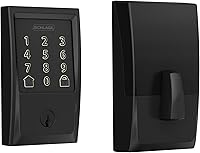
Schlage and ULTRALOQ include a touchscreen on the outside unit instead. Budget for an August keypad when you compare total costs, since a cheaper lock may still need a keypad, Wi-Fi Bridge, and batteries.
A keypad is optional if every adult uses the app, but it is close to required for a cleaner, sitter, or teen who needs a code. It adds batteries to change, mounting holes to drill, and a device to keep clean and dry.
Keep your physical key in a safe place for a dead battery or failed pairing.
Which August keypad works with older August locks?
Older August Smart Lock and August Smart Lock Pro models use the classic August Smart Keypad.
That keypad pairs to those generations through the August app and uses a simple numeric layout for a DoorCode. You set codes in the app, then type the code at the door to operate the lock.
This setup suits renters and buyers who keep the original August lock, since the interior thumbturn stays in place and no full deadbolt swap is needed. Check the app before you order, and pause if your lock shows a newer Wi-Fi generation.
Older locks may need the separate Wi-Fi Bridge for remote access, and you can use both at the same time. Mount the keypad at a comfortable height beside the door and test the code from outside.
Use separate codes per person and delete guest codes after visits.
Which keypad works with August Wi-Fi Smart Lock models?
Newer August Wi-Fi models need a keypad listing that names that exact model.
Do not assume the classic keypad fits every newer lock. Some Wi-Fi Smart Lock listings pair with a specific August keypad, while others rely on phone entry and shared access.
Search by the full lock name plus keypad and read the compatibility line before you pay. If no August keypad is listed for your model, phone entry may be your only August option and a built-in touchscreen swap may serve you better.
Our august smart lock reviews page covers the fourth generation Wi-Fi lock in more detail. Built-in Wi-Fi removes the need for a separate bridge, but a keypad still helps people without a phone.
Compare a smart lock vs keypad lock before forcing the August setup.
How does an August keypad code work at the door?
You type a DoorCode on the keypad, and the lock operates through its Bluetooth link to the keypad.
The August app creates and manages the codes. Think of the keypad as a small remote that lives on the outside of the door.
It sends the code to the lock, and the lock turns the deadbolt. You can set different codes for different people.
That lets you remove one person without changing codes for everyone else. Codes help with guests, cleaners and family members.
They also help when your phone battery is low or your hands are full. Keep codes private.
Do not share a code through a photo of the keypad, and change codes after a guest visit ends.
Rule: use separate codes per person so you can delete access one at a time.
Code habits that keep access clean
Create a code for each regular user. Name it in the app so you know whose entry caused each activity log line.
Use temporary codes for short visits. Set the code to expire, then let the app remove it on schedule.
Review the activity history once a month. It shows entries you may not recognize, and it helps you spot a code that needs to change.
Do I need the August Home Connect Wi-Fi Bridge with a keypad?
No, a keypad works without the Wi-Fi Bridge, but remote phone control needs Wi-Fi somewhere in the chain.
The keypad handles entry at the door. The bridge handles control from away.
The August Home Connect Wi-Fi Bridge is a white unit at 1.5 x 2.4 x 2.4 in. August Home lists it as model AC-R1, also called the August Connect Wi-Fi Bridge.
It connects your August Smart Lock to Wi-Fi. It requires a North American outlet at 110 to 240 volt.
It supports Alexa, Google Assistant and Siri for voice control. It requires iOS 9.0 or higher or Android 5.0 or higher on your phone.
It lets you lock or open from away and get alerts when someone enters or exits.
Place the bridge within range of the lock and your router. Test remote control from outside your home Wi-Fi before you rely on it for a trip.
Older August locks need the bridge for remote access. Newer August Wi-Fi models have Wi-Fi built into the lock or a bridge included in some bundles.
Read your lock box carefully. If Wi-Fi is built in, you may not need this separate white unit at all.
If your lock needs the bridge, plug it into a powered outlet near the door. A weak Wi-Fi signal at that outlet will make remote control feel slow.
Rule: buy the bridge for remote access, not for keypad entry.
How do I install an August keypad correctly?
Mount the keypad beside the door at a height every user can reach easily.
You need a screwdriver, a level and the included mounting hardware. Pick a spot on the door frame or wall that stays dry in rain.
Avoid a spot where a storm door or screen door blocks your hand. Hold the keypad in place and mark the holes.
Drill pilot holes if the material needs them, then mount the keypad firmly. Pair the keypad in the August app right after mounting.
Test the code from outside with the door closed. Test it again from a few steps away.
Measure your door backset, cross bore and thickness before any lock work. August repeats that warning for good reason, since a wrong fit stops the whole install.
Rule: test the code from outside before you close the app and walk away.
Install checks for August and other locks
For August, confirm the keypad and lock stay paired after a lock battery change. For a full swap, check door thickness first.
The Schlage Encode fits doors at 1-3/8 in to 1-3/4 in thick with a 2-3/8 in or 2-3/4 in backset. That Schlage fits standard doors and installs in minutes with just a screwdriver.
It needs no hardwiring, and its Snap and Stay design keeps the lock on the door during install.
Use a lock swap only when the door measurements match. Measure twice, then order once.
When should I swap to a lock with a built-in keypad?
Swap when your August lock has no matching keypad or when you want one unit with codes and fingerprint entry.
The Schlage Encode Smart WiFi Deadbolt Lock with Century Trim in Satin Nickel has built-in WiFi, so no extra hub is needed for the Schlage Home app. It manages up to 100 access codes for keyless entry.
It shows lock history, sends customizable notifications, manages multiple locks at once, and works with Alexa and Google Home for voice control. It has a fingerprint-resistant touchscreen and a built-in alarm for door movement and forced entry attempts.
BHMA lists it as certified for security, durability, and finish at the highest residential rating. It runs on four AA batteries, included, for up to six months with typical use, and includes one physical backup key.
It is backed by a limited lifetime mechanical and finish warranty and a limited three-year electronics warranty.
Built-in keypad locks for August switchers
The ULTRALOQ Bolt SE Wifi Smart Deadbolt Lock is another built-in option with Matter, remote control, and 7 in 1 keyless entry.
It stores up to 50 fingerprints and up to 50 passcodes. It also supports app control, a web portal, eKey and code sharing, voice control with Siri, Alexa, or Google Assistant, and two mechanical keys.
It connects through built-in Wi-Fi on 2.4 GHz only, so keep the router within 70 ft of the lock. It also supports Matter over Thread through Apple Home and other Matter apps, with a Thread Border Router required.
The zinc alloy body has an IP65 weather-resistant design for exterior doors. Install takes 10 minutes with a screwdriver and no professional help.
It uses four AA batteries for up to 18 months of battery life on Thread, with auto lock on a preset timer. ULTRALOQ backs it with lifetime mechanical coverage and 18-month electronic protection.
If you rent, read our best renter friendly smart lock guide before you drill. Permission rules change the choice.
Which option fits an apartment or rental door?
Renters should favor a lock that fits the existing door and needs no major changes.
An August lock plus keypad can suit a rental when the landlord allows it, so check your lease and ask before you drill. Some landlords allow a swap if you keep the original deadbolt and return it at move out.
If you cannot drill, a retrofit August lock may fit better than a full deadbolt swap, but the keypad still needs mounting. Confirm that step in writing and check door thickness and backset for apartment doors.
The Schlage Encode fits 1-3/8 in to 1-3/4 in doors, which covers many apartment doors. Our best smart lock for apartment guide compares options for shared walls and landlord rules, so read it before you order.
Use temporary codes for guests and service visits, delete them after each visit, and keep a physical key with a trusted person nearby in case a battery dies.
How do I compare August keypad prices and total costs?
Compare the full kit cost, not just the lock price.
An August lock plus keypad plus bridge can cost more than one built-in keypad lock. Add batteries, mounting hardware, and any hub or bridge you need for remote access.
The Schlage Encode includes four AA batteries and one backup key in the box. The ULTRALOQ Bolt SE includes two emergency keys, an installation kit, and a user guide, and manages up to 50 fingerprints and 50 access codes without a hub for Wi-Fi control.
If you already own an August lock, the keypad alone is often the cheapest path to code entry. Spend first on fit, since door thickness and backset must match, then on entry for your actual users.
Spend last on extras such as voice control, which is handy but does not replace a working code at the door.
What are common August keypad problems and fixes?
Most August keypad problems trace to pairing, batteries or Wi-Fi range.
Start with the simplest fix before you replace parts. First, check the keypad batteries and replace them with fresh ones.
Low batteries can cause missed codes or a slow response. Second, re-pair the keypad in the August app.
Stand close to the lock during pairing so Bluetooth can find both devices. Third, check Wi-Fi range if remote control fails.
The August Home Connect Wi-Fi Bridge needs a powered outlet at 110 to 240 volt near the door. Fourth, confirm the lock batteries.
A weak lock battery can stop the deadbolt even when the keypad lights up. Fifth, clean the keypad surface and keep it out of direct rain where you can.
Rule: replace batteries first, then re-pair, then check Wi-Fi range.
Problems that mean a swap
A keypad that never pairs may be the wrong generation for your lock, so stop and confirm the model before you buy another one.
A lock that needs fingerprint entry may outgrow the August keypad system. The ULTRALOQ Bolt SE adds fingerprint ID for up to 50 fingerprints.
A lock with a built-in alarm, such as the Schlage Encode, may suit a higher security need. Schlage lists a customizable alarm for door movement and forced entry attempts.
If you need Matter or Thread, the ULTRALOQ Bolt SE supports Matter over Thread with a Thread Border Router. The August bridge lists Alexa, Google Assistant, Vera, Android, and iOS, not Matter.
For a different built-in keypad brand, read our eufy smart lock c220 review and our aqara smart lock u100 review before you swap.
Which august smart lock keypad should you buy in the end?
Buy the August keypad that names your exact lock generation if you keep your August lock, and swap to a built-in keypad lock if no match exists.
Keep your August lock when the app confirms the generation and the matching keypad is in stock. Add the August Home Connect Wi-Fi Bridge only when you need remote control and your lock lacks built-in Wi-Fi.
Swap to the Schlage Encode when you want built-in Wi-Fi, up to 100 access codes, and a touchscreen in one deadbolt. Swap to the ULTRALOQ Bolt SE when you want fingerprint entry, Matter over Thread, and up to 50 fingerprints plus 50 passcodes.
Measure your door backset, cross bore, and thickness before you order any option. Confirm landlord permission for rentals, set separate codes per person, and delete guest codes after each visit.
Check august smart lock replacement parts if a part has worn out, or read august smart lock reviews before you commit to a newer August model.
Frequently asked questions
Does an August Smart Lock come with a keypad?
Many August locks do not include a keypad in the box. You often buy an August Smart Keypad separately, and it must match your lock generation.
Check your lock model before you order, since a keypad for one generation may not pair with another.
Can I use a non-August keypad with my August lock?
No, you should not expect a Schlage, ULTRALOQ or other brand keypad to pair directly with an August lock. Those locks bring their own keypads and apps.
A full lock swap is the usual path if you want a different keypad system.
Do I need the August Home Connect Wi-Fi Bridge for a keypad?
A keypad lets people enter at the door, while the Wi-Fi Bridge lets you control and check the lock from away. The bridge connects your August lock to Wi-Fi and supports iOS and Android phones.
It is a separate white unit at 1.5 x 2.4 x 2.4 in.