eufy Smart Lock C220 Review: Worth It? (November 2026)
The eufy Security Smart Lock C220 is a fingerprint deadbolt with built-in Wi-Fi that suits households wanting key-free entry without a separate bridge. It suits standard deadbolt doors and homes already using the eufy Security app; pick another model if you need a lever handle in the same unit.
On this page (13 sections)
- eufy Smart Lock C220 at a glance
- Who the eufy Smart Lock C220 suits
- Six ways to open: what daily use feels like
- Fingerprint storage and passcodes in real homes
- Built-in Wi-Fi and the eufy ecosystem
- Battery life: 8 AA batteries and about 8 months
- Installation on standard deadbolt doors
- Security credentials: BHMA Grade 3 and IP53
- How to lock the eufy Smart Lock when you leave
- Care, cleaning and long-term upkeep
- Trade-offs worth weighing before you buy
- Alternatives and related eufy models to compare
- Verdict: pick the C220 for fingerprint entry without a hub
The eufy Smart Lock C220 suits fingerprint-first front door access with built-in Wi-Fi and no separate bridge.
This review covers the specs, daily entry methods, battery life and install fit for standard deadbolt doors.
You get fingerprint, keypad, app, Apple Watch, voice and physical key access in one deadbolt.
That range helps when hands are full or a guest arrives without a phone.
The C220 scores 9.7 here because built-in Wi-Fi, BHMA Grade 3 certification, IP53 waterproofing and a 15-minute install without drilling cover the core needs for a front door.
eufy Smart Lock C220 at a glance
The C220 is a black aluminum deadbolt with fingerprint entry and Wi-Fi control built in.
It is model T8506, measures 7.67 x 4.49 x 4.41 inches, and uses a keyed-different key system.
eufy Security Smart Lock C220: Best for fingerprint entry with built-in Wi-Fi
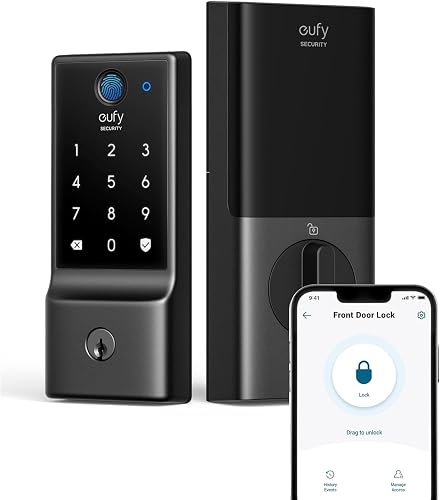
- Fingerprint entry in under 1 second per eufy
- 6 ways to open
- Built-in Wi-Fi, no bridge required
- 8 AA batteries, about 8 months
- BHMA Grade 3
- IP53 waterproof
A fingerprint deadbolt with built-in Wi-Fi and 8 AA batteries for about 8 months. It fits most standard deadbolts and suits key-free front door use.
Pros
- Built-in Wi-Fi means no separate bridge to buy
- Fingerprint, keypad, app, watch, voice and physical key options
- Fits bores under 54mm by removing a spacer
- BHMA Grade 3 certified after 100,000+ lock cycles
- IP53 waterproof and a wide operating range
Cons
- Deadbolt only, with no lever handle in this unit
- Battery life varies with how often you use it
- Spare keys can be copied by locksmiths and cannot be rekeyed
The box holds 2 keys, 8 AA batteries, exterior and interior assemblies, install sets and a mounting plate.
Included batteries and keys let you set it up on day one and keep a physical backup ready.
BHMA Grade 3 is the headline durability point.
eufy says it was locked and opened more than 100,000 times during certification testing.
IP53 waterproofing and an operating range from -22°F to 158°F support exterior use in rain, dust and temperature swings.
The polished black finish suits a front door, though it will show fingerprints and scratches over time.
Who the eufy Smart Lock C220 suits
The C220 suits households that want fingerprint entry at the main door without carrying keys each day.
Families with kids, older adults who struggle with small keys, and busy households with groceries or strollers often value a touch entry point.
It suits renters and homeowners with standard deadbolt doors.
Installation fits most standard deadbolts and takes about 15 minutes without drilling, so you can often swap it in during an afternoon.
Keep the original hardware until you confirm fit and test every entry method.
It also suits people who want guest access without key copies.
You can set scheduled codes for trusted people and disable individual codes as needed.
That helps for cleaners, relatives or a pet sitter, and you can remove access without changing the physical key.
It suits less well if you need a lever handle in the same unit, since this is a deadbolt and door handling is separate.
Measure the door first and compare a lever model if one-motion entry matters for your household.
Six ways to open: what daily use feels like
The C220 gives 6 ways to open your front door, and you will likely settle on two or three.
Fingerprint is fastest for daily use.
eufy says a touch opens in less than 1 second, and self-learning AI is meant to get more precise with each touch.
The keypad is the backup for guests.
You can add random digits to your pincode to hide it from prying eyes.
That habit helps when someone watches over your shoulder.
The app gives remote control and profile management.
You can lock or open from anywhere, manage user profiles, and see door activity in event history.
Apple Watch support helps when your phone is in a bag.
Voice through Alexa or Google Voice Assistant is hands-free when the doorbell rings and your hands are full.
Set household rules for voice, since anyone who can speak near a connected speaker may request entry.
The physical key is the final backup.
Two keys are included, spare keys can be copied by professional locksmiths, and the key cannot be rekeyed, so track copies carefully.
Fingerprint storage and passcodes in real homes
Storage capacity is 50 fingerprints and 100 passcodes, which covers most households with room to spare.
You can add prints for family members and codes for guests without running out quickly.
The self-learning AI claim means recognition gets more precise with every touch, per eufy.
In practice, the first few uses may need a firm, clean placement, and accuracy can improve as the system learns your print.
Wet or dirty fingers can still slow entry.
Keep the sensor clean with a soft, dry cloth, and teach household members to place the whole fingertip flat.
The keypad helps on rainy days or when a fingerprint fails.
Use long codes, add random digits, and remove guest codes when access ends.
The app lets you manage or delete profiles, which keeps old access from lingering.
Event history also lets you review who entered and when, rather than relying on memory.
Built-in Wi-Fi and the eufy ecosystem
Built-in Wi-Fi is a major reason to pick the C220.
No bridge is required, so you can control the lock from anywhere through the eufy Security app.
If you already have a eufy doorbell, you can add this lock to routines and control devices together for keyless entry in the app.
That link helps at the front door, where the doorbell and lock often work as a pair.
Our guide to smart door locks explains how deadbolts, keypads and Wi-Fi fit together across brands.
The C220 keeps setup simple by putting Wi-Fi inside the lock rather than asking for a hub on a shelf.
Real-time notifications and an alarm for unusual open attempts add another layer.
eufy says an alarm is triggered by an unusual attempt to open the deadbolt.
For broader eufy planning, our roundup of the best eufy smart door lock helps you place this deadbolt beside other eufy options.
Battery life: 8 AA batteries and about 8 months
Battery life is about 8 months from 8 AA batteries, and eufy notes timing may vary with use.
Batteries are included, which makes the first months easier to plan.
Households that use fingerprint entry many times a day, run frequent remote commands and get many notifications may see a shorter interval.
Light use can stretch it further.
Treat 8 months as a planning point, not a promise for every home.
Auto-Lock helps by securing the door without extra steps.
Set it if your household often forgets to lock up.
Store spare AA batteries near the door, not in a distant drawer.
When you swap them, test fingerprint, keypad, app and physical key before you close the door.
Installation on standard deadbolt doors
Installation is about 15 minutes without drilling for compatible doors.
eufy says it fits bores under 54mm by removing the spacer, and it works with most standard deadbolts.
Measure first.
Check bore diameter, backset, door thickness and space inside the door for the interior assembly.
Confirm the door closes freely and that trim or a storm door will not block the exterior assembly.
Remove old deadbolt parts in order and keep them in a labeled bag.
Fit the exterior assembly, connect it as directed in the manual, attach the interior assembly, and mount the plate.
Test bolt travel by hand before you enroll fingerprints.
If the door has a nonstandard bore or thicker profile, pause before you force parts.
Return or exchange may be simpler than drilling a door outside the stated fit range.
Security credentials: BHMA Grade 3 and IP53
Security starts with BHMA Grade 3 certification after more than 100,000 lock and open cycles.
That grade is a recognized benchmark for residential deadbolts, so it gives buyers a concrete standard to compare.
IP53 waterproofing helps with rain and dust at an exposed front door.
The operating range from -22°F to 158°F covers most climates, from winter cold to summer heat on a dark door.
Aluminum construction suits exterior use.
Wipe the exterior with a soft cloth and avoid harsh cleaners that can dull the polished finish.
No lock removes the need for common sense.
Keep codes private, add random digits, remove guest profiles when access ends, and keep physical keys in known places.
The alarm for unusual attempts helps, but household habits still carry much of the risk.
How to lock the eufy Smart Lock when you leave
Leaving the house should be one clear action, not a guess.
Start with Auto-Lock if you want the deadbolt to secure itself after entry.
That helps when children or guests forget to lock the door behind them.
Our guide on how to lock eufy smart lock walks through the daily steps in plain terms.
Practice it with the door open before you rely on it at night.
Check the app after you leave if you want remote confirmation.
Built-in Wi-Fi lets you see status and send a command from anywhere.
Set a household rule for who can open by voice.
Fingerprint and keypad give clearer control over who enters and when, so many households keep voice as a backup rather than the default.
Care, cleaning and long-term upkeep
Care is simple: clean the sensor, check batteries and test backup entry.
Wipe the fingerprint sensor and keypad with a soft, dry cloth.
Dirt and moisture can reduce recognition and keypad response.
Test the physical key every few months.
Keys that stay in a drawer can bind or get misplaced, and the C220 cannot be rekeyed.
Keep both included keys in known places and note who has copies.
Watch battery levels in the app and keep spare AA batteries on hand.
Replace them before they run flat, then test all entry methods.
Check the mounting plate and screws after seasonal temperature swings.
Doors swell and shrink, and a firm fit keeps the bolt aligned.
Trade-offs worth weighing before you buy
The main trade-off is deadbolt-only design with no lever handle in this unit.
The C220 secures the door, but it does not replace the handle you pull to open it.
Some households prefer a single unit that locks and opens as one motion.
Battery life varies with use, so the 8-month figure is a guide.
Heavy daily use means more frequent swaps than light use.
Fingerprint entry works best with clean, dry fingers.
Rain, gloves or dirty hands can push you to the keypad or physical key.
Spare keys can be copied by locksmiths and cannot be rekeyed.
Track copies and remove digital access when guests no longer need it.
Alternatives and related eufy models to compare
eufy Smart Lock C210 review
If you want a simpler eufy deadbolt before you commit to fingerprint entry, read our eufy smart lock c210 review.
eufy Smart Lock C30 review
If you want a newer eufy option to place beside the C220, our eufy smart lock c30 review gives a direct comparison point.
eufy Smart Lock C33 review
For another eufy deadbolt angle, see our eufy smart lock c33 review.
Matter support and contact sensors
If you plan a wider smart home, check which eufy smart locks support Matter.
For door and window alerts, our explainer on what is a ring contact sensor shows how a separate sensor can add entry alerts beside a smart deadbolt.
Verdict: pick the C220 for fingerprint entry without a hub
Pick the eufy Security Smart Lock C220 if you want fingerprint entry, built-in Wi-Fi and BHMA Grade 3 durability in a deadbolt that fits most standard doors.
It suits busy households, guest access through codes, and homes already using the eufy Security app.
Pick a different model if you need a lever handle in the same unit, if your door bore falls outside the stated fit range, or if you want Matter support confirmed for your setup.
Measure first, keep backup keys tracked, and set Auto-Lock if forgetting to lock up is a household pattern.
The strengths are clear: fast fingerprint entry, 6 ways to open, no bridge required, about 8 months on AA batteries, IP53 waterproofing and an install that fits bores under 54mm.
Frequently asked questions
How many fingerprints and passcodes can the C220 store?
The C220 stores up to 50 fingerprints and 100 passcodes. You can manage, create or delete user profiles in the eufy Security app, including guest profiles.
Set scheduled codes for trusted people, disable individual codes as needed, and review door activity in the event history.
Does the eufy Smart Lock C220 need a bridge for Wi-Fi?
No. The C220 has built-in Wi-Fi, and eufy says no bridge is required.
You can control it from anywhere through the eufy Security app.
That helps if you want remote access and alerts without adding a separate hub to your home network.
What batteries does the C220 use and how long do they last?
It uses 8 AA batteries, included in the box. eufy says runtime is about 8 months, and that timing may vary with how often the lock is used. High use, frequent remote commands and frequent fingerprint attempts can shorten the interval between battery changes.
Will the C220 fit my existing deadbolt door?
It is compatible with most standard deadbolts, and eufy says it fits bores under 54mm by removing a spacer. Measuring your door first helps.
Check bore diameter, backset, door thickness and clearance inside the door before ordering, and keep the original deadbolt parts until you confirm fit.


