Smart Lock vs Keypad Lock: Which Should You Choose? (November 2026)
Choose a smart lock if you want remote control and alerts, and a keypad lock if you want simple code entry with no WiFi. In a smart lock vs keypad lock choice, connected features are the main divide, while both give you keyless entry.
On this page (9 sections)
- Smart lock vs keypad lock: the two sides by side
- Connected control decides this smart lock vs keypad lock choice
- Access codes: how many do you really need?
- Battery life and power: a clear trade-off
- Auto-lock and flex-locking: how each door re-secures itself
- Alarms, alerts and security ratings
- Installation and door fit
- Who should buy which type in this comparison?
- Smart lock vs keypad lock: which should you choose for your home?
Choose a smart lock if you want remote control and alerts, and a keypad lock if you want simple code entry with no WiFi. In a smart lock vs keypad lock choice, connected features are the main divide, while both give you keyless entry.
Our score weighs specs, features and buyer feedback against what you're shopping for. We compared the specs, features and limits of each lock to show where the connected options pull ahead and where the standalone options stay simpler.
This guide covers smart door locks in general, then compares two connected Schlage Encode deadbolts with two standalone Schlage keypad levers. The contrast is not about quality.
It is about how you want to open the door and what you want to know after you open it.
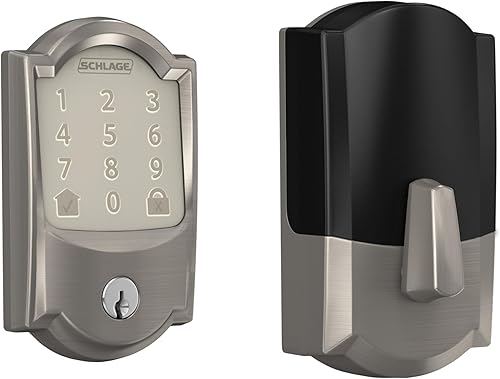 Best for remote access
Schlage Encode Smart WiFi Deadbolt Lock with Camelot Trim, Satin Nickel
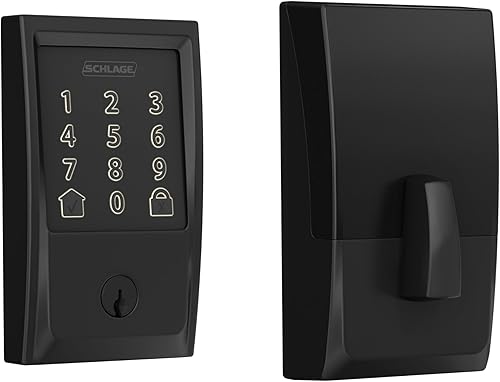 Best for matte black hardware
Schlage Encode Smart WiFi Deadbolt Lock with Century Trim, Matte Black
Smart lock vs keypad lock: the two sides by side
The smart deadbolts add WiFi, app control and history, while the keypad levers give code entry and longer battery life. That one split shapes cost of upkeep, daily habits and the features you will actually use.
| Feature | Smart deadbolt | Standalone keypad lever |
|---|---|---|
| How you open it | App, voice, touchscreen code | Code at the keypad, handle to exit |
| Remote control | Yes, with WiFi and Schlage Home app | No |
| Codes | Up to 100 | Up to 19 on the flex-lock model |
| Lock history | Yes, in the app | No |
| Notifications | Customizable, in the app | Low-battery indicator at the lock |
| Battery | Four AA batteries, up to 6 months | 9V battery, up to 2 years |
| Alarm | Built-in alarm for movement and forced entry | No built-in alarm listed |
| Backup access | One physical backup key | Code entry, handle operation inside |
Both types let you add, change or delete codes without making spare keys. Both install with a screwdriver and no hardwiring.
The difference shows up when you are away from home and want to know who entered, or when you want to open the door from the driveway.
Connected control decides this smart lock vs keypad lock choice
Pick a smart lock if remote access matters more than simplicity. The Encode deadbolts connect straight to your home WiFi and pair with the Schlage Home app, with no added accessory needed.
With that link, you can lock and open the door from anywhere. You can also manage multiple locks at once if you have more than one connected door.
That helps in a home with a front door and a side door on the same system.
Voice control is optional on the connected models. They work with Alexa and Google Home when paired with the app and a voice-enabled device.
A keypad lever has no voice control and no app, so there is nothing to set up beyond codes.
What remote control means in daily use
Remote control helps with a cleaner who arrives early, a relative who forgot a code, or a delivery you want to let in while you are out. You still need to decide if that level of access fits your home.
Lock history shows entries and exits in the app. That record can help you check whether a family member arrived home, or whether a temporary code was used.
A standalone keypad gives you no such record.
Customizable notifications add another layer. You can get alerts for lock events rather than checking the app each time.
If those alerts would sit unused on your phone, the connected features may not earn their place.
Access codes: how many do you really need?
The smart deadbolts hold up to 100 codes, while the keypad levers hold fewer codes and keep routine use simple. Code count matters most when many people come and go on a schedule.
The Encode models let you schedule up to 100 access codes for keyless entry. That suits a busy home, a rental, or a home office with regular visitors.
Each person can have a code that is easy to remember.
The flex-lock keypad lever assigns up to 19 codes. It starts with 2 pre-programmed codes out of the box.
That is plenty for family, a trusted neighbor and a cleaner.
The auto-lock keypad lever also uses codes entered at the keypad. Its focus is on re-locking after entry, not on managing a long list of users.
If your household is small, that simpler setup may fit better.
Temporary codes for guests and help
A temporary code can be added for a guest stay and removed after. With a smart lock, you can manage that change from the app.
With a keypad lever, you change codes at the door itself.
Plan how you will track who has a code. A long list needs a simple record of names and dates.
That record matters more as the code count grows, whichever lock you choose.
Battery life and power: a clear trade-off
The keypad levers run for up to 2 years on a 9V battery, while the smart deadbolts run for up to 6 months on four AA batteries. WiFi use explains most of that gap.
Longer battery life means fewer reminders to check the lock. It also means a low-battery warning is less likely to arrive at a busy time.
Both keypad levers have a dedicated low-battery indicator.
The smart deadbolts show a low-battery indicator on the touchscreen and in the app. That advance notice helps you change batteries before the lock stops working.
Still, expect to change batteries more often than with a standalone lock.
Keep spare batteries in a known place near the door. Note the type each lock uses, since the two types differ.
A quick check during a seasonal routine can prevent a lockout.
Auto-lock and flex-locking: how each door re-secures itself
The auto-lock keypad lever re-locks 5 seconds after code entry, while the flex-lock lever lets you switch modes inside. The smart deadbolts also auto-lock, with time delay options you can set or turn off.
Auto-lock helps if you often forget to lock up. The door secures itself after a set delay, so a rushed exit does not leave the home open.
That feature suits a side door that sees frequent use.
Flex-locking gives you a choice. Use the interior switch to stay in open mode or switch to automatic re-locking.
That choice can help on a door you use many times in a short period.
The Encode deadbolts add one-touch locking from the outside touchscreen. You can lock up with a press as you leave.
Auto-lock time delays can be chosen to suit your routine, or turned off completely.
Which re-lock style fits your routine
Choose fixed auto-lock if you want the door to secure itself every time. Choose flex-locking if some days need quick in and out access.
Choose adjustable delays if your household has mixed habits.
Think about children, guests and cleaners who may not lock the door behind them. A lock that re-secures itself can reduce that worry.
It does not replace a final check as you leave.
Alarms, alerts and security ratings
The smart deadbolts add a built-in alarm and app alerts, while the keypad levers focus on metal construction and a Grade 2/AAA rating. Both types aim for trusted residential security, but they add different layers.
Schlage says the Encode deadbolts have a secure, encrypted connection. They also have a built-in, customizable alarm for door movement and forced entry attempts.
The touchscreen resists fingerprints, which helps keep the keypad clean.
The Encode deadbolts are certified highest in residential Security, Durability and Finish by BHMA industry experts, as Schlage states. That rating covers the lock as a whole, including its finish and construction.
The keypad levers use high-quality metal construction. Schlage gives them a Grade 2/AAA rating for trusted security and durability for residential and light commercial use.
Their silicone-coated numbers light up when pressed, so you can enter a code in the dark.
Alerts versus a simple indicator
App alerts tell you about door events when you are away. A low-battery indicator tells you at the door when power runs low.
Each fits a different need, and neither replaces a sound door and frame.
If you want a broader home system, our best burglar alarms reviews and buying guide can help you compare sensors and alarms that work alongside a lock. A lock secures entry, while sensors watch for movement inside.
Installation and door fit
Both types install in minutes with a screwdriver and no hardwiring, and both replace existing hardware on the door. Measure your door before you order, whichever type you pick.
The Encode deadbolts fit standard doors with 1-3/8 in to 1-3/4 in door thickness and 2-3/8 in or 2-3/4 in backset. The Snap 'n Stay design helps keep the lock on the door, so both hands stay free during fitting.
The keypad levers replace an existing lever or knob. Schlage says you can install them yourself with no skill required, using a screwdriver and no hardwiring.
Check the trim and lever style against your current hardware so the new lock matches the room.
Fit and finish for your door
The Encode deadbolts here come in Camelot trim in satin nickel and Century trim in matte black. The keypad levers come in Camelot trim in matte black and satin chrome, with a lever handle.
Finish can decide the choice when features are close.
Measure door thickness and backset, and check the existing bore. Confirm the lock fits before you remove the old hardware.
Quiet fitting also leaves time to test codes and auto-lock before you rely on the new lock.
Who should buy which type in this comparison?
Buy a smart lock for remote control and history, and buy a keypad lock for simple, long-lasting code entry. Your daily habits should make the call, not the longest feature list.
Who should buy the Schlage Encode Smart WiFi Deadbolt Lock with Camelot Trim, Satin Nickel?
Choose this lock for app control, up to 100 codes and alerts in a satin nickel Camelot trim. It suits a main door where you want to check entries while away.
Battery changes every few months are the trade-off for WiFi features.
Who should buy the Schlage Encode Smart WiFi Deadbolt Lock with Century Trim, Matte Black?
Choose this lock for the same connected features in Century trim and matte black. It suits a home where dark hardware matches other fittings.
The feature set matches the satin nickel version, so finish is the main reason to pick it.
Who should buy the Schlage Electronic Keypad Lock, Lever Handle, Camelot Trim, Matte Black?
Choose this lever for up to 19 codes and flex-locking inside. It suits a side, garage or office door where you want long battery life and no app.
You will not get remote control or lock history.
Who should buy the Schlage Electronic Keypad Lock, Lever Handle, Camelot Trim, Satin Chrome?
Choose this lever for auto-locking 5 seconds after code entry. It suits a busy family door where forgetting to lock up is a concern.
It keeps things simple, with no WiFi, app or voice control.
Smart lock vs keypad lock: which should you choose for your home?
Pick the Encode smart deadbolt if you want to control the door from anywhere, and pick a keypad lever if you want code entry that lasts longer between battery changes. In this smart lock vs keypad lock comparison, your habits matter more than the badge on the box.
If you plan to add a smart lock you can rekey later, think about that need now. Our guide on how to rekey a smart lock explains the steps in plain terms.
Rekeying can matter when you move or change who has access.
If a keypad is not what you want on the outside, our best smart deadbolt without keypad guide covers other designs. A different entry method may suit your door better than a touchscreen or push buttons.
For a deeper look at one style, see our eufy smart lock c220 review and our aqara smart lock u100 review. Those reviews show how other smart locks handle codes and control.
If you already have a smart home hub or alarm, compare systems with our ring alarm vs alarm pro guide before you add a lock. A lock works best when it fits the system you already use, or when it stays simple on its own.
Our score weighs specs, features and buyer feedback against what you're shopping for. That is why the connected deadbolts score highest here: they add remote control, history and alerts, while the keypad levers score close behind for battery life and simplicity.
Measure your door, list who needs a code, and decide if remote access would change your week. That short plan will point you to the right lock type faster than any feature list.
Frequently asked questions
What is the main difference in a smart lock vs keypad lock?
A smart lock connects to WiFi and an app, so you can open the door from anywhere and review lock history. A keypad lock works on its own with codes entered at the door.
Both give keyless entry, but only the smart lock gives remote control and alerts.
Do I need WiFi for a keypad lock?
No. The standalone keypad locks here run on a 9V battery and do not need WiFi, an app or a hub.
You enter a code at the keypad and leave by turning the handle.
That makes them a simple choice for a side or garage door.
How many codes can each type hold?
The Schlage Encode smart deadbolts manage up to 100 access codes in the app. The Schlage keypad lever with flex-locking assigns up to 19 codes.
More codes help with guests, cleaners and family, while fewer codes keep routine code management simpler.
Which lock has longer battery life?
The standalone keypad locks run for up to 2 years with typical use on a 9V battery. The smart deadbolts use four AA batteries and run for up to 6 months with typical use.
WiFi and app features use more power, so expect more frequent battery changes with a smart lock.
Can a smart lock work without WiFi?
You can still use the touchscreen and codes at the door, but remote control, notifications and lock history need the Schlage Home app and a secure WiFi network. The smart deadbolts here have built-in WiFi, so no added hub is needed for those connected features.


