How to Rekey a Smart Lock
You can rekey a smart lock only when its physical cylinder supports rekeying. Confirm the cylinder and key system first, then follow the lock maker's steps to change the key while keeping the electronic functions intact.
On this page (9 sections)
- What does it mean to rekey a smart lock?
- Can every smart lock be rekeyed?
- How do you check cylinder compatibility?
- What tools and parts do you need?
- How do you rekey a supported smart lock?
- Which smart locks can help when you still want a physical key?
- What should you test after rekeying?
- Should you rekey or replace the lock?
- What is the safest way to rekey a smart lock?
You can rekey a smart lock only when its physical key cylinder supports rekeying. Check the cylinder and key system first, then use the maker's procedure to change the physical key without changing the lock's electronic codes.
A smart lock combines mechanical hardware with electronics. For the buying trade-offs, see smart lock vs keypad lock.
Rekeying changes the pins or cylinder so the old key no longer works, while app access, keypad codes, and other settings usually remain separate.
What does it mean to rekey a smart lock?
Rekeying changes which physical key opens the cylinder. It does not usually replace the whole lock or change its Wi-Fi, Bluetooth, keypad, or app functions.
A locksmith can rekey many standard cylinders by changing the internal pins to match a new key. Some locks use a maker-specific system, such as Kwikset SmartKey, that lets you change the key with a compatible tool.
The term “smart key lock” can cause confusion. A SmartKey lock is a mechanical rekeying system, while a smart lock may use electronics for keyless entry.
A lock can have one, both, or neither.
If you are comparing electronic options, start with this guide to smart door locks. It explains the difference between keypads, app-controlled locks, and other access methods.
Can every smart lock be rekeyed?
No. Cylinder compatibility decides whether rekeying is possible.
The lock must have a removable or serviceable physical cylinder, and the new key must match that cylinder's keyway and rekeying system.
Check these details before taking the lock apart:
- Does the lock have a physical key cylinder?
- Is the cylinder compatible with your existing key system?
- Does the maker support owner rekeying?
- Does the lock require a special tool?
- Will removing the cylinder affect the electronic assembly?
- Does the replacement cylinder fit the lock body and tailpiece?
Do not assume two locks can share a key because they look alike. Trim shape, finish, keypad layout, and brand do not prove that the cylinders are interchangeable.
For a lock designed around this task, see our guide to the smart lock you can rekey. It focuses on models where rekeying is part of the buying decision.
How do you check cylinder compatibility?
Match the lock brand, model family, keyway, cylinder format, and tailpiece before ordering parts. The cylinder must fit mechanically and work with the lock's internal drive.
Remove the interior cover only as far as the instructions allow, then identify the model number. Look for the keyway shape and compare it with the replacement cylinder or rekey kit.
If the instructions do not confirm compatibility, ask a locksmith or the manufacturer.
A compatible key must enter fully, turn smoothly, and operate the lock without forcing the cylinder. A key that fits the keyway but does not match the lock's pin system is not a safe substitute.
Do not modify a cylinder with files or force a key into it. A damaged cylinder can leave the door locked or unprotected at the wrong time.
What is a SmartKey lock?
A SmartKey lock uses a special rekeying process to set a new compatible key. It is different from a Wi-Fi smart lock, even though both products may use the word “smart.”
With a SmartKey system, the usual process involves inserting the current key, turning it to a set position, inserting the SmartKey tool, removing the old key, and inserting the new compatible key. The exact order varies by model.
Use only the tool and key type approved for that lock. If you do not have the current key or the correct tool, a locksmith may be able to rekey the cylinder.
What tools and parts do you need?
You need the lock's instructions, the correct new key, and any maker-specific rekey tool. A screwdriver may be needed to remove an interior cover, but do not assume every smart lock uses the same fasteners.
Prepare a clean work surface and keep the door open while testing. If the door closes during the job, a misaligned or incomplete lock can make entry difficult.
Have the old key available if the rekey process requires it. Keep the new key separate from other keys until you confirm that it works from both sides.
A locksmith may need a pin kit, follower, retaining clip tool, or replacement cylinder for a traditional cylinder. Those parts are not universal, so identify the exact lock before buying them.
How do you rekey a supported smart lock?
Rekeying a supported smart lock means removing or resetting the physical cylinder, setting the new key, reinstalling the parts, and testing the lock with the door open.
Use this general sequence:
- Keep the door open and disable any automatic locking feature temporarily if the instructions require it.
- Remove the interior cover or cylinder retainer according to the model instructions.
- Take out the physical cylinder without pulling on wires or electronic parts.
- Use the maker's rekey procedure, or have a locksmith change the cylinder pins.
- Insert the new key and turn it through the required positions.
- Reinstall the cylinder, retainer, cover, and any connected parts.
- Test the new key several times with the door open.
- Test keypad, app, or voice access separately.
Do not turn the key while the cylinder is partly removed unless the instructions specifically require it. Small parts can shift, and the lock may not reinstall correctly.
The Schlage support resources are useful when you need model-specific installation or troubleshooting instructions. Use the exact model guide rather than a general video for a similar-looking lock.
Which smart locks can help when you still want a physical key?
A smart lock with a physical cylinder can suit households that want keypad or app access plus a backup key. The Schlage Encode Plus review covers one such keyless entry option.
The physical key may be useful during battery problems, app issues, or when another person does not use the electronic controls.
The Schlage Encode Smart WiFi Deadbolt Lock with Camelot Trim, Satin Nickel has built-in Wi-Fi, keypad entry, Schlage Home app control, up to 100 access codes, auto-lock settings, a built-in customizable alarm, and one physical backup key. It fits standard doors from 1-3/8 in to 1-3/4 in thick with a 2-3/8 in or 2-3/4 in backset.
Its four included AA batteries support up to six months of typical use, with low-battery alerts on the touchscreen and in the app. The zinc lock has Satin Nickel finish and works with Alexa and Google Home when paired as described by Schlage.
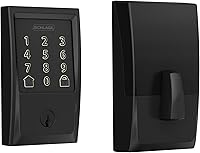
The Schlage Encode Smart WiFi Deadbolt Lock with Century Trim, Matte Black provides the same general combination of Wi-Fi access, keypad entry, app control, up to 100 access codes, auto-lock, a customizable alarm, and one physical backup key. Its Matte Black finish and Century Trim suit a different door-hardware style.
This model fits standard doors from 1-3/8 in to 1-3/4 in thick with a 2-3/8 in or 2-3/4 in backset. It uses four included AA batteries and supports up to six months of typical use, with low-battery indicators on the lock and in the Schlage Home app.
If you want a keypad lock with a lever rather than a Wi-Fi deadbolt, the Schlage Electronic Keypad Lock, Lever Handle, Camelot Trim, Matte Black uses 2 pre-programmed codes and supports up to 19 codes. Its Flex-Lock design allows an interior switch to select unprotected or automatic re-locking mode.
This lock uses an included 9V battery and can provide up to 2 years of typical battery life. Its zinc construction, illuminated silicone-coated buttons, Grade 2/AAA rating, and replacement installation style suit front doors, back doors, garage entries, and home offices.
For other brand and trim choices, compare the best Lockly smart lock and our Philips smart lock review. These comparisons can help when the key cylinder or electronic controls matter more than trim alone.
What should you test after rekeying?
Test the new key, keypad, app, and automatic locking with the door open. A lock that works with the door open can still bind when the door is closed if the strike or deadbolt is misaligned.
Insert the new key fully and turn it in both directions. The deadbolt should extend and retract without unusual force.
Then test the keypad or app and confirm that the lock reports the correct state.
If the lock has auto-lock, verify its delay before closing the door. Check that the low-battery warning and backup entry method are understood by everyone who may need access.
Never rely on one successful turn. Repeat the test several times, then close the door and test again while keeping another way to enter available.
Should you rekey or replace the lock?
Rekey when the cylinder is compatible and the lock still fits and works correctly. Replace the cylinder or the entire lock when compatibility is uncertain, the cylinder is damaged, or the hardware does not match your door.
Choose rekeying when you want to keep the current electronic setup and only need a new physical key. Choose replacement when you need a different keyway, a new trim style, a new access method, or a lock with features your current model lacks.
The Aqara Smart Lock U400 review offers one model to compare.
Before changing parts, measure the door thickness and backset and identify the exact model. For August owners, our guide to August smart lock reviews and August smart lock replacement parts can help separate model-specific hardware from general smart-lock parts.
If connectivity is part of the decision, check whether the model uses Wi-Fi, Bluetooth, Thread, or another system. Our guide on Schlage Encode Plus Thread explains why the connection standard matters when choosing a smart lock.
What is the safest way to rekey a smart lock?
Confirm cylinder compatibility, follow the exact model instructions, keep the door open, and test every access method before normal use. Rekeying is suitable when the lock supports the process, but forcing an incompatible cylinder can damage the hardware.
Pick a supported rekey system if changing the physical key is central to your decision. Pick a replacement lock if the cylinder is unknown, damaged, or incompatible with the key system you need.
Frequently asked questions
Can you rekey any smart lock?
No. A smart lock can be rekeyed only if its physical key cylinder supports rekeying and you have the correct replacement key or pin kit.
Keypad-only locks may not have a cylinder at all.
Confirm the model, cylinder type, and manufacturer instructions before removing parts.
Does rekeying a smart lock erase codes?
Usually, changing the physical key does not erase keypad codes or app settings because the mechanical cylinder and electronic system are separate. Still, follow the model instructions and test both the new key and electronic entry after reassembly.
What is a SmartKey lock?
SmartKey is a rekeying system used in some Kwikset locks. It lets you change the lock to a new compatible key with a special tool, but it is not the same as a smart lock with Wi-Fi, Bluetooth, or an app.
Should I rekey or replace a smart lock?
Rekey the lock when the cylinder supports it and the hardware still fits your door. Replace it when the cylinder is incompatible, the lock is damaged, or you need features such as app access, built-in Wi-Fi, or a different lock style.