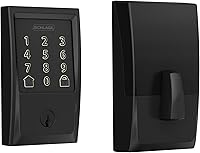
How to Use Schlage Encode Plus
To use Schlage Encode Plus, pair it to the Schlage Home app on 2.4 GHz WiFi, add access codes, and use the touchscreen, app, or Apple Home tap to lock and open. Then set auto-lock, notifications, and guest codes to fit your routine.
On this page (11 sections)
- How do I set up Schlage Encode Plus after I install it?
- How do I add and manage access codes in the Schlage Home app?
- How do I use the touchscreen to lock and open each day?
- How do I control the lock from the Schlage Home app when I am away?
- How do I use Apple Home tap and voice control with Encode Plus?
- How do I turn on auto-lock and alarm features?
- How do I manage guest access and notifications without sharing my main code?
- How should I care for the lock and check the battery?
- How do I choose the right Encode model for how I use the lock?
- What should I do if the lock will not connect or respond?
- How do I get the most from how to use Schlage Encode Plus every day?
To use Schlage Encode Plus, pair it to the Schlage Home app on 2.4 GHz WiFi, add access codes, and use the touchscreen, app, or Apple Home tap to lock and open.
Then set auto-lock, notifications, and guest codes to fit your routine.
Once connected, you can manage codes, check lock history, get alerts, and control the door from away from home.
How do I set up Schlage Encode Plus after I install it?
Start with the Schlage Home app and follow the pairing steps on your 2.4 GHz home WiFi.
Built-in WiFi means no extra hub or accessory is needed for remote access.
Install with a screwdriver and no hardwiring. The Snap 'n Stay design keeps the lock on the door so both hands stay free.
It fits standard doors with 1-3/8 in to 1-3/4 in thickness and a 2-3/8 in or 2-3/4 in backset.
After powering the lock, add it in the app, confirm it joins your network, and test lock and open from the front door.
How do I add and manage access codes in the Schlage Home app?
Open the app and create a code for each person who needs entry.
Schlage says Encode Plus manages up to 250 access codes for keyless entry.
Give family members their own codes, so you can remove one later without changing the others.
Avoid shared codes, since you lose track of who entered and when.
Use the app for guest and service codes, and set a start and end time when the app allows it.
Review lock history after guest stays or service visits, and remove codes you no longer need.
Our guide to schlage encode vs encode plus compares code counts and features.
How do I use the touchscreen to lock and open each day?
Press the touchscreen to wake it, then enter your code to open or use one-touch locking to secure the door.
Schlage says one-touch locking from the exterior touchscreen makes locking up easy.
The touchscreen is fingerprint resistant, which helps in wet or dusty conditions.
Wipe it with a soft, dry cloth when smudges build up.
If the screen stays dark, the batteries may be low. Schlage says a low-battery indicator shows on the touchscreen and in the app as advance notice.
Keep the physical backup key in a secure place, not under a mat or in a plant pot.
How do I control the lock from the Schlage Home app when I am away?
Open the app and tap lock or open on the lock screen.
Remote control works when the lock and your phone can both reach the internet.
Schlage says you can lock and open from anywhere when paired to the app and connected to a secure WiFi network.
Use the app to check the door is locked, and manage multiple locks at once if you have them.
Set customizable notifications for lock, open, and code use, plus alerts for door movement and forced entry attempts.
Do not share your app login with guests. Give them a door code instead.
If remote commands feel slow, check your WiFi signal at the door, since Encode Plus needs a steady 2.4 GHz connection.
How do I use Apple Home tap and voice control with Encode Plus?
Encode Plus works with Apple Home and Apple home keys.
Tap your iPhone or Apple Watch to lock or open when your device and lock support that setup.
Add the lock in Apple Home first, then follow the prompts to set up a home key on your device.
Test the tap from the door with the phone in your hand and with it in a pocket.
Voice control works with Alexa and Google Home, and can pair with smart home devices for automated routines.
Use voice when your hands are full, but keep a code as the backup.
Keep routines simple at first. Add one, test it for a few days, then add more only if they help.
Our guide to schlage encode plus matter explains how Matter fits with Apple Home and other platforms.
How do I turn on auto-lock and alarm features?
Open the lock settings in the app to choose an auto-lock delay or turn the feature off.
Schlage says auto-lock has a variety of time delay options and can be turned off completely.
A short delay suits a busy front door, while a longer delay suits a door where people go in and out with bags or strollers.
Test a few options and pick one that locks without catching people going back for one more trip.
Turn on the built-in alarm for door movement and forced entry attempts, since Schlage says the alarm is customizable.
Auto-lock relocks the door after a delay, while the alarm responds to movement or forced entry attempts, so both help but in different ways.
Tell everyone in the house that auto-lock is on, since people who do not know about the delay may get locked out more often.
How do I manage guest access and notifications without sharing my main code?
Create a separate code for each guest or visit.
Temporary codes let you grant access, then remove it, without changing your own code.
Schlage says you can manage up to 250 access codes on Encode Plus.
Set a clear start and end time when the app allows it, which matters for cleaners, pet sitters, and short-term guests.
Remove the code as soon as the visit ends if you set it manually.
Use lock history to confirm when a guest arrived and left.
Turn on notifications for guest code use, so you know the code worked and the door is locked again after entry.
Never give a guest your app password or your main code, since a guest code gives access to the door only.
How should I care for the lock and check the battery?
Wipe the touchscreen and trim with a soft, dry cloth.
Check the battery level in the app and on the touchscreen before the lock stops working.
Schlage says a low-battery indicator gives advance notice, so replace batteries as soon as it appears and keep spares nearby.
Do not wait for a full failure, since that can leave you without code entry.
The Encode models use four included AA batteries, with typical use giving up to six months of life. Results vary with use, remote commands, and WiFi strength, and a sticking bolt drains power faster.
Keep the backup key secure and test it once after setup.
How do I choose the right Encode model for how I use the lock?
Choose Encode Plus if you want Apple Home tap, up to 250 codes, and the newest features.
Choose the standard Encode if you mainly need app control, voice control, and up to 100 codes.
Our comparison of schlage encode vs encode plus breaks down those differences.
The standard Encode in Satin Nickel and Matte Black both offer built-in WiFi, app control, voice control with Alexa and Google Home, auto-lock, and a built-in alarm.
Encode Plus adds Apple Home and home keys, plus up to 250 codes, and works with Airbnb for automated guest access codes and notifications.
That extra capacity suits larger households, short-term rentals, and homes with many regular visitors.
All three models fit standard doors with 1-3/8 in to 1-3/4 in thickness and a 2-3/8 in or 2-3/4 in backset.
All three use a screwdriver install with no hardwiring, and all three meet the certified highest residential Security, Durability and Finish rating, according to Schlage.
Finish comes down to your door and trim. Satin Nickel suits lighter hardware, Matte Black suits darker trim, and Aged Bronze suits traditional hardware.
Pick the finish that matches the rest of the door, then add the best schlage encode plus door handle you like for a finished look.
If you want a wider search first, our guide to smart door locks explains how deadbolts, lever locks, and keypad locks compare.
Our roundup of the best schlage keyless entry door lock also shows more Schlage options for keyless entry.
What should I do if the lock will not connect or respond?
First, check the batteries and the WiFi signal at the door.
A weak 2.4 GHz signal and low batteries are the most common causes of slow or failed commands.
Move closer to the router to test, then check the lock from the front door again.
Open the app and confirm the lock shows online, and if it shows offline, wait a minute and try again.
Try the touchscreen code as a backup.
If the code works but the app does not, the issue is likely the network or the app connection.
If neither works, check the battery indicator and replace the batteries, using the backup key if the lock has no power.
If problems continue, check that the door and bolt line up cleanly, since a sticking bolt can stop the lock from moving fully.
How do I get the most from how to use Schlage Encode Plus every day?
Start with the app, add codes, and set auto-lock on day one.
That simple setup covers most daily use, and notifications plus lock history give you the rest.
Keep guest codes separate and remove them when visits end.
Use the touchscreen for quick entry, the app for remote checks, and Apple Home tap if you carry an iPhone or Apple Watch.
Check the battery indicator often and keep the backup key secure.
For your next step, read schlage encode plus matter if you want to connect the lock to more smart home features.
Compare schlage encode vs encode plus if you are still choosing a model, and check the best schlage encode plus door handle to finish the door hardware.
Frequently asked questions
How do I lock Schlage Encode Plus from outside?
Use one-touch locking on the exterior touchscreen, the Schlage Home app, a voice command through a paired device, or an Apple Home tap with iPhone or Apple Watch. Auto-lock can also relock the door after a delay you set or leave off.
How many access codes can Encode Plus hold?
Schlage says Encode Plus manages up to 250 access codes for keyless entry through the Schlage Home app. That count supports separate codes for family, guests, and service visits, so you can remove one code without changing the others.
Does Encode Plus need a hub for remote access?
Schlage says built-in WiFi connects Encode Plus to your home network without an extra hub or accessory. It uses a 2.4 GHz connection, so place the lock where your router signal is steady and test the app from the door after setup.
What do I do when the lock battery runs low?
Schlage says a low-battery indicator shows on the touchscreen and in the Schlage Home app. Replace the batteries before they run out, and keep the physical backup key in a secure place for manual entry if power is lost.