Can You Use a Front Door Smart Lock with myQ?
A myQ front door smart lock usually does not work as a direct myQ lock. myQ mainly manages compatible garage doors, while your front door lock normally uses its own app, hub, or smart-home platform.
On this page (7 sections)
- Does myQ work with a front door smart lock?
- What equipment is needed for myQ garage access?
- What front door hardware should you measure?
- Which front door lock can work without a separate bridge?
- Can a smart lock share access with a video doorbell?
- Can myQ and a front door lock use one app?
- What should you buy for a myQ and front door setup?
A myQ front door smart lock usually cannot be controlled directly through myQ. myQ is built around compatible garage door openers, hubs, and related garage access devices. A front door lock is a different kind of device with its own hardware, app, and connection method.
That does not mean the two cannot live in the same home. You can use myQ for the garage and a separate smart lock for the front door.
Each system can handle its own job while you learn two apps or connect them through a supported smart home platform.
The key point is to check the exact model before you buy. A garage opener that works with myQ says nothing about whether a nearby deadbolt will work with myQ.
Likewise, a lock that supports voice control may still need its own bridge or app.
This is common in entry setups. The garage and the front door have different risks, different traffic, and different hardware.
Treating them as separate systems keeps expectations clear.
It also helps with daily use. Guest access, alerts, and lock history will usually sit with the company that made each device.
Knowing that in advance makes the setup easier to manage.
If a broader routine matters to you, look for documented support from both brands. Do not assume a shared voice assistant means full shared control.
Confirm status, locking, opening, and alerts for each device before you rely on one routine.
In short, myQ for garage access and a separate lock for the front door is a normal and workable pairing.
Does myQ work with a front door smart lock?
myQ is not a universal front door smart lock platform. It is built around garage access equipment, such as compatible garage door openers and smart garage hubs.
A myQ account or app does not automatically make a regular deadbolt smart. It also does not automatically add remote lock and open control to a front door.
Before buying, separate the setup into 2 questions:
- What equipment will control the garage?
- What hardware and app will control the front door?
This approach prevents a common mismatch. A garage opener can be myQ-compatible while the front door lock uses August, Schlage, Google Home, Alexa, or another supported system.
If you are comparing entry options, our guide to smart door locks explains the main lock types, connection methods, and installation choices.
What equipment is needed for myQ garage access?
You need compatible garage hardware, a network connection, and the myQ app. Depending on your opener, that may mean a myQ-enabled opener or a separate Smart Garage Hub.
The right choice depends on the garage door system you already have.
Check the opener model and the compatibility requirements before buying extra equipment. The hub and opener must work together, and the home network must reach the garage with a steady signal.
A weak connection can make remote control feel slow or unreliable.
Placement matters for everyday use. The hub or opener should be positioned where it can connect without strain from distance, walls, or metal.
Test the signal during setup rather than after everything is mounted.
A front door lock is an additional device. It needs its own compatible deadbolt or replacement hardware, plus any bridge or app required by that lock.
A garage hub will not power, open, or replace a front door deadbolt.
Think about the full setup before you order. You may need garage equipment for myQ, door hardware for the lock, and one or more apps to manage them.
Each part has a separate role.
The result may look like one connected home, but the garage and front door can still have separate controls. Confirm which device sends alerts, which app stores access history, and which system handles guest codes.
That clarity helps when you add more devices later. You will know where to change a code, where to check an event, and which app to open when you want to lock up.
For the front door, measure the door and confirm fit before choosing a lock. For the garage, confirm opener compatibility before buying a hub.
Those two checks prevent most setup problems.
What front door hardware should you measure?
Measure the door before choosing a smart lock. The key measurements include door thickness, backset, cross bore, and the space around the deadbolt.
Door thickness describes the slab from the interior face to the exterior face. Backset is the distance from the door edge to the center of the lock hole.
Cross bore is the large hole through the door face.
Also check whether the door has a standard deadbolt layout and whether the interior trim leaves room for the smart lock body. A lock that fits the hole may still interfere with trim, glass, a storm door, or nearby wall space.
The August Home Connect Wi-Fi Bridge is useful only when you already have a compatible August Smart Lock. It connects that lock to Wi-Fi and supports remote access, voice control through Amazon Alexa, Google Assistant, or Siri, and alerts through a supported smartphone.
The bridge measures 1.5 x 2.4 x 2.4 in and requires a North American outlet with 110–240 volt power. It is not a front door lock by itself, so you still need compatible August lock hardware.
Which front door lock can work without a separate bridge?
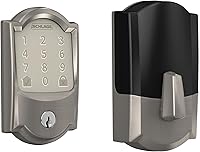
A lock with built-in Wi-Fi can reduce the number of extra devices. The Schlage Encode Smart WiFi Deadbolt Lock connects to home Wi-Fi and works with the Schlage Home app.
It fits standard doors with 1-3/8 to 1-3/4 in door thickness and a 2-3/8 or 2-3/4 in backset. Measure your door instead of assuming that a standard-looking deadbolt will fit.
The lock uses a touchscreen keypad, app control, and 4 AA batteries. Schlage states that typical battery life can reach 6 months, and the lock includes a physical backup key.
This Schlage model is a separate front door system from myQ. It supports Alexa and Google Home when paired with the Schlage Home app and a voice-enabled device.
That may help you build a broader smart-home routine, but it does not mean the lock is natively controlled by myQ.
For Google-based homes, compare best google smart lock front door. If you use Home Assistant, see best smart lock for home assistant.
Can a smart lock share access with a video doorbell?
A smart lock and video doorbell solve different jobs. The lock controls entry, while the doorbell can show who is outside and send an alert.
Some brands and platforms support connected routines, but compatibility is specific. Check whether the exact lock, doorbell, app, and account type support the action you want.
A doorbell transformer does not power a front door smart lock. The Ring transformer below is designed for compatible Ring wired video doorbells and replaces an underpowered North American doorbell transformer.
It accepts 120V AC at 60 Hz and provides 16V 30VA output. It is relevant to the video doorbell side of an entry setup, not to powering a battery-operated or Wi-Fi front door lock.
If you are deciding which device to add first, read smart lock vs video doorbell for the different roles each one fills.
Can myQ and a front door lock use one app?
Only use one-app control when the integration is explicitly supported. A shared voice assistant does not always mean that the devices can perform every action together.
Start by checking the supported platforms for the garage equipment and the front door lock. Then confirm whether the integration allows status checks, locking, opening, garage control, alerts, or routines.
Do not assume that a lock advertised for Alexa, Google Home, Ring, or another platform will automatically appear inside myQ. Compatibility can depend on the exact model and the current software connection.
A keypad may also be a better fit than a connected lock for some homes. Compare smart lock vs keypad lock if you want code entry without choosing a full smart-home setup.
For August owners, the right accessory depends on the lock model. Our guide to the August smart lock keypad covers keypad choices and the role of separate access hardware.
What should you buy for a myQ and front door setup?
Buy garage equipment for myQ and front door hardware for the entry lock. Treat them as separate systems until you confirm a supported integration.
Choose the August Home Connect Wi-Fi Bridge when you already have a compatible August Smart Lock and need Wi-Fi-based remote access. Choose the Schlage Encode Smart WiFi Deadbolt when you want a front door deadbolt with built-in Wi-Fi, a touchscreen keypad, and app control.
Choose the Ring transformer only when a compatible Ring wired video doorbell needs a replacement transformer. It does not replace a smart lock bridge, deadbolt, or garage hub.
Tuya users should compare best smart lock tuya before choosing a lock that may require a different app or hub. If you also use Ring, see best smart locks compatible with ring and verify the exact model support.
The short answer is simple: myQ can handle compatible garage access, but a front door smart lock needs its own compatible hardware and control path. Measure the door, identify the garage equipment, and confirm the exact integration before buying.
Frequently asked questions
Can myQ control a front door smart lock?
Usually no. myQ is designed around compatible garage door openers, hubs, and access devices. A front door smart lock normally needs its own supported app or smart-home connection, so check both systems before expecting one app to control the garage and entry door.
What equipment do I need for myQ access?
You need a compatible myQ garage door opener or a myQ Smart Garage Hub setup, a working Wi-Fi connection, and the myQ app. The exact equipment depends on your garage door hardware.
A front door smart lock is separate unless both systems support a documented integration.
Can I use a regular deadbolt with a smart lock?
Some smart locks replace the interior and exterior parts of a deadbolt, while others work with specific existing hardware. Measure the door thickness, backset, cross bore, and available space before choosing a lock.
Follow the lock maker's fit requirements.
Is a Wi-Fi bridge the same as a smart lock?
No. A Wi-Fi bridge connects a compatible lock to a network so you can access it remotely.
It does not replace the lock hardware.
For example, the August Home Connect Wi-Fi Bridge is an accessory for an August Smart Lock, not a complete front door lock.