Yale Assure Lock 2 Touch Review: Worth It? (November 2026)
The Yale Assure Lock 2 Touch is a strong choice for fingerprint entry and local Bluetooth control, but this version has no built-in Wi-Fi. Choose it if you want biometric access and can use Bluetooth or add the right remote-control setup.
On this page (8 sections)
- Yale Assure Lock 2 Touch review: is it a good fit?
- How fingerprint access works in daily use
- Does the Yale Assure Lock 2 Touch support remote control?
- Access methods and who each one suits
- Yale Assure Lock 2 Touch size, finish and installation
- How to choose between Yale Assure Lock models
- Battery care and everyday maintenance
- Yale Assure Lock 2 Touch review: final verdict
The Yale Assure Lock 2 Touch is best for homeowners who want fingerprint entry, passcodes and Bluetooth control in one keyed deadbolt. It has no built-in Wi-Fi, so you should plan your remote access around that limit from the start.
This is a lock for a front or entry door where convenience matters every day. A fingerprint can open the door without a key or a code, while other options cover guests and low battery situations.
You get several ways to enter, including biometric touch, a touchscreen passcode, the Yale Access App, a phone and an Apple Watch. Auto Open adds hands free entry when you approach with your phone, and a physical key remains available as a traditional backup.
That range matters because no single method suits everyone in a home. A regular resident may prefer fingerprint access for speed, while a visitor may find a shared code simpler and easier to withdraw later.
Bluetooth control works best when your phone is near the deadbolt. It can support nearby entry and management, but it is not the same as direct internet control from anywhere.
The satin nickel finish and rectangular shape suit a household that wants a modern entry point without abandoning a keyed deadbolt. You keep familiar hardware behavior while adding smarter access choices.
Two factor authentication and biometric verification add security layers for access management. Matte keypads help resist visible fingerprint marks, although regular cleaning is still sensible.
Use is listed for the United States and Canada, so confirm that point before you buy. That regional limit is simple to miss and worth checking early.
If your main goal is quick biometric entry at home, this model has a clear purpose. If away from home control is the main goal, compare the compatible Yale setup before you commit.
Attention to who needs access should guide your choice. Giving each person the right method can make daily entry smoother and make permission changes easier to manage.
Yale Assure Lock 2 Touch review: is it a good fit?
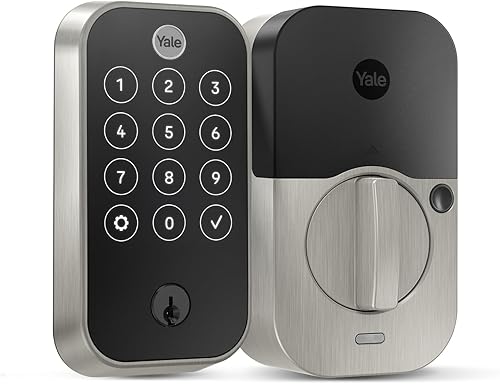
The Yale Assure Lock 2 Touch is a good fit when fast fingerprint access is your main reason for upgrading. Its rectangular satin nickel body uses a zinc material type and is designed for an entry or front door.
Yale Assure Lock 2 Touch Deadbolt: Best for fingerprint entry
- Fingerprint scanner
- Bluetooth connectivity
- Touchscreen keypad
- Auto Open
- Passcode Open
- Satin Nickel finish
A biometric smart deadbolt for front or entry doors. Fingerprint access, passcodes, app control and Auto Open give you several ways to enter, while the no-Wi-Fi design limits direct remote control unless the compatible setup is added.
Pros
- Fingerprint access
- Passcode and app control
- Auto Open
- DoorSense included
- Keyed entry
Cons
- No built-in Wi-Fi
- Remote-control needs the right added setup
- Use is limited to the U.S. and Canada
Yale Security identifies this model as the Assure Lock 2 Touch, with model number YRD420-F-BLE-619. The package includes 4 AA batteries, DoorSense, a key, mounting hardware and the deadbolt.
The lock supports Android, Apple HomeKit and iOS control. Its control methods are App and Touch, while the lock type combines biometric, keypad and pin tumbler entry.
What makes the Touch model different?
The main difference is the fingerprint scanner built into the touchscreen keypad. Instead of remembering a code every time, an approved user can touch the scanner for biometric entry.
Fingerprint access can be useful for people who regularly arrive with groceries, bags or children in their hands. You can still create passcode access for family, friends, a dog walker or a house sitter through the Yale Access App.
The keypad also gives you a backup when a fingerprint is not convenient. A physical key provides another entry method, while DoorSense helps the lock work with door-position awareness.
The Yale Assure Lock 2 Touch is part of a wider group of smart door locks that trade traditional keys for codes, apps or biometric access. The right choice depends on how much remote control and smart-home integration you need.
How fingerprint access works in daily use
Fingerprint entry makes the most sense for regular users who want quick access without carrying a key. Yale Security says the scanner is designed for 99% accuracy and recognition in less than 0.5 seconds.
Those figures are brand claims, not a guarantee that every finger will scan the same way in every condition. Dry, wet or dirty fingers may affect any touch-based reader, so keep a passcode or key available as a backup.
Set up access for the people who should enter, then remove access when it is no longer needed. Temporary access is useful for visitors, but review who still has permission instead of leaving old virtual keys active.
The matte keypad is intended to resist visible fingerprint marks. That does not replace normal cleaning, and it does not mean the lock can never show use.
Does the Yale Assure Lock 2 Touch support remote control?
The Yale Assure Lock 2 Touch supports Bluetooth control, but this version does not include Wi-Fi. Bluetooth is useful when your phone is near the lock, while away-from-home control depends on the compatible Yale setup you add.
That distinction matters if you want to lock the door after leaving, check access activity remotely or manage a guest code while traveling. Confirm the required module or bridge before buying instead of assuming every Assure Lock 2 configuration works the same way.
Our guide to the Yale Assure Lock 2 Wi-Fi module explains what to check when remote access is a priority. If you are comparing other connection standards, see whether you can use a Yale Assure Lock with Zigbee or which Yale Assure Lock works with Z-Wave.
A no-Wi-Fi lock can still suit a household that mainly uses fingerprints, passcodes and nearby phone control. It is less convenient if direct remote control is the feature you expect to use most.
Access methods and who each one suits
The Yale Assure Lock 2 Touch gives you multiple entry choices instead of forcing every user into one method. That is useful when household members have different habits.
Fingerprint access suits regular residents who want the quickest touch-based option. Passcodes work better for visitors and service providers because you can share a code without handing over a key.
The Yale Access App supports virtual keys and an Activity Feed. The app can help you manage who has access and review activity, but the exact remote behavior still depends on the lock’s Bluetooth setup and any compatible added hardware.
Auto Open can help when you approach the door with your phone. The description also mentions Auto-Lock, so the lock can reduce the chance that you leave the door unsecured after entering or leaving.
A physical key remains useful during a dead battery or when electronic access is inconvenient. Store it somewhere secure and accessible to the people who may need it.
Yale Assure Lock 2 Touch size, finish and installation
The lock measures 0.88 x 2.5 x 4.88 inches, with a satin nickel color and brushed finish. Measure your existing door area and check the installation instructions before ordering, especially if the current deadbolt has limited clearance.
The package includes the deadbolt, mounting hardware, DoorSense, 4 AA batteries and a key. It is one item and one piece, so plan for the complete installation rather than assuming extra locks or spare hardware are included.
Use the supplied mounting hardware according to the instructions and keep the door aligned with the strike. A smart lock can have good electronic features and still work poorly if the deadbolt rubs, drags or fails to extend smoothly.
Check the keyway and interior clearance before installation. The lock is intended for an entry door or front door, so confirm that your door type and existing bore preparation match the installation requirements.
How to choose between Yale Assure Lock models
Choose the Yale Assure Lock 2 Touch if fingerprint entry is more important than built-in Wi-Fi. It is the clearest choice for a household that wants biometric access, keypad codes and Bluetooth control in one deadbolt.
Choose another Assure Lock model if your smart-home system depends on a specific radio standard. The best Yale Assure lock guide can help you compare the range, access methods and connection options across the family.
If you prefer a lever-style entry point, compare the best Yale Assure lever lock options. A lever lock solves a different installation and door-hardware need, so do not choose it only because the app features look similar.
For homes centered on Wi-Fi, compare the best smart Wi-Fi door lock options and verify whether the lock includes Wi-Fi or needs an additional module. The connection method affects how you manage the lock when you are away.
Battery care and everyday maintenance
The Yale Assure Lock 2 Touch uses 4 AA batteries and includes a battery indicator. Keeping spare batteries in the home helps you act on a low power warning before it affects entry.
A battery indicator gives you time to plan a replacement. It does not remove the need to test backup entry methods or to keep the included key in a safe place.
Test your backup key and passcode after installation. You should know which method works if your phone is unavailable, a fingerprint does not scan or the batteries need changing.
A short test after fitting can also reveal whether the deadbolt moves smoothly. If it rubs or sticks, check alignment and the strike area before assuming the electronics are at fault.
Keep the touchscreen and fingerprint area clean with a soft, suitable cloth. Dust, moisture and residue can affect how reliably a scanner reads a finger.
Avoid forcing the deadbolt if the door is misaligned. Resistance can reduce smooth operation, and repeated forcing can create a bigger maintenance problem.
Check that the bolt extends fully and retracts without dragging. A door that has settled over time may need adjustment so the lock can close cleanly.
Review access permissions from time to time. Remove old virtual keys, change codes that no longer need to work and check the Activity Feed to confirm recent entry events.
Household routines change, and access should change with them. A dog walker, house sitter or guest who no longer needs entry should not keep an active permission by default.
Keep the physical key stored where trusted users can reach it in an emergency. Hiding it outside the home can undo the security benefits of keyless entry.
Replace batteries as a set when the indicator advises it. Keeping the same age and type together helps the lock power on consistently.
Wipe the satin nickel exterior gently and avoid harsh methods that could mark the finish. A clean fingerprint area and a tidy keypad also make the lock easier for visitors to use.
A brief weekly check of operation, alignment and permissions can catch small issues while they are still easy to fix. Good maintenance is mostly about preparation, clean touch surfaces and removing access that is no longer needed.
Yale Assure Lock 2 Touch review: final verdict
The Yale Assure Lock 2 Touch brings together fingerprint access, passcodes, Auto Open, app control and a keyed deadbolt. That combination makes it a practical choice for a front or entry door.
Its clearest strength is choice. Regular users can use biometric touch, while visitors can use a code or a virtual key through the Yale Access App.
A phone, an Apple Watch, Auto Open and the included key add further options.
That flexibility helps in real daily use. You are not forced to carry a key, remember one code or rely on a single device for every entry.
The main limitation is equally clear. This model uses Bluetooth and does not have built-in Wi-Fi, so remote access requires more planning and may need compatible added hardware.
Bluetooth suits nearby control well, but it should not be confused with direct internet connectivity. If you want to manage the lock while away from home, confirm the exact Yale module or bridge path before buying.
The keyed design is a useful safety net. It gives you a traditional route when electronics, a phone or a fingerprint are not convenient.
DoorSense and Auto-Lock also support a more settled routine. Auto-Lock can help reduce the chance of leaving the door unsecured, while DoorSense adds door position awareness.
Pick this lock if quick biometric entry is your priority. It fits a household that values speed, several access methods and a familiar deadbolt shape.
Pick a different Yale setup if remote control from outside the home is central to your plan. A lock with built-in Wi-Fi or the right compatible module may fit that need better.
In short, the Yale Assure Lock 2 Touch is strongest at the door itself. Choose it for fingerprint entry and local Bluetooth control, and plan separately for any remote access you want.
Frequently asked questions
Is the Yale Assure Lock 2 Touch worth it?
The Yale Assure Lock 2 Touch is worth considering if fingerprint entry, passcodes and Bluetooth control matter more to you than built-in Wi-Fi. It offers several access methods, including Auto Open and a physical key, but you should plan around the no-Wi-Fi design and confirm the setup you need for remote access.
Does the Yale Assure Lock 2 Touch have Wi-Fi?
The Yale Assure Lock 2 Touch Deadbolt in this review uses Bluetooth and has no built-in Wi-Fi. That means your remote-control plan matters.
Check which Yale module or bridge fits your lock before buying if you want to manage the deadbolt while away from home.
Can you open the Yale Assure Lock 2 Touch with a fingerprint?
Yes. The Yale Assure Lock 2 Touch has a fingerprint scanner for biometric entry.
You can also use the touchscreen keypad for passcodes, the Yale Access App, a phone or Apple Watch, Auto Open and the included key, so fingerprint access is one option among several.
Does the Yale Assure Lock 2 Touch work with Apple HomeKit?
The Yale Assure Lock 2 Touch supports Apple HomeKit, along with Android and iOS control listed for the lock. Its listed connectivity is Bluetooth, not built-in Wi-Fi, so check the exact smart-home path you plan to use before buying and confirm that your devices and setup are compatible.