Which Outdoor Wi-Fi Extenders Work with eero?
The best outdoor Wi-Fi extender compatible with eero depends on how you connect it: use a third-party repeater for a wireless reach extension, or use a weatherproof outdoor access point over Ethernet for a stronger yard connection. These devices expand network coverage, but they are not eero mesh nodes.
On this page (8 sections)
- Which outdoor Wi-Fi extenders work with eero?
- Is the TP-Link RE315 a good eero outdoor Wi-Fi extender?
- Which outdoor Wi-Fi extender eero setup works over Ethernet?
- Should you choose a repeater or an outdoor access point?
- How should you set up an eero outdoor Wi-Fi extender?
- What should you choose for an outdoor security camera?
- Can powerline networking replace an outdoor eero extender?
- Which outdoor wifi extender compatible with eero should you choose?
An outdoor wifi extender compatible with eero can extend coverage to a yard, garage or camera location, but it will not function as a native eero mesh node. A third party device can connect to your existing network as a client.
It can then share that connection with nearby devices in a different way.
Choose a wireless repeater for simpler placement near an exterior wall. Choose a wired outdoor access point when you need weather protection and can run Ethernet.
The first option is quicker to install. The second option usually gives a steadier outdoor link.
The right choice depends on three things. You need to know if the device can join your eero network.
You also need to check if it is rated for outdoor use. Finally, you need to know if your camera or other device needs a steady connection.
A porch camera close to the house may work well with an indoor repeater. A camera in an open yard may need a wired access point instead.
Distance alone does not fix a weak signal at the device location. Placement still matters in either setup.
Think about care as well as setup. An indoor repeater must stay dry and within its normal room temperature range.
An outdoor access point is built for exposure, but cables and power parts still need careful routing. A clear plan for both parts helps the system stay reliable.
Roaming is another point to consider. Your phone, laptop or tablet may switch between networks in its own way.
That can feel different from moving between true eero nodes. A matching network name does not always mean the same handoff behavior.
Start with the camera location and work back to the network. Test the signal where the device will sit or where the camera will mount.
Choose the setup that keeps that link stable during normal daily use. That approach avoids paying for range you cannot actually use.
Which outdoor Wi-Fi extenders work with eero?
Third-party extenders can work with eero as network clients, but compatibility is not the same as eero mesh integration. The TP-Link models below are indoor dual-band repeaters with Ethernet ports, while the WAVLINK model is an outdoor-rated access point and repeater with PoE power.
An eero network can provide the host Wi-Fi signal. The extender then receives that signal and rebroadcasts it, or uses a wired connection in access point mode when the model supports that setup.
Before buying, confirm that the extender supports the wireless security and connection process used by your eero system. Also check whether you need one network name, a separate outdoor network, or a wired connection for a security camera.
For a broader explanation of how mesh systems work, see our mesh Wi-Fi guide.
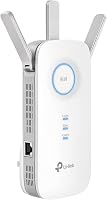
TP-Link RE550: Best for larger indoor-to-outdoor reach
The TP-Link AC1900 WiFi Range Extender RE550 suits an eero user who needs to push coverage toward an outdoor wall, porch or nearby garage from an indoor outlet. It is a dual-band wireless repeater with up to 1300 Mbps on 5 GHz and up to 600 Mbps on 2.4 GHz.
TP-Link gives the RE550 coverage of up to 2100 sq. ft. in its feature description, while the product specifications show a range of 2800 sq. ft. Treat both figures as coverage claims rather than a guarantee for your yard, since walls, distance and interference change the result.
The RE550 supports up to 32 devices and includes a Gigabit Ethernet port. That port can connect a nearby wired device, or it can support Access Point mode when you can bring Ethernet from the eero network to the extender.
Its EasyMesh support does not make it an eero mesh unit. TP-Link also states that the RE550 is not compatible with mesh Wi-Fi systems such as Deco, so check the exact operating mode before expecting whole-home mesh behavior.
The Tether app supports setup, control and firmware updates. Place the extender where it still receives a reliable signal from eero, rather than at the far edge of the dead zone.
Is the TP-Link RE315 a good eero outdoor Wi-Fi extender?
The TP-Link AC1200 WiFi Extender Dual Band 5GHz/2.4GHz is best for a smaller coverage gap near an exterior wall. Its AC1200 dual-band design provides up to 867 Mbps on 5 GHz and 300 Mbps on 2.4 GHz, with coverage of up to 1500 sq. ft.
The RE315 supports up to 32 devices and has a fast Ethernet port for wired connections. It can suit a porch camera or nearby room when the eero signal is already strong at the chosen placement point.
Its compact size can make it easier to place near an exterior wall than a larger outdoor unit. However, it is not weatherproof, so keep it indoors and protect it from rain, condensation and direct outdoor exposure.
TP-Link describes the RE315 as EasyMesh-compatible with compatible routers, but it is not compatible with mesh systems such as Deco. That means you should treat it as a third-party extender for an eero network, not as an eero replacement node.
The Tether app and intelligent signal indicator can help you find a better location. If the signal is already weak where you install the repeater, the outdoor device may still have an unstable connection.
Which outdoor Wi-Fi extender eero setup works over Ethernet?
The WAVLINK AX1800 is the better match when you need a true outdoor installation and can run Ethernet from the network. It is an IP67 weatherproof Wi-Fi 6 outdoor access point and repeater with PoE power, four 8 dBi omnidirectional fiberglass antennas and dual-band speeds up to 1800 Mbps.
WAVLINK gives this model a line-of-sight coverage radius of 200 to 300 m and support for up to 256 devices. Those figures apply to the stated conditions, so buildings, trees and other obstructions can reduce the useful range.
The device supports 802.3 AF/AT active PoE and passive PoE. The included items include a 54V/0.3A passive PoE adapter, PoE converter, Ethernet cable, four antennas, mounting hardware, cable ties and a holder.
The PoE adapter is not waterproof and must stay indoors. If you replace the Ethernet cable, WAVLINK specifies CAT5e or better and a length shorter than 100 m or 328 ft.
This model can run in AP mode when connected to Ethernet, which is the clearest alternative to a wireless eero extender. It also supports Repeater mode when you need to extend an existing wireless network, but the repeater placement still needs a stable signal.
Its mesh mode works with specific WAVLINK products. Do not assume that this creates an eero mesh network or gives you eero app control.
Should you choose a repeater or an outdoor access point?
Choose a repeater when you want a simpler installation, and choose an outdoor access point when reliability and weather protection matter more. The main difference is how the device receives the network connection.
That choice shapes speed, stability and where you can place the device.
A wireless repeater receives the eero signal over Wi-Fi and retransmits it. That avoids Ethernet installation and extra cable work.
An indoor outlet near the exterior wall may be all you need for a porch or garage.
The trade off is that the repeater must sit close enough to the eero network to receive a useful signal. If it is placed too far out, it may pass on a weak connection.
A strong outdoor device cannot fix a weak link from the house.
A wired access point receives the network through Ethernet and creates Wi-Fi outdoors. This takes more planning and more cable work.
It gives the outdoor radio a direct wired path instead of asking it to repeat a weak signal.
Our Wi-Fi range extender vs access point comparison explains the difference in more detail. It can help you match the method to your home layout.
It also helps you see why cable route matters before you buy.
For a camera mounted far from the house, the WAVLINK is the most purpose-built option of these 3 because it is weatherproof and supports PoE. It suits yards, farms, garages and other open areas.
An indoor repeater is not a match for that kind of exposure.
For a nearby porch or garage, the RE550 or RE315 can work if installed indoors. They suit a smaller gap where the eero signal remains stable at the plug point.
Keep them dry and away from direct outdoor exposure.
Think about the device at the end of the link as well. A security camera may need a steady upload for live view or alerts.
A laptop or tablet may need less strict stability for browsing. The far device should shape your choice, not just the advertised range.
Care for the setup after install. Check the signal indicator during setup and again after furniture or doors change.
Keep an indoor repeater clear of heat and moisture. Keep a wired outdoor unit mounted securely with cables routed well.
A repeater is the faster fix when the gap is small. A wired access point is the stronger fix when the run is longer or exposed.
Pick the method that fits the route, the weather and the device you need to serve.
How should you set up an eero outdoor Wi-Fi extender?
Start by testing the eero signal at the planned extender location, then choose repeater or access point mode. A device placed beyond the usable signal cannot create a dependable connection simply because it has a longer advertised range.
For an indoor TP-Link repeater, install it near the exterior wall but still within a strong eero signal area. Use the signal indicator during setup, then check whether the camera or outdoor device stays connected from its final location.
For the WAVLINK, run Ethernet from the network to the outdoor location and keep the PoE adapter indoors. Seal and route the outdoor cable carefully, mount the antenna unit securely, and keep the cable within the stated length limit.
Use a separate network name only if it makes device setup easier. A matching name may feel simpler, but third-party extenders can handle roaming differently from eero nodes.
If your camera can use Ethernet, a wired access point may be more dependable than a wireless repeater. If the camera has local recording or another non-Wi-Fi option, review how security cameras can work without Wi-Fi before deciding that every camera must use the extender.
What should you choose for an outdoor security camera?
Choose the RE315 for a nearby camera, the RE550 for a larger indoor coverage gap, and the WAVLINK for a weather-exposed location with Ethernet access. The best option is the one that keeps a stable connection at the camera's mounting point.
The RE315 is the smallest step for a porch or side entrance close to the house. The RE550 offers higher listed dual-band capacity, 3 antennas and a Gigabit Ethernet port for a larger indoor-to-outdoor coverage plan.
The WAVLINK is the strongest fit for yards, farms, garages and other exposed areas because its IP67 rating, PoE support and outdoor access point modes address installation conditions that indoor repeaters do not.
See our best outdoor Wi-Fi extender guide for more buying factors. For camera-specific placement and connection needs, compare the best Wi-Fi extenders for outdoor security cameras.
If your router and outdoor camera are separated by a long distance, our best long range outdoor Wi-Fi extender guide may help you compare coverage patterns. For wired installations, see the best outdoor Wi-Fi extenders with PoE.
Can powerline networking replace an outdoor eero extender?
Powerline networking can be an alternative when Wi-Fi cannot cross the building well, but it still needs a suitable outdoor access point at the far end. A powerline adapter carries the network through electrical wiring.
An outdoor access point then creates the final Wi-Fi signal near the camera.
This can help when an Ethernet run is hard to install. It can also help when a wireless link fades across walls or distance.
The network still needs a clean path to the outdoor point.
This approach depends on the home electrical layout and the location of the outlets. Adapters must sit on suitable circuits and plugs.
A long or messy electrical route may give a weaker result than expected.
It does not make an indoor extender weatherproof. An indoor repeater placed outside is still at risk from rain, dust and temperature swings.
Weather protection must come from the outdoor device itself.
It also does not automatically create eero mesh behavior. The far access point will act as a separate radio point.
Phones and laptops may switch in a different way from eero nodes.
Compare the trade-offs in our powerline Ethernet adapter vs Wi-Fi extender guide. Use it to weigh setup effort against link quality.
Think about where plugs sit and where the camera mounts.
For a detached garage, powerline plus an outdoor access point may be a workable plan. For an open yard with no outlet nearby, a direct Ethernet run may be cleaner.
For a nearby porch, a simple indoor repeater may be enough.
Check the full path before you commit. Test the eero signal indoors, check outlet positions, and plan the cable route outside.
Choose the option that gives the camera a steady connection with the least risk. That will save trouble later.
Which outdoor wifi extender compatible with eero should you choose?
Pick the TP-Link RE315 for a small indoor coverage gap, the RE550 for broader indoor repeater coverage, and the WAVLINK AX1800 for a wired outdoor access point. None of the 3 should be treated as a native eero mesh node.
Each one joins the network in its own way.
The RE315 fits a porch or side room close to the house. Its smaller size makes placement near an exterior wall easier.
It is a good fit when the eero signal is already fair at the plug point.
The RE550 fits a larger indoor gap toward a garage or outdoor wall. It has more listed capacity and three antennas for wider indoor coverage.
It still needs to stay indoors and receive a stable signal from eero.
The WAVLINK fits exposed outdoor locations. It is weatherproof, supports PoE power and can run as an access point over Ethernet.
It suits yards, farms and other open areas where an indoor repeater would not be safe.
Use a repeater when you want the shortest setup. Place it where the eero signal remains strong, not at the far edge of the dead zone.
Use the signal indicator to check the spot during setup.
Choose the WAVLINK when the device will be outside. Ethernet should be available, and weather protection and PoE should matter more than a simple plug in install.
Keep the PoE adapter indoors and route the cable with care.
For a nearby camera, the RE315 may be enough. For broader indoor coverage, the RE550 may be the better step.
For a far or exposed camera, the WAVLINK is the more purpose built choice.
In every case, test the final location before you finish setup. Move the camera or device to its real mounting point and check the link there.
Choose the setup that stays steady in daily use.
Frequently asked questions
Can you use an outdoor Wi-Fi extender with eero?
You can use a third-party Wi-Fi extender with an eero network if the extender can connect to the wireless network and its operating mode fits your setup. It will not become an eero mesh point, so roaming, network names and device management may differ from a genuine eero unit.
Does eero make an outdoor Wi-Fi extender?
eero does not offer an outdoor-rated extender in the products compared here. For outdoor coverage, you can place a compatible wireless repeater indoors near the exterior wall, or run Ethernet to a weatherproof outdoor access point.
Is an outdoor access point better than a Wi-Fi extender for eero?
A wired outdoor access point is usually the stronger choice when you can run Ethernet outside because it avoids relying on a weak wireless link between the eero network and the outdoor device. A repeater is easier when cable installation is not practical.
Will an eero-compatible extender improve internet speed?
An extender improves coverage, not the internet speed supplied by your service. Wireless repeaters can also reduce available throughput because they receive and retransmit traffic, so place one where it still receives a stable signal from the eero network.