Wi-Fi Range Extender vs Booster: Is There a Difference? (November 2026)
A Wi-Fi range extender and booster usually describe the same type of device. Focus on coverage, bands, Ethernet, setup modes and router compatibility instead of the label.
On this page (7 sections)
- Wi-Fi range extender vs booster: what is the difference?
- Which features matter more than the label?
- Which product suits your home?
- How should you place a Wi-Fi extender or booster?
- Should you choose a booster, repeater or mesh system?
- What should security camera owners check?
- Wi-Fi range extender vs booster: which should you buy?
A Wi-Fi range extender and a Wi-Fi booster usually mean the same kind of device. Both labels commonly describe hardware that receives an existing wireless signal and sends coverage into a weak-signal area.
The device does not create internet service on its own. It depends on the router and the connection it receives from that router.
That dependency shapes what it can do in daily use. A strong received signal gives it more to pass on, while a weak received signal leaves little room for improvement.
The useful difference is in the features behind the label. Check the supported bands, coverage claim, Ethernet port, setup method, operating modes and compatibility with your router.
Bands tell you which devices can connect and how the network behaves at different distances. Dual-band models give more choice than a unit limited to one band.
An Ethernet port adds a wired option for a nearby device. It can also support access point mode when a wired connection is available at that location.
Operating modes change how the unit is used. Some act as a repeater, while others can bridge a wired network or create Wi-Fi from a cable.
Setup method affects how much time and effort the install takes. WPS may be quick, while an app can offer clearer guidance on placement and settings.
Compatibility matters before you buy. The extender should work with your router, gateway or access point and with the devices you plan to connect.
Coverage claims need a careful read. They describe a stated maximum under certain conditions, not a promise for every room, wall or floor plan.
Placement is just as important as the model. The unit should sit between the router and the weak area so it can receive a usable signal first.
This Wi-Fi range extender vs booster comparison explains what the terms mean and how the products below fit different home network needs. Our score weighs specs, features and buyer feedback against what you're shopping for.
Use the guide to match the device to the actual problem. One weak room calls for a different choice than weak coverage across several floors.
Wi-Fi range extender vs booster: what is the difference?
The terms overlap, so the label does not reliably identify a different technology. A device called a booster may be a range extender, repeater or access point with a different marketing name.
A wireless extender normally connects to your existing router over Wi-Fi. It then broadcasts the network farther into the home.
That can help a camera, phone, laptop or streaming device stay connected in a room where the router's signal is weak.
The word booster is often used in the same way. It does not automatically mean stronger internet service, a faster plan or better performance through every wall.
A true buying comparison starts with the connection method. A wireless extender depends on the signal it receives from the router, while an access point uses an Ethernet connection to create Wi-Fi from a wired network.
For a wider look at network layouts, see our guide to mesh Wi-Fi. Mesh systems and extenders can both improve coverage, but they are different approaches to managing a home network.
Does a booster increase internet speed?
A Wi-Fi booster is designed mainly to improve coverage, not to increase your internet plan's speed. The TP-Link models below state that wireless extenders can deliver 50% or less of current speeds in some conditions.
A stronger signal can still improve daily use. If a device previously struggled to maintain a connection, better signal reliability may reduce interruptions and improve practical performance.
Results depend on distance, walls, floor materials, interference and the connection between the extender and router. A large coverage number cannot remove those limits.
Which features matter more than the label?
Choose by bands, connection options and operating modes rather than by the word extender or booster. The right feature depends on where the weak signal is and which devices you need to connect.
Dual-band hardware supports both 2.4 GHz and 5 GHz networks. The 2.4 GHz band can help with reach, while 5 GHz can offer higher stated speeds over a shorter range.
An Ethernet port gives you another option. It can connect a wired device to the extended network, or it can support access point mode when the device accepts a wired network connection.
Setup tools also matter. WPS or one-tap setup may be convenient, while an app can help you manage settings, check firmware and find a better location.
The best Wi-Fi range extender guide can help if you want to compare more models by coverage features and setup needs.
When does an Ethernet port help?
An Ethernet port helps when a device needs a wired connection or when you can run cable to the extender's location. It can also make access point mode possible on supported models.
The TP-Link AC1900 RE550 has a Gigabit Ethernet port and access point mode. The TP-Link AX3000 model also has a Gigabit Ethernet port and access point mode.
The Finwarm extender has an Ethernet port and supports access point mode. The Baetaey model has an Ethernet port and supports repeater, bridge, access point and router modes.
A port does not make every wireless connection wired. You still need a suitable Ethernet cable and a network layout that reaches the device.
Which product suits your home?
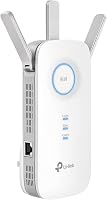
The TP-Link AC1900 RE550 is the strongest fit when you want dual-band coverage, a Gigabit Ethernet port and broad device compatibility. It supports up to 1300 Mbps on 5 GHz and up to 600 Mbps on 2.4 GHz, with 3 adjustable external antennas.
The RE550 has a stated coverage range of up to 2800 square feet and supports up to 32 devices in its feature description. Its title identifies it as an AC1900 dual-band wireless repeater.
It also supports EasyMesh with an EasyMesh-compatible router, adaptive roaming and access point mode. TP-Link says it is not compatible with Deco mesh Wi-Fi systems.
Its Tether app supports setup and management, while an intelligent signal indicator helps with placement. The RE550 suits a home where you want more control over location and a wired connection for a television, console or computer.
The TP-Link AX3000 model is the better fit for a Wi-Fi 6 home with newer devices and a higher stated dual-band capacity. Its title identifies Wi-Fi 6, and its feature data gives speeds up to 2404 Mbps on 5 GHz and 574 Mbps on 2.4 GHz.
It has a stated coverage range of up to 2400 square feet and supports up to 64 devices in its feature description. Two high-gain directional antennas and Beamforming are included among its listed features.
The model supports EasyMesh with a compatible router, access point mode and a Gigabit Ethernet port. Its Tether app includes setup, firmware checks and a signal indicator for placement.
TP-Link describes compatibility with Wi-Fi devices and routers or access points, including devices using 802.11ac and 802.11ax. Choose it when Wi-Fi 6 support and device capacity matter more than the RE550's stated coverage range.
The Finwarm 2026 WiFi Extender suits buyers who want one-tap setup and a very large stated coverage figure. Its title gives a 15,888-square-foot range claim, support for 55 or more devices and repeater, bridge, access point and router modes.
Finwarm describes beamforming, high-gain antennas and support for WEB, WAP and WPA2 security protocols. It also describes compatibility with routers, gateways and cable modems.
The device has an Ethernet port for wired devices or access point use. Its one-tap setup uses the WPS button on the extender and router.
The large coverage number is a manufacturer claim, not a guarantee for every home. Walls, distance and router placement still matter, so treat the number as a comparison point rather than a promise for each room.
The Baetaey 2026 WiFi Extender Signal Booster suits homes that mainly need 2.4 GHz coverage and flexible operating modes. It supports 2.4 GHz wireless operation, has 4 adjustable external antennas and gives a stated range of up to 15,000 square feet.
Baetaey lists repeater, bridge, access point and router modes. It also states support for more than 70 devices in one feature description and identifies laptops, smartphones, speakers, IP cameras, tablets and Fire Stick devices as examples.
The device has a 300 Mbps data transfer rate, an Ethernet port and one-tap WPS setup. It supports WEP and WPA/WPA2 wireless security protocols.
Because it supports 2.4 GHz rather than dual-band operation, it is a narrower fit than the TP-Link models for homes that want both 2.4 GHz and 5 GHz. It may suit a buyer whose priority is reach for compatible 2.4 GHz devices.
How should you place a Wi-Fi extender or booster?
Place the device between the router and the weak-signal area, not inside the dead zone. It needs a usable connection to the router before it can send coverage farther.
Start near the middle of the route between the router and the room with poor coverage. Use the device's signal indicator or setup app if one is available, then move it if the connection remains weak.
Avoid hiding the extender behind large furniture or placing it beside thick walls, metal objects or appliances that may interfere with the signal. The best position is usually open and high enough to keep the wireless path clear.
Test the rooms where you need coverage. A phone showing a network name does not always mean that the connection is strong enough for a camera stream, video call or other demanding use.
For homes with long distances or several floors, compare the coverage needs in our guide to long-range Wi-Fi extenders. A single extender may not be the best answer for every layout.
Should you choose a booster, repeater or mesh system?
Choose a basic extender or booster for one weak area, and consider mesh when you want a broader whole-home network design. Your router and home layout should guide the choice.
An extender can be practical when the router works well in most rooms and only one area needs help. It is also useful when you want to add coverage without replacing the existing router.
A mesh system is designed around multiple network points. It may make more sense when coverage is weak across several rooms or floors and you want one coordinated system.
Compatibility matters. The TP-Link RE550 and AX3000 models support EasyMesh with compatible routers, but the RE550's data specifically excludes Deco mesh systems.
If your internet service comes from Xfinity, our guide to the best mesh Wi-Fi systems for Xfinity covers a different path from adding one extender.
What should security camera owners check?
Security cameras need a stable connection in their installed location, so check signal strength, band support and placement before choosing by coverage claims. A camera that sits far from the router may benefit from a better-positioned network device.
A dual-band model gives you more network options for compatible cameras and other home devices. The Baetaey model's 2.4 GHz support may suit devices that use that band, but it does not provide 5 GHz coverage.
An Ethernet port can help when you can run cable to a suitable location. If you are building a wired camera network, compare the best Ubiquiti PoE switches and best NETGEAR unmanaged PoE switches for a different connection approach.
Do not place an extender where the router signal is already unusable. For outdoor cameras, also check the camera's own installation requirements because an indoor wireless device does not make an outdoor location suitable.
Wi-Fi range extender vs booster: which should you buy?
Choose by the problem you need to solve, not by the label. The TP-Link AC1900 RE550 is the best fit for dual-band coverage with a Gigabit Ethernet port, while the TP-Link AX3000 suits Wi-Fi 6 homes and up to 64 devices.
The RE550 fits a home that needs both 2.4 GHz and 5 GHz coverage. Its Ethernet port also helps when a television, console or computer can connect by cable.
The AX3000 fits a home with newer Wi-Fi 6 devices and more connected equipment. Its stated capacity makes it the narrower choice for busy households.
Choose the Finwarm model if one-tap setup and multiple operating modes are your main priorities. It suits a buyer who wants WPS setup and access point use without a complex install.
Choose the Baetaey model if 2.4 GHz operation, 4 modes and adjustable antennas match your devices. It is the better match when reach on that band matters most.
If the weak area is small, place one extender where it can still receive a solid router signal. Keep it in the open and test the room from the places you actually use a phone or laptop.
If several rooms need coordinated coverage, compare a mesh system instead. An extender can help one area, while a mesh design plans coverage across the whole home.
For another label comparison, read Wi-Fi range extender vs repeater. The names overlap there too, so the useful decision still comes down to how the device connects and where you need coverage.
Frequently asked questions
Is a Wi-Fi range extender the same as a booster?
Usually, yes. Wi-Fi range extender, booster and repeater often describe a device that receives an existing wireless signal and sends it farther.
Compare the actual bands, coverage claims, Ethernet port, operating modes and router compatibility because the label alone does not tell you how the device works.
Does a Wi-Fi booster increase internet speed?
A Wi-Fi booster usually improves coverage rather than increasing the speed supplied by your internet plan. A stronger connection can improve practical performance in a weak-signal room, but walls, distance, wireless traffic and the extender's connection to the router still affect results.
Should I buy an extender or a booster?
Choose based on the features you need, not the name. A dual-band extender suits homes with newer and older devices, an Ethernet port helps connect a wired device, and access point mode can use a wired connection to create Wi-Fi in another area.