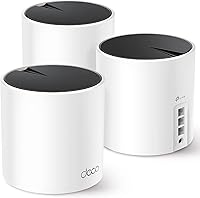
TP-Link Deco XE75 Review: Worth It? (November 2026)
The TP-Link Deco XE75 is a strong WiFi 6E mesh choice for larger homes that need 6 GHz capacity and broad coverage. Choose the 3-pack for up to 7,200 sq ft, or the XE75 Pro for a 2.5 Gbps port in a smaller setup.
On this page (11 sections)
- TP-Link Deco XE75 review: the short answer
- What comes with the TP-Link Deco XE75?
- How does the XE75 tri-band design work?
- Is the 6 GHz band useful in daily use?
- What is different about the Deco XE75 Pro?
- How should you set up the XE75?
- How many devices can the XE75 handle?
- What security features does Deco XE75 include?
- Is Deco XE75 good for a security camera network?
- XE75 vs other TP-Link Deco systems
- TP-Link Deco XE75 review verdict
The TP-Link Deco XE75 is a strong WiFi 6E mesh choice for larger homes that need broad coverage and a 6 GHz band. The 3-pack covers up to 7,200 sq ft, while the XE75 Pro makes more sense when you need a 2.5 Gbps wired port in a smaller area.
The main buying decision is simple. Pick the regular XE75 for its three-unit coverage, or choose the XE75 Pro when multi-gig wired connections matter more than coverage.
TP-Link Deco XE75 review: the short answer
The TP-Link Deco XE75 earns a 9.7 score because its 3-pack combines tri-band WiFi 6E with up to 7,200 sq ft of stated coverage. The extra 6 GHz band can serve as a backhaul between nodes or connect compatible WiFi 6E devices.
It is a better match for a larger home than a single-router setup. A smaller home with a multi-gig internet plan may get more value from the XE75 Pro and its 2.5 Gbps WAN/LAN port.
Our score weighs specs, features and buyer feedback against what you're shopping for. We compared the two XE75 models by coverage, band design, wired ports, setup and practical use.
For broader planning, our mesh WiFi buying guide explains how node placement, wired connections and home size affect a mesh system.
What comes with the TP-Link Deco XE75?
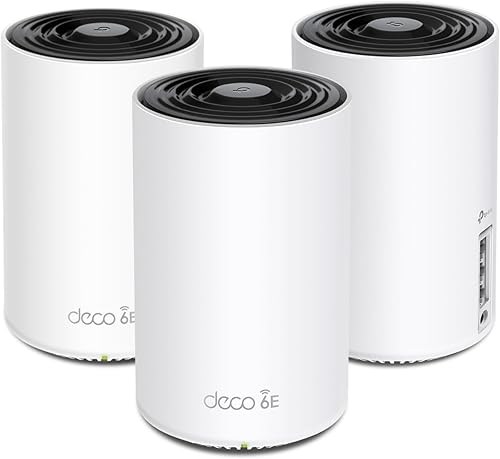
The TP-Link Deco XE75 3-pack includes 3 Deco XE75 units, 3 power adapters, 1 RJ45 Ethernet cable and 1 Quick Installation Guide. Each unit measures 4.13 x 4.13 x 6.65 in and has internal antennas.
TP-Link Deco XE75 AXE5400 Tri-Band WiFi 6E: Best for large homes
- 3-pack
- Up to 7,200 sq ft coverage
- Tri-band WiFi 6E
- Up to 5,400 Mbps
The 3-pack suits larger homes that need broad coverage and a dedicated 6 GHz option. Its 6 GHz band can work as a backhaul by default or as a WiFi network for compatible devices.
Pros
- Largest stated coverage area here
- Three WiFi bands
- 6 GHz backhaul option
- App setup and management
Cons
- Requires a modem for most internet providers
- 6 GHz device access requires compatible devices
- No 2.5 Gbps port listed
The system uses Ethernet and WiFi for connectivity, with app control through the Deco app. It works with personal computers and is designed to work with internet providers such as Comcast, Charter, AT&T, Verizon, Xfinity, Spectrum, RCN, Cox, CenturyLink and Frontier.
A modem is required for most providers.
TP-Link also describes AI-driven mesh behavior that learns about the network environment, client quality and user behavior. That feature is intended to help the system manage connections as you move around the home.
Who should choose the 3-pack?
Choose the 3-pack if your home has several areas that need coverage or if one router leaves distant rooms with weak service. The stated coverage is up to 7,200 sq ft, so it has a clear advantage over the single XE75 Pro in this comparison.
A three-unit system also gives you more placement choices. Put the main unit near the modem, then place the other units where they can connect reliably without being hidden inside cabinets or crowded behind large electronics.
The 3-pack is less compelling if your home is compact and your main priority is a wired connection above 1 Gbps. In that case, the Pro's port layout deserves closer attention.
How does the XE75 tri-band design work?
The XE75 uses 6 GHz, 5 GHz and 2.4 GHz bands, with total stated speeds of up to 5,400 Mbps. The listed band rates are up to 2,402 Mbps on 6 GHz, up to 2,402 Mbps on 5 GHz and up to 574 Mbps on 2.4 GHz.
Those figures describe the combined wireless design, not a guaranteed speed for one device. Actual results depend on the device, distance, walls, interference, internet plan and whether the connection uses WiFi or Ethernet.
The 6 GHz band is the most important difference from older dual-band systems. It is available for WiFi 6 traffic, and the XE75 can use it as a backhaul between nodes by default.
You can also switch the 6 GHz band to WiFi network mode. That option is useful when you have compatible WiFi 6E devices that can connect directly to the newer band.
The 2.4 GHz band remains useful for devices that need longer range or do not support newer WiFi bands. The 5 GHz band sits between the two, offering a familiar option for many current devices.
Is the 6 GHz band useful in daily use?
The 6 GHz band is most useful when your compatible devices are close enough to the nodes and your mesh nodes have a clear wireless path. It can also help keep the node-to-node connection separate from older device traffic when used as a backhaul.
Its value depends on your device mix. A home filled with older WiFi equipment will not gain direct 6 GHz access from those devices, although the system can still use the band for backhaul.
Walls and distance matter more at higher frequencies. Place nodes where they can maintain a good connection rather than putting one at the far edge of the home and expecting it to repair a weak link.
For a WiFi 6 alternative, compare this review with our TP-Link Deco X50 review. For newer WiFi 7 options, see our TP-Link Deco BE11000 review.
What is different about the Deco XE75 Pro?
The TP-Link Deco XE75 Pro is a single WiFi 6E mesh router with one 2.5 Gbps WAN/LAN port and two 1 Gbps LAN ports. It covers up to 2,900 sq ft and supports total stated tri-band speeds of up to 5,400 Mbps.
TP-Link Deco XE75 Pro AXE5400 Tri-Band WiFi: Best for multi-gig wired links

- One 2.5 Gbps WAN/LAN port
- Two 1 Gbps LAN ports
- Up to 2,900 sq ft coverage
- Tri-band WiFi 6E
The XE75 Pro is the better fit when a 2.5 Gbps WAN/LAN port matters more than the larger coverage of the 3-pack. It can work as a standalone router and with TP-Link Deco mesh WiFi.
Pros
- 2.5 Gbps WAN/LAN port
- Two additional 1 Gbps LAN ports
- 6 GHz band
- App-based setup and control
Cons
- Lower stated coverage than the 3-pack
- Requires a separate modem
- One unit is included
The 2.5 Gbps port is the key reason to choose the Pro. It gives a compatible modem, switch, computer, game console or other wired device a path above 1 Gbps, while the two 1 Gbps ports handle standard wired connections.
The Pro can work as a standalone WiFi router and is compatible with TP-Link Deco mesh WiFi. It includes 1 Deco XE75 Pro unit, 1 power adapter, 1 RJ45 Ethernet cable and 1 Quick Installation Guide.
Its dimensions are 4.13 x 4.13 x 6.65 in. The unit has internal antennas, app control and WiFi 6E tri-band connectivity.
Who should choose the XE75 Pro?
Choose the Pro if your home is within its stated 2,900 sq ft coverage and you have a reason to use the 2.5 Gbps WAN/LAN port. That could include a multi-gig internet plan or a wired device that supports a faster Ethernet link.
Choose the regular XE75 instead if coverage is the main concern. The three-unit system has a much larger stated coverage area and gives you more nodes for distributing the wireless signal.
Our TP-Link Deco BE25 review is another useful comparison if you're weighing a newer Deco option with a different WiFi generation.
How should you set up the XE75?
Start by connecting the main Deco unit to your modem, then use the Deco app to complete setup and add the other units. TP-Link describes the app as providing visual guidance for setup and network management.
Place the main unit in an open area near the modem. Avoid hiding it inside a cabinet, behind dense furniture or beside devices that could block its signal.
Place additional units between the main unit and weak coverage areas. A node needs a usable connection to the rest of the mesh, so the farthest room is not always the best location for the final unit.
After setup, walk through the home with the devices you use most. Check the rooms where video calls, streaming, cameras or game consoles need reliable service, then move a node if the connection path is poor.
The app also supports guest WiFi control and works with Alexa for turning guest WiFi on or off by voice command.
How many devices can the XE75 handle?
TP-Link lists the XE75 system for up to 200 devices and the same total stated speed of up to 5,400 Mbps. That capacity suits homes with phones, computers, televisions, smart-home devices and security cameras sharing a network.
A device count is not the same as a promise that every device will receive maximum speed. High-bandwidth activity, distance, walls and the wireless backhaul all affect the experience.
Separate demanding devices across wired and wireless connections when possible. The XE75 supports Ethernet and WiFi, so a wired connection can reduce the wireless load for devices that stay near a node.
The Pro's two 1 Gbps LAN ports and one 2.5 Gbps WAN/LAN port make it more flexible for wired equipment. The regular XE75's listed LAN port bandwidth is 10/100/1000 Mbps.
What security features does Deco XE75 include?
The XE75 includes TP-Link HomeShield with free features such as basic network security, security scanning, IoT device identification, basic parental controls, quality of service and basic weekly or monthly reports.
TP-Link also identifies its cybersecurity commitment and says it signed the Cybersecurity and Infrastructure Security Agency's Secure-by-Design pledge. You can read more about TP-Link's approach on the official Deco XE75 product page.
Security features don't remove the need for good account habits. Use a strong administrator password, keep the firmware updated through the app and review connected devices regularly.
Create a guest network for visitors and devices that do not need access to your main network. Keep cameras, televisions and other smart devices updated when updates are available.
Is Deco XE75 good for a security camera network?
The XE75 can suit a home security camera network when the cameras need reliable WiFi coverage across several rooms or outdoor areas. The 3-pack's stated coverage gives it an advantage when the camera locations are spread across a larger home.
Camera traffic still depends on signal strength and placement. Put a node close enough to the camera area to maintain a stable link, but keep it indoors and protected from moisture unless the unit is specifically designed for outdoor use.
Use Ethernet for cameras or recording equipment that stays near a node and supports wired networking. This can reduce the amount of video traffic using the wireless connection.
For a camera system with wired power and data, compare your network plan with our guide to the best 4-port TP-Link PoE switches. If you need more management controls, see the best TP-Link managed PoE switches.
XE75 vs other TP-Link Deco systems
The XE75 sits between older WiFi 6 Deco systems and newer WiFi 7 models. Its defining feature is the 6 GHz band, while its practical choice between models comes down to coverage and wired port speed.
The regular XE75 is the better match for broad coverage because it includes 3 units and lists up to 7,200 sq ft. The XE75 Pro is the better match for a smaller home with a multi-gig wired connection because it lists one 2.5 Gbps WAN/LAN port.
If you are comparing WiFi 6 systems, our guide to the best TP-Link Deco WiFi 6 mesh systems can help narrow the choices. For WiFi 7, use the best TP-Link Deco WiFi 7 mesh systems roundup.
Do not choose by the AXE5400 label alone. Check the number of units, stated coverage, available ports and whether your devices support 6 GHz.
TP-Link Deco XE75 review verdict
The TP-Link Deco XE75 3-pack is the better pick for large homes that need broad WiFi 6E coverage and a 6 GHz backhaul option. Its 3 units and up to 7,200 sq ft coverage give it the clearest advantage in this comparison.
Pick the XE75 Pro if your home is smaller and a 2.5 Gbps WAN/LAN port matters more than extra coverage. Pick the regular XE75 if your priority is reaching more rooms with one coordinated mesh system.
Both models use tri-band WiFi 6E, app control and HomeShield features. Your final choice should follow the layout of your home, the number of nodes you need and the wired speeds your modem and devices support.
Frequently asked questions
Is the TP-Link Deco XE75 worth it?
The TP-Link Deco XE75 is worth considering if you need a tri-band WiFi 6E mesh system with up to 7,200 sq ft of stated coverage. Its main advantage is the 6 GHz band, which can work as a backhaul or serve compatible WiFi 6E devices.
What is the difference between Deco XE75 and XE75 Pro?
The Deco XE75 3-pack covers up to 7,200 sq ft and includes 3 Deco XE75 units. The XE75 Pro covers up to 2,900 sq ft and adds one 2.5 Gbps WAN/LAN port plus two 1 Gbps LAN ports, making it a better fit for multi-gig wired devices.
Does Deco XE75 use the 6 GHz band as backhaul?
Yes. The Deco XE75 can use its 6 GHz band as a backhaul between nodes by default.
TP-Link also allows the band to switch to WiFi network mode, which lets compatible WiFi 6E devices connect to 6 GHz directly.
Do I need a modem for TP-Link Deco XE75?
A modem is required for most internet providers when using the TP-Link Deco XE75. The Deco system replaces the router and extender part of a home network, but it does not replace the modem used to connect to the provider.