TP-Link Deco vs TP-Link Extender: Which Should You Choose? (November 2026)
Choose TP-Link Deco when you want to replace your router with whole-home mesh, and choose a TP-Link extender when one weak area needs help. The right choice depends on your home's size, current router and how many devices need reliable coverage.
On this page (8 sections)
- TP-Link Deco vs TP-Link extender: what is the main difference?
- Should you replace your router with Deco?
- Should you keep your router and add an extender?
- Which extender fits a smaller coverage gap?
- How do setup and network names differ?
- Do wired connections change the choice?
- How should you choose for a security camera network?
- Which should you choose?
Choose TP-Link Deco when you want to replace your router with whole-home mesh, and choose a TP-Link extender when one weak area needs help. The TP-Link Deco vs TP-Link extender decision comes down to coverage, device count, network design and how much of your current setup you want to change.
A Deco system uses multiple units to create one mesh network. An extender connects to the router you already have and pushes coverage farther into a weak area.
 Best for one dead zone
TP-Link AC1200 WiFi Extender Dual Band 5GHz/2.4GHz
TP-Link Deco vs TP-Link extender: what is the main difference?
Deco is a whole-home network system, while an extender adds reach to an existing network. That difference affects setup, roaming, coverage planning and the number of devices the network can support.
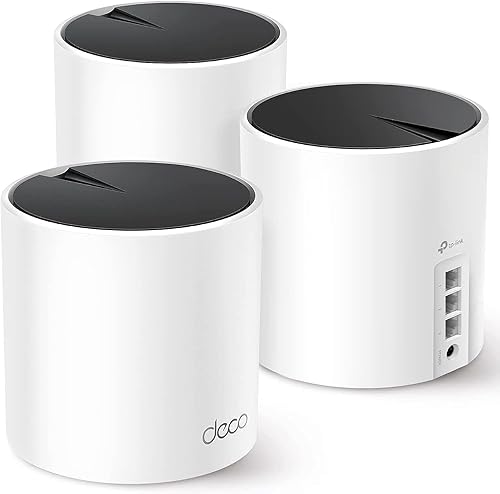
The Deco X55 is a 3-pack with Wi-Fi 6 AX3000, coverage up to 6500 square feet and support for up to 150 devices. Each unit has 3 Gigabit Ethernet ports and supports wired Ethernet backhaul.
The Deco S4 is also a 3-pack, but it uses AC1900 Wi-Fi, covers up to 5500 square feet and supports up to 100 devices. Each unit has 2 Gigabit Ethernet ports and supports wired Ethernet backhaul.
The AC1200 RE315 extender covers up to 1500 square feet and supports up to 32 devices. The RE220 covers up to 1200 square feet and supports up to 30 devices.
These coverage figures are planning points, not guarantees for every floor plan. Walls, distance, interference, router placement and the position of each mesh unit can change the result.
For broader planning, our mesh Wi-Fi buying guide explains how coverage, backhaul and device demand shape a home network.
Should you replace your router with Deco?
Choose Deco if your router has several weak areas, your home is larger or you want one mesh network across multiple rooms. Deco is the stronger fit when the problem affects the whole home's layout rather than one distant corner.
The Deco X55 combines 3 units into one Wi-Fi 6 mesh system. Its stated capacity of up to 150 devices suits homes with phones, computers, televisions, tablets, printers, gaming consoles and security cameras sharing the network.
The X55 also has 3 Gigabit Ethernet ports on each unit. Wired Ethernet backhaul can help when you can connect units by cable and want to reduce the wireless work between them.
The Deco app helps with setup and management. TP-Link HomeShield includes no-cost basic network security, quality of service and parental controls.
The X55 is the best match here for a larger home or a household that expects many connected devices. Its 6500-square-foot coverage target is much broader than either extender's stated range.
If you want to compare a different Deco class, read our TP-Link Deco BE11000 review before choosing a newer or higher-capacity system.
When does the Deco X55 make more sense?
The Deco X55 makes more sense when you want Wi-Fi 6, up to 6500 square feet and support for up to 150 devices. It also suits homes where several units need wired connections because each unit has 3 Gigabit Ethernet ports.
The 3-pack can replace a router and extender arrangement. That means you plan a new network layout instead of adding coverage to the existing one.
A modem is required for most internet service providers. The system works with internet service providers such as Comcast, Charter, AT&T, Verizon, Xfinity, Spectrum, RCN, Cox, CenturyLink and Frontier.
TP-Link also describes the X55 as an AI-driven mesh system that learns the network environment. Treat that as a network management feature, not a promise that every room will receive the same speed.
Our TP-Link Deco X50 review is useful if you are comparing another Deco option with a similar whole-home purpose.
When does the Deco S4 make more sense?
The Deco S4 makes more sense when you want mesh coverage up to 5500 square feet and support for up to 100 devices without choosing the X55's Wi-Fi 6 platform. It creates one network name and password across the 3 units.
The S4 offers AC1900 Wi-Fi and up to 100 connected devices. Its 2 Gigabit Ethernet ports per unit support wired connections and wired Ethernet backhaul.
The S4 can work as a Wi-Fi router, and its Deco units work together as a unified network. It also supports parental controls and setup through the Deco app.
Choose it when your household needs broad coverage but does not need the X55's stated device capacity. The S4 is still a replacement-style choice, so expect to reorganize the network rather than simply add one plug-in unit.
For another mesh comparison, our TP-Link Deco XE75 review covers a different Deco system and helps show how model class changes the decision.
Should you keep your router and add an extender?
Choose an extender if your existing router performs well in most of the home and one area needs a stronger connection. This approach changes less of your network and can make sense for an apartment, small home or single distant room.
The TP-Link AC1200 RE315 supports 5 GHz and 2.4 GHz bands, with stated wireless rates of 867 Mbps on 5 GHz and 300 Mbps on 2.4 GHz. It covers up to 1500 square feet and supports up to 32 devices.
The RE315 has 2 adjustable external antennas and one Ethernet port. Its Tether app provides setup and a signal indicator to help you find a suitable location.
The RE315 is EasyMesh-compatible with an EasyMesh-compatible router. It is not compatible with Deco mesh systems, so don't buy it as an add-on for a Deco network.
Place an extender where it can still receive a useful signal from the router. Putting it inside the dead zone may leave the extender with a weak connection to repeat.
The extender does not directly increase your internet plan's speed. It can improve coverage and signal reliability, but throughput still depends on the router, connection quality, interference and the device you use.
Which extender fits a smaller coverage gap?
The RE315 is the better extender choice when you need up to 1500 square feet and support for up to 32 devices, while the RE220 suits a smaller gap of up to 1200 square feet and up to 30 devices.
The RE315 uses AC1200 dual-band Wi-Fi and includes an Ethernet port. Its listed dimensions are 3.5 in deep, 1.4 in wide and 4.9 in high.
The RE220 is a dual-band extender with 2.4 GHz speeds up to 300 Mbps and 5 GHz speeds up to 433 Mbps. It covers up to 1200 square feet and supports up to 30 devices.
The RE220 works with any standard Wi-Fi router and supports OneMesh. Its dimensions are 2.6 in deep, 3 in wide and 4.3 in high.
Choose the RE220 when the weak area is modest and your device count is lower. Choose the RE315 when the coverage target is larger or you want the higher AC1200 class and a 100 Mbps Ethernet port.
For a broader outdoor coverage plan, see our guide to the best outdoor mesh Wi-Fi systems. Outdoor cameras and other distant devices may need a different layout than indoor phones and laptops.
How do setup and network names differ?
Deco replaces or takes over the router role, while an extender joins the network you already use. That makes Deco a larger setup change, even when the app-guided process is simple.
With Deco, connect the system to the modem required by most internet providers, then place the other units around the home. Use the Deco app to manage the network and keep the units within useful range of one another.
With an extender, start with the existing router. Set up the extender through the Tether app or the router's supported process, then move it to a location between the router and the weak area.
A single mesh network is one of Deco's main benefits. The Deco S4 uses one network name and password, and the Deco system manages movement between units.
The RE315 can support smooth whole-home connectivity when paired with an EasyMesh-compatible router. That does not make it compatible with Deco, so the router standard matters.
Keep the network name and password easy to manage, but avoid changing them repeatedly while troubleshooting. If a device stays connected to the weaker access point, test its position and the network mode before assuming the hardware is faulty.
Do wired connections change the choice?
Choose Deco when you need several Gigabit Ethernet ports across multiple units, and choose an extender when one Ethernet connection in a distant area is enough. Wired connections can matter for cameras, televisions, desktop computers and other fixed devices.
Each Deco X55 has 3 Gigabit Ethernet ports. The 3-unit system therefore gives you multiple wired connection points around the home, subject to your cabling and network layout.
Each Deco S4 has 2 Gigabit Ethernet ports. It also supports wired Ethernet backhaul, which can connect the Deco units by cable instead of relying only on wireless links.
The RE315 has one Ethernet port for a wired device. The RE220 has an Ethernet port as well, but the supplied product data identifies its connector type as USB 2.0, so check the exact connection needs before ordering.
If your camera system needs wired power and data, a separate network device may be more suitable. Our guide to a PoE splitter with PoE passthrough explains one way to plan power and Ethernet around compatible equipment.
A managed switch can also change how many wired devices your network supports. See our guide to the best TP-Link managed PoE switches if your setup includes several compatible PoE devices.
How should you choose for a security camera network?
Choose Deco for broad wireless coverage across several camera areas, and choose an extender when one camera location sits just beyond your router's useful range. Check the camera's connection type and the distance between the network device and the camera.
The X55 supports security cameras among its compatible devices and offers 3 Gigabit ports per unit. Its coverage and device capacity make it the strongest fit here for a larger connected home.
The S4 also works with all Wi-Fi-enabled devices and offers 2 Gigabit ports per unit. It suits a home that needs broad mesh coverage but has a smaller device demand than the X55's stated limit.
The RE315 can help one distant wireless camera area when the existing router is otherwise suitable. The RE220 is a smaller-range option for a modest coverage gap.
Do not place an extender where the router signal is already unusable. Start closer to the router, confirm the connection, then move the unit toward the camera area while keeping a reliable link.
Which should you choose?
Pick the TP-Link Deco X55 for the broadest coverage and highest device capacity here. Pick the Deco S4 for a large AC mesh network, the RE315 for one larger weak area, and the RE220 for a smaller gap.
Choose Deco if you are ready to replace the router-style network with a coordinated mesh system. The X55 reaches up to 6500 square feet and supports up to 150 devices, while the S4 reaches up to 5500 square feet and supports up to 100.
Choose an extender if most rooms already work well and you want a focused fix. The RE315 covers up to 1500 square feet and supports up to 32 devices, while the RE220 covers up to 1200 square feet and supports up to 30.
Our TP-Link Deco BE25 review is the next useful comparison if you are still deciding between Deco models. For this TP-Link Deco vs TP-Link extender choice, match the network type to the size of the weak area and the number of devices you need to keep connected.
Frequently asked questions
Is TP-Link Deco better than a TP-Link extender?
TP-Link Deco is better when you need whole-home coverage, a single mesh network and support for many devices. A TP-Link extender is better when your current router works well and only one room or area has a weak signal.
Choose based on the size of the problem, not the product name alone.
Can you use a TP-Link extender with TP-Link Deco?
The TP-Link AC1200 RE315 is not compatible with Deco mesh systems. It is EasyMesh-compatible with an EasyMesh-compatible router, while Deco products are designed as mesh systems that replace or work within a compatible Deco network.
Does a TP-Link extender increase internet speed?
A TP-Link extender is designed to improve Wi-Fi coverage rather than directly increase internet speed. A stronger signal can improve reliability and may improve throughput in a weak area, but your internet plan, router, distance and interference still affect the result.
Is Deco a router or an extender?
Deco can replace a Wi-Fi router and create a mesh network across multiple units. The Deco X55 and Deco S4 each include units that can work as a Wi-Fi router, while a TP-Link extender connects to an existing router and expands its coverage.
How do I choose between mesh Wi-Fi and an extender?
Choose mesh Wi-Fi for a larger home, several weak areas or many connected devices. Choose an extender for a focused coverage gap when you want to keep your current router.
Check the coverage, device limit, wireless class and Ethernet needs before choosing.


