Powerline Ethernet Adapter vs Wi-Fi Extender: Which Is Better? (November 2026)
Choose a powerline Ethernet adapter when electrical wiring can carry a stable connection, and choose a Wi-Fi extender when you need wireless coverage without depending on the circuit. The better option depends on walls, outlets, distance, device type and the connection your home can support.
On this page (8 sections)
- Powerline Ethernet adapter vs Wi-Fi extender: which is better?
- When should you choose a powerline adapter?
- When is a Wi-Fi extender the better choice?
- Which option works better for security cameras?
- Which one is easier to install?
- Which option gives the highest usable speed?
- What should you check before buying?
- Which should you choose?
Choose a powerline Ethernet adapter for a wired device in a difficult room, or choose a Wi-Fi extender for broader wireless coverage. The powerline ethernet adapter vs wifi extender decision is mainly about whether your home has a suitable electrical path or a usable wireless path.
Powerline adapters send network data through electrical wiring between 2 or more adapters. Wi-Fi extenders connect to the router wirelessly, then repeat coverage for devices farther away.
Use powerline for a desktop, smart TV or game console that can connect by Ethernet. Use an extender when phones, tablets and other Wi-Fi devices need access without a cable running across the room.
A wired endpoint often benefits most from a stable cable connection. Powerline can move that wired connection through the home without a new Ethernet run in the walls.
A wireless endpoint needs a wireless signal at its location. An extender can help if it sits where the router signal is still usable.
Thick walls, floors and building materials can weaken Wi-Fi before it reaches a distant room. That is the point at which an electrical path may become more useful for a fixed device.
An extender does not create a strong signal from nothing. It needs a decent connection from the router to repeat toward the weak area.
Placement therefore matters on both sides of this choice. Powerline needs direct wall outlets on the same electrical circuit, while Wi-Fi needs a spot between the router and the dead zone.
Speed also depends on the whole chain. Your internet plan, the port or wireless band, wiring quality, distance and interference can all affect what the device receives.
Think about the device first, then the room. If the device has Ethernet and a suitable outlet is nearby, powerline is worth checking.
If the device only has Wi-Fi, an extender is the more direct fit.
Neither device removes every limit in the home. The best choice is the one whose path matches your walls, outlets, devices and daily use.
 Best for basic wired links
TP-Link AV600 Powerline Ethernet Adapter Kit
 Best for faster wired connections
TP-Link AV1000 Powerline Ethernet Adapter KIT
Powerline Ethernet adapter vs Wi-Fi extender: which is better?
Powerline is the stronger match for a wired endpoint when the electrical circuit works, while a Wi-Fi extender is the simpler match for wireless coverage. Neither option guarantees the same speed in every home.
A powerline kit needs 2 or more adapters. One connects near the router, and another connects in the distant room.
Both must plug directly into wall outlets on the same electrical circuit.
A Wi-Fi extender needs a location where it can still receive a useful signal from the router. If the extender is placed inside the dead zone, it may repeat a weak connection rather than solve the problem.
The TP-Link AV600 kit has a 100 Mbps Ethernet port and AV600 powerline speeds. The TP-Link AV1000 kit has a Gigabit Ethernet port and AV1000 powerline speeds, giving a wired device more capacity when the wiring and internet plan can support it.
The TP-Link AC1200 extender uses 5 GHz and 2.4 GHz bands, with stated rates of 867 Mbps at 5 GHz and 300 Mbps at 2.4 GHz. The TP-Link RE220 uses both bands too, with stated rates of 433 Mbps at 5 GHz and 300 Mbps at 2.4 GHz.
When should you choose a powerline adapter?
Choose powerline when thick walls block Wi-Fi, the destination has a suitable wall outlet, and the device can use Ethernet. It is especially useful for a desktop, smart TV or game console in a basement, attic, garage or room on another floor.
Powerline does not need a new Ethernet run through the walls. Instead, the adapters use the home's existing electrical system to create a wired network connection.
The AV600 kit is a practical fit for a basic connection where a 100 Mbps port matches the device and internet plan. Its 2 included adapters create the connection, and an Ethernet cable is included.
The AV1000 kit is a better fit when a Gigabit Ethernet port gives your wired device more room. Its HomePlug AV2 connection is rated AV1000, but the maker notes that wiring quality, distance and interference affect actual results.
Powerline has strict placement rules. Do not use a power strip, surge protector or extension cord between the adapter and the wall outlet.
Large appliances can also affect performance. Keep the adapters away from washing machines, refrigerators and air conditioners, and avoid nearby electrical noise where possible.
AFCI breakers can limit or block powerline performance in some homes. Powerline may also not work with routers or gateways using modified, open-source or non-standard firmware.
When is a Wi-Fi extender the better choice?
Choose a Wi-Fi extender when several wireless devices need coverage and you can place the extender between the router and the weak area. The extender should receive a useful signal before it can repeat that signal.
An extender avoids the same-circuit requirement that powerline uses. You can move it to a different outlet if the first location does not provide a strong enough connection.
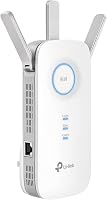
The AC1200 model covers up to 1500 sq ft and supports up to 32 devices. It has dual-band Wi-Fi, Adaptive Path Selection, one Ethernet port and compatibility with almost all Wi-Fi-enabled devices and routers or access points.
The RE220 covers up to 1200 sq ft and supports up to 30 devices. Its dual-band design and Adaptive Path Selection suit a smaller weak-signal area served by a standard Wi-Fi router.
Place an extender where the router signal is still usable, not at the farthest point where you want coverage. A signal indicator or setup app can help you compare locations before settling on one.
The AC1200 model uses the TP-Link Tether app for setup and management. It can connect to an EasyMesh-compatible router, but it is not compatible with Deco mesh Wi-Fi systems.
For a wider home-network plan, review this guide to mesh Wi-Fi. A mesh system may be a better fit when you want several coordinated access points instead of one repeated signal.
Which option works better for security cameras?
Choose powerline for a camera or recorder that has an Ethernet connection and a suitable outlet path, and choose a Wi-Fi extender for a wireless camera within reliable repeater coverage. Check the camera's connection type before choosing the network device.
A powerline adapter can place an Ethernet connection in a room where the router's wireless signal is weak. The AV600 and AV1000 kits do not provide Wi-Fi, so they cannot directly improve a camera that only accepts wireless access.
A Wi-Fi extender can help a wireless camera reach the router from a nearby weak area. Coverage claims are not the same as guaranteed speed, and walls, interference, distance and device limits can change the result.
If your camera uses Power over Ethernet, a powerline adapter alone does not supply PoE. Read about a PoE injector for Starlink Mini when that specific setup is relevant, and compare your camera's power requirements before connecting anything.
For a wired bridge between network types, see how to bridge wireless and ethernet. That guide is useful when a device needs Ethernet but the main network connection starts as Wi-Fi.
Which one is easier to install?
A Wi-Fi extender is usually easier to reposition, while a powerline kit has simpler endpoint wiring but stricter outlet requirements. Both are designed for home setup, but the room conditions decide how easy the final placement will be.
Powerline setup starts with 2 adapters. Connect one near the router and place the other in the destination room, using direct wall outlets on the same electrical circuit.
The powerline kits use plug-and-pair setup and need no new wiring or configuration. They still require attention to circuit layout, appliances and electrical noise.
Wi-Fi extender setup starts with a location that receives a usable router signal. The AC1200 model uses a quick setup process through the Tether app, while the RE220 works with a standard Wi-Fi router.
If you need an Ethernet connection from a wireless network, read how to bridge wireless and ethernet before choosing hardware. The correct approach depends on whether the remote device needs wired networking, wireless networking or both.
Which option gives the highest usable speed?
The AV1000 powerline kit offers the highest wired port capacity here, while the AC1200 extender offers the highest stated total wireless bandwidth. Actual performance depends on the connection path and the device at the far end.
The AV1000 kit has a 1000 Mbps Gigabit Ethernet port. That does not mean every home will receive 1000 Mbps, because electrical wiring, distance, interference and the internet plan can reduce the result.
The AV600 kit has a 100 Mbps Ethernet port. It may suit a basic wired device, but the port itself limits the connection compared with the Gigabit model.
The AC1200 extender has 1.2 Gbps total bandwidth, with 867 Mbps at 5 GHz and 300 Mbps at 2.4 GHz. These are wireless rates, not a promise that an internet plan or client device will reach those figures.
The RE220 has stated wireless rates of 300 Mbps at 2.4 GHz and 433 Mbps at 5 GHz. It may be enough for a smaller coverage problem, especially when the goal is access in a room rather than maximum throughput.
For a direct comparison of electrical wiring and wireless networking, read powerline ethernet adapter vs wifi. If you prefer a powerline device with wireless access at the far end, see the guide to the best powerline ethernet adapter with wifi.
What should you check before buying?
Check the device connection, outlet location, circuit layout and wireless path before choosing between powerline and an extender. These checks prevent a mismatch that better headline speed cannot fix.
First, identify the remote device. A desktop, smart TV or game console with Ethernet can use either a powerline adapter or an extender with an Ethernet port.
A phone or tablet needs Wi-Fi, so a standard powerline kit is not enough.
Next, check the destination room. Powerline needs direct wall outlets on the same electrical circuit.
Wi-Fi needs a placement point that still receives a usable signal from the router.
Then consider obstacles. Thick walls may favor powerline, while a home with separate circuits or AFCI-related limitations may favor an extender.
Electrical appliances and wireless interference can affect either approach.
Finally, compare the connection your internet plan and device can use. A Gigabit port is more capable than a 100 Mbps port, but it does not remove limits created by wiring, wireless conditions or the plan itself.
For cable runs that are practical outdoors, see best outdoor ethernet cable. For power connections that convert PoE to USB, see how to choose a PoE to USB adapter.
Which should you choose?
Pick the TP-Link AV1000 kit for the strongest wired option here, pick the AV600 kit for a basic 100 Mbps wired link, choose the AC1200 extender for broader wireless coverage, and choose the RE220 for a smaller dead zone.
Choose powerline when your remote device has Ethernet and the adapters can use direct wall outlets on the same circuit. Choose Wi-Fi when several wireless devices need coverage and the extender can sit between the router and the weak area.
The right answer is not the largest number on the box. It is the option whose connection path matches your home's wiring, walls, outlets and devices.
The TP-Link AV1000 kit suits a desktop, laptop, smart TV or game console that can use a Gigabit Ethernet port. Its AV1000 powerline connection gives the wired device more capacity, although wiring quality, distance and interference still affect the result.
The TP-Link AV600 kit suits a basic wired connection where a 100 Mbps Ethernet port matches the device and the internet plan. It uses the same direct outlet and same circuit rules, so placement needs the same care.
For wireless coverage, the TP-Link AC1200 extender is the broader option here. It uses 5 GHz and 2.4 GHz bands, supports up to 1500 sq ft of stated coverage and up to 32 devices, and has one Ethernet port for a wired device.
The TP-Link RE220 suits a smaller weak-signal area with a standard Wi-Fi router. It provides dual-band coverage for up to 1200 sq ft and up to 30 devices, with stated rates of 433 Mbps at 5 GHz and 300 Mbps at 2.4 GHz.
Check care and daily use before you settle the choice. Keep powerline adapters away from large appliances, and place an extender where the router signal is still usable rather than in the weakest spot.
Also check the limits that apply in your home. AFCI breakers may limit or block powerline in some homes, and wireless conditions can change extender performance from room to room.
For a fixed wired device in a difficult room, start with powerline if the circuit is suitable. For phones, tablets and other Wi-Fi devices spread across a larger area, start with the AC1200 extender.
For a smaller dead zone, the RE220 may be enough. In every case, match the device type first, then the outlet or signal path, then the speed your plan and device can actually use.
Frequently asked questions
Is a powerline Ethernet adapter better than a Wi-Fi extender?
A powerline Ethernet adapter is better for a stable wired connection when both adapters can use direct wall outlets on the same electrical circuit. A Wi-Fi extender is better when phones, tablets and other wireless devices need coverage in a dead zone and the extender can still receive a usable signal from the router.
Does a powerline adapter use Wi-Fi?
The 2 TP-Link powerline kits compared here do not have Wi-Fi capabilities. They send network data through existing electrical wiring and provide Ethernet connections at the second adapter.
Choose a Wi-Fi powerline model if you need wireless access at the far outlet.
Can a Wi-Fi extender make internet faster?
A Wi-Fi extender is designed to improve coverage, not directly increase internet speed. The TP-Link AC1200 model supports 867 Mbps at 5 GHz and 300 Mbps at 2.4 GHz, but distance, walls, interference, router performance and device limits affect actual throughput.
Can powerline adapters work on different floors?
They can work across floors when the outlets are on the same electrical circuit and the home's wiring supports the connection. The TP-Link kits describe use in multi-story homes, basements, attics and garages, but wiring quality, distance, electrical noise and AFCI breakers can limit or block performance.