How to Bridge Wireless and Ethernet
To bridge wireless and Ethernet, connect a wireless bridge to your Wi-Fi network, then run an Ethernet cable from the bridge to a wired device. Match the network settings and security, and check whether the device needs a bridge, access point, extender, or powerline adapter.
On this page (7 sections)
- How do you bridge wireless and Ethernet?
- What settings should you check before setup?
- Where should you place a wireless bridge?
- Can powerline connect a wired device without a long cable?
- When can a Wi-Fi extender's Ethernet port help?
- How do you troubleshoot a wireless Ethernet bridge?
- Should you use a wireless bridge or another connection?
To bridge wireless and Ethernet, connect a wireless bridge to your Wi-Fi network, then connect a wired device to the bridge with an Ethernet cable. Set the bridge to the correct mode, choose your Wi-Fi network, and enter its password.
A bridge helps when a device has an Ethernet port but no Wi-Fi, or when running a cable all the way back to the router is impractical. It does not make the wireless signal stronger by itself, and the connection still depends on the bridge receiving a usable Wi-Fi signal.
How do you bridge wireless and Ethernet?
Use a wireless bridge or a device with bridge mode to connect the wired device to your router's Wi-Fi. Follow the device's setup steps, select the correct network, enter its password, and connect the wired device to the bridge's Ethernet port.
- Check the wired device's network settings and note whether it uses automatic addressing or a fixed IP address.
- Place the bridge where it can receive a good Wi-Fi signal from the router.
- Open the bridge's setup page or app, then select its bridge, client, or wireless adapter mode.
- Choose your Wi-Fi network and enter its password and security settings.
- Connect the bridge's Ethernet port to the wired device.
- Restart the wired device if it doesn't request a network address automatically.
- Confirm that it can reach the router and access the network services it needs.
Device labels vary. A maker may call the mode client, wireless client, media bridge, or Ethernet bridge, so check the device instructions for the mode that connects a wired client to Wi-Fi.
For a wider view of home network choices, our mesh Wi-Fi guide explains how mesh systems extend wireless coverage through a home. Mesh can help with a weak signal, while a bridge connects a wired device to Wi-Fi.
What settings should you check before setup?
The bridge and router need compatible Wi-Fi settings, and the wired device needs a valid network address. Check the network name, password, security mode, and whether the router assigns addresses automatically.
Most home devices use DHCP to request an address from the router. If the wired device uses a fixed IP address, make sure that address fits the router's network and doesn't duplicate another device.
Some bridges offer a setup button or app instead of a web page. Use the instructions for your exact model, and don't change the router's network mode unless the bridge instructions require it.
The bridge may also have a separate Ethernet setting, such as automatic speed or a fixed address. Leave settings at their defaults unless you have a specific compatibility problem to solve.
How do bridge, access point, and extender modes differ?
Bridge mode connects a wired device to Wi-Fi; access point mode sends Wi-Fi from a wired network connection. Extender mode repeats or relays Wi-Fi to improve coverage, and some extenders also provide an Ethernet port for a nearby wired device.
Choose a bridge when the router is wireless and the device is wired. Choose an access point when you can run Ethernet from the router to a location that needs Wi-Fi.
Choose an extender if you need to improve Wi-Fi coverage and can place it where it still receives a useful signal. An Ethernet port on an extender may connect a nearby wired device, but check the device's supported modes.
Our guide to what a wireless NVR is and why it matters explains how wireless camera recorders fit into a network. A wireless NVR may still use Ethernet for its connection to the router or other equipment.
Where should you place a wireless bridge?
Place the bridge where it can receive a stable signal from the router and sit close enough to the wired device for Ethernet. A bridge placed beside the wired device but beyond reliable Wi-Fi range may connect the cable while failing to maintain the wireless link.
Start near the wired device, then test the router connection before settling on a location. Avoid placing the bridge behind large objects or inside cabinets if those block the wireless signal.
For an outdoor device, use equipment rated for the location and follow its installation instructions. Our guide to best outdoor wireless Ethernet bridges covers options made for outdoor links.
If the wireless signal is weak throughout that area, improve coverage first or consider another connection method. A mesh system, an outdoor access point, or a wired run may suit the layout better than a bridge alone.
Can powerline connect a wired device without a long cable?
Powerline adapters carry network data through a home's electrical wiring, giving a wired device a connection in another room. They need at least two adapters, and their performance depends on the electrical wiring and conditions in the home.
Plug each adapter directly into a wall outlet on the same electrical circuit. Power strips, surge protectors, and extension cords can prevent them from working as intended, and nearby large appliances may interfere.
The TP-Link AV600 kit is a lower-speed option for a desktop, smart TV, or game console where a wired connection is needed over existing electrical wiring.
TP-Link says the kit can provide AV600 powerline speeds over a line length of up to 750 ft, but actual speeds can be lower due to wiring, distance, electrical noise, and the port limit. It has no Wi-Fi, so it doesn't act as a wireless bridge.
The TP-Link AV1000 kit has a Gigabit Ethernet port for a wired device and also uses existing electrical wiring.
TP-Link says the kit uses HomePlug AV2 and provides AV1000 powerline speeds, while actual performance depends on wiring quality and interference. Check for AFCI breakers and plug the adapters directly into wall outlets before choosing this approach.
Compare more options in our guide to best gigabit powerline Ethernet adapters. Powerline and wireless bridging solve related problems in different ways: one uses electrical wiring, while the other uses Wi-Fi.
When can a Wi-Fi extender's Ethernet port help?
An extender with an Ethernet port can connect a nearby wired device while extending Wi-Fi coverage. Compare powerline adapters and Wi-Fi extenders if you are choosing between those approaches.
It may be a practical fit when you need both functions, but check the extender's supported network modes and compatibility with your router.
The TP-Link AC1200 WiFi Extender Dual Band 5GHz/2.4GHz has an Ethernet port for a wired device and supports EasyMesh with compatible routers. TP-Link says it extends Wi-Fi coverage, rather than directly increasing internet speed.
TP-Link says the RE315 isn't compatible with Deco mesh systems. Check compatibility before buying, especially if your network already uses a mesh system.
An extender's Ethernet port doesn't necessarily mean it works as a standalone bridge in every setup. Confirm its operating modes before choosing it for a device that needs a wired connection to Wi-Fi.
How do you troubleshoot a wireless Ethernet bridge?
Check the Wi-Fi connection, network address, Ethernet cable, and bridge mode in that order. This separates a wireless-link problem from a wired-device setting or router issue.
- No Wi-Fi connection: Confirm the network name, password, and security mode. Move the bridge closer to the router and repeat setup if needed.
- Bridge connects but the wired device has no network: Check the Ethernet cable and port, then restart the device so it can request an address.
- Device has an address but can't reach a service: Check the router's access rules, device firewall, and whether the service requires a particular network.
- Connection drops: Test the bridge closer to the router, reduce obstacles, and check whether other devices lose Wi-Fi at the same time.
- Setup page won't open: Follow the bridge instructions for finding its address or reconnecting to its setup network.
If you're powering a separate access point or camera with Power over Ethernet, confirm that the power source and device match. These guides explain why a PoE switch may have no power and the difference between a PoE injector and splitter.
Should you use a wireless bridge or another connection?
Choose a wireless bridge when the wired device is in range of reliable Wi-Fi and you can't run Ethernet to it. Use powerline when the electrical circuit is suitable, an extender when coverage also needs help, and Ethernet when you need a direct cable connection.
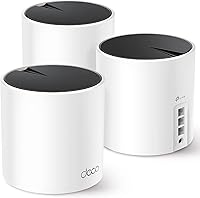
If you already use a mesh system, check whether it can connect to the wired device or whether an Ethernet port on a mesh unit is available. Our TP-Link Deco BE25 review can help you understand one mesh option.
For a dedicated bridge, compare the best wireless Ethernet bridges and confirm the device supports the mode your wired equipment needs. If Wi-Fi coverage is the main issue, first look at router placement, mesh, or an extender.
A wireless bridge works when its Wi-Fi link is strong enough and the wired device accepts the network settings it provides. Pick a bridge for a device near usable Wi-Fi, powerline for a suitable shared circuit, or an extender when the area also needs more wireless coverage.
Frequently asked questions
What does a wireless Ethernet bridge do?
A wireless Ethernet bridge joins a Wi-Fi network and provides an Ethernet connection for a wired device. Connect the bridge to Wi-Fi using its setup method, then connect the device to the bridge's Ethernet port.
The device still relies on the bridge's wireless link to reach the router.
Is a wireless bridge the same as an access point?
No. A bridge usually connects a wired device or wired network to an existing Wi-Fi network.
An access point usually connects to the router over Ethernet and provides Wi-Fi to wireless devices.
Some devices offer multiple modes, so choose the mode that matches your wiring and network.
Can powerline adapters bridge Wi-Fi and Ethernet?
Powerline adapters carry network data over electrical wiring to provide a wired connection in another room. They need at least two adapters, plugged directly into wall outlets on the same circuit.
They don't create a Wi-Fi connection by themselves, so they differ from a wireless Ethernet bridge.
What security settings should a wireless bridge use?
Use the same Wi-Fi network name and password as your router, and select a security mode supported by both devices. Prefer the strongest compatible option offered in the router and bridge settings.
Avoid open Wi-Fi, and keep the bridge's firmware and administrator password current.