Mesh Wi-Fi System vs Router: Which Should You Choose? (November 2026)
Choose a mesh Wi-Fi system for whole-home coverage, or a single router for a smaller home and simpler setup. Your layout, device count and wired connection needs decide which option fits best.
On this page (10 sections)
- Mesh Wi-Fi system vs router: which should you choose?
- How does a single router work?
- How does a mesh Wi-Fi system work?
- Which is better for many connected devices?
- Which option is better for security cameras?
- Do mesh systems have better coverage than routers?
- Which has the better speed?
- Which system is easier to set up?
- Which product fits your home?
- Should you buy mesh Wi-Fi or a router?
Choose a mesh Wi-Fi system for whole-home coverage, or a single router for a smaller home and simpler setup. The best choice depends on your floor plan, wall materials, device count and internet plan.
A router sends Wi-Fi from one central location. A mesh Wi-Fi system uses multiple nodes that cooperate under one network name, so devices can connect through the node with the better path.
This mesh wifi system vs router comparison looks at coverage, speed, setup, wired connections and smart-home use. We compared the product specifications and features for 4 options.
Mesh Wi-Fi system vs router: which should you choose?
Choose a router when one central location covers your home, and choose mesh when distance or walls create weak areas. If you are weighing other coverage options, compare Wi-Fi extenders and access points.
A mesh system adds placement and equipment decisions, but it can spread coverage across rooms and floors.
A single router is easier to understand. You connect it to the modem, place it in a useful central position and connect your devices.
Mesh adds 2 or more nodes. One node connects to the modem, while the others sit in areas where they can extend the network without being too far from the main node.
A mesh system is not a guarantee of full-speed Wi-Fi in every room. Node placement, walls, floor levels and the connection between nodes still affect performance.
For a broader overview of mesh Wi-Fi and home networking, start with the site's complete buying guide.
How does a single router work?
A single router is usually the better fit for a smaller or open home with one strong Wi-Fi location. It keeps the network simple and avoids buying or placing extra nodes.
The TP-Link AX1800 WiFi 6 Router is a single dual-band router with Wi-Fi 6, up to 1.8 Gbps total bandwidth, 4 high-gain antennas and Gigabit connectivity. It supports OFDMA, beamforming, OpenVPN server and PPTP VPN server features.
Its speed figures are up to 1,200 Mbps on 5 GHz and up to 574 Mbps on 2.4 GHz. Actual performance changes with distance, obstacles and connected devices.
This router requires a separate modem. It can work well when your rooms are close enough to the central router and you prefer one device to manage.
When is one router enough?
One router is often enough when the home has an open layout, few floors and a practical central installation point. It also suits households that want a straightforward network without node placement.
Check the rooms where you use video calls, cameras, gaming consoles and smart televisions. If those areas already receive a stable signal, adding mesh nodes may not solve a problem you do not have.
A router can also suit a smaller home with a moderate device count. Start with the connection you need in daily use rather than choosing from the largest speed label.
How does a mesh Wi-Fi system work?
A mesh system uses several nodes to spread one Wi-Fi network across a larger area. Devices can move between nodes without requiring you to switch network names manually.
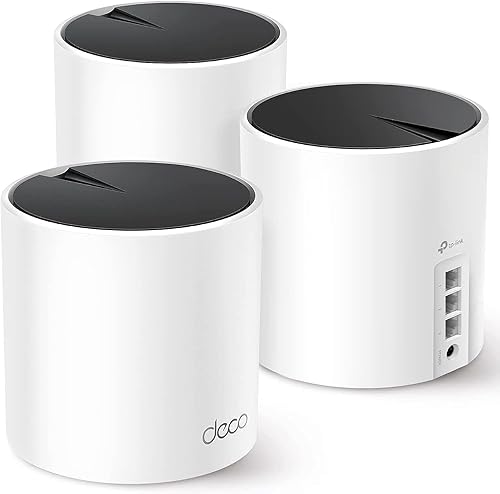
The TP-Link Deco X55 AX3000 WiFi 6 Mesh System comes as a 3-pack with coverage up to 6,500 square feet and support for up to 150 devices. Each Deco X55 has 3 Gigabit Ethernet ports and supports wired Ethernet backhaul.
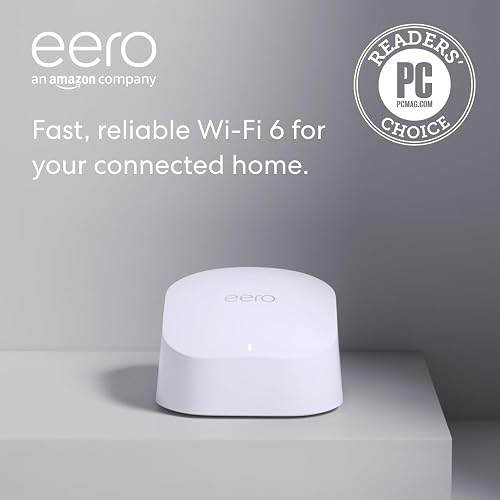
The Amazon eero 6 mesh wifi router is a 1-pack with coverage up to 1,500 square feet, speeds up to 900 Mbps and support for 75 or more devices. Its app guides setup, and cross-compatible eero hardware can expand the system.
The TP-Link Deco S4 Mesh AC1900 WiFi System is a 3-pack with coverage up to 5,500 square feet and support for up to 100 devices. Each unit has 2 Gigabit Ethernet ports, and the system uses one network name.
See the best mesh Wi-Fi system for home if your main goal is consistent coverage across several living areas.
Where should you place mesh nodes?
Place the main node near the modem, then put additional nodes between the main node and the weak area. Avoid hiding a node behind large objects or placing it at the far edge of coverage where its own connection is already poor.
Use the app during setup when the system supports app guidance. The Deco and eero systems in this comparison both use apps for setup and management.
Test important rooms after placing the nodes. A camera at the far end of a home, for example, needs a stable connection where it is installed, not just a strong signal beside the main node.
Which is better for many connected devices?
Mesh is usually the stronger choice when several rooms contain connected devices. A single router can still work well if the devices are close to it and the home layout does not create weak areas.
The Deco X55 supports up to 150 devices, while the Deco S4 supports up to 100. The eero 6 supports 75 or more devices.
The AX1800 router uses Wi-Fi 6 and OFDMA to communicate with more devices at the same time. Its single-device design may be enough when those devices stay within reliable range.
Device capacity figures do not tell you the exact speed every device will receive. Streaming, gaming, video calls, cameras and smart-home traffic all share the available connection.
Which option is better for security cameras?
Choose mesh when cameras are spread across a home and need stronger wireless coverage, or choose Ethernet when you can run a cable. Camera placement matters more than the router label alone.
The Deco X55 lists security cameras among compatible devices and supports Ethernet, Wi-Fi and wired Ethernet backhaul. The eero 6 supports Wi-Fi devices and can be expanded with compatible eero hardware.
A single router may be suitable for cameras close to the router. A distant outdoor camera may need a mesh node, an outdoor extender or a wired connection instead.
Before changing your network, check whether your camera stores video locally or depends on cloud access. This guide explains whether security cameras can work without Wi-Fi.
For a camera connected by Ethernet, compare the network path and power method. Our guide to PoE injector vs extender covers a different way to extend a wired connection.
Do mesh systems have better coverage than routers?
Mesh systems generally offer more coverage across multiple rooms because they use multiple nodes. The exact result still depends on the home, node placement and connection between nodes.
The Deco X55 has a stated coverage of up to 6,500 square feet. The Deco S4 reaches up to 5,500 square feet, while the eero 6 1-pack reaches up to 1,500 square feet.
Those figures help compare the products, but they are not a promise for every building. Thick walls, metal structures, floors and interference can reduce the useful range.
An outdoor area may need a different approach. Review the best outdoor Wi-Fi extenders when the weak signal is outside the main home.
Which has the better speed?
A router or mesh system is only as useful as the connection your home can actually use. Compare the speed class with your internet plan, device load and expected coverage.
The Deco X55 is an AX3000 Wi-Fi 6 mesh system with a stated data transfer rate of 3,000 Mbps. The AX1800 router has up to 1.8 Gbps total bandwidth.
The eero 6 supports internet plans up to 900 Mbps. The Deco S4 uses AC1900 Wi-Fi and has a stated data transfer rate of 1,200 Mbps.
These labels are not direct guarantees of internet speed on every device. Wireless conditions, distance and obstacles can change the result.
For newer wireless hardware, compare the best Wi-Fi 7 mesh systems. If you want Wi-Fi 6 specifically, use these Wi-Fi 6 mesh system reviews.
Which system is easier to set up?
A single router usually has the shortest physical setup, while mesh systems add node placement after the main connection is active. App guidance can make either type easier to manage.
The Deco X55 and Deco S4 use the Deco app for setup and management. The eero 6 uses the eero app, which guides setup and allows management from anywhere.
The AX1800 router uses app and voice control options. It also requires a separate modem, as do the TP-Link mesh systems for most internet service providers.
Set up the main device first, update it if the app offers an update, then add other nodes one at a time. Give each node a clear name or location in the app so future troubleshooting is easier.
Which product fits your home?
The Deco X55 is the strongest match for a large home and many devices, while the AX1800 router fits a simpler single-router network. The eero 6 focuses on easy expansion, and the Deco S4 offers broad coverage with Wi-Fi 5.
The Deco X55 is the most capable mesh option here by stated coverage and device capacity. Its 3-pack, app control and wired Ethernet backhaul support make it a practical choice for homes with several rooms and wired connection points.
The eero 6 suits buyers who want a simple starting point. Its 1-pack can cover a smaller area, while the expansion path helps if your needs grow later.
The AX1800 is the clearest single-router choice in this group. It avoids multi-node placement, but it cannot solve a distant weak area as directly as a mesh system.
The Deco S4 is a broad-coverage option for homes that do not need Wi-Fi 6. Its 3-pack and wired Ethernet backhaul support give you several placement choices.
Should you buy mesh Wi-Fi or a router?
Pick the TP-Link AX1800 WiFi 6 Router if one central location covers your home. Pick the TP-Link Deco X55 if you need broad coverage and support for many devices.
Choose the eero 6 when app-guided setup and future expansion matter most. Choose the Deco S4 when you want a 3-node system with up to 5,500 square feet of stated coverage but do not need Wi-Fi 6.
The right mesh wifi system vs router choice starts with your floor plan. Measure weak areas, count the devices that need stable connections and decide whether Ethernet backhaul is practical before you choose.
For gaming traffic across several rooms, compare the best mesh Wi-Fi systems for gaming.
Frequently asked questions
What is the difference between a mesh Wi-Fi system and a router?
A router is one central device that sends Wi-Fi through your home, while a mesh Wi-Fi system uses multiple nodes that work as one network. Choose a router for a smaller, open layout, or choose mesh when walls, floors or distance create weak areas.
Is mesh Wi-Fi faster than a router?
Mesh Wi-Fi is not automatically faster than a single router. It can provide more consistent coverage across a larger home, while a strong router may deliver higher speeds near its central location.
Wired backhaul can help mesh nodes maintain better connections.
Do mesh Wi-Fi systems replace a router?
Many mesh systems can replace your router, but you still need a modem for most internet service providers. Some systems can also work with an existing router, although using both network systems may require a suitable configuration.
Is a mesh Wi-Fi system better for security cameras?
A mesh system can help Wi-Fi security cameras stay connected when cameras are far from the main router. Wired cameras may be a better fit where you can run Ethernet, since they do not depend on the same wireless coverage.


