TP-Link Deco X55 Review: Worth It? (November 2026)
The TP-Link Deco X55 is the better choice for broad household coverage, while the X55 Pro suits a smaller home with internet service above 1 Gigabit and 2.5G wired devices.
On this page (9 sections)
- TP-Link Deco X55 review: which model should you choose?
- What does the Deco X55 3-pack offer?
- How useful are the X55 Ethernet ports?
- Is the Deco X55 Pro better for fast Ethernet?
- X55 vs X55 Pro: key differences
- How should you place a Deco X55 system?
- Can the Deco X55 handle a security-camera network?
- What are the main trade-offs?
- Final verdict: is the TP-Link Deco X55 worth choosing?
The TP-Link Deco X55 is a strong mesh choice for household coverage and Ethernet connections, especially in the 3-pack version. The regular X55 offers up to 6,500 square feet of stated coverage, while the X55 Pro trades coverage and extra units for 2.5G ports on a single device.
That trade-off sits at the centre of this comparison. One model is built to spread a wireless signal through more of a home.
The other is built to keep wired speed high for equipment that can use more than Gigabit Ethernet.
This review compares the 2 models using their published features and the needs behind a typical home network. We checked coverage, device capacity, wireless bands, wired ports, setup tools and the trade-offs between a multi-unit system and a single 2.5G unit.
Coverage matters most when rooms sit far from the router or behind several walls. A 3-pack gives you more places to put a node, so weak areas can be served closer to the devices that use them.
Wired speed matters most when a computer, storage device or other fixed kit has a clear cable route. In that case, port speed can shape daily performance more than an extra wireless node elsewhere in the house.
Both models are listed for up to 150 devices, so device count alone does not settle the choice. The better fit depends on whether your home needs wider wireless reach or faster wired connections.
Setup and ongoing management also shape the experience after the boxes are opened. App-based control helps keep the network in view, but placement, walls and cable routes still decide how well either system works in a real home.
TP-Link Deco X55 review: which model should you choose?
Choose the regular Deco X55 3-pack for broad coverage, multiple rooms and Gigabit Ethernet connections. Choose the X55 Pro 1-pack when your priority is 2.5G wired networking and your space fits within its stated 2,500 square feet.
The 2 models share the AX3000 dual-band Wi-Fi 6 class and support up to 150 devices. Their biggest differences are the number of units, stated coverage and Ethernet port speed.
The regular X55 has 3 Gigabit Ethernet ports per unit. The X55 Pro has 2 x 2.5G ports on its single unit, which matters more if your internet service or local wired devices can use speeds above 1 Gigabit.
For a wider overview of mesh terms, placement and backhaul, see our mesh Wi-Fi buying guide.
What does the Deco X55 3-pack offer?
The TP-Link Deco X55 AX3000 WiFi 6 Mesh 3-pack is the better coverage option in this comparison. It covers up to 6,500 square feet and supports up to 150 devices, with 3 Gigabit Ethernet ports on each unit.
TP-Link Deco X55 AX3000 WiFi 6 Mesh: Best for whole-home coverage
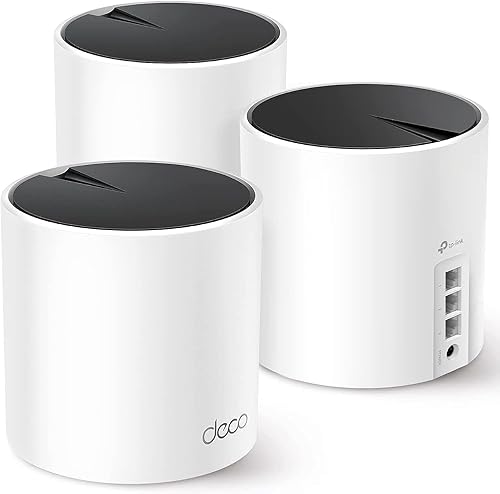
- Deco X55 3-pack
- Up to 6,500 sq ft coverage
- Up to 150 devices
- 3 Gigabit Ethernet ports per unit
A 3-pack designed for larger homes and households with many connected devices. It also gives you wired Ethernet backhaul and three Gigabit ports on each unit.
Pros
- Largest stated coverage
- 3-pack helps spread mesh nodes through a home
- Up to 150 devices
- Gigabit Ethernet ports on every unit
Cons
- Gigabit ports do not target internet service above 1 Gigabit
- A 3-pack may be more than a smaller home needs
The 3 units let you spread the wireless system across the rooms that need it. A mesh layout can make more sense than relying on one router when walls, floors or distance leave weak areas.
The system uses dual-band Wi-Fi 6 with a stated AX3000 data transfer rate. Its listed wireless figures include up to 2,402 Mbps on the 5 GHz band and up to 574 Mbps on the 2.4 GHz band.
Those numbers describe the wireless class, not a guaranteed speed at every device. Distance, walls, connected devices and local interference can change what a phone, computer, television or camera actually receives.
The regular X55 lists Ethernet and Wi-Fi connectivity and includes a quick installation guide, an RJ45 Ethernet cable, 3 Deco X55 units and 3 power adapters. Each unit measures 4.33 in L x 4.33 in W x 4.49 in H.
How useful are the X55 Ethernet ports?
The 3 Gigabit Ethernet ports on each regular X55 unit give you flexible wired connections for devices placed near a node. The system also supports wired Ethernet backhaul, so Ethernet can connect mesh units when running cable is practical.
Wired backhaul can help when a node's location is separated from the main unit by several walls. It also gives you a direct connection option for a compatible security camera, computer, television, printer or gaming console.
The ports are rated at 10/100/1000 Mbps. That makes the regular X55 a natural match for Gigabit-class home networking, but it does not provide the 2.5G port speed found on the X55 Pro.
If you need to power a wired device over Ethernet, a separate injector may be relevant. Our guide to the best Gigabit PoE injectors explains the difference between network data and power delivery.
A PoE injector is not automatically the right choice for every camera or router. Check the device's power requirements and connection type before adding one, and see which PoE injector works with Starlink Mini if that is your specific setup.
Is the Deco X55 Pro better for fast Ethernet?
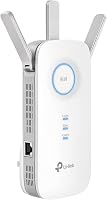
The TP-Link Deco X55 Pro is the better fit for 2.5G wired connections, not for maximum whole-home coverage. Its single unit covers up to 2,500 square feet and has 2 x 2.5G ports.
TP-Link Deco X55 Pro AX3000 Whole Home: Best for 2.5G wired networks

- Deco X55 Pro 1-pack
- Up to 2,500 sq ft coverage
- 2 x 2.5G ports
- Up to 150 devices
A single-unit option for homes that need 2.5G ports for an internet plan above 1 Gigabit or multi-gig wired devices. Its stated coverage is smaller than the regular X55 3-pack.
Pros
- 2 x 2.5G ports
- Designed for internet service above 1 Gigabit
- Up to 150 devices
- Smaller single-unit setup
Cons
- Lower stated coverage than the X55 3-pack
- One unit may not solve dead zones in a larger home
The X55 Pro uses the same AX3000 dual-band Wi-Fi 6 class as the regular X55. It lists up to 2,402 Mbps on the 5 GHz band and up to 574 Mbps on the 2.4 GHz band, with performance affected by distance, obstacles and other conditions.
Its main advantage is the 2.5G wired connection. That can suit an internet subscription above 1 Gigabit or a multi-gig device such as a network-attached storage system, provided the rest of the network can use that speed too.
The X55 Pro 1-pack includes 1 Deco X55 Pro unit, 1 power adapter, 1 RJ45 Ethernet cable and a quick installation guide. It measures 4.33 in L x 4.33 in W x 4.49 in H and weighs 15.52 oz.
One unit may be enough for a smaller space with a clear placement point. It is less convincing as a direct replacement for the regular X55 3-pack when your main issue is coverage across many rooms.
X55 vs X55 Pro: key differences
The regular X55 wins on stated coverage and number of mesh units, while the X55 Pro wins on port speed. Use the table to match the model to your network rather than choosing only by the shared AX3000 label.
| Feature | TP-Link Deco X55 | TP-Link Deco X55 Pro |
|---|---|---|
| Pack size | 3-pack | 1-pack |
| Stated coverage | Up to 6,500 sq ft | Up to 2,500 sq ft |
| Stated device capacity | Up to 150 devices | More than 150 devices |
| Wi-Fi class | AX3000 dual-band Wi-Fi 6 | AX3000 dual-band Wi-Fi 6 |
| 5 GHz figure | Up to 2,402 Mbps | Up to 2,402 Mbps |
| 2.4 GHz figure | Up to 574 Mbps | Up to 574 Mbps |
| Wired ports | 3 Gigabit Ethernet ports per unit | 2 x 2.5G ports |
| Backhaul | Supports wired Ethernet backhaul | Supports Ethernet backhaul |
| Control | Deco app | Deco app and voice control |
| Main fit | Larger homes and Gigabit networks | Smaller homes and 2.5G networks |
The regular X55's 3-pack has more physical coverage points. The X55 Pro's 2.5G ports can be more valuable when the network's limiting point is wired speed instead of wireless reach.
That is why the shared AX3000 label should not decide the purchase on its own. The 3-pack suits a larger layout with Gigabit wired links.
The single Pro unit suits a smaller layout where a 2.5G connection is the priority.
For another regular X55 comparison, read our TP-Link Deco X50 review. You can also compare the newer class of hardware in our TP-Link Deco X60 review and TP-Link Deco BE25 review.
How should you place a Deco X55 system?
Place the main Deco near the modem and the other units between that point and weak areas, with as few dense obstacles as possible. A mesh unit works best when it still receives a useful signal from the network rather than being placed at the very edge of coverage.
Start with a central, open location for the first unit. Put additional units where they can serve the next area without being hidden behind large objects or pushed into a distant corner.
For wired backhaul, run Ethernet between compatible network points and the Deco units. This can reduce the need for the mesh nodes to rely only on a wireless connection between rooms.
The regular X55 app helps with setup and management. The system also includes AI-driven mesh features that learn the network environment, while HomeShield includes no-cost basic network security, quality of service and parental controls.
TP-Link states that the X55 works with internet service providers such as Comcast, Charter, AT&T, Verizon, Xfinity, Spectrum, RCN, Cox, CenturyLink and Frontier. A modem is required for most internet service providers.
See TP-Link's official Deco X55 information before installation.
Can the Deco X55 handle a security-camera network?
The regular X55 is the more flexible pick for security cameras spread around a home, because the 3-pack provides more placement points and each unit has Gigabit Ethernet ports. The X55 Pro can still suit a smaller camera setup if one unit covers the needed area.
Wireless cameras need a dependable connection at their mounting locations. Check signal strength where each camera will sit, not only beside the main router.
Use Ethernet for a camera or recorder when the cable route is practical. A wired link can make the connection easier to plan, but the camera and network equipment must support the same connection method.
For outdoor runs, protect the cable from weather and use suitable installation practices. Our guide to the best outdoor Cat6 Ethernet cables covers the cable choice separately from the mesh system.
The X55's listed compatible devices include security cameras, smartphones, personal computers, smart televisions, tablets, printers and gaming consoles. That broad device list does not remove the need to check each camera's own network and power requirements.
What are the main trade-offs?
The regular X55's main strength is coverage through 3 mesh units, but its Ethernet ports top out at Gigabit speed. That is enough for many homes, yet it is not the best match for a network built around 2.5G wired transfers.
The X55 Pro's main strength is 2 x 2.5G ports on one unit, but its stated coverage is much smaller than the regular X55 3-pack. A single unit may leave distant rooms without the coverage you expect from a multi-unit mesh system.
Both models use app-based setup and management. That keeps configuration in one place, but your final result still depends on placement, walls, device distance and the wired or wireless path used by each device.
The regular X55 also includes TP-Link HomeShield features and lists compatibility with a modem-based internet connection. Security features can help manage a home network, but they do not replace strong account settings and sensible device configuration.
Final verdict: is the TP-Link Deco X55 worth choosing?
The TP-Link Deco X55 3-pack is the better overall choice for household coverage, multiple rooms and Ethernet-connected devices. Its up-to-6,500-square-foot coverage and 3 Gigabit ports per unit make it the more flexible option for a larger home.
Pick the X55 Pro when your space is closer to its up-to-2,500-square-foot coverage and your network needs 2.5G ports for above-1-Gigabit internet or multi-gig wired equipment. Pick the regular X55 when spreading coverage through the home matters more than exceeding Gigabit Ethernet.
For this TP-Link Deco X55 review, the decision rule is simple: choose the 9.7-scored X55 3-pack for coverage, and the 9.5-scored X55 Pro for 2.5G wired networking.
Frequently asked questions
Is the TP-Link Deco X55 good for a large home?
The regular TP-Link Deco X55 3-pack has stated coverage of up to 6,500 square feet, so it is the stronger fit of these 2 options for a larger home. Actual coverage depends on walls, distance and other conditions, so place the units where your home needs better wireless reach.
How many Ethernet ports does the TP-Link Deco X55 have?
Each TP-Link Deco X55 unit has 3 Gigabit Ethernet ports. The 3-pack therefore gives you 3 units with wired ports, and the system supports wired Ethernet backhaul.
Use Ethernet when a fixed connection is practical for a camera, computer or other device.
What is the difference between Deco X55 and X55 Pro?
The main difference is wired port speed and pack size. The Deco X55 3-pack has 3 Gigabit ports per unit and up to 6,500 square feet of stated coverage, while the X55 Pro 1-pack has 2 x 2.5G ports and up to 2,500 square feet of stated coverage.
Can Deco X55 support security cameras?
The Deco X55 lists security cameras among its compatible devices and supports Ethernet and Wi-Fi connections. For a camera system, plan placement around signal strength, use wired Ethernet where practical, and confirm that your recorder or camera supports the connection method you choose.