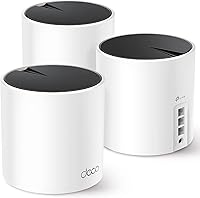
TP-Link Deco BE3600 Review: Worth It? (November 2026)
The TP-Link Deco BE3600 is the better choice for larger homes that need mesh coverage, while the Archer BE230 suits a smaller home with one main router and several wired devices.
On this page (10 sections)
- TP Link Deco BE3600 review: the short answer
- What does the Deco BE23 include?
- What does the Archer BE230 do differently?
- How fast is the TP-Link Deco BE3600?
- Which one has better coverage?
- Which product is better for security cameras?
- How should you set up the Deco BE3600?
- How should you set up the Archer BE230?
- What are the main trade-offs?
- TP Link Deco BE3600 review: final verdict
The TP-Link Deco BE3600 is a strong fit for larger homes that need mesh coverage, while the Archer BE230 is the simpler pick for a smaller home with one main router. Both are dual-band Wi-Fi 7 products with speeds up to 3.6 Gbps, but their layouts and wired ports serve different buyers.
The biggest choice is not the Wi-Fi 7 label. It is whether you need 3 mesh units covering up to 6,500 sq ft or one router covering up to 2,000 sq ft.
TP Link Deco BE3600 review: the short answer
The Deco BE23 3-pack earns the higher score because it gives you more coverage, more connected-device capacity and 2.5 Gbps ports on every unit. It suits a larger home, a home with difficult signal areas or a setup where wired backhaul may help connect rooms.
The Archer BE230 is more practical when one central router can cover your home. It has more total LAN ports on the main unit, including three 1 Gbps ports, and it adds USB 3.0.
Our score weighs specs, features and buyer feedback against what you're shopping for.
What does the Deco BE23 include?
The Deco BE23 is a 3-pack dual-band Wi-Fi 7 mesh system with up to 3.6 Gbps data transfer, coverage up to 6,500 sq ft and support for up to 150 devices. Each unit has two 2.5 Gbps WAN/LAN ports.
TP-Link Deco 7 BE23 Dual-Band BE3600 WiFi: Best for larger homes

- 3-pack mesh system
- Up to 6,500 sq ft
- Up to 150 devices
- 2 x 2.5 Gbps ports per unit
A 3-pack Wi-Fi 7 mesh system for spreading dual-band coverage across a larger home. It also gives each unit two 2.5 Gbps WAN/LAN ports for wired backhaul or multi-gig devices.
Pros
- 3-unit mesh coverage
- Up to 6,500 sq ft
- Up to 150 connected devices
- Two 2.5 Gbps ports per unit
- VPN client and server support
Cons
- Dual-band design does not include 6 GHz
- A 3-pack may be more equipment than a small home needs
The included box contents are 3 Deco BE23 units, 3 power adapters, 1 RJ45 Ethernet cable and a Quick Installation Guide. The units are white, use internal antennas and weigh 5.6 lb as a product package.
Who should choose the Deco BE23?
Choose it if your home needs coverage from multiple points rather than one central router. A 3-pack can also help when you want to place mesh units near separate work, streaming or smart-home areas.
The Deco BE23 supports wired and wireless backhaul. Wired backhaul can make sense when rooms already have Ethernet, while wireless backhaul avoids running cable between the units.
Its 2.5 Gbps ports are useful for a multi-gig modem or wired devices that can use more than 1 Gbps. The ports are WAN/LAN, so their role can change with the network layout.
The system creates one network name and supports AI-Roaming. TP-Link also includes free HomeShield features such as basic network security, a private IoT network and parental controls.
For a broader explanation of mesh wi-fi, compare the number of nodes, the home layout and the available Ethernet wiring before choosing a system.
What does the Archer BE230 do differently?
The Archer BE230 is a single dual-band BE3600 Wi-Fi 7 router rated for up to 2,000 sq ft and up to 60 devices. It has one 2.5 Gbps WAN/LAN port, one 2.5 Gbps LAN port and three 1 Gbps LAN ports.
TP-Link Dual-Band BE3600 Wi-Fi 7 Router: Best for a single-router setup

- Up to 2,000 sq ft
- Up to 60 devices
- 2 x 2.5 Gbps ports
- 3 x 1 Gbps LAN ports
A single Archer BE230 router for smaller homes that need Wi-Fi 7, two 2.5 Gbps ports and three additional 1 Gbps LAN ports. It supports EasyMesh if you later expand coverage.
Pros
- Single-router setup
- Two 2.5 Gbps ports
- Three 1 Gbps LAN ports
- USB 3.0
- EasyMesh support
Cons
- Coverage is rated for up to 2,000 sq ft
- Dual-band design does not include 6 GHz
The box includes the Archer BE230 router, 1 power adapter, 1 Quick Installation Guide and 1 RJ45 Ethernet cable. The router is black, has 4 fixed antennas and weighs 1.2 lb.
When is one router the better fit?
Choose the Archer BE230 when your home is within its stated coverage range and you prefer one central network device. It avoids placing and powering multiple mesh units.
Its five wired ports are useful for a desktop computer, game console, smart television or other Ethernet devices. Two ports support 2.5 Gbps, while three support 1 Gbps.
The router also includes USB 3.0, EasyMesh support, HomeShield and Tether App setup. EasyMesh gives you an expansion path if one router does not cover the whole home later.
The Archer BE230 supports Alexa and Google Assistant voice commands. It also supports VPN features and private IoT networking.
If you are comparing this router with another mesh option, the TP-Link Deco BE11000 review shows how a higher-tier Deco design differs from a dual-band BE3600 setup.
How fast is the TP-Link Deco BE3600?
Both products offer BE3600-class dual-band Wi-Fi 7 with up to 3.6 Gbps total data transfer. The stated maximum is split between up to 2,882 Mbps on 5 GHz and 688 Mbps on 2.4 GHz.
Those numbers are shared across the wireless bands and describe maximum link capacity, not a guaranteed speed for one phone or laptop. Distance, walls, device support and network traffic affect real use.
Both devices support Wi-Fi 7 features including Multi-Link Operation, Multi-RUs and 4K-QAM. Newer Wi-Fi 7 devices may be positioned to use these features more fully, while older devices remain backward compatible with the Wi-Fi generations they support.
Neither product includes 6 GHz because both are dual-band systems. If 6 GHz is a key requirement, compare another product class instead of choosing between these two.
The TP-Link Deco BE25 review is another useful comparison if you want to see how a different Deco model fits into the same brand family.
Which one has better coverage?
The Deco BE23 has the larger stated coverage area, with up to 6,500 sq ft from the 3-pack. The Archer BE230 is rated for up to 2,000 sq ft from one router.
Coverage claims are planning figures, not guarantees for every floor plan. Walls, floors, building materials and the router's position can change the result.
A mesh system works by placing units in different parts of the home. The first unit connects to the modem, while the other units extend the network.
Keep each added unit close enough to maintain a useful connection to the network.
A single router works best when it can sit in a fairly central position. If the modem is at one edge of the house, the Archer BE230 may not distribute the signal as evenly as it would from a central location.
The TP-Link Deco X50 review can help if you are comparing the BE23 with another Deco system rather than a single Archer router. The TP-Link Deco X60 review offers another model comparison.
Which product is better for security cameras?
The Deco BE23 is the better choice when cameras are spread across a larger home and need coverage from more than one location. Its private IoT network can also separate compatible smart-home devices from your main network.
The Archer BE230 is a better match for a smaller camera setup near one central router. Its EasyMesh support gives you an option to expand later if the original coverage area is not enough.
Neither product replaces good camera placement, strong account passwords or updated firmware. Put cameras where they have a stable signal, and use Ethernet where a wired connection is practical.
For outdoor camera locations, compare a best outdoor wifi extender with a wired access point before assuming a mesh node is the right answer. If you are running Ethernet, the poe injector vs extender guide explains the difference between powering a device and extending a wireless signal.
How should you set up the Deco BE3600?
Start by placing the first Deco unit beside the modem and connect them with Ethernet. Add the other units where they can reach the first unit reliably, then use the Deco app to complete setup and manage the network.
Choose wired backhaul when Ethernet already reaches the rooms where the additional units will sit. Wireless backhaul is useful when running cable is not practical.
Give each unit open space rather than placing it inside a cabinet or behind large objects. Keep the system away from locations that block the signal between nodes.
The Deco system supports access point mode, guest networking, IPv6, QoS, port forwarding, dynamic DNS and VPN client and server functions. Turn on only the features you need, and review the network after major changes.
How should you set up the Archer BE230?
Place the Archer BE230 in a central location, connect it to the modem and complete setup with the Tether App. The app also supports firmware updates and network management.
Use the 2.5 Gbps WAN/LAN port for a suitable internet connection or wired device, depending on your layout. The three 1 Gbps LAN ports are enough for standard wired devices that do not need multi-gig speeds.
The router supports EasyMesh routers and range extenders. That gives you an expansion route, but start with the single-router setup if your home falls within the stated coverage area.
The Archer BE230 requires a separate modem for most internet service providers. The Deco BE23 also requires a modem for most providers, so neither product is a complete modem-router replacement in those cases.
For another single-unit comparison, the TP-Link Deco X10 review may help you compare a different Deco approach with the Archer layout.
What are the main trade-offs?
The Deco BE23 costs more space and setup effort in exchange for a wider mesh footprint. It is the more flexible option for a larger floor plan, many connected devices or rooms that can benefit from wired backhaul.
The Archer BE230 keeps the network simpler. It has a smaller stated coverage area, but its two 2.5 Gbps ports, three 1 Gbps LAN ports and USB 3.0 make the main unit useful for wired home equipment.
Both systems are dual-band, so neither is the right pick if you specifically want a 6 GHz band. Both also support Wi-Fi 7 features, but compatible client devices and local network conditions still affect what you experience.
For an outdoor wired network, review the best outdoor access point options before placing indoor networking equipment where it may face weather or unsuitable conditions.
TP Link Deco BE3600 review: final verdict
Choose the Deco BE23 3-pack if your home needs up to 6,500 sq ft of mesh coverage, supports many connected devices or has multiple rooms where wired backhaul could help. Its higher score reflects that broader coverage and the two 2.5 Gbps ports on every unit.
Choose the Archer BE230 if one router can cover up to 2,000 sq ft and you want a simpler setup with five wired ports on the main device. It is the more focused choice for a smaller home, while EasyMesh leaves room to expand later.
Frequently asked questions
Is the TP Link Deco BE3600 worth it?
The TP-Link Deco BE3600 makes sense when you need coverage across a larger home and want three mesh units instead of one router. Its 3-pack is rated for up to 6,500 sq ft and up to 150 devices, while the single Archer BE230 is rated for up to 2,000 sq ft and up to 60 devices.
What is the difference between the Deco BE23 and Archer BE230?
The Deco BE23 is a 3-pack mesh Wi-Fi system with two 2.5 Gbps ports on each unit. The Archer BE230 is one dual-band router with two 2.5 Gbps ports, three 1 Gbps LAN ports and USB 3.0, so it is better suited to a smaller home with a central router location.
Does the TP-Link Deco BE3600 support 6 GHz?
No. Both products in this comparison are dual-band BE3600 Wi-Fi 7 devices, so they use the 2.4 GHz and 5 GHz bands.
That can simplify device support, but shoppers specifically seeking a 6 GHz band should compare a tri-band Wi-Fi system instead.
Does the Deco BE23 need a modem?
The Deco BE23 works with any internet service provider, but a modem is required for most internet service providers. Connect the modem to one Deco unit, then place the other units where they can extend coverage.
The Deco system can use wired or wireless backhaul.