How to Install a Smart Lock
Most smart lock installations take 20 to 40 minutes with a screwdriver and no drilling. Measure door thickness and backset first, remove the old deadbolt, mount the new lock, align the bolt, then add batteries and set up the app or keypad codes.
On this page (12 sections)
- What do you need to measure before smart lock installation?
- How do you check door alignment and bolt travel?
- What tools and parts should you have ready?
- How do you remove the old deadbolt without damaging the door?
- How do you mount a deadbolt smart lock step by step?
- How do you align the tailpiece and test the bolt?
- How do you install a keypad lever lock differently?
- How do you set up the app, WiFi, and access codes?
- How do you test auto lock, voice control, and notifications?
- What mistakes make a smart lock feel stiff or unreliable?
- When should you call a locksmith instead of finishing the install?
- How do you finish a smart lock installation and keep it working?
Most smart lock installations take 20 to 40 minutes with a screwdriver and no drilling. Measure door thickness and backset first, remove the old deadbolt, mount the new lock, align the bolt, then add batteries and set up the app or keypad codes.
A standard door makes the job quiet and simple. The lock fits the same hole, the bolt slides without rubbing, and the keypad sits flat.
What do you need to measure before smart lock installation?
Measure door thickness, backset, and cross bore diameter before you buy or install. These three numbers show if the lock will fit without new drilling.
Door thickness is usually 1-3/8 in to 1-3/4 in for residential doors, and the Schlage Encode models fit that range. Measure at the deadbolt hole, not at the edge.
Backset is the distance from the door edge to the center of the hole. Most doors use 2-3/8 in or 2-3/4 in, and the Encode models fit both.
Check the door edge for a clean mortise and a strike plate that lines up with the bolt. Our guide to smart door locks explains the types in more detail.
How do you check door alignment and bolt travel?
Close the door and throw the old bolt before you remove anything. The bolt should slide in and out with light pressure and meet the strike plate squarely.
Warned signs include a bolt that scrapes the strike, a door that needs a hip push to latch, and a gap that changes from top to bottom.
Check the hinges for loose screws and check the frame for paint buildup around the strike. Tighten hinges and clear paint from the strike area with basic tools.
If the door sags, call a carpenter or locksmith. Forcing a smart lock onto a sagging door often leads to bent tailpieces and worn gears.
What tools and parts should you have ready?
Gather a Phillips screwdriver, a tape measure, a pencil, and the included hardware. That is the full tool list for most deadbolt swaps.
Lay out the exterior keypad, interior assembly, mounting plate, long screws, short screws, and backup key. Keep the screws in a small cup so they do not roll off the porch.
For the Encode deadbolts here, the lock uses four AA batteries and Schlage says they are included. Keep your phone at hand for app setup, but wait to pair it until the lock is mounted.
Pairing too early can make you chase a software issue when the real problem is alignment. Take a photo of the old lock before you remove it for reference.
How do you remove the old deadbolt without damaging the door?
Remove the interior screws first, then pull the exterior cylinder straight out. Keep the door closed and work slowly so the tailpiece does not scratch the edge.
Start with the two long screws on the interior side. Once they are out, the old deadbolt should separate into two pieces.
Pull the exterior part toward you.
Remove the bolt assembly from the door edge if your new lock uses a fresh bolt. Some locks reuse the existing bolt, and some include a new one.
Do not pry with a flat screwdriver. The door edge and the bore can chip easily, and a chipped bore makes the new lock sit crooked.
How do you mount a deadbolt smart lock step by step?
Slide the exterior keypad through the bore, add the interior assembly, and tighten the mounting screws evenly. This is the core of any smart lock installation for a standard deadbolt.
Place the exterior keypad with the tailpiece through the bore. The tailpiece should enter the bolt assembly without bending.
Connect the interior assembly and line up the mounting plate. Start the screws by hand, then tighten a little at a time in an X pattern.
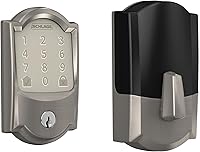
Check that the keypad sits flat and does not rock. The Schlage Encode Smart WiFi Deadbolt Lock with Camelot Trim in Satin Nickel fits doors from 1-3/8 in to 1-3/4 in thick and installs in minutes with just a screwdriver and no hardwiring.
The matching Century trim version has the same core install steps. It uses the same fit range and the same screwdriver only approach, so trim choice is mostly about look and finish.
How do you align the tailpiece and test the bolt?
Turn the thumbturn with the door open, then test again with the door closed. The bolt should move smoothly in both positions.
With the door open, rotate the thumbturn to throw and retract the bolt. Watch the tailpiece to confirm it turns the mechanism fully.
Close the door and test again. The bolt should enter the strike plate without binding, so adjust the strike or door if it hits the frame.
For slight misalignment, loosen the interior assembly, shift the lock a fraction of an inch, and retighten. On a motorized lock, grinding or stalling usually points to alignment, not a weak battery.
How do you install a keypad lever lock differently?
A keypad lever replaces a knob or lever, so align both the latch and the handle. Remove the old knob and latch, slide the keypad side through the hole, and connect the interior lever.
Test the lever open and closed. It should turn, retract the latch, and return to center without sticking.
The Schlage Electronic Keypad Lock in Matte Black uses an included 9V battery for up to 2 years with typical use. It offers 2 preprogrammed setup codes plus up to 19 codes for friends and family.
This style suits side doors, garage entries, and home offices where you want keyless entry without a full deadbolt motor.
Our comparison of smart lock vs keypad lock helps you weigh that choice.
How do you set up the app, WiFi, and access codes?
Add batteries last, then pair to the app and create codes only after the bolt tests clean. Strong WiFi at the door matters for remote features.
Insert the batteries correctly and follow the app prompts to connect to home WiFi. The Encode deadbolts use built in WiFi with no extra hub and work with the Schlage Home app for remote locking, lock history, and notifications.
Create one main code and test it at the door. Add guest codes one at a time, since the Encode manages up to 100 access codes when paired to the app.
If you plan to rekey often, our guide to the smart lock you can rekey covers models that make that job easier. Also check the best lockly smart lock guide if you prefer a touchscreen lock from a different brand.
How do you test auto lock, voice control, and notifications?
Test each feature at the door before you put the tools away. A lock that works in the app but fails at the door is not done.
Test one touch locking from the exterior touchscreen. Then test auto lock with the shortest delay you plan to use.
Test the backup key once and confirm it retracts the bolt. Store it in a safe place outside the house if you always lock the door behind you.
Test voice control only if you plan to use it. The Encode deadbolts work with Alexa and Google Home when paired with the app and a voice enabled device, according to Schlage.
Turn on notifications for low battery and door movement if you want alerts.
What mistakes make a smart lock feel stiff or unreliable?
Most install problems come from alignment, paint buildup, or weak setup, not from a bad lock. Fix the door path before you replace parts.
Overtightened mounting screws can warp the keypad and bind the tailpiece. Loosen the screws a small amount and test again.
Paint on the door or frame can block the bolt or the strike. Scrape paint from the strike plate and the bolt channel.
A weak WiFi signal at the door can delay app commands. Test the app from inside and outside the house.
If remote commands lag, move the router or add a range extender.
Dead batteries are another common cause. The Encode models show a low battery indicator on the touchscreen and in the app, according to Schlage.
When should you call a locksmith instead of finishing the install?
Call a locksmith if the door sags, the frame is split, or the bolt will not enter the strike. Those are door problems, not lock problems.
Also call for help if the cross bore is stripped, the deadbolt hole is off center, or the door has no standard bore at all. Call if the lock fits but the motor stalls after alignment and fresh batteries.
Do not force the lock with extra screws or shims. That may hold it for a week and fail when the weather changes.
After a locksmith adjusts the door, retest the bolt, the keypad, and the app. Tell household members where the backup key is stored.
How do you finish a smart lock installation and keep it working?
Finish by testing codes, auto lock, and app control, then note the battery type and backup key spot. That small routine prevents most follow up problems.
Write down the model, battery type, and install date, and save it in your phone or a drawer.
Review the code list monthly if you share access. Remove codes for guests who no longer need entry, and use app lock history to see who came and went.
Clean the touchscreen with a dry cloth and avoid harsh chemicals. The Encode has a fingerprint resistant touchscreen, according to Schlage, but grit can still scratch it over time.
Check the bolt path twice a year, since paint, humidity, and settling can change alignment. For your next step, read the buying guide for smart door locks if you want to compare features before you buy.
Frequently asked questions
How long does smart lock installation take?
Most homeowners finish in 20 to 40 minutes when the door already has a standard deadbolt hole. Add time for WiFi setup, code creation, and testing the bolt.
If the door needs new holes or the bolt sticks, plan for a longer session.
Do I need to drill new holes for a smart lock?
Usually no. Most smart deadbolts fit the same cross bore and backset as a standard deadbolt.
Measure first and check the lock's door thickness range.
A lever lock may need a different hole pattern, so confirm before you remove the old hardware.
What tools are needed for smart lock installation?
A Phillips screwdriver is usually the main tool. You will also want a tape measure, a pencil, and the included installation hardware and instructions.
No hardwiring is needed for battery powered locks, and most installs do not require a power drill.
Can I install a smart lock myself?
Yes, if your door is standard and the bolt moves freely. The job is mostly swapping hardware and aligning parts.
If the door is warped, the frame is damaged, or the bolt will not throw smoothly, call a locksmith before forcing the lock.