eufy Smart Lock C30 Review: Worth It? (November 2026)
The eufy Smart Lock C30 is a strong Wi-Fi keypad deadbolt for buyers who want remote control without a hub. It suits standard front doors, with 100 passcodes, auto-lock and a physical key backup, while the main trade-offs are battery upkeep and limited smart home compatibility.
On this page (14 sections)
- eufy Smart Lock C30 at a glance
- Who the eufy Smart Lock C30 suits best
- Keypad, app and voice entry in daily use
- Built-in Wi-Fi and no hub required
- Auto-lock and wrong-try protection
- Weather protection and temperature range
- Battery life and power backup
- Setup and door fit checks
- Care, keys and code management
- Alternatives here: the other C30 version
- Trade-offs between the two C30 versions
- How the C30 compares with nearby eufy picks
- Is the C30 right for your front door?
- eufy Smart Lock C30 verdict
The eufy Smart Lock C30 suits buyers who want Wi-Fi control without extra hardware. It gives you keypad entry, app control, voice commands, auto-lock and a physical key for backup.
Built-in Wi-Fi removes the need for a separate bridge, so remote features stay available through the eufy Security app when you are away.
The 100 passcodes suit a busy household. You can give a cleaner, sitter or relative their own code and remove it later without rekeying the door.
Auto-lock adds a safety net for forgetful days. A timer you set will secure the door after you rush out or come home with your hands full.
Physical buttons suit a front door well. They are easier to press with wet hands or gloves than a flat touchscreen.
The physical key backup lowers the risk of battery locks. If power runs low or a phone battery dies, you still have a straightforward way inside.
There are clear trade-offs to weigh before you buy. Batteries are not included, smart home support is limited to Alexa and Google Assistant, and Apple HomeKit, IFTTT and Matter are not supported yet.
Neither version fits every door, so check fit first. The lock suits most standard deadbolts, but it does not fit a rounded latch hole and may need the provided eufy deadbolt.
For the right door, this is a focused and capable lock with no monthly fee. It suits buyers who value simple keyless entry over a wider smart home platform.
eufy Smart Lock C30 at a glance
The C30 is a keypad deadbolt with built-in Wi-Fi and no hub required. It fits most standard deadbolts, and eufy says a 15-minute DIY install is possible with no drilling.
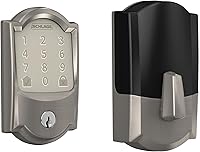
The black, painted metal body has a traditional rectangular shape. It measures 2.57 x 1.63 x 6.05 inches, so it covers a common deadbolt area without looking oversized on most front doors.
Physical buttons are the main design choice to note. They suit wet weather, gloves and regular wiping better than a touchscreen, which can smudge or miss a press when hands are dirty.
No drilling keeps the job simple for many buyers. You still need to check door thickness, backset and latch shape, especially the rounded latch hole this model does not fit.
It also works as a deadbolt and keypad in one unit. That means fewer parts to align, one clear daily routine to learn and a physical key ready for backup.
eufy Security Smart Lock C30: Best for hub-free Wi-Fi control

- Built-in Wi-Fi, no hub required
- Keypad deadbolt with physical key
- Auto-lock with customizable timer
- IP53 exterior, -22°F to 158°F
- BHMA Grade 3
- 4 AA batteries, up to 5 months
- Up to 100 passcodes
Best for buyers who want built-in Wi-Fi with no bridge, physical buttons and a weather rating suited to a front door.
Pros
- No hub or bridge needed for Wi-Fi
- Physical buttons resist wear and grime
- IP53 rating and wide temperature range
- BHMA Grade 3 certification
- Up to 100 passcodes
- 18-month protection on electronic parts
Cons
- Batteries are not included
- Not compatible with Apple HomeKit, IFTTT or Matter
- Does not fit a rounded latch hole
The top version here uses physical buttons, which eufy says offer better durability and error resistance than a touchscreen. That choice matters in rain, with gloves or when your hands are wet.
Who the eufy Smart Lock C30 suits best
This lock suits households that want keyless entry without a bridge or monthly fee. You can give each person a passcode, up to 100 in total, and remove a code when access changes.
It also suits renters or busy families who need a physical key backup. If the batteries die, the physical key still opens the door, which removes a common worry with battery locks.
Our smart door locks buying guide helps you compare keypad, fingerprint and app entry before you choose a style.
Keypad, app and voice entry in daily use
You can open the door with a passcode, the eufy app, voice control or a physical key. Voice control works with Alexa or Google Assistant, and the app gives remote control from anywhere.
The app also provides access management, real-time notifications and event history on the second version. That history helps you see when a code was used, which is useful with cleaners, sitters or family members.
If you want a broader shortlist, our best eufy smart door lock guide compares C30 against other eufy models in one place.
Built-in Wi-Fi and no hub required
Built-in Wi-Fi means remote control works with no bridge or hub to buy and power. You can check and control the lock through the eufy Security app when you are away from home.
That design also keeps setup simpler than a lock that needs a separate hub near the door. The trade-off is that remote features depend on your home Wi-Fi reaching the front door well.
A strong router placement matters more than the lock itself in that case. Test your Wi-Fi signal at the door before you rely on app commands from outside the house.
Auto-lock and wrong-try protection
Auto-lock secures the door after a timer you set, whether the door is open or closed. That helps if you forget to lock up after carrying in groceries or letting a pet out.
Wrong-try protection temporarily locks the system after multiple incorrect attempts. That slows down someone guessing a code, and it works alongside the physical key and app controls.
Our guide on how to lock a eufy smart lock walks through manual locking, auto-lock timing and app use step by step.
Weather protection and temperature range
The first C30 version has IP53 waterproofing and operates from -22°F to 158°F. That suits a front door exposed to rain, wind and seasonal swings.
IP53 means the exterior assembly has stated protection against water spray and dust. It does not mean the lock can sit underwater.
The second version lists IPX3 waterproofing with the same temperature range. IPX3 covers water spray from certain directions.
For a door under a porch roof, IPX3 may handle most rain well. An exposed door may favour the higher IP53 rating.
eufy also lists BHMA Grade 3 certification on the first version. Grade 3 is the top residential grade and relates to durability testing for residential locks.
That grade gives buyers a recognised benchmark for strength and cycle testing on a main front door.
Care still matters in harsh weather. Wipe away grit after storms and test the deadbolt by hand so the bolt is not sticking.
Cold weather can also affect batteries. Keep spare AA batteries indoors and watch low battery warnings closely in winter.
For most climates, both temperature ranges are generous. The bigger difference is the stated water rating, so match that choice to how exposed your front door really is.
Battery life and power backup
Power comes from 4 AA batteries, rated for up to 5 months of use. eufy bases that estimate on 20 to 30 door uses per day, so heavy use or cold weather can shorten it.
Batteries are not included, so add them to your order. A low battery indicator and app notification warn you before the lock stops working.
Keep spare AA batteries inside the house, not in a garage that gets very cold. Replacing them early is easier than dealing with a dead battery at the door.
Setup and door fit checks
Installation is 15 minutes of DIY work with no drilling for most standard deadbolts. Still, you should check your door fit before you order, because fit issues are the most common cause of a poor install.
The C30 does not fit a rounded latch hole. eufy says to use the provided eufy deadbolt for the best fit in that case, so check your current deadbolt shape first.
Measure your door thickness and backset, then compare them with the lock requirements. A 10-minute check before ordering can save a return later.
Care, keys and code management
Care is simple: wipe the keypad, keep batteries fresh and manage codes as people come and go. Physical buttons can be wiped clean, and they do not rely on a touchscreen surface that can smudge.
Assign a unique passcode to each person rather than sharing one code. That way, you can delete a single code for a former cleaner or guest without changing codes for everyone else.
Test the physical key after install and store a spare key outside the house with a trusted person. That backup matters if batteries die or a phone battery runs out.
Alternatives here: the other C30 version
eufy Security Smart Lock C30 (B0DJ2BX2JN)
This version is best for app and voice entry if you value notifications and history. It shares the same core design, 100 passcodes and 5-month battery estimate as the other C30.
Built-in Wi-Fi lets you manage access from anywhere through the eufy Security app. That suits parents, landlords and busy homes where people come and go at different times.
Real-time notifications and event history add useful visibility. You can see when a code was used, which helps with cleaners, dog walkers, sitters and older children.
Voice control with Alexa or Google Assistant gives another hands-free route inside. It is handy with full hands, though you still need a code, the app or a key for other entry methods.
Wrong-try protection is another point of difference. After multiple incorrect attempts, the system locks temporarily, which slows code guessing.
The main difference is focus. The first version leads with IP53 and BHMA Grade 3, while this version leads with app features and wrong-try protection.
Both versions use 4 AA batteries, rated for up to 5 months at 20 to 30 uses per day. Batteries are not included, and a low battery indicator helps you plan a change.
Both pair with eufy Video Doorbells and eufy Security Cameras. That integration is most valuable if you already use eufy gear, since the lock fits into one app.
Neither version supports Apple HomeKit, IFTTT or Matter yet. If that matters to you, this is the main reason to look elsewhere before choosing.
For app-focused homes, this C30 is a tidy fit. It keeps hub-free Wi-Fi, physical buttons and key backup, with more detail on notifications and daily access control.
Trade-offs between the two C30 versions
Pick the first version if weather protection and certification matter most to you. IP53, BHMA Grade 3 and physical buttons make it a strong pick for an exposed front door.
Pick the second version if app control and event history matter most. Its app features, notifications and voice entry are described in more detail, with IPX3 rather than IP53.
Neither version works with Apple HomeKit, IFTTT or Matter yet. Both pair with eufy Video Doorbells and eufy Security Cameras, so eufy users get more value than non-eufy homes.
How the C30 compares with nearby eufy picks
The C30 sits in a crowded eufy range, so compare features before you pay for extras you may not need. Some eufy locks add fingerprint entry, a video doorbell or a lever handle, while the C30 stays focused on keypad and app entry.
Our eufy Smart Lock C33 review covers a close alternative for buyers who want a different feature mix at a similar role.
Our eufy Smart Lock C210 review is another useful comparison if you want to see how eufy splits features across its range.
If you want a non-eufy option, our Wyze Lock Bolt review gives a rival keypad lock to compare on entry methods and setup.
Is the C30 right for your front door?
The C30 is right for a standard front door if you want Wi-Fi control with no hub and no monthly fee. It covers the main needs: 100 passcodes, auto-lock, voice and app entry, a physical key and weather protection.
It is less right if you need Apple HomeKit, IFTTT or Matter support today. It is also less right if your door has a rounded latch hole and you do not want to use the provided eufy deadbolt.
For a wider shortlist, see our best keypad door lock picks and our best keypad locks for front doors before you decide.
eufy Smart Lock C30 verdict
This eufy smart lock c30 review points to the first C30 version for most front doors, and the second for app-focused homes. Both give you hub-free Wi-Fi, auto-lock and 100 passcodes, with small differences in protection and app features.
Pick B0D8XZBR5R if you want IP53 and BHMA Grade 3. Pick B0DJ2BX2JN if you want stronger app and voice emphasis with event history.
Check your door fit, order AA batteries at the same time, and set auto-lock on day one. That simple setup gives you the main benefits of this lock from the start.
Frequently asked questions
How many passcodes does the eufy Smart Lock C30 store?
The C30 stores up to 100 different passcodes. That capacity suits family members, regular guests, dog walkers and cleaners, each with a separate code.
You can remove a code when access changes, which is simpler than copying physical keys for every person.
How long do the C30 batteries last?
eufy says the 4 AA batteries last up to 5 months, based on 20 to 30 door uses per day. Batteries are not included.
A low battery indicator and app notification warn you before power runs out, and a physical key still opens the door if the battery dies.
Does the eufy Smart Lock C30 need a hub?
No. Built-in Wi-Fi lets the C30 connect directly for remote control through the eufy Security app, with no bridge or hub required.
That saves cost and setup steps.
You still need a reliable home Wi-Fi signal at the front door for remote commands and notifications.
What temperatures can the C30 handle?
The exterior lock operates from -22°F to 158°F, or -30°C to 70°C. That range covers most climates for a front door.
Cold and heat can still affect battery life, so keep spare AA batteries handy and watch for low battery warnings during extreme seasons.