Does Kwikset Halo Support Matter?
Some Kwikset Halo locks support Matter, but not every Halo model does. Matter support belongs to the newer Halo Select line, while the original Halo Wi-Fi locks use Wi-Fi and the Kwikset app instead.
On this page (11 sections)
- Which Halo models support Matter?
- What does Matter support mean for a Halo lock?
- How does the original Halo Wi-Fi lock differ?
- How do you check the exact model before you buy?
- Does Halo Select still work with the Kwikset app?
- What if you want Matter but not Kwikset?
- When does a Wi-Fi bridge help an older smart lock?
- Which products are worth comparing with a Halo lock?
- What should you do if Matter setup fails?
- Which Halo parts and handles should you plan for?
- Does Kwikset Halo Matter support decide your pick?
Some Kwikset Halo locks support Matter, but not every Halo model does. Matter support belongs to the newer Halo Select line, while the original Halo Wi-Fi locks use Wi-Fi and the Kwikset app instead.
That short answer matters because Kwikset uses the Halo name across several locks. The name on the box decides what smart-home systems the lock can join, so check the full model name before you order.
Which Halo models support Matter?
Halo Select models are the Matter-ready ones. The original Halo Wi-Fi, Halo Touch, and Halo Touchscreen models should not be treated as Matter locks.
We checked the model names Kwikset uses for each line. Halo Select is the line to look for when Matter is your goal.
It sits apart from the older Wi-Fi-only Halo locks that launched the family.
You can check three places before you buy. Look at the retail title, the model name in the Kwikset app, and the Matter wording on the box.
All three should point to Halo Select if Matter matters to you.
Save the model number with your other home details. That one paper trail will help with setup, support, and any later sale or move.
What does Matter support mean for a Halo lock?
A Matter Halo lock can work with Matter-certified controllers and apps. That gives you more choice in how the lock joins your home system.
Matter is a shared smart-home standard. A lock that supports it can talk to a compatible hub or controller, rather than staying tied to one brand's app or bridge.
For many buyers, the appeal is choice. You may want the lock to work with the controller you already own, or with a future controller you plan to buy.
Matter support does not change the basic job of the lock. It still needs batteries, a correct install, and a Wi-Fi signal strong enough at the door.
How does the original Halo Wi-Fi lock differ?
The original Halo Wi-Fi locks connect through Wi-Fi and the Kwikset app. They do not gain Matter support by name alone.
Those locks were built for remote control, codes, and alerts through the Kwikset app. They fit homes that want phone control without adding a smart-home hub.
If you already own an original Halo Wi-Fi lock, you do not need to replace it just to keep using it for daily lock and code duties. The limit shows up only when you want Matter joining.
That is why the model name is the whole ballgame. Halo Select points one way, and Halo Wi-Fi points another.
How do you check the exact model before you buy?
Match the Halo Select name and Matter wording on the same model. Do not rely on a short listing title or a store category label.
Start with the full retail name. It should say Halo Select and mention Matter support in clear words.
Then check the Kwikset website for that same model name.
Next, confirm the finish and function you want. If you like a certain look, check whether that finish exists in the Halo Select line, such as the kwikset halo venetian bronze option buyers often ask about.
Do not assume every finish came in every generation.
Finally, keep the box and receipt. If Matter does not appear during setup, that proof will help you return or exchange the lock quickly.
Does Halo Select still work with the Kwikset app?
Yes, Halo Select can still use the Kwikset app for setup and daily control. Matter adds a second path, it does not remove the app.
You will still want the app for codes, activity, and settings at first. Matter joining is handled through a compatible controller, so follow the steps for that controller during setup.
Keep the app updated on your phone. Update the lock firmware when Kwikset offers it, and test codes and remote actions after each update.
Battery care still matters. A Matter lock with a weak battery will act up just like any other smart lock, so replace batteries on a steady schedule.
What if you want Matter but not Kwikset?
A Wi-Fi deadbolt with built-in app control can be a clean alternative. It suits homes that want remote access without a separate bridge.
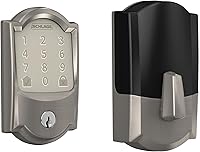
The Schlage Encode Smart WiFi Deadbolt Lock with Camelot Trim, Satin Nickel fits that pattern. It has built-in Wi-Fi, the Schlage Home app, and voice control with Alexa and Google Home.
Schlage says it manages up to 100 access codes and shows lock history in the app. It also fits standard doors with 1-3/8 in to 1-3/4 in thickness and 2-3/8 in or 2-3/4 in backset.
That makes it a fair cross-check against Halo Select. Compare the trim, the app you prefer, and whether you want Matter or built-in Wi-Fi.
When does a Wi-Fi bridge help an older smart lock?
A bridge helps when your lock uses Bluetooth and you want remote access. It adds Wi-Fi to a lock that cannot reach your network on its own.
The August Home Connect Wi-Fi Bridge fills that gap for August Smart Locks. It connects the lock to Wi-Fi so you can lock or check the door from away from home.
August says the bridge needs a North American outlet with 110-240 volt. It works with iOS 9.0 or higher and Android 5.0 or higher, and it supports Alexa, Google Assistant, and Siri.
This is not a Matter upgrade for a Halo lock. It is a different brand's answer to the same remote-access need.
Which products are worth comparing with a Halo lock?
Compare three paths: Matter Halo Select, built-in Wi-Fi, or a bridge for a Bluetooth lock. Each path solves a different setup problem.
For door power and video doorbells, power supply quality can matter as much as the lock itself. The Hardwired Transformer for Ring Wired Video Doorbells replaces an underpowered doorbell transformer and gives 16V 30VA output from 120V AC input.
Ring says it fits most North American doorbell transformers and comes with the tools for installation. It suits homes where a doorbell browns out or drops offline under load.
For lock choice, our guide to smart door locks breaks down codes, apps, and hubs. If you already lean Kwikset, see the best kwikset smart deadbolt guide for the wider Kwikset line.
What should you do if Matter setup fails?
Restart the lock, check the battery, and confirm the controller is Matter-ready. Most failed joins trace back to signal, power, or a wrong model.
Start with a kwikset halo touchscreen factory reset only if Kwikset's steps for your exact model call for it. A reset clears codes and pairing, so save any codes you need first.
Then move the controller closer to the door during setup. Thick walls, metal doors, and long distances can block the join even when the lock works fine at your desk.
If the lock never shows as Matter-ready, recheck the model name. An original Halo Wi-Fi lock will not join a Matter network, no matter how many times you retry.
Which Halo parts and handles should you plan for?
Plan for batteries, spare parts, and a matching handle at the same time. A lock is only part of the door setup.
If a keypad or motor fails later, kwikset halo replacement parts can save you from replacing the whole lock. Keep the model number handy when you order parts.
For the inside handle, see the best kwikset halo handle guide. A good handle makes daily use easier, especially on a heavy door.
If you run cameras as well, How Does a DVR Work, and Why It Matters? explains local recording. You can also check How Many Cameras Can an NVR Support in Most Homes? when you plan a larger system.
Does Kwikset Halo Matter support decide your pick?
Yes, if Matter is a must-have, buy the Halo Select model that names Matter support. If Matter is optional, an original Halo Wi-Fi lock can still do the daily job well.
Pick Halo Select for Matter joining. Pick an original Halo Wi-Fi lock only when you are sure you do not need Matter.
Pick a built-in Wi-Fi deadbolt when you want app control without a bridge or a Matter controller.
Before you order, write down the full model name, finish, and door measurements. That simple check prevents the most common Halo mistake: buying the right brand and the wrong generation.
Frequently asked questions
Does the original Kwikset Halo support Matter?
No. The original Halo Wi-Fi models are not Matter locks.
They connect over Wi-Fi and work through the Kwikset app and supported voice assistants.
If you want Matter, look for a Halo Select model that states Matter support on its retail name and in the Kwikset app setup.
How can I check if my Halo model supports Matter?
Check the exact model name on the box, the lock, and your Kwikset app device page. Look for Halo Select and Matter wording together.
If the name only says Halo Wi-Fi, Halo Touch, or Halo Touchscreen without Select, do not assume Matter support.
Kwikset support can also confirm by serial or model number.
Can a non-Matter Halo lock get Matter later with an update?
Do not count on it. Matter support depends on the radio hardware in the lock.
A software update cannot add a radio that is not present.
Buy the Matter-enabled Halo Select model if Matter is a must-have feature for your home setup.