How Do UWB Smart Locks Work?
A smart lock UWB system uses ultra wideband ranging to judge how close your phone is, then opens when you approach. It needs a UWB phone, a UWB lock, and a short setup.
On this page (11 sections)
- How does a smart lock UWb judge distance?
- Which phones support UWB for smart locks?
- How does approach based opening work step by step?
- What are the limits of UWB approach opening?
- How is UWB different from Bluetooth, NFC, and Wi-Fi?
- Do you need Wi-Fi or a bridge for a UWB lock?
- Can a wired doorbell transformer help a smart lock setup?
- How do you set up a UWB smart lock for daily use?
- Which UWB lock features matter for guests and backups?
- What should you check before you buy a UWB lock?
- How do you decide if a UWB smart lock is right for you?
A smart lock UWB system uses ultra wideband ranging to find how close your phone is, then opens as you approach on foot. It pairs UWB chips in the lock and phone with location rules in the maker app.
It does not replace a code or key in every case. UWB adds hands-free entry with a supported phone, so you still need backups for dead batteries, guests, and days without your phone.
This guide covers how approach opening works, which phones support UWB, and what trade-offs to expect.
How does a smart lock UWb judge distance?
UWB works by timing radio pulses between phone and lock to estimate distance. That timing is far finer than a Wi-Fi or Bluetooth signal check.
Bluetooth and Wi-Fi locks often use signal strength as a rough proxy for range. That signal shifts with walls, pockets, and body position, so it can give false reads.
The lock and phone swap secure messages during the check. The lock then applies your rule, such as opening only within a set distance.
Placement also affects range. A thick door or metal frame can change how cleanly pulses travel, so keep phone and lock in open line of sight during setup.
Which phones support UWB for smart locks?
You need a phone with UWB hardware and a lock that supports the same standard. Bluetooth alone will not give you UWB approach opening.
Recent flagship phones from Apple and Samsung include UWB on many models, but not every variant does. Check your exact model against the lock maker's list before you order.
Android support can also depend on app permissions for nearby devices, location, or motion access.
If your phone does not support UWB, many locks still offer codes, key fobs, NFC taps, or a physical key. Our roundup of the best smart lock with nfc covers tap to enter options for phones without UWB.
How does approach based opening work step by step?
Approach opening follows detect, verify, check distance, then act. The lock wakes when it sees your phone nearby.
First, your phone sends a UWB ready signal when the lock app is active. Second, the lock verifies your account and device identity.
Third, it measures distance and checks your set rules.
Fourth, it opens only if you meet all conditions, such as being within range, arriving from outside, and having the feature turned on. Some makers add a short delay so it does not open while you are still inside.
Fifth, the lock can auto-lock after a set time, so approach entry does not leave the door open.
What are the limits of UWB approach opening?
UWB approach entry has clear limits around phones, batteries, and guest access. It is a convenience layer, not a full replacement for codes and keys.
Your phone must have UWB, a charged battery, and the app running in the background. Low power mode, a dead battery, or a closed app can block the feature.
Interference and layout can also cause missed reads. Thick doors, metal gates, and crowded entries may slow detection, so test the entry path during setup.
Keep a backup method ready at all times. A code works for guests, a physical key covers a dead phone battery, and a key fob helps if you prefer not to carry your phone.
How is UWB different from Bluetooth, NFC, and Wi-Fi?
UWB differs from Bluetooth, NFC, and Wi-Fi in how it measures position and how far it reaches. Each method solves a different entry need.
Bluetooth is common for phone control at short range, but signal strength is a rough distance guide. NFC needs a close tap, often within inches, which is precise but not hands-free.
Wi-Fi links a lock to your home network for remote control and alerts, while UWB can judge distance hands-free as you approach.
If you want phone control without UWB, our best bluetooth door lock guide covers that path. If you want tap entry, the NFC roundup above is a closer match.
The August Home Connect Wi-Fi Bridge links an August lock to Wi-Fi for control from anywhere. It uses Wi-Fi and Bluetooth, and it works with Amazon Alexa, the Google Assistant, and Siri for voice control.
You need a North American outlet at 110 to 240 volts, plus iOS 9.0 or higher or Android 5.0 or higher on your phone. The bridge measures 1.5 x 2.4 x 2.4 inches and weighs 2.88 ounces.
It suits owners who already have an August lock and want remote access without replacing the lock. It does not add UWB.
Do you need Wi-Fi or a bridge for a UWB lock?
You do not need Wi-Fi for the approach step itself, but you need a network path for remote control. UWB handles the short range phone check at the door.
Wi-Fi or a bridge lets you check lock state, get alerts, and open for a guest while you are away. Without that path, the lock works locally with your phone, codes, or fobs.
Remote features stay offline.
Built-in Wi-Fi locks reduce extra parts. A separate bridge adds a plug, a setup step, and one more device to power.
That trade-off matters if you prefer fewer parts near the door.
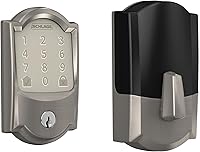
The Schlage Encode Smart WiFi Deadbolt Lock connects to home Wi-Fi for control and monitoring in the Schlage Home app. It manages up to 100 access codes and shows lock history with customizable notifications.
It works with Alexa and Google Home when paired with the app and a voice device. Voice control is optional.
Schlage says it fits doors 1-3/8 in to 1-3/4 in thick with a 2-3/8 in or 2-3/4 in backset. Install takes minutes with a screwdriver, with no hardwiring.
It runs on four AA batteries, included, with up to six months of life in typical use. A low battery indicator shows on the lock and in the app, and one physical backup key is included.
Can a wired doorbell transformer help a smart lock setup?
A doorbell transformer does not power a smart lock, but it can support a wired video doorbell near the same entry. That matters if you plan a full entry upgrade.
A video doorbell and a lock often sit on the same door frame. If the doorbell needs stable power, it can affect your overall setup experience even though the lock runs on batteries.
This Ring transformer replaces most North American doorbell transformers. It takes 120V AC 60 Hz input and gives 16V 30VA output, with tools included for install.
It measures 2.34 x 2.55 x 1.92 inches and weighs 1.57 pounds. It is made to optimize Ring wired video doorbell models with increased power.
Use it only if you have a compatible wired doorbell and a transformer that is underpowered. It will not charge lock batteries or add Wi-Fi to a lock.
If you have no wired doorbell, you do not need it.
How do you set up a UWB smart lock for daily use?
Setup starts with fit, phone compatibility, and a test of the approach path. Measure door thickness, backset, and cross bore before you buy.
Confirm your phone supports UWB and the lock app allows background access. Install with the phone nearby so you can pair it in one session, following our smart lock installation guide.
After install, test approach opening from inside and outside at a normal pace, with the phone in your usual pocket or bag. Set auto-lock, create guest codes, and test a backup key or fob.
If you travel often, add Wi-Fi or a bridge and see our smart door locks guide.
Which UWB lock features matter for guests and backups?
Guest and backup features matter more than approach range because phones and batteries fail. Codes let you give a cleaner or sitter time limited entry, and a physical key covers dead batteries and lost phones.
Fobs help when you do not want to use an app. Look for locks that let you manage multiple users, change codes, and view entry history.
Our roundup of best smart lock with key fob covers fob based backups, and our best non wifi smart lock covers local only options. Our aqara smart lock u200 review and wyze lock bolt review help compare specific models.
What should you check before you buy a UWB lock?
Before you buy, check phone support, door fit, power, and backup entry. Those four items decide if a UWB smart lock will work for you.
Confirm your phone has UWB, not just Bluetooth, and that the lock supports the same UWB standard and works with your phone software. Then check door thickness and backset against the lock's limits.
Check battery type and backup entry, with batteries easy to reach and a code, fob, or key if the phone fails. If you want remote access, check whether Wi-Fi is built in or needs a bridge.
Also check auto-lock options and guest code limits, as those affect daily use more than peak range numbers.
How do you decide if a UWB smart lock is right for you?
A UWB smart lock is right for you if you have a supported phone and want hands-free entry with strong backups. It is not right if your phone lacks UWB or you want a simple code only lock.
Pick UWB if you arrive home with bags, kids, or a stroller and want the door to open as you walk up. Pick a code and fob setup if guests visit often or you share entry with others.
Pick NFC or Bluetooth if your phone lacks UWB. Pick a non Wi-Fi local lock if you want fewer network parts and no remote checks.
Whatever you choose, keep a physical key or fob in reach. Start with the smart door locks guide to compare types, then check phone compatibility before you order.
Frequently asked questions
What phone do I need for a UWB smart lock?
You need a phone with UWB hardware, not just Bluetooth or Wi-Fi. Check the maker list for your exact phone model before you buy, then keep the phone software current.
If your phone lacks UWB, use a code, key fob, or backup key instead.
Is UWB more secure than Bluetooth for approach opening?
UWB measures distance with tighter timing, so it is harder to fake a close position than a simple signal strength check. It still depends on phone location settings, battery state, and the lock maker's rules.
Treat it as a convenience feature, not a sole safety layer.
Can a UWB lock work without Wi-Fi?
Yes, the approach step can work by phone and lock alone, but remote control and alerts need a network path. A bridge or built-in Wi-Fi gives remote access.
Without that link, you will rely on codes, fobs, or a physical key for other entry methods.