9 Best Wired Floodlight Security Cameras (November 2026)
The best wired floodlight security cameras include the Google Nest Cam with Floodlight for smart activity alerts, the Blink Wired Floodlight Camera for Alexa homes, and the Arlo Wired Floodlight Security Camera 2K HDR for 2K HDR coverage.
On this page (3 sections)
The best wired floodlight security camera for most homes is the Google Nest Cam with Floodlight, with person, animal and vehicle alerts and free event history. For permanent power paired with 2K HDR video, compare the Arlo models; for Ethernet and local recording, consider REOLINK PoE.
A wired floodlight camera can mean a camera connected to a junction box, a plug-in camera, or a PoE model powered over Ethernet. This roundup focuses on cameras with a wired power option, and calls out where a model uses a plug or needs a network cable.
If you want a conventional camera without a built-in floodlight, see our best wired outdoor security cameras. Our guide to what a hardwired security camera is and why it matters explains the difference between power wiring and the camera's network connection.
Our picks at a glance
-
1

-
2

-
3
 Best for 2K HDR coverage
Arlo Wired Floodlight Security Camera 2K HDR
9.7/10 our score
See it on Amazon
- 4
 Check it
eufy Security Floodlight Camera E340
Best for pan-and-tilt coverage - 5
 Best for an existing junction boxCheck it
- 6
 Best for bright local recordingCheck it
- 7
 Check it
REOLINK PoE Security Camera Elite Pro Floodlight
Best for PoE and local storage - 8
 Check it
eufy Security Floodlight Camera E340
Best for a plug-in cable option - 9
 Check it
Onforu 2K Floodlight Camera Plug&Hardwired
Best for flexible installation
Which wired floodlight security cameras stand out?
The Google Nest Cam is the most balanced choice for app alerts, while the other cameras suit specific priorities such as local recording, wider views or PoE. Match the power method and storage setup to your home before comparing lights and detection features.
Google Nest Cam with Floodlight: Best for smart activity alerts
- 1080p HDR video
- Person, animal and vehicle detection
- 3 hours of free event history
- Stores up to 1 hour of events during Wi-Fi or power outages
Google's floodlight camera can distinguish people, animals and vehicles, then send alerts in the Google Home app. It also keeps up to 1 hour of recorded events during a Wi-Fi outage or power loss.
Pros
- Activity detection separates people, animals and vehicles
- 3 hours of event history without a subscription
- Talk and listen through the camera
Cons
- Video history beyond 3 hours requires a subscription
- Some features require working internet and Wi-Fi
Google's camera earns the top spot for households that want alerts classified by activity type. It can distinguish people, animals and vehicles, and it sends notifications through the Google Home app.
The floodlight turns on when the camera detects important activity, and the built-in microphone and speaker let you talk with visitors. Video is 1080p HDR with night vision, and the camera includes 3 hours of event history at no charge.
There is a small amount of outage protection: the camera stores up to 1 hour of recorded events if Wi-Fi goes down or power is interrupted. Some app features still depend on a working internet connection and Wi-Fi, so check whether that fits your setup.
Choose it for smart activity alerts and simple event review. Longer video history and 24/7 recording require a Nest Aware Plus subscription, and the camera uses the Google Home app rather than the Nest app.
Blink Wired Floodlight Camera: Best for Alexa homes
- 2600-lumen LED lighting
- 1080p HD live view
- Customizable dual-zone motion detection
- Connects to existing outdoor wiring
Blink pairs 2600-lumen lighting with motion detection, a built-in siren and Alexa features. Its setup uses existing outdoor wiring, and footage can be stored in the cloud or backed up locally with separately sold equipment.
Pros
- Person detection is available with an optional plan
- Motion zones can be customized
- Supports local backup with compatible separately sold equipment
Cons
- Person detection requires an optional subscription plan
- Sync Module and storage media for local backup are sold separately
Blink is a strong fit if your home already has outdoor wiring and you use Alexa devices. The camera has 2600 lumens of LED lighting, 1080p HD live view, a built-in siren and two-way audio.
Its dual-zone motion detection lets you customize the areas that trigger notifications. Person detection is available through an optional Blink Subscription Plan, and clips can be stored in the cloud or backed up locally with separately sold Blink equipment.
The installation uses your home's existing outdoor wiring. That makes it a more direct option for replacing or adding a wired exterior light, but the included instructions and your wiring conditions determine the work involved.
Pick Blink for Alexa features and motion zones. Check the storage route you plan to use, since the Sync Module and USB drive or MicroSD card for local backup are sold separately.
Arlo Wired Floodlight Security Camera 2K HDR: Best for 2K HDR coverage
- 2K HDR video
- Up to 2000-lumen floodlight
- 160° field of view
- Hardwires to an existing junction box
Arlo combines 2K HDR video, a 2000-lumen light and continuous hardwired power for larger outdoor areas. Live streaming and basic alerts work without a subscription, while advanced detection and longer video history require a paid plan after the trial.
Pros
- Hardwired power from an existing junction box
- Color night vision and two-way audio
- Live streaming and basic alerts work without a subscription
Cons
- Advanced features require a paid plan after the trial
- Installation requires a compatible weatherproof junction box
This Arlo model suits a driveway or yard where you want sharper video and permanent power from a junction box. It combines 2K HDR video, a 2000-lumen floodlight and a 160° field of view.
The camera includes color night vision, two-way audio, motion alerts, zoom and a remote siren. Arlo says live streaming and basic alerts work without a subscription; advanced detection and 60-day video history require a paid plan after the trial.
Before choosing it, confirm that your outdoor electrical box is compatible. Arlo specifies a 4 in round, UL-listed weatherproof junction box, so check the box and mounting location before planning the installation.
Choose this version for 2K HDR and continuous junction-box power. If you are comparing wired camera options for other locations, our best wired indoor security camera picks cover indoor models.
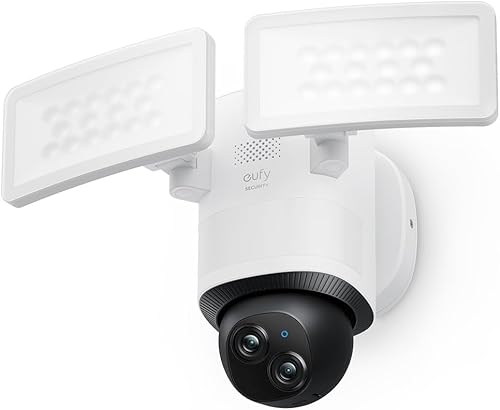
eufy Security Floodlight Camera E340: Best for pan-and-tilt coverage
- Dual 2K and 3K cameras
- 360° pan-and-tilt coverage
- 2000-lumen light
- Continuous recording with microSD or HomeBase S380
The E340 combines a wide lens with a telephoto camera and pan-and-tilt movement for broad coverage. Continuous recording needs a microSD card up to 128 GB or a HomeBase S380.
Pros
- Dual cameras with up to 8× hybrid zoom
- Pan-and-tilt movement and auto-tracking
- Continuous recording can use local storage
Cons
- Needs a junction box for hardwired installation
- Maximum resolution is 2K with AI tracking or Dual Views
The eufy E340 suits a side yard or driveway where a fixed lens may miss activity around a corner. Its dual cameras combine a wide-angle view with a telephoto camera, and the pan-and-tilt mechanism covers up to 360°.
The camera can track people and follow scheduled auto-patrols. Its 2000-lumen light includes adjustable brightness and motion-activated illumination, while the built-in alarm is rated at 95 dB.
For continuous recording, install a microSD card up to 128 GB or connect a HomeBase S380. The hardwired version needs AC power and a UL-listed junction box; its maximum resolution drops to 2K when AI tracking or Dual Views is active.
Pick this E340 for moving coverage and local recording. Confirm the resolution mode and storage setup you want before mounting it.
Arlo Wired Floodlight Camera: Best for an existing junction box
- 2K HDR video
- Up to 2000-lumen lighting
- 160° field of view
- Continuous hardwired power
This Arlo model brings hardwired power, 2K HDR video and a 2000-lumen floodlight to a compatible outdoor junction box. Basic alerts and live streaming work without a subscription; advanced detection and 60-day history require a paid plan after the trial.
Pros
- Continuous power from a junction box
- Color night vision and two-way audio
- Includes a built-in siren
Cons
- Advanced features require a paid plan after the trial
- Needs a compatible weatherproof junction box
This Arlo camera shares the 2K HDR video and 2000-lumen lighting approach of the other Arlo pick, with a black finish. It is designed for continuous hardwired power from an existing junction box.
Its listed field of view is 160°, and the camera includes color night vision, two-way audio, motion alerts and a siren. Basic alerts and live streaming work without a subscription, while advanced detection and longer history require Arlo Secure after the trial.
Use the same installation check as with the other Arlo model: verify that the junction box is a compatible 4 in round, UL-listed weatherproof type. That check matters before choosing a mounting point.
Choose this model if you want Arlo's wired features in black. Compare the camera position and the finish with the rest of your exterior lighting.
WYZE Floodlight Camera v2: Best for bright local recording
- 2K HD video
- 2800-lumen LED lights
- 160° wide-angle view
- Continuous local recording to microSD
WYZE pairs 2K video with two dimmable lights rated at 2800 lumens. A microSD card supports continuous local recording, and the camera includes two-way talk and a siren.
Pros
- Bright lighting with ambient and dusk-to-dawn modes
- Continuous local recording to microSD
- Custom motion zones
Cons
- Uses 2.4 GHz Wi-Fi and does not support 5 GHz
- Outdoor power adapter is sold separately
WYZE is a useful option when bright lighting and local recording matter more than having the highest resolution in this group. It records 2K HD video, uses two dimmable LED lights rated at 2800 lumens and provides a 160° wide-angle view.
A microSD card enables continuous local recording, with storage for up to 30 days of footage. Other useful details include color night vision, two-way talk, customizable motion zones, a 105 dB siren and dusk-to-dawn automation.
The camera connects to 2.4 GHz Wi-Fi and does not support 5 GHz. WYZE also notes that the outdoor power adapter is sold separately, so factor in the included power setup when planning the installation.
Pick WYZE for bright light and microSD recording. If you want to view camera footage on a screen, our guide to connecting a wired security camera to a TV explains the connection choices.
REOLINK PoE Security Camera Elite Pro Floodlight: Best for PoE and local storage
- 16MP dual-lens video
- 180° panoramic view
- PoE connection over Ethernet
- Local recording to microSD, NVR, FTP or NAS
REOLINK uses one Ethernet cable for power and network, with no Wi-Fi connection. It supports continuous recording to microSD, a compatible NVR, FTP or NAS, and its package does not include a power adapter.
Pros
- Wide 180° view from dual lenses
- Supports continuous local recording
- Person, vehicle and animal detection
Cons
- Requires a PoE NVR or switch and Ethernet cabling
- Power adapter is not included
REOLINK takes a different approach from Wi-Fi floodlight cameras: it uses PoE over Ethernet for both power and network. Its dual 8MP lenses provide a combined 180° panoramic view, and the camera supports color and infrared night vision.
For recording, it can use a microSD card up to 512 GB, a compatible Reolink NVR, FTP or NAS. It also supports continuous recording, human, vehicle and animal detection, two-way talk and a siren.
This setup requires Ethernet cabling and a PoE NVR or switch. The package does not include a power adapter, and the camera does not support Wi-Fi, so check your network equipment before you buy.
Choose REOLINK if you want a wired network and local storage options. It can suit a property where you already have a PoE recorder or switch and can route Ethernet to the mounting point.
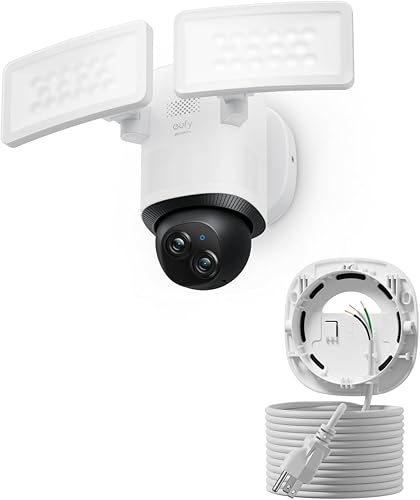
eufy Security Floodlight Camera E340: Best for a plug-in cable option
- Dual 2K and 3K cameras
- 360° pan-and-tilt coverage
- 2000-lumen light
- 20 ft AC cable with three-prong plug
This E340 version uses a three-prong plug and a 20 ft AC cable, so it can work where a junction box is unavailable. It supports continuous recording with a microSD card up to 128 GB or a HomeBase S380.
Pros
- Cable gives more placement options than junction-box wiring
- Dual cameras with pan-and-tilt coverage
- Continuous recording can use local storage
Cons
- A plug-in connection is not permanent hardwiring
- Maximum resolution is 2K with AI tracking or Dual Views
This version of the eufy E340 uses a 20 ft AC cable and three-prong plug instead of junction-box wiring. That gives you more choice in placement when an electrical box is not available near the camera position.
It has the same dual-camera concept, pan-and-tilt coverage, 2000-lumen light and support for continuous local recording. Use a microSD card up to 128 GB or connect a HomeBase S380; resolution is limited to 2K with AI tracking or Dual Views.
The cable makes this a corded camera, not a permanently hardwired one. If a fixed electrical connection is your priority, compare the junction-box version above.
Pick this version when a plug-in cable fits your installation. For a different power option, read our guide to what a plug-in security camera does.
Onforu 2K Floodlight Camera Plug&Hardwired: Best for flexible installation
- 2K QHD video
- 5500-lumen lighting
- 20 ft power cord
- Plug-in or hardwired installation
Onforu offers both plug-in and hardwired installation, with a 20 ft power cord included. It supports continuous local recording to a separately sold microSD card up to 256 GB.
Pros
- Flexible plug-in or hardwired setup
- Three adjustable light heads
- Continuous local recording to microSD
Cons
- The plug-in setup does not provide permanent hardwired power
- microSD card is sold separately
Onforu gives you a choice of plug-in or hardwired installation, and includes a 20 ft power cord. Its three adjustable light heads are rated at 5500 lumens, while the camera records 2K QHD video with color night vision.
It supports continuous recording to a separately sold microSD card up to 256 GB. Motion detection, two-way audio and app-controlled brightness add useful controls for a driveway, walkway or backyard.
The flexibility comes with a decision to make: a plug uses the power cord, while hardwired installation is the permanent electrical option. The camera supports 2.4 and 5 GHz Wi-Fi, with a caveat for 5 GHz Wi-Fi 6 networks.
Choose Onforu if you want both plug-in and hardwired setup options. If you are considering solar power instead of a permanent supply, see our best solar panels for security cameras.
How should you choose a wired floodlight camera?
Choose the camera by power connection first, then check coverage, recording and app needs. A high lumen number or resolution won't help if the camera can't be mounted where you need it.
Does the camera use permanent electrical wiring?
For fixed power, look for a model that connects to an existing junction box or outdoor wiring. Arlo and the hardwired eufy E340 require junction-box installation, while Blink connects to existing outdoor wiring.
Some cameras in this roundup have more than one power form. The eufy cable model and Onforu can plug into an outlet, but a plug-in connection is not the same as permanent wiring.
Is Wi-Fi, Ethernet or a plug the right connection?
A wired power supply does not always mean a wired network. Google Nest, Blink, Arlo, eufy and WYZE use Wi-Fi, while REOLINK PoE uses Ethernet for power and network and does not support Wi-Fi.
If you need cameras that work without Wi-Fi, compare local recording and network requirements carefully. Our guide on whether security cameras can work without Wi-Fi explains what changes when a camera is offline.
How much light and view do you need?
Match the floodlight to the area and the camera's view to the approach path. The options here range from 2000 lumens on Arlo and eufy to 5500 lumens on Onforu, while REOLINK offers a 180° panoramic view and eufy adds pan-and-tilt movement.
A wider view can reduce blind spots, but check the mounting angle and nearby walls. A camera aimed at a driveway entrance may need different coverage than one watching a side yard.
Where will recordings be stored?
Choose a storage method you can use and maintain. WYZE and eufy support local microSD recording, REOLINK supports a card, NVR, FTP or NAS, and Blink offers local backup with separately sold equipment.
Cloud services can add event history or detection features on some models. Confirm which features work without a plan before deciding, especially if you want continuous recordings or long-term event access.
Which wired floodlight camera should you choose?
Choose Google Nest for activity alerts and simple event review, Blink for Alexa and existing outdoor wiring, or Arlo for 2K HDR video with junction-box power. Pick REOLINK when PoE and multiple local recording options fit your network.
If you can't run permanent wiring, compare the plug-in eufy or Onforu options, or consider solar power with our guide to a solar security camera with monitor. For a hardwired setup, confirm the junction box, cable route and recording plan before installation.
Our top 3 picks at a glance
-
1
-
2
-
3
Best for 2K HDR coverage
Arlo Wired Floodlight Security Camera 2K HDR
9.7/10 our score
See it on Amazon
Frequently asked questions
What makes a floodlight camera wired?
A wired floodlight camera gets power from a permanent electrical connection, a plug or a Power over Ethernet cable. For this guide, the closest match to permanent hardwiring is a camera connected to an existing junction box.
Check the installation method before buying, since some models called wired use a plug-in cable.
Do wired floodlight cameras need Wi-Fi?
Many wired floodlight cameras use Wi-Fi for app access, alerts and video streaming, even though they get power from house wiring. REOLINK's PoE model uses Ethernet for power and network instead of Wi-Fi.
If internet access is a concern, compare recording and remote-viewing needs before choosing.
Can a wired floodlight camera record without a subscription?
Some can record locally without a required subscription. WYZE supports continuous recording to microSD, and eufy supports continuous recording with a microSD card or HomeBase S380.
Blink offers local backup with separately sold compatible equipment.
Check storage limits and which features require a paid plan.
Can I install a wired floodlight camera myself?
Installation depends on the model and your home's wiring. Blink says its camera connects to existing outdoor wiring, while Arlo and eufy specify junction-box installation.
If you aren't qualified to work on household wiring, use a licensed electrician and follow the camera's installation instructions.


