9 Best Solar WiFi Security Cameras (November 2026)
The best solar WiFi security cameras include the aosu D1 Classic 4-Cam Kit for a multi-camera property, the ZEEPORTE SECURITY Solar Security Cameras Wireless Outdoor for adjustable WiFi coverage, and the Gianteye 2K Security Camera System for dual-band WiFi.
On this page (5 sections)
The best solar WiFi security camera for most multi-area homes is the aosu D1 Classic 4-Cam Kit, which connects four cameras to one base with 32 GB of local storage. For a standalone camera, Gianteye supports both 2.4 GHz and 5 GHz WiFi, while eufy offers a detachable solar panel and local storage options.
Solar power can reduce the need to run a power cable, but it doesn't solve weak WiFi, poor sunlight or a lack of continuous recording. If WiFi won't reach the camera, compare solar cellular security cameras.
Match the camera's network band, storage method and recording style to the location before you choose.
If you want a broader explanation of how these systems work, start with what a solar security camera is and how it's used. This roundup focuses on cameras that use WiFi and solar charging.
Our picks at a glance
-
1

-
2
 Best for adjustable WiFi coverage
ZEEPORTE SECURITY Solar Security Cameras Wireless Outdoor
9.6/10 our score
See it on Amazon -
3
- 4
 Check it
SEHMUA Solar Security Cameras Wireless Outdoor
Best for 360-degree app control - 5
 Check it
Cinnado 2K Solar Wireless Outdoor Cameras
Best for two-camera coverage - 6
 Check it
GNCC Solar Security Cameras Wireless Outdoor 2.4G
Best for adjustable motion alerts - 7
 Best for local storage flexibilityCheck it
- 8
 Check it
SEHMUA 2K Solar Security Cameras Wireless Outdoor
Best for a two-camera solar set - 9
 Check it
GALAYOU Solar Camera Outdoor Wireless for Home
Best for a separate solar panel mount
How we chose solar WiFi security cameras
The best solar WiFi security cameras combine a workable connection, a practical solar setup and recording options that fit the area you want to watch. We compared the features for WiFi band support, panel placement, storage, camera control and event recording.
WiFi requirements matter before any other feature. Most cameras here use 2.4 GHz WiFi only, while Gianteye also supports 5 GHz; the aosu kit connects its cameras to a base, which connects to the router by Ethernet.
Solar panel placement is the next check. Integrated panels keep a camera compact, while detachable panels let you place the panel in a sunnier spot than the camera itself.
Battery-powered cameras commonly save motion events rather than continuous footage. If you need constant recording, confirm that requirement before choosing a solar camera, since several picks explicitly do not support 24/7 recording.
Compare solar WiFi cameras by connection and storage
The table highlights the differences that affect setup and footage access. Check the recording mode and required network band for your exact installation.
| Product | Best for | Resolution | Storage | WiFi connection | Our score |
|---|---|---|---|---|---|
| aosu D1 Classic 4-Cam Kit | a multi-camera property | 2K (3 MP) | 32 GB in aosuBase | Cameras connect to base, which connects to router by Ethernet | 9.6 |
| ZEEPORTE SECURITY Solar Security Cameras Wireless Outdoor | adjustable WiFi coverage | 2304 x 1296 | MicroSD up to 256 GB or 7-day rolling cloud | 9.6 | |
| Gianteye 2K Security Camera System | dual-band WiFi | MicroSD card or optional cloud | 9.5 | ||
| SEHMUA Solar Security Cameras Wireless Outdoor | 360-degree app control | 2K | 9.4 | ||
| Cinnado 2K Solar Wireless Outdoor Cameras | two-camera coverage | 2304 x 1296 | MicroSD up to 128 GB or cloud | 9.2 | |
| GNCC Solar Security Cameras Wireless Outdoor 2.4G | adjustable motion alerts | 1080P | MicroSD up to 128 GB or paid cloud | 9.1 | |
| eufy Security eufyCam C37 | local storage flexibility | MicroSD up to 256 GB or compatible HomeBase | 8.8 | ||
| SEHMUA 2K Solar Security Cameras Wireless Outdoor | a two-camera solar set | 2K in the product title | MicroSD up to 128 GB or optional cloud trial | 8.7 | |
| GALAYOU Solar Camera Outdoor Wireless for Home | a separate solar panel mount | 2K HD in product description | MicroSD up to 128 GB or paid cloud | 8.4 |
The best solar WiFi security cameras for different setups
The right camera depends on the number of areas to cover, your router's WiFi bands and where sunlight reaches. The picks below are ordered by score, with each one suited to a distinct setup.
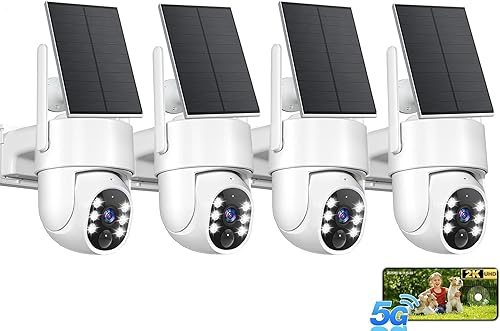
1. aosu D1 Classic 4-Cam Kit: Best for a multi-camera property
aosu D1 Classic 4-Cam Kit: Best for a multi-camera property
- Four cameras connect to one aosuBase
- 32 GB local storage
- Integrated solar panels
- 2K video with pan, tilt and tracking
The four-camera kit suits homes that need several views and centralized event storage. Cameras connect wirelessly to the included base rather than directly to home WiFi.
Pros
- Four live feeds in the app
- 32 GB local storage
- Integrated solar panels
Cons
- Base needs a router LAN connection
- Cameras are designed for use with the included base
The aosu D1 Classic is the strongest fit when one camera won't cover the areas you need to monitor. Its four cameras connect to one aosuBase, and the app can show all four live feeds together.
The base has 32 GB of local storage for event-based loop recording. The cameras connect wirelessly to the base, while the base connects to your router's LAN port by Ethernet, so this is not a direct WiFi-camera setup.
Each camera has an integrated solar panel, pan and tilt, automatic tracking, 2K video and spotlight-supported color night vision. aosu says about 3 hours of direct sunlight each day helps keep a camera charged, though shade and panel angle can affect charging.
Choose this kit when you want several views managed through one system. Check that the base can sit near both your router and a suitable network connection before mounting cameras around the property.
2. ZEEPORTE SECURITY Solar Security Cameras Wireless Outdoor: Best for adjustable WiFi coverage
ZEEPORTE SECURITY Solar Security Cameras Wireless Outdoor: Best for adjustable WiFi coverage
- 2K video
- 355° horizontal and 120° vertical rotation
- 2.4 GHz WiFi only
- MicroSD or rolling cloud storage
Remote pan and tilt help you change the view through the app, while local and cloud options cover different storage preferences. It needs a 2.4 GHz WiFi network.
Pros
- Broad pan and tilt range
- MicroSD and cloud storage options
- Solar panel with rechargeable battery
Cons
- No automatic motion tracking
- No continuous recording
ZEEPORTE suits a location where remote pan and tilt can help you adjust the viewing direction. It records at 2304 x 1296 and rotates 355° horizontally and 120° vertically.
The camera supports 2.4 GHz WiFi only. Its microSD slot supports cards up to 256 GB, and it also includes lifetime 7-day rolling cloud storage for short recordings; advanced features require a subscription.
This is an event-recording camera, not a 24/7 recorder, and it has no automatic motion tracking. You can remotely control its angles in the app, so it can suit a yard or entrance where you want to change the view manually.
3. Gianteye 2K Security Camera System: Best for dual-band WiFi
Gianteye 2K Security Camera System: Best for dual-band WiFi
- Supports 2.4 GHz and 5 GHz WiFi
- Detachable solar panel
- 2K color night vision
- MicroSD or optional cloud storage
Gianteye is the dual-band choice in this group and includes a detachable solar panel. It offers pan and tilt control, two-way audio and local or optional cloud storage.
Pros
- 2.4 GHz and 5 GHz support
- Detachable solar panel
- MicroSD or optional cloud storage
Cons
- MicroSD card is not included
- The four-pack title and included-camera count need confirmation before buying
Gianteye is the standout option if your setup calls for both 2.4 GHz and 5 GHz WiFi. For another brand's WiFi models, compare Swann WiFi security cameras.
It has a detachable solar panel, 2K video, app-controlled pan and tilt, two-way audio and a spotlight for color night vision.
The camera supports either a microSD card or optional cloud storage. The card is not included, so choose your storage method before installation.
The title describes a four-pack, but the supplied product details don't confirm how many cameras come in the box. Confirm the pack contents before buying if you need a specific number of cameras.
4. SEHMUA Solar Security Cameras Wireless Outdoor: Best for 360-degree app control
SEHMUA Solar Security Cameras Wireless Outdoor: Best for 360-degree app control
- 2K video
- 355° horizontal and 100° vertical rotation
- 2.4 GHz WiFi only
- IP65 weather rating
This SEHMUA camera lets you adjust its viewing direction from the app and has a solar and battery-powered design. Its WiFi connection is limited to 2.4 GHz.
Pros
- Wide pan and tilt range
- Two-way audio
- IP65 weather rating
Cons
- Does not support 5 GHz WiFi
- Spotlight must be activated for color night vision
This SEHMUA camera suits buyers who want to change the view from a phone after installation. It offers a 355° horizontal and 100° vertical rotation range, along with 2K video and two-way audio.
It connects to 2.4 GHz WiFi, not 5 GHz. The camera supports event recording, and its color night vision requires manually activating the spotlight.
The solar-powered design can suit a place without a convenient outlet. Plan for direct sunlight at the panel and a reliable network signal where the camera will be mounted.
5. Cinnado 2K Solar Wireless Outdoor Cameras: Best for two-camera coverage
Cinnado 2K Solar Wireless Outdoor Cameras: Best for two-camera coverage
- Two cameras in the named pack
- 2K video
- MicroSD or optional cloud storage
- 2.4 GHz WiFi only
The two-camera pack can cover separate locations, and each camera supports pan, tilt and zoom through the app. MicroSD cards are sold separately.
Pros
- Two cameras in the named pack
- MicroSD and cloud options
- Multiple night vision modes
Cons
- 2.4 GHz WiFi only
- No continuous recording
The Cinnado pack is a useful fit when you want two separate camera views. The cameras support app-controlled pan, tilt and zoom, and the stated maximum resolution is 2304 x 1296.
Each camera needs 2.4 GHz WiFi and records motion-triggered clips rather than continuous video. For local storage, add a microSD card; cloud storage is also available.
The cameras include solar panels and backup batteries. Their event recording design can work for doors, patios or driveways where motion alerts matter more than a constant recording timeline.
6. GNCC Solar Security Cameras Wireless Outdoor 2.4G: Best for adjustable motion alerts
GNCC Solar Security Cameras Wireless Outdoor 2.4G: Best for adjustable motion alerts
- 2.4 GHz WiFi and Bluetooth setup
- 3-level adjustable PIR sensitivity
- MicroSD up to 128 GB or paid cloud
- Motion-event recording
GNCC offers adjustable PIR sensitivity and local card storage, with paid cloud storage as another option. It records motion events rather than continuous footage.
Pros
- Adjustable PIR sensitivity
- MicroSD option
- Bluetooth setup support
Cons
- No 5 GHz WiFi
- No motion tracking or continuous recording
GNCC gives you three PIR sensitivity levels to adjust for a busy yard or entryway. Its low-power design records motion events, and it supports a microSD card up to 128 GB or paid cloud storage.
This camera uses 2.4 GHz WiFi only, with Bluetooth also used for setup. It doesn't support automatic motion tracking or continuous 24/7 recording.
The solar panel and rechargeable battery can reduce routine charging, but direct sunlight still matters. GNCC recommends mounting it away from foliage that may block the panel.
7. eufy Security eufyCam C37: Best for local storage flexibility
eufy Security eufyCam C37: Best for local storage flexibility
- 2K resolution
- Detachable solar panel
- MicroSD up to 256 GB or compatible HomeBase
- 2.4 GHz WiFi
The detachable panel can be positioned for sunlight separately from the camera view. Standalone storage needs a separately purchased microSD card, and cloud storage is not supported.
Pros
- Detachable solar panel
- MicroSD or compatible HomeBase storage
- Pan, tilt and AI tracking
Cons
- No built-in storage
- HomeBase compatibility varies by model
The eufyCam C37 suits buyers who want to position the solar panel apart from the camera. Its detachable 3 W panel can be aimed for sunlight while the camera is mounted for coverage.
It supports 2K video, pan and tilt, AI tracking and local storage. Standalone recording needs a separately purchased microSD card up to 256 GB; compatible HomeBase models are another option, and cloud storage isn't supported.
The camera uses 2.4 GHz WiFi and doesn't record continuously. Check HomeBase compatibility before choosing that route, since support differs across models.
8. SEHMUA 2K Solar Security Cameras Wireless Outdoor: Best for a two-camera solar set
SEHMUA 2K Solar Security Cameras Wireless Outdoor: Best for a two-camera solar set
- Two cameras in the named pack
- Removable solar panels
- MicroSD up to 128 GB
- 2.4 GHz WiFi only
This two-camera set includes removable solar panels and app-controlled pan and tilt. It supports a microSD card or optional cloud storage.
Pros
- Two cameras in the named pack
- Removable solar panels
- MicroSD storage option
Cons
- No 5 GHz WiFi
- The specs also describe video resolution as 1080 pixels
This SEHMUA set includes two cameras with removable solar panels and app-controlled pan and tilt. Its built-in memory card slot supports a separately purchased card up to 128 GB, with optional cloud storage also available.
The system connects to 2.4 GHz WiFi only. The product title describes 2K, while its specifications also describe video resolution as 1080 pixels, so confirm the resolution you expect before choosing it.
9. GALAYOU Solar Camera Outdoor Wireless for Home: Best for a separate solar panel mount
GALAYOU Solar Camera Outdoor Wireless for Home: Best for a separate solar panel mount
- Detachable or integrated solar panel options
- 2.4 GHz WiFi
- MicroSD up to 128 GB or paid cloud
- Pan, tilt and motion tracking
The solar panel can mount on the camera or separately, which helps when the best camera angle gets less sun. Local card storage is available with a separately purchased card.
Pros
- Separate panel mounting option
- Two-way audio
- MicroSD storage option
Cons
- No 5 GHz WiFi
- No continuous recording
GALAYOU gives you the option to mount the solar panel separately from the camera. That can help when the camera needs one angle for coverage and a different position gets better sun.
It supports 2.4 GHz WiFi, app-controlled pan and tilt, motion tracking, two-way audio and microSD cards up to 128 GB. Cloud storage is another option, but it requires a paid plan.
This camera records motion events rather than continuous video. Choose it when separate panel placement solves a real mounting problem and the camera's 2.4 GHz connection reaches the location.
What should you check before installing a solar WiFi camera?
Check WiFi strength, sunlight, recording needs and the path to stored clips before mounting a solar camera. A camera that fits the features on paper can still be a poor match for a shaded or weak-signal spot.
Does a solar WiFi camera support your router's band?
Many solar cameras support 2.4 GHz WiFi only, so check the router's available bands before setup. If you need 5 GHz support, Gianteye is the dual-band option in this selection.
WiFi coverage also falls with distance and obstacles. Test the signal near the planned camera position, then adjust router placement or network coverage if the connection is unreliable.
Is the solar panel positioned for enough sun?
A panel needs a clear path to sunlight to recharge the camera. Keep it away from branches, roof overhangs and other obstructions, and consider a detachable panel if the best camera angle gets less sun.
Solar charging varies with weather and placement. For an overview of panel placement and power, see our guide to solar security cameras with SD cards.
Do you need event clips or continuous recording?
Battery-powered solar cameras often use motion-triggered recording to conserve power. If you need footage from every minute of the day, check the recording mode carefully because several picks here don't offer continuous recording.
For a closer look at cameras that depend on a battery instead of solar, compare our best battery operated security cameras and best battery operated outdoor security cameras.
What storage method fits your needs?
MicroSD cards keep footage local, but card capacity and whether a card is included vary by camera. Some models also offer cloud storage, which may have limits or require a paid plan for certain features.
The aosu system stores event clips on its base, while the eufyCam C37 needs a microSD card or compatible HomeBase. Match the storage method to how you want to review and retain recordings.
Would another camera connection work better?
WiFi isn't the only way to connect a security camera. If the location has no reliable WiFi coverage, our guide explains whether security cameras can work without WiFi.
For a remote site without home internet, cellular security cameras use a different connection approach. If you're considering a particular brand, compare Tapo security cameras or Eufy outdoor cameras as well.
Which solar WiFi security camera should you choose?
Choose the aosu D1 Classic 4-Cam Kit when you want multiple cameras and centralized local event storage. Pick Gianteye if you need 5 GHz WiFi support, or eufy if a detachable panel and local storage options suit your installation.
For a single 2.4 GHz camera, choose by the viewing range, card capacity and motion features you need. The best solar WiFi security camera is the one that has enough sunlight, a reliable network connection and a recording method that fits the location.
Our top 3 picks at a glance
-
1
-
2
Best for adjustable WiFi coverage
ZEEPORTE SECURITY Solar Security Cameras Wireless Outdoor
9.6/10 our score
See it on Amazon -
3
Frequently asked questions
Do solar WiFi security cameras need a strong WiFi signal?
They need a usable WiFi connection at the camera location for app access and network features. Check the signal where you plan to mount the camera, including outdoors behind walls or near the edge of the yard.
A solar panel helps with power, but it does not extend WiFi range.
Do solar WiFi cameras record all the time?
Many battery-powered solar cameras record motion events to conserve power. Several picks here do not support continuous 24/7 recording, so check the recording mode if you need a constant timeline.
A multi-camera base system may store event clips centrally, which is different from continuous recording.
Can I use a 5 GHz WiFi network with a solar camera?
Some cameras support both 2.4 GHz and 5 GHz WiFi, while many listed here support only 2.4 GHz. Gianteye is the dual-band option in this selection.
If your router uses separate network names, connect the camera to a supported band during setup.
Where should I place a solar camera panel?
Place the panel where it can receive direct sunlight, and keep the camera aimed at the area you want to monitor. A detachable panel gives you more choice when those two positions differ.
Check the cable reach and mounting instructions before fixing either part in place.
Can a solar WiFi camera work without internet?
WiFi and internet are different: a camera may connect to a local network yet lose remote app access if the internet goes down. Local storage options vary, and some systems use a base connected to the router.
For more detail, see how cameras can work without WiFi.