Blink vs Arlo: Which Security Cameras Fit Your Home? (November 2026)
Pick Blink for a simple, low fuss setup and Arlo when you want a hub with local backup and wider camera choices. In this Blink vs Arlo check, we compared the ecosystems by power, recording features and ongoing service requirements before you buy extra cameras.
On this page (11 sections)
- Blink vs Arlo: the quick verdict for your home
- The two side by side on power, recording and service
- Power needs: hub plug in, batteries at the cameras
- Recording features: local backup and camera storage
- Ongoing service requirements: what you must maintain
- Wi-Fi and hub placement: where the SmartHub helps most
- Camera choices: what the Arlo hub works with
- Who should buy which in this Blink vs Arlo choice
- Trade offs: simplicity against hub control
- Setup and care in plain steps
- Final verdict: Blink vs Arlo for your home
Pick Blink for a simple, low fuss setup and Arlo when you want a hub with local backup and wider camera choices. In this Blink vs Arlo check, we compared the ecosystems by power, recording features and ongoing service requirements before you buy extra cameras.
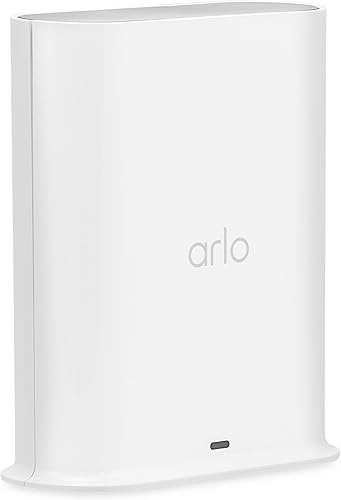
That short answer needs one clear caution. The Blink item in this Blink vs Arlo comparison is an audiobook, not a camera, while the Arlo item is a hub that connects Arlo cameras to Wi-Fi.
We compared the specs as given, and the choice turns on what kind of product you actually need at home.
Our score weighs specs, features and buyer feedback against what you're shopping for. We have not tested these products hands on.
We checked the specs and compared what each title actually includes.
 Best for simple audio listening
Malcolm Gladwell, Little, Brown & Company Blink
Blink vs Arlo: the quick verdict for your home
Arlo wins for camera homes that want a hub, and Blink wins only if you want this audiobook, not home video. The Arlo Pro SmartHub is built to connect Arlo cameras, while the Blink title is a spoken book with a 7 hour and 44 minute listening length.
Buyers shopping for blink vs arlo security cameras often want one system for doors, yards and driveways. A hub can support that plan, but a book cannot.
Treat the Blink option here as a non camera item, and do not add it to a camera count.
For camera use, the Arlo hub has a clear job. It connects cameras to Wi-Fi, supports local backup and can work with Essential, Pro 5S/6/6 XL, Ultra, Floodlight and Video Doorbell cameras.
That list helps you plan a mixed setup with cameras in more than one spot.
The two side by side on power, recording and service
The Arlo hub covers recording support, while the Blink audiobook covers none of these home security tasks. The table below shows the practical difference in power, storage and ongoing service needs.
| Point | Malcolm Gladwell, Little, Brown & Company Blink | Arlo Pro SmartHub |
|---|---|---|
| Product type | Audiobook, unabridged | Hub accessory for Arlo cameras |
| Power | No home power use for a camera | Power adapter in the box, indoor use |
| Recording | No video recording | USB Type A local video backup |
| Connectivity | No Wi-Fi camera link | Wi-Fi 2.4 GHz, Z-Wave, Zigbee and ArloRF ready |
| Indoor or outdoor | Not for home security placement | Indoor hub, cameras cover outdoor spots |
| Control | Listening format only | App control and voice assistant links |
| Product | Best for | Program type | Listening length | Narrator | Our score |
|---|---|---|---|---|---|
| Malcolm Gladwell, Little, Brown & Company Blink | simple audio listening | Audiobook | 7 hours and 44 minutes | Malcolm Gladwell | 9.3 |
| Arlo Pro SmartHub | hub based camera systems | 9.1 |
For power, the Arlo hub includes a power adapter and an Ethernet cable for a wired connection to your home router. That wired link matters because the hub is the bridge between your cameras and your network.
The Blink audiobook needs no outlet, no router and no camera battery, because it is not watching your home.
For recording, the Arlo hub supports local video backup through USB Type A. That gives you a storage path at the hub, in addition to camera storage choices you must check for each camera model.
The Blink title has a listening length, not a recording length.
For ongoing service requirements, an Arlo system needs cameras, a hub link and a storage plan. The Blink audiobook needs only a way to listen.
Do not mix those needs when you budget time or money for a camera system.
Power needs: hub plug in, batteries at the cameras
The Arlo SmartHub plugs in indoors, while the Blink audiobook has no camera power at all. The hub box includes a power adapter, an Ethernet cable and a quick start guide.
Place the hub where it can reach your router by wire and still reach cameras by wireless. Arlo says the hub provides long range connectivity for your cameras.
That helps when a camera sits far from the router, but placement still needs a check room by room.
Setup uses the 2.4 GHz band for cameras. If your router is dual band, Arlo says the device can switch to the stronger band once connected.
That dual band point helps with phones and tablets, while cameras stay on the band the hub manages.
The hub measures 5.42 x 7.2 x 3.1 inches and weighs 16 ounces. It is a small box that can sit on a shelf or stand, but it is listed as indoor use.
Keep it away from outdoor mounts, rain and direct yard placement.
Recording features: local backup and camera storage
Recording in this Blink vs Arlo pair belongs to Arlo, through the hub and the cameras it serves. The SmartHub supports local video backup through a USB Type A connection.
That local backup can reduce reliance on cloud storage for the portion of footage saved at home. It does not remove the need to check how each camera saves clips, how long files stay on the hub and how you review them in the app.
Check those points for the exact camera models you plan to buy.
The hub also has a smart siren. That siren is part of the hub system, not a separate outdoor siren you can move anywhere.
Use it as an indoor alert point and check camera siren features separately.
The Blink audiobook has no recording feature for home video. Its 7 hour and 44 minute length tells you how long the narration runs, with Malcolm Gladwell as narrator.
Do not count that time toward camera coverage or storage planning.
If you want broader camera context before you choose, our guide to the best blink security cameras helps you see how Blink camera picks differ from this audiobook item.
Ongoing service requirements: what you must maintain
Arlo needs a hub, cameras, a router link and storage care, while Blink here needs only listening access. The ongoing work for a camera system is real, and it starts before the first clip.
You must keep the hub plugged in, check the wired router link and confirm cameras still connect. You must also check battery levels in outdoor cameras if you use battery models, and confirm that local backup storage is working.
The hub supports Wi-Fi 2.4 GHz, Z-Wave, Zigbee and ArloRF, so changes to your router or smart home gear can affect the setup.
App control is part of the hub design. The hub works with desktop, laptop, smartphone and tablet, and its controller types include Amazon Alexa, Apple HomeKit, Google Assistant and IFTTT.
Test those links after setup if you plan to use voice control or automations.
The Blink audiobook has no service plan, no camera check and no storage care. That is not a benefit for home security.
It simply means the item does not belong in a camera service budget.
For a close brand comparison before you buy cameras, read our blink vs ring security camera guide and compare service needs across brands.
Wi-Fi and hub placement: where the SmartHub helps most
The Arlo SmartHub helps most in homes where cameras sit far from the router. It connects Arlo cameras to Wi-Fi through your home router and provides long range connectivity for cameras.
Expanded coverage can come through additional base stations. That point matters for larger homes, detached garages or yards where one router spot may not reach every camera.
Plan hub placement first, then test each camera spot before you drill mounts.
The hub has 4 channels in the specs. That channel count helps you think about how many camera streams the hub can support in the setup described.
Confirm the exact camera models and hub limits for your planned count before you buy more cameras.
The Blink audiobook has no Wi-Fi role. It cannot extend range, manage cameras or link a doorbell.
If range is your main concern, focus on the hub, the cameras and the router layout.
For context on larger wired systems, see how many cameras can an NVR support in most homes and compare hub based wireless plans with wired recorder plans.
Camera choices: what the Arlo hub works with
The Arlo SmartHub works with a clear list of Arlo camera types, which helps you mix spots. Arlo lists Essential 1, 2, 3 and 3 XL, Pro 5S, 6 and 6 XL, Ultra cameras, Floodlight and Video Doorbell cameras.
That list lets you plan by location. Use doorbell cameras near the front door, floodlight cameras where light matters and other cameras at side yards or driveways.
The hub then ties those cameras to one system for viewing and backup.
The Blink title gives no camera list at all. It is an unabridged English audiobook published April 5, 2005, by Little, Brown & Company.
That detail matters for listeners, not for a camera map of your home.
If you plan outdoor Blink mounts in a separate purchase, our best blink outdoor 4 mounting brackets guide can help you plan the mount side. For install steps, read our guide on how to mount Blink Outdoor 4 before you place screws.
Who should buy which in this Blink vs Arlo choice
Buy Arlo if you want a hub for Arlo cameras, and buy Blink only if you want the audiobook. The right pick depends on the job, not on the brand name alone.
Choose the Arlo Pro SmartHub if you already plan Arlo cameras or want backup at a hub. It suits homes with several camera spots, a router in a central place and a need for local video backup.
It also suits buyers who want app control and smart home links through Alexa, Apple HomeKit, Google Assistant or IFTTT.
Choose the Blink audiobook if you want to listen to Blink in spoken form. It runs 7 hours and 44 minutes, is narrated by Malcolm Gladwell and is the unabridged version.
That pick suits a commute, a walk or time at home with headphones.
Do not buy the audiobook as a security camera substitute. It cannot watch a door, record a yard or alert you to motion.
For visible deterrence without a live camera, read what is a decoy security camera and what it does and compare that role with real recording.
Trade offs: simplicity against hub control
Blink is simpler because it does less, and Arlo is more work because it connects more. That trade off sits at the center of this Blink vs Arlo comparison.
The Blink audiobook needs no mounts, no batteries and no storage checks. Its trade off is total: it gives no home video protection.
Simplicity here is not a camera advantage, since the item does not perform camera tasks.
The Arlo hub gives control through a wired router link, wireless camera links and local backup. Its trade off is setup work: placement, app pairing, camera checks and storage care.
The hub is also indoor only, so outdoor cameras still need their own mounts and power plans.
For buyers who want a different wired brand path, compare the best amcrest security camera picks. For a broader wired and wireless mix, check the best Annke security cameras guide and compare service needs there too.
Setup and care in plain steps
Set up Arlo by placing the hub, wiring it to the router and pairing cameras one by one. Start with the hub in a central indoor spot, then connect the Ethernet cable to your router as the manual directs.
Add the power adapter and confirm the hub shows a good link before you mount outdoor cameras. Pair each camera near the hub first, then move it to its final spot and check the live view.
That order helps you find weak spots before you fix mounts in place.
Check the USB Type A backup path after pairing. Confirm files save as you expect and that you can review them in the app.
Keep the hub firmware and app current, and recheck links after router or password changes.
Care for the Blink audiobook is simple: keep the file or disc in a safe place and use a player you trust. There are no lenses to clean, no batteries to swap and no mounts to tighten.
That care list is short because the item is media, not a camera.
Final verdict: Blink vs Arlo for your home
For home security cameras, choose Arlo over Blink in this pair, because only Arlo connects cameras to Wi-Fi and local backup. Pick the Arlo Pro SmartHub if your plan uses Arlo cameras at the door, yard, driveway or side of the house.
Pick the Blink audiobook only for listening. Its 7 hour and 44 minute unabridged narration makes it a clear pick for audio fans, but it adds no coverage to your home.
If you need cameras, build the plan around cameras, mounts, power and storage first.
Count your camera spots, check hub range and confirm storage before you buy. That step will tell you more than brand names alone.
Then compare blink vs arlo options by the exact models you plan to use, not by a book title paired with a hub.
Frequently asked questions
Is Blink vs Arlo a choice between two camera brands?
In this comparison, Blink is represented by a Blink audiobook title with no camera features, while Arlo is represented by the Arlo Pro SmartHub for Arlo cameras. That gap matters, so judge the Arlo hub on its hub features and do not treat the audiobook as a camera system.
Which system fits a small home better?
A hub based Arlo setup fits when you plan several Arlo cameras and want local backup through the hub. A single camera need may not need a hub at all, so count the cameras first and check what each camera needs to connect and record.
Does the Arlo Pro SmartHub record by itself?
The Arlo Pro SmartHub connects Arlo cameras to Wi-Fi and supports local video backup through a USB Type A connection. It is a hub accessory, not a camera, so cameras such as Essential, Pro, Ultra, Floodlight and Video Doorbell models do the seeing and recording.
What should you check before buying either option?
Check the exact product type first, then power needs, Wi-Fi band, storage method and ongoing service requirements for the cameras you plan to use. Count how many cameras you need, where they will mount and how footage will be stored.


