8 Best PoE Switches with Four Powered Ports (November 2026)
The best four-port PoE switches include the TP-Link 8 Port Gigabit Ethernet Network Switch for adding wired devices, the TP-Link TL-SG1005P for four PoE+ cameras, and the NETGEAR 5-Port PoE Gigabit Ethernet Unmanaged Essentials for simple 63W PoE power.
On this page (4 sections)
The best PoE switch with four powered ports for most small camera systems is the TP-Link TL-SG1005P, with four PoE+ ports and a 65W total budget. For higher stated power, consider YuanLey; for VLAN and per-port controls, consider NETGEAR's managed model.
A switch described as four-port PoE often has five physical Ethernet ports: four powered connections and a separate uplink. Count powered ports and total ports separately when planning cameras, access points, and the connection back to your router or recorder.
For a broader look at home network layout, see our guide to mesh Wi-Fi. If only two powered connections are needed, compare two-port PoE switches.
Our picks at a glance
-
1
 Best for adding wired devices
TP-Link 8 Port Gigabit Ethernet Network Switch
9.7/10 our score
See it on Amazon -
2

-
3
 Best for simple 63W PoE power
NETGEAR 5-Port PoE Gigabit Ethernet Unmanaged Essentials
9.4/10 our score
See it on Amazon
- 4
 Check it
NETGEAR 5 Port PoE Gigabit Ethernet Easy
Best for per-port PoE controls - 5
 Check it
YuanLey 5 Port Gigabit PoE Switch
Best for a larger stated power budget - 6
 Check it
Goalake 5-Port Ethernet PoE Switch
Best for mixed port speeds - 7
 Best for managed features on a budgetCheck it
- 8
 Check it
TRENDnet 5-Port Gigabit PoE+ Switch
Best for light PoE loads
How we chose four-port PoE switches
The best four-port PoE switch depends on powered-port count, total PoE budget, port speed, and whether you need network controls. We compared those features and ranked the listed options by how well their documented features fit small camera and access-point groups.
Our score weighs specs, features and buyer feedback against what you're shopping for. We gave priority to four PoE ports, useful power capacity, and a clear uplink arrangement, while accounting for management features and speed limits where stated.
A four-port PoE switch can provide power and network data to compatible devices over Ethernet. Your cameras still need to be compatible with the switch's PoE standard, and their combined power draw must stay within the total budget.
| Product | Best for | Ports | PoE | Management | Our score |
|---|---|---|---|---|---|
| TP-Link 8 Port Gigabit Ethernet Network Switch | adding wired devices | 8 Gigabit RJ45 | No PoE | Unmanaged | 9.7 |
| TP-Link TL-SG1005P | four PoE+ cameras | 9.5 | |||
| NETGEAR 5-Port PoE Gigabit Ethernet Unmanaged Essentials | simple 63W PoE power | Unmanaged | 9.4 | ||
| NETGEAR 5 Port PoE Gigabit Ethernet Easy | per-port PoE controls | Easy Smart managed | 9.2 | ||
| YuanLey 5 Port Gigabit PoE Switch | a larger stated power budget | 9.0 | |||
| Goalake 5-Port Ethernet PoE Switch | mixed port speeds | 8.7 | |||
| STEAMEMO 5 Port PoE+ Switch | managed features on a budget | 8.5 | |||
| TRENDnet 5-Port Gigabit PoE+ Switch | light PoE loads | 8.2 |
The best PoE switches with four powered ports
These picks all provide four PoE ports, though budgets, port speeds, and controls differ. Match the switch to your devices' power needs and the network features you plan to use.
TP-Link 8 Port Gigabit Ethernet Network Switch: Best for adding wired devices
- 8 Gigabit RJ45 ports
- Unmanaged plug-and-play setup
- Fanless metal housing
This non-PoE switch is useful when you need extra wired network ports alongside a separate PoE switch. Its eight Gigabit ports and fanless metal design suit a quiet home network.
Pros
- Eight Gigabit ports
- Fanless operation
- Metal housing
Cons
- Does not power PoE devices
- Uses a separate power adapter
The TP-Link TL-SG108 is not a PoE switch, so it can't power cameras or access points over Ethernet. It earns a place here as a companion option when you need more wired network connections beside a separate PoE switch.
All eight ports support 10/100/1000 Mbps connections. The unmanaged plug-and-play setup requires no configuration, and the fanless metal design suits a room where switch noise would be distracting.
Use it to add wired connections for a recorder, computer, printer, or other Ethernet device. Pairing it with a PoE switch can expand the data network, but only the PoE switch supplies power to compatible endpoints.
Choose this model when your main need is port expansion and PoE power is handled elsewhere. If you need a single switch to power four cameras, choose one of the PoE models below instead.
TP-Link TL-SG1005P: Best for four PoE+ cameras
- 4 PoE+ ports
- 65W total PoE budget
- 1 non-PoE Gigabit port
Four PoE+ ports and a stated 65W total budget fit a small group of compatible devices. QoS and IGMP Snooping add traffic features without requiring managed-switch setup.
Pros
- Up to 30W per PoE port
- QoS and IGMP Snooping
- Metal case and fanless design
Cons
- Only one non-PoE port
- No VLAN management noted
The TP-Link TL-SG1005P is the best fit for a straightforward four-device PoE setup. It has four PoE+ ports with a 65W total power budget, plus one Gigabit port that does not provide PoE.
TP-Link specifies support for 802.3af/at devices and up to 30W per PoE port. Check each camera's maximum draw as well as the combined load, since the 65W total budget is shared across the powered ports.
QoS and IGMP Snooping are included for traffic handling, and the metal case is fanless. TP-Link also describes desktop and wall-mount placement, so the switch can fit on a shelf or a suitable mounting surface.
Choose this model for four compatible PoE devices when an unmanaged setup is enough. For VLAN controls or port monitoring, consider a managed alternative such as the best managed four-port PoE switches.
NETGEAR 5-Port PoE Gigabit Ethernet Unmanaged Essentials: Best for simple 63W PoE power
- 4 PoE+ ports
- 63W total PoE budget
- Desktop or wall mounting
This unmanaged option combines four PoE+ ports with a 63W budget and dynamic PoE allocation. Its metal case supports desktop or wall placement.
Pros
- Dynamic PoE allocation
- Fanless metal design
- Desktop or wall mounting
Cons
- No network management features
- Power budget is lower than the TP-Link pick
NETGEAR's GS305P is a simple choice if you want four PoE+ ports and a 63W budget without configuring network features. It has four powered Gigabit ports and one additional Gigabit Ethernet port.
Dynamic PoE allocation redistributes unused power among connected devices, according to NETGEAR. The switch has a compact metal case, fanless operation, and supports desktop or wall mounting.
Its unmanaged design keeps setup simple, but it does not offer the VLAN and per-port management options found on the managed NETGEAR model below. Check your devices' total power needs before choosing it, especially if several endpoints draw close to their maximum.
Choose the GS305P for a plug-and-play camera or access-point group that fits within 63W. If you need management controls, compare it with the best managed PoE switch with four ports.
NETGEAR 5 Port PoE Gigabit Ethernet Easy: Best for per-port PoE controls
- 4 PoE+ ports
- 63W total PoE budget
- VLAN, QoS, port monitoring
Easy Smart management adds VLAN configuration, QoS, port monitoring, and per-port PoE controls. This is a fit when you want to manage traffic and power from a compact switch.
Pros
- VLAN and QoS features
- Per-port PoE controls
- Uninterrupted PoE feature
Cons
- Plastic case
- Management adds setup steps
The NETGEAR GS305EP suits a small network where per-port PoE control and traffic management matter. It provides four PoE+ ports and a 63W total budget, with VLAN, QoS, and port-monitoring features.
Its per-port PoE controls let you manage power delivery, while the uninterrupted PoE feature is designed to keep PoE power on during a firmware update or software reboot. NETGEAR also describes a web-based management interface.
The switch supports desktop or wall placement and has fanless operation. Its case is plastic, so consider where it will sit and how you plan to mount it before buying.
Pick this model when you want management features without moving to a larger switch. See our four-port TP-Link PoE switch guide for another four-powered-port option.
YuanLey 5 Port Gigabit PoE Switch: Best for a larger stated power budget
- 4 Gigabit PoE+ ports
- 78W total PoE power
- One Gigabit uplink
The 78W stated power total is the largest among these four-PoE-port picks. A one-key VLAN mode isolates PoE ports from one another while allowing communication with uplink ports.
Pros
- 78W total power
- All five ports are Gigabit
- VLAN isolation mode
Cons
- VLAN mode behavior should match your network plan
- Brand support details are limited
YuanLey's five-port switch has four Gigabit PoE+ ports, one Gigabit uplink, and a 78W total power budget. That is the largest stated budget among the four-PoE-port options in this guide.
Its one-key VLAN mode isolates PoE ports from one another while allowing traffic to reach the uplink ports. The switch is unmanaged otherwise, with plug-and-play setup and a metal housing.
The stated per-port ceiling is 30W, so the total budget does not mean each port can draw 30W at once. Check both the individual device limits and the combined power required by your cameras or access points.
Consider YuanLey if your devices need more combined power than the 52W or 63W options provide. Confirm that its VLAN mode and uplink behavior suit the network you intend to build.
Goalake 5-Port Ethernet PoE Switch: Best for mixed port speeds
- 4 PoE ports
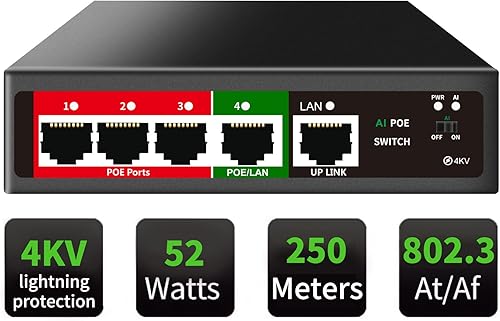
- 52W total PoE power
- Two PoE ports are 100 Mbps
Two PoE ports support Gigabit speeds and two support 100 Mbps, with a Gigabit uplink. Its Easy Smart features include VLAN, QoS, port mirroring, and bandwidth controls.
Pros
- VLAN and QoS features
- Desktop or wall mounting
- 52W total PoE power
Cons
- Two PoE ports are limited to 100 Mbps
- Confirm device speed needs before connecting
Goalake's five-port model fits buyers who want management features and can work with mixed PoE port speeds. It has two Gigabit PoE ports, two 100 Mbps PoE ports, and one Gigabit uplink.
Its stated total PoE power is 52W, with up to 30W per PoE port. Management features include VLAN, QoS, port mirroring, and bandwidth controls, while the metal design supports desktop or wall placement.
Check camera network requirements before using the 100 Mbps ports. They may suit devices whose network needs fit that speed, but a camera with a Gigabit requirement should use one of the two Gigabit PoE ports.
Choose Goalake if you need its management features and can assign devices to the right port speeds. For a more focused look at switches with a fiber uplink, see four-port PoE switches with SFP.
STEAMEMO 5 Port PoE+ Switch: Best for managed features on a budget
- 4 PoE+ ports
- 52W total PoE budget
- VLAN and QoS support
The STEAMEMO combines four PoE+ ports with a 52W budget and management features such as VLAN, QoS, DHCP Snooping, and port mirroring. It supports desktop or wall placement.
Pros
- VLAN and QoS support
- Managed and unmanaged modes
- Fanless design
Cons
- Two PoE ports are 100 Mbps
- Management options may take setup
STEAMEMO combines four PoE+ ports with a 52W budget and management features such as VLAN, QoS, DHCP Snooping, and port mirroring. Its port layout includes two Gigabit PoE ports, two 100 Mbps PoE ports, and one Gigabit uplink.
The product description says it can switch between managed and unmanaged modes. That gives you a simple mode for basic connections and additional controls when you need them, though you may need to configure the network features yourself.
The switch supports desktop or wall mounting and has a fanless design. Because two powered ports are limited to 100 Mbps, check which cameras will connect to them and whether their video traffic fits that speed.
Consider this option when you want management features with a compact four-powered-port layout. If all camera ports need Gigabit speeds, choose a switch whose four PoE ports are all specified as Gigabit.
TRENDnet 5-Port Gigabit PoE+ Switch: Best for light PoE loads
- 4 Gigabit PoE+ ports
- 32W PoE budget
- 10Gbps switching capacity
Four Gigabit PoE+ ports and a 32W total budget suit a group of devices whose combined power needs stay within that limit. Its fanless metal housing is designed for quiet desktop use.
Pros
- All four PoE ports are Gigabit
- Lifetime manufacturer protection in the US and Canada
- Fanless metal housing
Cons
- Lowest PoE budget in this group
- No management features noted
TRENDnet's TPE-TG52 offers four Gigabit PoE+ ports and a 32W total PoE budget. Its five-port layout includes one additional Gigabit port, while 10Gbps switching capacity supports the switch's stated network throughput.
This budget is lower than the other PoE models here, so calculate the combined draw of connected devices before choosing it. A four-port count does not guarantee enough power for four devices at their maximum load.
The metal switch has a fanless design and a wall-mount option. TRENDnet states lifetime manufacturer protection for the United States and Canada, and lists a 0°C to 40°C operating temperature range.
Pick it for a small group of lower-draw devices when all four PoE ports need Gigabit connectivity. If the combined power demand exceeds 32W, choose a model with a higher total budget.
How do you choose a four-port PoE switch?
Choose a four-port PoE switch by checking the powered ports, the uplink, and the total power budget. Then confirm port speed and whether you need management features such as VLAN or per-port power control.
How many ports does a four-port PoE switch use?
A four-port PoE switch commonly has four powered ports plus a separate uplink port, for five physical ports total. The uplink carries data to your router, recorder, or existing network, but usually does not provide PoE on these models.
For whole-home Wi-Fi and wired networking, see the TP-Link Deco BE25 review.
Count the ports you need for powered devices separately from the uplink. If you also want a wired connection for a computer or recorder, check whether the switch has another non-PoE port or plan for a second switch.
What PoE budget should you choose?
Choose a total PoE budget that exceeds the combined maximum draw of the devices you plan to connect. Check the per-port ceiling too, since a switch may have enough total power but still lack the per-port capacity for a particular camera.
For example, the TL-SG1005P has a 65W total budget and up to 30W per PoE port. TRENDnet's TPE-TG52 has a 32W total budget, which may fit lower-draw cameras but leaves less room for devices with higher power needs.
Do all four PoE ports need to be Gigabit?
No, but the connected device's network speed should guide the choice. Goalake and STEAMEMO each specify two Gigabit PoE ports and two 100 Mbps PoE ports, while the TP-Link, NETGEAR, YuanLey, and TRENDnet models specify Gigabit PoE ports.
Use Gigabit connections where your devices or network need them. If a camera's network port is only 100 Mbps, a 100 Mbps switch port may be sufficient for that device, subject to its traffic and network plan.
When should you choose managed PoE?
Choose a managed switch when you need features such as VLANs, QoS, port monitoring, or power control for each port. An unmanaged switch is easier when you only need to connect devices and don't plan to configure traffic rules.
For cameras, VLANs can help separate camera traffic from other network devices when configured correctly. If you want to route camera traffic through a fiber connection, explore four-port PoE switches with SFP.
Can a PoE switch power every security camera?
A PoE switch can power a camera only when the camera and switch use compatible PoE standards and the switch has enough available power. Check the camera's own power requirements before connecting it.
A battery-powered camera may not use Ethernet for power at all. Read what a battery-powered security camera is to understand how that style differs from a wired PoE camera.
Which four-port PoE switch should you choose?
Choose the TP-Link TL-SG1005P for four PoE+ devices and a 65W budget, or YuanLey when its 78W stated budget is useful. Pick NETGEAR's managed model for per-port PoE controls, and choose TRENDnet when 32W is enough and all four powered ports need Gigabit speeds.
If you only need to power two devices, a two-port PoE switch may better fit the setup. For a smaller footprint, compare mini PoE switches or wall-mount PoE switches.
faq
Our top 3 picks at a glance
-
1
Best for adding wired devices
TP-Link 8 Port Gigabit Ethernet Network Switch
9.7/10 our score
See it on Amazon -
2
-
3
Best for simple 63W PoE power
NETGEAR 5-Port PoE Gigabit Ethernet Unmanaged Essentials
9.4/10 our score
See it on Amazon
Frequently asked questions
Does a four-port PoE switch have four or five Ethernet ports?
Most compact four-port PoE switches have five Ethernet ports total: four ports that provide PoE and one port for an uplink. The uplink connects the switch to your router or network.
Check the port labels and configuration, since some models use different layouts.
How much PoE power do four cameras need?
Add the maximum power draw of all four cameras, then leave room below the switch's total PoE budget. A switch can have four powered ports yet still lack enough total power for four high-draw devices.
Check both per-port limits and the combined budget.
Can I connect a non-PoE device to a PoE switch?
Yes, a standard Ethernet device can usually use a PoE switch port for data, but confirm the switch supports automatic PoE detection and check its instructions. The YuanLey product description says it detects PoE and non-PoE devices automatically.
Do I need a managed four-port PoE switch?
An unmanaged switch is simpler when you only need to connect devices and supply power. Choose a managed model if you want features such as VLANs, QoS, port monitoring, or per-port power controls, and make sure those settings fit your network.