Aqara Smart Lock U100 Review: Worth It? (November 2026)
The Aqara Smart Lock U100 suits Apple Home households that want fingerprint entry and Home Key tapping on a deadbolt. It is a strong fit if you already use iPhone or Apple Watch, and less ideal if you need an NFC card in the box or want hub-free remote passwords.
On this page (12 sections)
- The Aqara Smart Lock U100 at a glance
- Who the U100 suits best
- Fingerprint entry in daily use
- Apple Home and Home Key explained
- Keypad codes and guest passwords
- Battery life, weather resistance and security
- Setup and hub choices
- Auto-lock and Do Not Disturb mode
- Trade-offs to weigh before you buy
- How the U100 compares with the U200
- Care and long-term use
- Verdict: should you buy the U100?
The Aqara Smart Lock U100 is a fingerprint deadbolt built for Apple Home, and this aqara smart lock u100 review looks at where that focus helps and where it creates limits. It suits households that already carry iPhone or Apple Watch and want guest access managed in one app.
Choose it if Apple Home is your main platform. Look at newer Aqara models or a different brand if you refuse to buy a hub or want a card included.
Our score weighs specs, features and buyer feedback against what you are shopping for. We compared the specs and checked how each feature works in daily use.
The Aqara Smart Lock U100 at a glance
The U100 offers fingerprint, Home Key, keypad and key entry in a gray zinc alloy deadbolt. It measures 5.27 x 3.46 x 2.91 inches and uses Bluetooth and Zigbee.
Aqara Smart Lock U100: Best for Apple Home Key entry
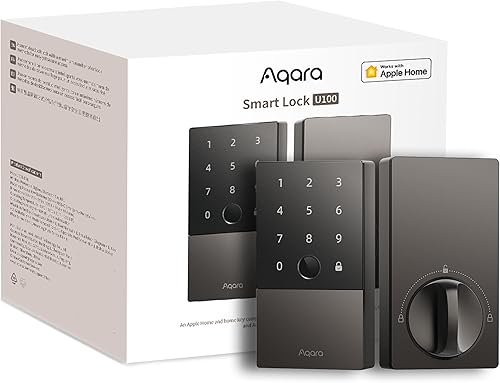
- Apple Home Key support
- Fingerprint reader for up to 50 fingerprints
- Keypad with permanent, periodic and one-time passwords
- Auto-lock and Do Not Disturb mode
- 4 AA batteries with USB-C emergency charging
- Zinc alloy body with IP65 rating
A fingerprint deadbolt built around Apple Home, with keypad codes and a mechanical key backup. It works best when your phone platform and hub setup match its design.
Pros
- Apple Home Key works with iPhone or Apple Watch, even when the device is out of power
- Fingerprint storage for up to 50 people
- One-time local passwords work without internet
- Auto-lock helps prevent a door being left open
- USB-C port provides emergency charging
Cons
- NFC card is not included and is sold separately
- Remote password setup needs an Aqara Zigbee 3.0 hub
- Sharing Apple Home Keys needs an Apple Home Hub
Its size matters on a narrow door stile. Measure the door edge and the space around the handle before you order, and confirm the deadbolt bore matches a standard door.
Key facts in one place
The lock runs on 4 AA 1.5V batteries, included in the box, with battery life up to 8 months. A USB-C port gives emergency charging if the batteries run flat.
Aqara says the zinc alloy body has an IP65 rating and meets the same safety standard as BHMA Level 3. The stated temperature range is -31°F to 151°F, which covers most covered porch use.
Who the U100 suits best
The U100 suits Apple households with regular guests. You can share door access in Apple Home, so a guest gets a Home Key instead of a copied physical key.
It also suits families who want separate entry methods per person. One person can use a fingerprint, another can use a code, and a visitor can use a one-time password.
It suits renters who want keyless entry but still want a mechanical key backup. Two mechanical keys are included, so you can keep one with a trusted person outside the home.
It suits Aqara users who already own a Zigbee 3.0 hub. With that hub, you can set remote passwords in the Aqara Home app and link the lock to Google Home, Alexa or IFTTT automations.
It is a weaker fit if you want every feature out of the box. The NFC card costs extra, and some remote features wait on a hub purchase.
Our guide to smart door locks helps you compare deadbolts with lever locks and rim locks before you pick a type.
Fingerprint entry in daily use
Fingerprint entry stores up to 50 fingerprints for fast access without a code. That capacity covers most families, plus a few regular guests or helpers.
Aqara says fingerprints are stored locally and AES encrypted. Local storage limits exposure compared with sending biometric data to a cloud service, and it also means a new phone session does not move your prints.
Enroll each user in person and choose the finger each person will use most. A thumb or index finger that works cleanly on day one will work better on wet or dirty days.
Keep the keypad as your second method. Gloves, wet hands or a wet sensor can slow fingerprint entry, and a code gives you a simple fallback.
Keep one mechanical key as the final fallback. A dead battery, a damaged sensor or a new resident who has not enrolled yet can all make the key the fastest option.
Apple Home and Home Key explained
Apple Home Key lets you tap iPhone or Apple Watch to open the door. Aqara says this works even when the iPhone or Apple Watch is out of power, which helps if your phone dies on the way home.
You manage and share guest access in Apple Home. That keeps permissions in one place, and you can change or remove a guest without taking back a physical key.
Sharing Apple Home Keys needs an Apple Home Hub. Without that hub, you can still use your own keys at the door, but guest sharing will not work as described.
Our list of the best smart lock for Apple HomeKit shows how the U100 compares with other locks built for the same platform.
Keypad codes and guest passwords
The matte keypad supports permanent, periodic and one-time passwords. Aqara also describes an anti-peep password option, which lets you add extra digits around your real code.
One-time passwords are generated locally. They work even if the home internet is down, which matters for a cleaner, dog sitter or repair visit during an outage.
Remote passwords need an Aqara Zigbee 3.0 hub. The hub lets you create or change codes in the Aqara Home app when you are away from the door.
Plan code hygiene from the start. Give each regular user a unique permanent code, set an end date for periodic codes, and delete one-time codes after the visit.
Avoid shared family codes if you can. Unique codes show who entered in activity records and make it easy to remove one person without changing codes for everyone else.
Battery life, weather resistance and security
Battery life reaches up to 8 months on 4 AA batteries. Aqara includes the batteries, so you can start using the lock without a separate purchase.
The USB-C port is for emergency charging. It does not replace AA batteries for normal use, so treat it as a backup if the lock loses power at the door.
The zinc alloy body has an IP65 rating. That rating covers dust and water spray, but it does not mean you should hose the lock or leave electronics submerged.
Aqara says the lock meets the same safety standard as BHMA Level 3. That is a durability and security benchmark for deadbolts, and it signals the U100 is aimed at front door use rather than a light interior door.
Fingerprint data stays local and encrypted. End-to-end encryption protects data in transit, and local storage reduces the risk from a cloud account breach.
Setup and hub choices
Setup starts with door fit, batteries and app pairing. Install the lock body, fit the 4 AA batteries, then add the lock in the Aqara Home app or Apple Home as the manual directs.
Smart lock installation is easier when you check door thickness, backset and strike alignment first. A misaligned strike can make any deadbolt bind, even when the electronics work fine.
Decide on hubs before you buy extras. An Aqara Zigbee 3.0 hub supports remote passwords and third-party automations, while an Apple Home Hub supports sharing Home Keys.
Test every entry method before you rely on it. Try fingerprint, keypad, Home Key and the mechanical key, then check that the deadbolt throws fully and retracts fully.
Walk through the door to check auto-lock. The built-in gyroscope helps the lock detect a closed door, and auto-lock then secures it for you.
Our smart lock installation guide walks through measuring the door and checking alignment before mounting.
Auto-lock and Do Not Disturb mode
Auto-lock secures the door after you close it, without a separate tap. That helps if you leave with bags in both hands and forget to check the bolt.
You can disable auto-lock if you prefer the door to stay open. That setting suits a home office or a shop counter, but it removes the main safety benefit on a front door.
Do Not Disturb mode mutes lock sounds for a set period. It helps if you return late and do not want a chirp to wake family members.
Set the mute window around your normal return times. A short window for late nights is more useful than leaving sounds off all day.
Test auto-lock with the door fully closed and latched. If the door bounces or the strike is tight, adjust the strike or hinges before blaming the lock electronics.
Trade-offs to weigh before you buy
Home Key is the headline feature, but hubs and a separate card add cost. Remote passwords need a Zigbee 3.0 hub, guest Home Key sharing needs an Apple Home Hub, and the NFC card is sold separately.
Bluetooth alone covers entry at the door. Zigbee matters when you want remote code changes, automations with Google Home or Alexa, or a link to an Aqara video doorbell.
Aqara gives an example with the Aqara Video Doorbell G4. When someone presses that doorbell, you can see who is at the door and open the U100 from the same setup.
That example shows the value of automations, but it also shows the cost of building a full ecosystem. Price the hub and any doorbell before you compare the lock with a hub-free rival.
The detailed aqara smart lock review of the newer U400 helps if you want to see what changed in the next model.
How the U100 compares with the U200
The U200 is the model to check if you want a newer Aqara design. Compare its entry methods, hub needs and card support with the U100 before you choose by age alone.
Our Aqara Smart Lock U200 review covers that model's fingerprint and keypad setup in the same detail. Read both reviews side by side if you are torn between the two.
Price tier alone should not decide the pick. Door fit, your phone platform and whether you already own a hub matter more than a small price gap.
If you already own Aqara gear, the U100 fits your current app and hub. If you own none of it, a lock with fewer hub needs may cost less over time.
Care and long-term use
Clean the fingerprint sensor and keypad with a dry or lightly damp soft cloth. Avoid harsh cleaners, and dry the surface fully after cleaning.
Replace AA batteries when the app or lock reports a low level. Do not wait for a full discharge, and keep spare AA batteries in a known place for a quick swap.
Test the mechanical key twice a year. A key that sticks in winter can become a bigger problem if the batteries fail at the same time.
Check the strike plate and door alignment once a year. Seasonal swelling can make the bolt bind, and a smooth throw protects the motor and batteries.
Store the second mechanical key outside the home. A trusted neighbor or family member is a safer place than a drawer inside the house you are trying to enter.
Verdict: should you buy the U100?
Buy the Aqara Smart Lock U100 if Apple Home is your main platform. Fingerprint entry, Home Key tapping and guest access in Apple Home form a clear match for iPhone households.
Skip it if you want an NFC card included or remote codes with no hub. The card is separate, and remote password setup needs a Zigbee 3.0 hub.
Our score of 9.7 reflects strong Apple Home integration, local fingerprint storage and solid battery life, weighed against the hub and card costs.
For a wider view of Home Key locks, read our best smart lock with Apple Home Key roundup before you decide.
If you own a different brand, our guides on how to lock an eufy smart lock and how to lock a Kwikset smart lock cover daily use for those locks.
This aqara smart lock u100 review points to one rule: pick the U100 when your phone, hub and door all fit its design, and pick a rival when any one of those pieces does not.
Frequently asked questions
Does the Aqara Smart Lock U100 work with Apple Home Key?
Yes, Aqara says the U100 supports Apple Home Key, so you can hold an iPhone or Apple Watch near the lock to open it, even when the device is out of power. Sharing keys with guests needs an Apple Home Hub, and you manage guest access in the Apple Home app rather than handing out a physical key.
How many fingerprints does the U100 store?
The U100 stores up to 50 fingerprints in its high-precision fingerprint reader. Aqara says fingerprint data is stored locally on the device and is AES encrypted, rather than being sent to a cloud account.
That local storage also means you should enroll each regular user in person and keep the mechanical key as a backup.
What is included with the Aqara Smart Lock U100?
The box includes the Smart Lock U100, four AA batteries, installation accessories, two mechanical keys and a user manual. It does not include an NFC card, which Aqara sells separately.
Check that your door fits the lock before ordering, and keep both mechanical keys in safe places for emergency use.
Does the U100 need a hub for remote passwords?
Remote password setup through the Aqara Home app needs an Aqara Zigbee 3.0 hub. One-time passwords are created locally and work without internet, and Apple Home features need an Apple Home Hub when you share Home Keys.
If you mainly use fingerprint or Home Key entry at the door, you may not need a hub on day one.


