PoE Switch vs PoE NVR: Which Camera Setup Should You Choose? (October 2026)
Choose a PoE NVR for a simpler, integrated camera setup; choose a separate PoE switch when you want more flexibility in how cameras connect to your network and recorder. Check camera compatibility, port count and power needs before choosing.
On this page (7 sections)
- PoE switch vs NVR: what does each device do?
- Which setup is easier to install?
- When should you choose a PoE NVR with built-in ports?
- When does a separate PoE switch make more sense?
- How should you compare port count and camera capacity?
- What should you check before buying?
- Which camera setup should you choose?
Choose a PoE NVR for a simpler, integrated setup; choose a separate PoE switch when you want more flexibility in how cameras connect to your network and recorder. In a PoE switch vs NVR comparison, the key difference is that a switch handles camera power and network traffic, while an NVR records video and may also provide PoE ports.
A separate switch can serve cameras that send video across your network to a recorder. If you are considering wireless placement, see whether PoE cameras can work wirelessly.
With an integrated PoE NVR, you can plug compatible cameras into the recorder itself.
Your choice depends on camera compatibility, port count, power budget and how you want to arrange the equipment. If you’re still comparing camera options, start with our guide to the best PoE security cameras.
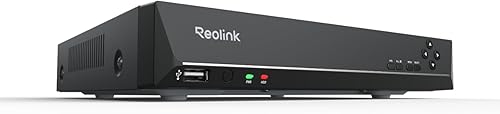 Best for a compact Reolink system
REOLINK RLN8-410 8CH NVR Network Video Recorder
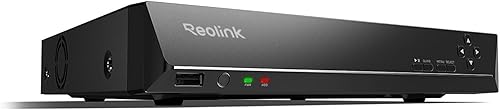 Best for more Reolink cameras
REOLINK RLN16-410 16CH NVR Network Video Recorder
PoE switch vs NVR: what does each device do?
A PoE switch connects and powers compatible cameras, while an NVR records their video. Some NVRs combine both jobs by including PoE camera ports.
A PoE switch doesn’t replace the recorder. It sends power and network data to connected devices, but you need a separate NVR or another recording method to save footage.
A PoE NVR with built-in camera ports puts those connections on the recorder. Learn more about what a PoE NVR is and how it works.
What happens in a switch-based camera system?
In a common layout, PoE cameras connect to a switch, and the switch connects to the network and recorder. The camera sends video over Ethernet, while the switch supplies power to compatible devices.
The NVR needs to be able to access and record the cameras on that network. Its setup rules vary, so confirm the required network connection and camera compatibility before buying equipment.
This layout separates camera power and networking from recording. It can suit a system where you want to place the switch near a group of cameras or keep camera connections apart from the recorder.
What happens with an NVR that has PoE ports?
With an integrated PoE NVR, each compatible camera can connect directly to a PoE port on the recorder. The recorder powers the camera and handles its video connection.
That can reduce the number of separate devices and network connections you need to plan. It also ties the setup to the NVR’s camera support and port count.
For example, the REOLINK RLN8-410 supports up to 8 Reolink cameras and has a built-in 2TB HDD. It works only with Reolink cameras, so confirm compatibility before building a system around it.
Which setup is easier to install?
A PoE NVR with matching cameras is often the more direct setup because the camera ports and recorder are in one unit. A separate PoE switch adds another device and another connection to plan.
An integrated recorder can be appealing if you want one central place for camera connections and recording. Follow its setup instructions, connect compatible cameras to the PoE ports, and complete the recorder’s camera configuration.
A separate switch adds flexibility in where camera connections meet the network. You’ll need to plan how the switch, cameras and recorder connect, and how the NVR will find each camera.
If one camera won’t power up, review our guide to why a PoE switch may have no power. For a small switch that handles up to 4 PoE cameras, the TP-Link TL-SG1005P has a 65W total PoE power budget.
When should you choose a PoE NVR with built-in ports?
Choose an integrated PoE NVR when its camera compatibility and channel count fit your system. You’ll have camera connections and recording in one device.
This can be a straightforward path for someone starting with a compatible camera family. The recorder’s port count gives you a clear starting point for planning, but it also sets a limit on how many cameras can connect directly.
The REOLINK RLN8-410 is suited to a smaller Reolink system with up to 8 cameras. Its built-in 2TB HDD provides local recording, and Reolink says it can work with or without an internet connection.
For a larger Reolink setup, the RLN16-410 supports up to 16 PoE cameras and has a built-in 4TB HDD. Check the hardware version and camera model for compatibility before connecting equipment.
If you’re planning a system with many cameras, our guide to NVR camera capacity in most homes can help you estimate the channels you need.
When does a separate PoE switch make more sense?
Choose a separate PoE switch when its port count, power budget and network layout suit your camera system. You’ll still need a compatible recorder if you want to save footage to an NVR.
A switch can help when cameras are spread across an area and you want their Ethernet cables to meet at a separate network point. It also gives you a choice of switch size, rather than relying only on the number of PoE ports built into an NVR.
The TP-Link LS108GP has 8 PoE+ Gigabit ports and a 65W total PoE power budget. Its PoE Auto Recovery mode can reboot a dropped or unresponsive PoE-powered device when that mode is on.
Check the combined power needs of your cameras against the switch’s total budget. A port count alone doesn’t tell you whether the switch can power every camera at once.
Can you use a switch with a PoE NVR?
You may be able to use a switch and NVR together, depending on the NVR’s network design and camera compatibility. Check the recorder’s instructions before connecting cameras through an external switch.
Some setups use a switch to connect cameras across the network while the NVR records their streams. Other systems expect cameras to connect directly to the NVR’s own PoE ports.
Don’t assume that plugging an external switch into an NVR will expand its camera capacity. The recorder still has a supported channel limit, and it may have rules about how cameras connect.
How should you compare port count and camera capacity?
Choose by the number of cameras you plan to connect and how many powered PoE ports the setup needs. The switch’s PoE ports and the NVR’s camera channels measure different limits.
A switch may have more or fewer PoE ports than the recorder has channels. For example, an 8-port PoE switch doesn’t guarantee an NVR can record 8 cameras, and an NVR with many channels doesn’t necessarily power every camera directly.
Make a list of camera models and their connection needs. Then check the NVR’s supported camera count, the switch’s PoE port count and total power budget, and whether the camera brand works with the recorder.
If you’re considering a particular camera resolution, compare options in our guides to 4K PoE security cameras and outdoor PoE security cameras. For cameras that cover more than one direction, see our dual-lens PoE camera guide.
What should you check before buying?
Confirm camera compatibility, PoE power needs, recording capacity and network connections before choosing either setup. These checks can prevent a port or recorder mismatch.
First, check whether the cameras work with the NVR. The REOLINK recorders in this comparison are for Reolink cameras, so they may not suit a mixed-brand camera system.
Next, compare the camera count with both the recorder’s supported channels and the available PoE ports. If you plan to add cameras later, account for that growth now.
Finally, check each camera’s power requirements against the switch’s per-port limits and total PoE budget. If you’re deciding whether the switch is the right kind of power source, our guide to PoE injectors vs switches explains that choice.
Which camera setup should you choose?
Pick a PoE NVR if you want a simpler, integrated setup and its camera support fits; pick a separate PoE switch if you need its port layout and will pair it with a compatible recorder. Check the camera count, power budget and connection plan before you buy.
For a small Reolink setup, the RLN8-410 combines recording with connections for up to 8 cameras. If you need up to 16 Reolink PoE cameras, the RLN16-410 offers more channels.
For a separate switch, match the TP-Link TL-SG1005P’s 4 PoE+ ports or the LS108GP’s 8 PoE+ ports to your camera group and power needs. Then confirm that your NVR can discover and record those cameras.
Frequently asked questions
What is the difference between a PoE switch and a PoE NVR?
A PoE switch supplies network connectivity and power to compatible cameras, while a PoE NVR adds video recording and may include PoE camera ports. A switch-based setup uses a separate recorder; an integrated PoE NVR can connect cameras directly, depending on compatibility and network design.
Can I connect a PoE switch to a PoE NVR?
Often, a switch and NVR can be used in one system, but the exact connection depends on the recorder, cameras and network layout. Confirm camera compatibility and the NVR's supported connection method before wiring the system, and check whether the switch's power budget covers all connected cameras.
Does a PoE switch record security camera video?
A PoE switch does not record video by itself. It provides network connections and power to compatible PoE devices; you still need an NVR or another recording method to store camera footage.
Should every camera connect directly to the NVR?
No. A camera can connect to an NVR's PoE port or, in some setups, through a separate switch on the network.
The right route depends on the NVR's design, camera compatibility and how the system handles network access.
How many cameras can I connect to a PoE switch?
The usable camera count depends on the number of PoE ports, the total power budget and each camera's power needs. The recorder must also support the camera count.
For a broader planning guide, see how many cameras an NVR can support.


