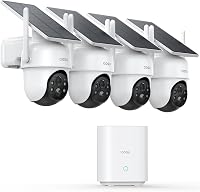
Tactacam DEFEND Cam Review: Worth It? (November 2026)
The Tactacam DEFEND is a solar-powered LTE camera for outdoor sites without WiFi. Its 360° remote pan, tilt and zoom help you check different parts of a property from your phone.
On this page (7 sections)
- Is the Tactacam DEFEND a good cellular security camera?
- What does the DEFEND offer for off-grid surveillance?
- How does the DEFEND compare with other cellular cameras?
- What should you check before mounting a DEFEND?
- Where can a cellular camera help beyond WiFi?
- What are the DEFEND's main trade-offs?
- Is the Tactacam DEFEND the right camera for your property?
The Tactacam DEFEND is a solar-powered LTE camera for outdoor sites without WiFi. It combines remote 360° pan, tilt and zoom with 4K photos, 1080p video and motion alerts, making it a fit for checking a gate, barn or cabin from your phone.
Its main condition is cellular coverage: the camera needs LTE signal where you mount it. We compared its stated features with two other solar cellular options to show where each setup may fit.
Is the Tactacam DEFEND a good cellular security camera?
The DEFEND is a strong match for a remote property if you need solar power and the ability to move the view remotely. It is less suitable if the site has weak cellular coverage or you need 4K video.
TACTACAM Defend 360 Cellular Security Camera: Best for remote property views

- LTE cellular connection
- Solar and rechargeable battery
- 360° remote pan, tilt and zoom
- 4K photos and 1080p video
A solar-powered cellular camera for remote outdoor monitoring where WiFi and a wall outlet aren't available. Remote pan, tilt and zoom let you change the view from your phone.
Pros
- LTE connection works without home WiFi
- Solar charging with a built-in rechargeable battery
- Remote 360° pan, tilt and zoom
- 4K photos and 1080p video
Cons
- Needs cellular signal at the mounting spot
- Video is 1080p, while 4K is for photos
The camera uses LTE rather than your home network, so it doesn't need WiFi setup at the property. Its solar panel charges a built-in rechargeable battery, which avoids running a wall outlet to the camera.
Remote pan, tilt and zoom help you check different angles using one camera. That flexibility can be useful for a yard or driveway, though its usefulness depends on where you mount it and what areas fall within view.
Who should consider the DEFEND?
Consider it if you want to monitor an outdoor location without WiFi or nearby electrical power and can confirm LTE coverage there. The remote controls may also suit a site where you want to inspect more than one direction from a single mounting point.
Think carefully if your priority is the sharpest saved video. The DEFEND records 1080p video; its 4K specification applies to photos.
What does the DEFEND offer for off-grid surveillance?
The DEFEND combines LTE connectivity, solar charging and remote viewing controls for outdoor monitoring away from a home network. These features address separate setup needs, so check each one against the conditions at your site.
| Feature | Tactacam DEFEND |
|---|---|
| Connection | LTE cellular |
| WiFi required | No |
| Power | Solar and rechargeable battery |
| Remote movement | 360° pan, tilt and zoom |
| Photos | 4K |
| Video | 1080p |
| Alerts | Instant motion alerts |
| Use | Outdoor |
A cellular camera can send alerts and imagery without joining your home WiFi, but it still depends on a working cellular connection. Check signal at the intended mounting point, since coverage can differ between open ground and a building or metal structure.
Solar power also depends on the panel getting suitable sunlight. Consider shade, roof lines and seasonal changes before settling on the camera position.
How does the DEFEND compare with other cellular cameras?
The DEFEND emphasizes remote pan, tilt and zoom, while the alternatives below add different features for outdoor monitoring. Your best choice depends on the number of locations, night viewing and whether you want to speak through the camera.
SEHMUA 4G LTE Cellular Solar Security Camera: Best for two-way talk

- 4G LTE cellular connection
- Solar panel and built-in battery
- 2K color night vision
- Two-way talk
A solar-powered 4G LTE option with two-way talk and 2K color night vision. Its built-in SIM is for U.S. use, and continued cellular service requires a subscription after the trial.
Pros
- No WiFi or wired power needed
- Two-way talk through the app
- 2K color night vision
- Horizontal and vertical rotation
Cons
- Cellular service requires a plan after the trial
- Built-in SIM is for U.S. use
The SEHMUA includes two-way talk and 2K color night vision. It connects over 4G LTE and includes a built-in SIM for U.S. use; after its trial, a subscription is needed to continue cellular service.
Oculview 4G LTE Cellular Security Camera: Best for covering two locations

- Two cameras in the pack
- 4G LTE with built-in SIM
- Solar powered
- 2K color night vision
A two-camera pack for monitoring separate outdoor areas without WiFi. Each camera needs its own cellular and cloud storage plan after its trial.
Pros
- Two cameras for separate locations
- Solar powered for off-grid use
- 2K color night vision and two-way audio
- Local storage supports a memory card up to 128GB
Cons
- Each camera needs its own plan after the trial
- Memory card is not included
The Oculview pack includes two cameras, which may suit separate gates or buildings. Each camera requires its own data and cloud storage plan after the trial, and local memory card storage is also an option with a card up to 128GB, sold separately.
For a broader shortlist, compare best cellular security cameras by connection and power needs. If you need a unit that can pan and tilt, see our best PTZ cellular security cameras.
What should you check before mounting a DEFEND?
Confirm cellular signal, solar exposure and the camera's viewing position before installing the DEFEND. These checks help prevent a camera from being mounted where it can't connect or keep its battery charged.
First, test the cellular signal at the specific outdoor location. A signal near the house doesn't guarantee the same connection at a distant barn or gate.
Next, look at the path of the sun and any shade that may fall on the solar panel. A location under deep roof cover or heavy tree shade may not suit a solar-powered camera.
Finally, plan the view. Remote movement adds flexibility, but the camera still needs a clear line of sight to the area you want to monitor.
Where can a cellular camera help beyond WiFi?
Cellular cameras can help monitor remote outdoor areas beyond the reach of a home network, provided they have compatible coverage. Farms, cabins, gates and construction sites are common examples of places where a cellular connection may be useful.
For a wider outdoor comparison, see best outdoor cellular security cameras. If your site has WiFi, a cellular-only camera may not be the simplest fit; our guide to what Google Nest Cam is covers a familiar WiFi camera option.
Camera placement should also match the reason you're monitoring the area. A visible camera may help document activity, while a concealed camera raises different privacy and placement questions.
Read what a decoy security camera does and why hidden security cameras matter before choosing a camera style.
What are the DEFEND's main trade-offs?
The DEFEND's main strengths are off-grid power and remote view control, while its main limitation is dependence on LTE coverage. Its video is 1080p even though it can take 4K photos.
That combination favors property checks where you want to look around remotely without installing multiple fixed cameras. It may be a poor fit in a cellular dead zone or where you need high-resolution video rather than photos.
The product information doesn't specify cellular plan costs or terms for the DEFEND. Check the current service requirements for your intended location before buying, and compare them with alternatives that state their plans.
Is the Tactacam DEFEND the right camera for your property?
Choose the DEFEND if LTE coverage is available, solar charging suits the mounting spot, and remote pan, tilt and zoom matter to you. Pick the SEHMUA if two-way talk is a priority, or the Oculview two-pack if you need cameras at separate locations and can account for separate plans.
For a different cellular model with remote movement, read our Defend 360 cellular security camera review. If you are comparing camera brands, see best Reolink security cameras.
Frequently asked questions
Does the Tactacam DEFEND camera need WiFi?
No. The DEFEND connects over LTE cellular, so it doesn't need a home WiFi network or router.
It does need cellular signal where you install it, so check coverage at the exact gate, barn or cabin location before choosing a mount.
Does the Tactacam DEFEND need an outlet?
No wall outlet is required for the solar-powered DEFEND. It has a rechargeable battery that solar charging can keep topped off, which suits outdoor locations without wired power.
Sun exposure at the mounting spot will matter for solar charging.
What image and video quality does the DEFEND provide?
The DEFEND provides 4K photos and 1080p video, plus instant motion alerts. Those are different formats and resolutions, so don't assume the video is 4K.
Consider what detail you need from saved clips before choosing a camera.
How does the DEFEND compare with other cellular cameras?
The DEFEND stands out for solar power and remote pan, tilt and zoom, while the SEHMUA adds two-way talk and the Oculview pack includes two cameras. Compare cellular coverage, power at each site, viewing needs and ongoing data plans before deciding.