Defend 360 Cellular Security Camera Review: Worth It? (November 2026)
The TACTACAM Defend 360 suits remote properties with LTE coverage and no Wi-Fi or outlet. Its solar power and phone-controlled pan, tilt and zoom help cover changing views, but it depends on cellular service.
On this page (8 sections)
- Defend 360 cellular security camera review: what stands out?
- What do pan, tilt and zoom mean for coverage?
- How does LTE affect installation?
- Can solar power keep the camera running?
- What image quality and alerts should you expect?
- How does it compare with other cellular cameras?
- What should you check before mounting it?
- Is the TACTACAM Defend 360 worth considering?
The TACTACAM Defend 360 is a solar-powered LTE camera for remote monitoring where Wi-Fi and a wall outlet are unavailable. It adds phone-controlled pan, tilt and zoom, with 4K photos and 1080p video, but it still needs cellular coverage at the site.
It makes the most sense for a gate, barn or cabin where you want to check different angles from afar. If the location has weak LTE, or you need continuous recording, confirm those needs before choosing it.
Defend 360 cellular security camera review: what stands out?
The Defend 360's main draw is remote viewing without Wi-Fi, paired with a camera head you can reposition from your phone. That combination can help when a fixed camera would miss activity outside its narrow view.
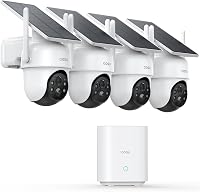
TACTACAM Defend 360 Cellular Security Camera: Best for remote pan and tilt

- LTE cellular connection
- Solar power with rechargeable battery
- 360° remote pan, tilt and zoom
- 4K photos and 1080p video
A solar cellular camera for checking a remote gate, barn or cabin where LTE is available but Wi-Fi and an outlet are not. Remote pan, tilt and zoom let you change the view from your phone.
Pros
- Does not require Wi-Fi
- Solar charging and built-in rechargeable battery
- Remote pan, tilt and zoom
- Weather-resistant outdoor design
Cons
- Needs usable LTE coverage
- No stated continuous recording feature
- Cellular service requirements need checking before setup
TACTACAM lists LTE cellular connectivity, solar power with a rechargeable battery, 360° pan, tilt and zoom, 4K photos, 1080p video and instant motion alerts. It is an outdoor dome camera, and its weather-resistant design is intended for exterior use.
Who should consider this camera?
Consider it if you need to monitor a property beyond your home network and have LTE coverage where the camera will go. The remote controls can help you look toward a gate, driveway or other area without physically visiting the camera.
It is also a practical candidate when running an outdoor power cable would be difficult. Solar charging can support an off-grid installation, though the site still needs a suitable place for the panel to receive sunlight.
Who should look elsewhere?
Look elsewhere if the mounting spot has no dependable cellular service. LTE is the camera's connection, so solar power cannot make it reachable from your phone when the signal is absent.
Also compare alternatives if you need verified continuous recording or a specific cellular plan. Those requirements should be clear before installation, not left for you to discover after mounting the camera.
What do pan, tilt and zoom mean for coverage?
Remote pan, tilt and zoom let you change the camera's viewing direction from your phone. That can help you inspect different parts of a property, although it does not mean every area is recorded at once.
A fixed camera keeps its view pointed in one direction. The Defend 360 can be repositioned on demand, so you can check a second angle when you receive an alert or want to look around.
Remote movement is useful when the camera is high or placed far from the house. It may reduce the need to install several fixed cameras for different views, but it doesn't guarantee full coverage at every moment.
For a wider comparison of cameras built around this feature, see our guide to best PTZ cellular security cameras. If solar power is your main concern, compare best solar cellular security cameras as well.
How does LTE affect installation?
The Defend 360 connects through LTE cellular rather than Wi-Fi, so check coverage at the exact installation point. Signal can differ between an open yard, a metal-sided barn and a spot near a window.
Before mounting, use a phone or another reliable method to check the carrier signal where the camera will sit. A signal at the driveway entrance does not confirm that the camera will connect several hundred feet farther away.
Also confirm how cellular service is activated and paid for. The available product details don't specify the Defend 360's plan terms, carrier choices or data limits, so verify these with TACTACAM before buying.
Our overview of best cellular security cameras compares the broader category, including the trade-offs of relying on a cellular connection.
Can solar power keep the camera running?
The Defend 360 uses a solar panel to charge its built-in rechargeable battery, which avoids a wall outlet at the camera. Placement matters because the panel needs exposure to sunlight to recharge.
Choose a mounting location where the panel can face an open area and where shadows from eaves, branches or nearby structures won't block it for long periods. Follow TACTACAM's instructions for panel positioning and battery setup.
Solar charging doesn't remove every power concern. Weather and seasonal sunlight can affect how much energy reaches the battery, so plan a way to check the camera and its charge status through the app.
A solar camera also needs a secure mounting point that allows both the camera and panel to face the right directions. Keep the camera's remote viewing needs in mind while positioning it, since a sunny location may not automatically give the best view of a gate.
What image quality and alerts should you expect?
The Defend 360 captures 4K photos and 1080p video, and it sends motion alerts and imagery to your phone. The 4K figure applies to photos, so it should not be read as a 4K video claim.
Motion alerts can help you respond when activity occurs at a remote property. Before relying on them, check how the camera handles alert settings and what cellular data or storage the chosen setup uses.
The product information does not state continuous recording, storage options, detection range or how long clips remain available. If you need evidence from a specific period, confirm the recording and storage details before placing the camera in service.
How does it compare with other cellular cameras?
The Defend 360 is a strong fit when remote pan, tilt and zoom matter most. Other cellular models may be a better match if you prioritize color night viewing, two-way talk or a particular recording mode.
| Camera | Connection and power | Standout detail | Check before choosing |
|---|---|---|---|
| TACTACAM Defend 360 | LTE cellular; solar and rechargeable battery | Remote pan, tilt and zoom; 4K photos and 1080p video | Confirm cellular plan and recording details |
| SEHMUA 4G LTE Cellular Solar Security Camera | 4G LTE; solar panel and battery | 2K color night vision and two-way talk | U.S. use; subscription needed after trial |
| LITYMOL 4G LTE Cellular Security Camera | 4G LTE; solar panel and battery | Motion-triggered recording | No 24/7 recording or automatic motion tracking |
The Tactacam DEFEND Cam Review covers another camera in the brand's cellular lineup. For a different cellular brand, see best Reolink cellular security cameras.
The SEHMUA model adds 2K color night vision and two-way talk, but its built-in SIM is for U.S. use and cellular service requires a subscription after the trial. The LITYMOL uses motion-triggered recording to conserve battery and does not support 24/7 recording or automatic motion tracking.
What should you check before mounting it?
Check cellular coverage, sunlight and the view from the planned mounting point before drilling or attaching hardware. These three factors determine whether the camera can connect, charge and see the area you care about.
Confirm the LTE connection at the camera's actual height and position. If the signal is weak, consider another location before you install the mount.
Next, look for an angle that gets sunlight while keeping the camera aimed at useful activity. Check both the camera's view and the panel's exposure, since they may need different orientations.
Finally, confirm the cellular plan, app setup, storage behavior and alert settings. The available product details do not answer all of those questions, and each one can affect the camera's ongoing use.
Is the TACTACAM Defend 360 worth considering?
The Defend 360 is worth considering if your remote property has LTE coverage, you want solar power and you value adjustable views. Its 4K photos, 1080p video and remote pan, tilt and zoom address those needs directly.
Choose another camera if your site lacks cellular coverage, you need 24/7 recording or you want a confirmed service plan before deciding. For a cellular camera that can rotate on demand, compare the Defend 360 with the best PTZ cellular security camera options and verify coverage at the location first.
Frequently asked questions
Does the TACTACAM Defend 360 need Wi-Fi?
No. The Defend 360 connects over LTE cellular, so it can work without a home Wi-Fi network if the installation site has usable cellular coverage.
Check coverage at the camera's exact mounting location before buying, since a remote property can have different signal strength from a nearby road or building.
Does the Defend 360 record in 4K?
The Defend 360 captures 4K photos and records video at 1080p. Those are different image formats, so don't assume its video resolution is 4K.
Consider which matters more for your use: still images when motion is detected, or video clips you can review on your phone.
Can the Defend 360 run without an electrical outlet?
Yes, it uses solar charging with a rechargeable built-in battery, so it does not need a wall outlet at the camera. Solar charging depends on the installation site's sunlight and placement; choose a mount with suitable exposure and follow TACTACAM's setup guidance.
Does the Defend 360 record continuously?
Continuous recording is not specified for the Defend 360. Its listed features include motion alerts and imagery sent to your phone when motion is detected, so don't plan around uninterrupted footage unless TACTACAM confirms that recording mode and its storage requirements.