NAS vs Surveillance Hard Drives: Which Should You Choose? (October 2026)
Choose a surveillance hard drive for a compatible recorder that writes camera footage around the clock; choose a NAS drive for a network storage system and shared files. Check your recorder’s approved drive list and workload needs before you buy.
On this page (8 sections)
- NAS hard drive vs surveillance hard drive: what is the difference?
- When should you choose a NAS hard drive?
- When should you choose a surveillance hard drive?
- Can you use either type in an NVR or DVR?
- How should you compare capacity and retention?
- Which one is easier to maintain?
- What if you want a different surveillance storage format?
- NAS vs surveillance hard drive: which should you choose?
Choose a surveillance hard drive for a compatible recorder that records camera footage continuously; choose a NAS hard drive for a network storage system and shared files. In a NAS hard drive vs surveillance hard drive comparison, the recording workload and system compatibility matter more than the label alone.
A NAS drive is designed for network storage, often with multiple users or bays. A surveillance drive is designed for ongoing video recording, but the exact features and supported recording load depend on the model.
Before choosing, check the recorder or NAS maker’s compatibility list, drive capacity limits, and supported interface. A drive that fits a bay may still be unsupported.
 Best for a multi-user NAS
Seagate 8TB IronWolf Internal NAS Hard Drive
NAS hard drive vs surveillance hard drive: what is the difference?
NAS drives focus on shared network storage, while surveillance drives focus on camera recording workloads. The right choice depends on which system will host the drive and what it will do most often.
A NAS can store files shared by computers and other devices over a network. Some NAS setups also store camera footage, but the enclosure, software, and drive all need to support that use.
A surveillance drive is intended for recording streams from security cameras. Recorders may have their own requirements for drive type, capacity, number of bays, and supported models.
What does the workload mean for you?
A workload describes the kind of read and write activity a drive is expected to handle. A NAS may manage file access from several users, while a recorder may write video data continuously from one or more cameras.
For recording options and setup, see recording wireless security cameras.
These are different jobs, so a drive marketed for one environment should not be assumed to suit the other. The label is a useful clue, not a substitute for checking support in your system.
If you’re new to recorder storage, What Is an NVR Hard Drive, and What It Does? explains how the recorder and drive work together.
When should you choose a NAS hard drive?
Choose a NAS drive when a supported network storage system will host the drive for shared files or a NAS-based camera setup. Confirm the exact drive and capacity are supported by your NAS before buying.
The Seagate 8TB IronWolf is designed for multi-user NAS environments and up to 8-bay NAS enclosures. It has 8TB capacity and a SATA 6Gb/s connection, so it may suit a compatible NAS that needs an internal drive.
A NAS can also be part of a camera storage plan if its software supports the cameras and recording workflow. Check how footage is written, how long it is retained, and whether the system can recover or alert you when a drive has a problem.
Don't choose a NAS drive only because a recorder has a SATA bay. Verify that the recorder maker supports the exact model and capacity.
When should you choose a surveillance hard drive?
Choose a surveillance drive when the recorder maker supports it and your main job is continuous camera recording. Check the drive’s recording workload guidance and the recorder’s capacity limits.
For a larger capacity example, review this 8TB surveillance hard drive guide.
The exact camera count, resolution, and recording schedule affect storage demand. A system that records motion events may use less space than one that records continuously, but retention settings and camera settings matter too.
Before buying a high-capacity drive, make sure the recorder can address the full capacity. Our guide to a surveillance hard drive 16TB covers the details to check for that size.
If the recorder reaches its storage limit, it may overwrite older footage or stop recording, depending on settings. Understand the behavior before setting your retention target.
Can you use either type in an NVR or DVR?
Use only a drive supported by the specific NVR or DVR model. Interface, form factor, capacity, and firmware support all affect whether installation and recording will work.
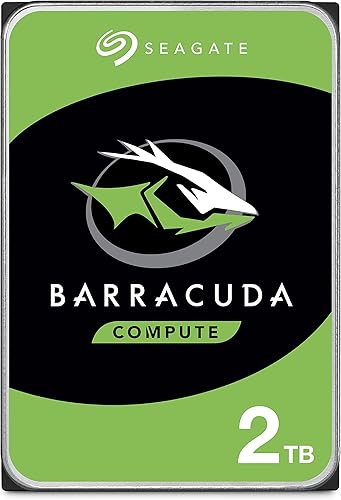
The Seagate BarraCuda 2TB Internal Hard Drive HDD is a 3.5-inch SATA desktop drive with 2TB capacity. It is described for PC applications, so treat it as a desktop storage option unless your recorder maker confirms support.
For a camera recorder, look up the exact drive model rather than relying on “SATA” or “3.5-inch” alone. A match on those two details does not confirm that the recorder supports the drive’s workload or firmware behavior.
For compact installations, compare the recorder’s bay size and drive options with our guide to best 2.5 hard drive for surveillance.
How should you compare capacity and retention?
Estimate the footage you need to keep, then choose a supported capacity that meets that target. Storage needs rise with more cameras, higher resolution, longer retention, and continuous recording.
Our 4TB surveillance hard drive guide covers a mid-sized option.
Make a simple list of the cameras, recording mode, and desired days of footage. Use the recorder’s storage calculator if available, and leave room for settings or future cameras that may increase demand.
A larger drive does not automatically solve a retention problem if the recorder limits capacity or the system overwrites footage sooner than expected. Check recorder settings after installation and confirm the recorded timeline matches your goal.
If you need external storage for copies or exports, see best external surveillance hard drive for a separate storage use case. External backup storage does not replace a compatible internal recording drive.
Which one is easier to maintain?
Choose the system whose health tools and alerts you can check regularly. A drive is only one part of storage reliability, so plan for monitoring and backup.
The IronWolf includes IronWolf Health Management, which Seagate says can help monitor drive health. The NAS and its software still need to support the feature for it to be useful.
For either drive type, check system logs and storage alerts. Keep important footage backed up separately if losing it would matter, and periodically confirm that new recordings are being saved.
What if you want a different surveillance storage format?
Match the storage medium to the camera and recorder design. Some cameras use memory cards or USB storage, while recorder-based systems commonly use internal drives.
A memory card is a different choice from a NAS or surveillance hard drive. Check the camera’s supported card type, capacity, and endurance guidance before relying on it for repeated recording.
For compatible Blink Outdoor 4 setups, read how to use USB storage with Blink Outdoor 4. If a camera uses a card, our guide to best high endurance microSD card 128GB explains what to check before choosing one.
NAS vs surveillance hard drive: which should you choose?
Pick a NAS hard drive for a supported NAS handling shared files; pick a surveillance hard drive for a supported recorder focused on continuous camera footage. If your recorder or NAS lists a specific model, use that compatibility guidance as the deciding factor.
The IronWolf fits a multi-user NAS role based on its intended design and capacity. For recorder storage, choose a drive specifically supported by your NVR or DVR, and compare models in our guide to the best SkyHawk surveillance hard drive.
Use the BarraCuda for a compatible desktop PC role, not as a default surveillance pick. The 2 books below are reading material about surveillance, not digital storage products.
Frequently asked questions
Can you use a NAS hard drive in an NVR?
Sometimes, but the recorder must support the specific drive and its capacity. A SATA connection or a matching size alone does not guarantee compatibility.
Check the NVR maker’s drive list, bay limits, and firmware guidance before installing a NAS drive.
Is a surveillance hard drive better for a NAS?
A surveillance drive may work in a NAS only if the NAS supports that model and workload. NAS drives are built for shared network storage, while surveillance drives are designed around continuous camera recording.
Match the drive to the system’s approved hardware and actual use.
What is the main difference between NAS and surveillance hard drives?
The main difference is the workload each drive is designed to handle. NAS drives target network storage and shared access, while surveillance drives target continuous video recording from cameras.
Compare the intended workload and compatibility for your enclosure or recorder.
Can a regular desktop hard drive record security camera footage?
It may work in some recorders, but compatibility and workload suitability vary by model. Check the recorder’s approved drive list and the drive’s intended use before relying on it for ongoing footage.
For a small form factor choice, see our guide to a best 2.5 hard drive for surveillance.
How do you know how much surveillance storage you need?
Estimate storage from camera count, resolution, frame rate, recording schedule, and retention goal, then check the recorder’s limits. When storage fills, older footage may be overwritten depending on system settings; see what happens when NVR storage is full.