7 Best Wyze Security Cameras Outdoor (November 2026)
The best Wyze outdoor security cameras include the WYZE Cam OG Indoor/Outdoor Security Camera for simple outdoor coverage, the WYZE Cam Pan v3 for adjustable viewing, and the WYZE Bulb Cam for porch light replacement.
On this page (7 sections)
- How we ranked the best Wyze security cameras outdoor
- Best Wyze outdoor security cameras compared
- Which Wyze outdoor camera is best for your mounting location?
- How should you choose recording and storage?
- Do Wyze outdoor cameras need wired power?
- What should you check before installing an outdoor Wyze camera?
- Final verdict on the best Wyze security cameras outdoor
The best Wyze security cameras outdoor are the WYZE Cam OG and WYZE Cam Pan v3 for most homes. The OG keeps the setup simple, while the Pan v3 gives you remote 360° pan and 180° tilt coverage.
That split matters because outdoor placement is rarely perfect on the first try. A front door may need a straight view of visitors, while a corner of the yard may need the camera to turn toward a gate or driveway.
This roundup compares outdoor Wyze security cameras by mounting, recording, power, lighting, viewing range and Wi-Fi needs. We checked the stated specs and features, then matched each model to a clear outdoor use.
Mounting comes first in practice because the fixing point decides much of the rest. A compact camera can sit on a shelf or wall, a bulb camera needs the right socket, and a floodlight camera needs space for the fixture and light panels.
Recording comes next because continuous local storage and event based alerts suit different homes. A busy street outside the property can create more detections, while a quiet side entrance may need less frequent review.
Power needs separate the group in a practical way. Some models use a plug in adapter, some use an existing light socket or floodlight wiring, and the solar model is built for wire free placement where sunlight reaches the panel.
Lighting also changes what night video shows. Color Night Vision helps in low light, but a spotlight or floodlight can reveal more detail and make the area easier to check from the app.
Viewing range is not only about width. A fixed camera holds one direction all the time, while a pan and tilt camera can shift toward activity but may move away from another area that still matters.
Wi-Fi needs deserve a check before you choose a spot. Most models in this group use 2.4 GHz Wi-Fi only, so a camera at a far wall or gate may need a closer access point or a different placement.
For a wider look at the brand, see our guide to the best Wyze security cameras. If you're deciding between rooms and exterior areas, our guide to Indoor vs Outdoor Security Cameras, Explained Simply covers the basic placement differences.
Use the sections that follow to narrow the choice by job rather than by headline features. Start with the location you need to watch, then check power and Wi-Fi, then compare recording and lighting for that exact spot.
Our picks at a glance
-
1
 Best for simple outdoor coverage
WYZE Cam OG Indoor/Outdoor Security Camera
9.7/10 our score
See it on Amazon -
2

-
3

How we ranked the best Wyze security cameras outdoor
The Cam OG ranks first for its balance of outdoor coverage, local recording, lighting and simple controls. The Cam Pan v3 follows closely because pan, tilt and motion tracking are useful when one camera must watch changing activity.
The ranking starts with the main outdoor job each camera can do well. A fixed view suits a door or garage where the approach stays the same, while a moving camera suits a yard where activity can start in several places.
Weather resistance received real weight because outdoor use means rain, heat, cold and dust at the mounting point. An IP65 rating does not remove the need for careful placement, but it helps separate models built for exterior use from indoor only options.
Useful viewing coverage mattered more than a large number on its own. A wide fixed lens can cover an entry in one frame, while 360° pan and 180° tilt can check a driveway and then a side path without moving the mount.
Recording choices were weighed next because the best camera for alerts may not be the best camera for review. Local microSD recording keeps footage on the device, while optional cloud features can add backup and smarter alert types on supported models.
Practical power needs also affected the order. A plug in camera near an outlet is simple to keep running, a bulb camera avoids a separate cable when the socket fits, and a solar camera avoids wiring but needs sunlight at the panel.
Lighting was treated as part of security rather than as a nice extra. A small spotlight can help near a door, while brighter floodlight models can light a driveway and improve color detail after motion is detected.
Setup effort played a smaller role, but it still mattered for first time buyers. Bluetooth pairing and app controls can make a camera easier to aim, test and adjust before the mount is fixed.
Honest trade offs kept the list from becoming a simple feature count. A pan camera can look away from a blind spot, a fixed camera cannot follow activity, and a larger floodlight fixture needs more wall space and electrical planning.
All seven cameras use Wi-Fi, but most require a 2.4 GHz connection. A camera can be wireless for video access while still needing a power cable, so check the power section before choosing a mounting point.
That Wi-Fi point is easy to miss because a strong signal near the router does not guarantee a strong signal at a gate, garage or far wall. Test the spot from the app before you drill, screw in or hardwire anything.
The final order therefore favours cameras that match common outdoor jobs with fewer surprises. Simple coverage, adjustable coverage, socket based lighting, dual views, floodlight coverage and solar placement each win in a different setting.
| Product | Best for | Video | Power | Storage | Our score |
|---|---|---|---|---|---|
| WYZE Cam OG Indoor/Outdoor Security Camera | simple outdoor coverage | 1080p with Color Night Vision | Plug-in; outdoor adapter sold separately | microSD up to 256 GB or Cam Plus | 9.7 |
| WYZE Cam Pan v3 | adjustable viewing | Wired; outdoor adapter required | microSD up to 512 GB or Cam Plus | 9.6 | |
| WYZE Bulb Cam | porch light replacement | 120V, 60Hz socket | 9.4 | ||
| WYZE Duo Cam Pan 2K Dual Cam | two views at once | Indoor power adapter included | microSD up to 512 GB or optional cloud recording | 9.3 | |
| WYZE Floodlight Camera v2 | bright motion lighting | Corded electric | microSD local recording up to 30 days | 9.0 | |
| WYZE Floodlight Camera Pro | panoramic floodlight coverage | microSD local recording up to 30 days | 8.8 | ||
| WYZE Solar Cam Pan | wire-free multi-camera setups | Solar powered and battery powered | microSD up to 512 GB or optional cloud recording | 8.4 |
Best Wyze outdoor security cameras compared
The best model depends on the outdoor problem you need to solve. Pick a compact fixed camera for a door or garage, a pan camera for changing views, a floodlight camera for bright coverage, or the Solar Cam Pan when wiring is the main concern.
WYZE Cam OG Indoor/Outdoor Security Camera: Best for simple outdoor coverage
- 1080p live streaming
- Color Night Vision
- IP65 indoor and outdoor use
- Built-in spotlight and siren
- Local recording up to 256 GB
A straightforward outdoor camera with 1080p video, a spotlight, a siren and local recording. It suits buyers who want a small fixed camera and do not need remote pan and tilt.
Pros
- IP65 rating
- Built-in spotlight
- 2-way audio
- Works with Alexa, Google Assistant and IFTTT
Cons
- 2.4 GHz Wi-Fi only
- Outdoor power adapter sold separately
- No remote pan and tilt
The WYZE Cam OG Indoor/Outdoor Security Camera is the strongest general pick for a front door, garage, yard or other area where a small camera can cover one main direction. Its 1080p live stream and Color Night Vision keep the feature set focused.
The IP65 rating supports indoor or outdoor use. Outdoor placement requires a Wyze Outdoor Power Adapter, which is sold separately, so plan the cable route before mounting.
A built-in 40-lumen spotlight adds light near the camera, and the user-activated 90-decibel siren gives you a way to respond from the Wyze app. Two-way audio includes noise and echo cancellation.
For recording, a compatible microSD card up to 256 GB supports continuous local recording without a subscription. Cam Plus adds cloud backup and AI alerts if you want those features.
The main trade-off is fixed viewing. The OG does not remotely pan or tilt, and it uses 2.4 GHz Wi-Fi only.
Choose it when a simple view and local storage matter more than changing the camera angle.
WYZE Cam Pan v3: Best for adjustable viewing
- 360° pan and 180° tilt
- 1080p video
- Color Night Vision
- IP65 rating
- microSD up to 512 GB
The Pan v3 is a strong fit when a single camera needs to check different parts of a yard or room. Its remote movement and motion tracking add coverage, but outdoor power planning is still required.
Pros
- Remote pan and tilt
- Up to 4 custom waypoints
- IP65 weather resistance
- Privacy mode
Cons
- 2.4 GHz Wi-Fi only
- Outdoor power adapter required
- 1080p rather than 2K
The WYZE Cam Pan v3 fits a yard, driveway or indoor area where one camera needs to check multiple directions. It provides 360° pan and 180° tilt coverage, with up to 4 custom waypoints for repeat patrol routes.
Its 1080p video includes Color Night Vision, while motion tracking can follow pets and people. The app also offers custom motion zones, sound alarms and a privacy mode that disables the camera and blocks its view.
The IP65 rating supports outdoor use, but an Outdoor Power Adapter is required. Like the Cam OG, the Pan v3 connects to 2.4 GHz Wi-Fi rather than 5 GHz.
Local recording supports a microSD card up to 512 GB, or you can use Cam Plus for cloud recording. Bluetooth pairing helps with setup, and the camera works with Alexa, Google Assistant and IFTTT.
Choose the Pan v3 when remote movement gives you more value than a higher resolution. For setup instructions on a related model, see how to use Wyze Cam v4.
WYZE Bulb Cam: Best for porch light replacement
- 2K video
- E26 socket
- 160° view
- 800-lumen dimmable LED
- Color Night Vision
The Bulb Cam combines an outdoor camera with a warm 800-lumen light in one E26 fixture. It works best where the existing sconce fits the stated depth and opening limits and where a fixed view is acceptable.
Pros
- 2K video
- 160° wide view
- Built-in 800-lumen light
- No separate camera power cable
Cons
- E26 socket only
- Cannot use a dimmer switch
- Does not rotate remotely
The WYZE Bulb Cam is best for an outdoor sconce that uses a compatible E26 socket. It combines a 2K camera with a dimmable 800-lumen, 3000K warm-light LED bulb.
Before installation, check the socket carefully. The Bulb Cam is designed for 120V, 60Hz E26 sockets, cannot be used with a dimmer switch, and fits sconces with a depth under 7.8 in and a bottom opening over 2.5 in.
The 160° wide view helps cover a porch, entry or nearby yard from one light position. The camera is fixed after you manually adjust it, so it does not rotate remotely through the app.
A microSD card up to 256 GB supports continuous local recording. The camera also offers motion alerts, two-way audio, lighting controls and a built-in siren.
This is a smart choice when replacing a porch bulb is easier than running a separate camera cable. Skip it if you need remote pan and tilt or if your fixture does not match the socket and clearance requirements.
WYZE Duo Cam Pan 2K Dual Cam: Best for two views at once

- Dual 2K cameras
- 360° pan and 180° tilt
- IP65 rating
- Two motion-activated spotlights
- microSD up to 512 GB
The Duo Cam Pan covers two areas with one moving view and one steady view. It suits larger outdoor zones where a single fixed camera would leave important angles uncovered.
Pros
- Dual-camera coverage
- 2K resolution
- IP65 weather resistance
- Mounting kit included
Cons
- 2.4 GHz Wi-Fi only
- Local storage card sold separately
- Outdoor power planning is needed
The WYZE Duo Cam Pan 2K Dual Cam suits a larger exterior area where one moving view and one steady view are useful at the same time. Its dual-camera design is more flexible than a single fixed lens.
One camera can pan and tilt through 360° and 180°, while the other keeps a steady watch. Pan Scan and up to 4 custom waypoints help set a repeat route for the moving camera.
The camera provides 2K video, WDR and Color Night Vision. Two motion-activated spotlights and a 98-decibel siren add response options when activity is detected.
An IP65 rating supports indoor or outdoor placement, and the mounting kit is included. The indoor power adapter is included, but outdoor installation still needs a suitable way to protect and route power.
Local recording supports a microSD card up to 512 GB. The Duo Cam Pan uses 2.4 GHz Wi-Fi and supports Bluetooth setup, Alexa, Google Assistant and IFTTT.
Choose it when two viewpoints matter more than the smallest body. It is a strong option for a side yard, wide entry area or property corner with more than one important angle.
WYZE Floodlight Camera v2: Best for bright motion lighting
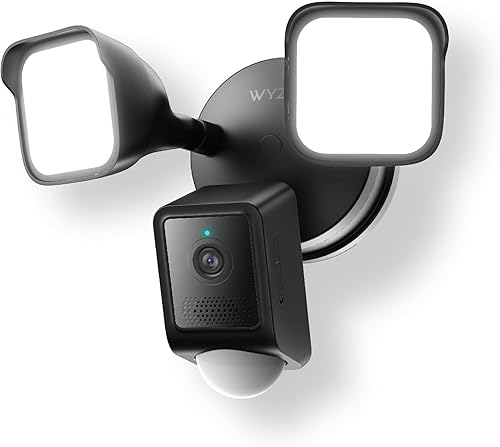
- 2K HD video
- 2800-lumen dimmable LEDs
- 160° view
- 270° PIR motion detection
- 105 dB siren
The Floodlight Camera v2 is designed for an outdoor location that needs both video and strong motion lighting. It is a practical choice for driveways, entries and other areas with existing electrical wiring.
Pros
- 2800-lumen lighting
- 270° PIR motion detection
- 2K video
- Dusk-to-dawn automation
Cons
- Corded installation
- 2.4 GHz Wi-Fi only
- Larger fixture than a small camera
The WYZE Floodlight Camera v2 is the best fit for an outdoor location that needs both surveillance and strong motion lighting. Its 2K camera has a 160° view and 270° PIR motion detection.
Two dimmable LED lights provide 2800 lumens. Ambient Light Mode can keep a lower light level on until motion triggers increased brightness, while dusk-to-dawn automation manages the daily light cycle.
The camera also includes Color Night Vision, two-way talk and a 105-decibel siren. Custom motion zones let you set where the light and recording should respond.
This model uses corded electric power, so it works best where an existing exterior electrical point can support installation. It is IP65 rated and connects through 2.4 GHz Wi-Fi.
A compatible microSD card supports 24/7 local recording, with up to 30 days of footage stated for the camera. Pick it for a driveway or entry where lighting is as important as video.
WYZE Floodlight Camera Pro: Best for panoramic floodlight coverage

- 180° panoramic view
- 2.5K HD video
- 3000-lumen LEDs
- Three adjustable light panels
- 105 dB siren
The Floodlight Camera Pro favors broad coverage and adjustable lighting. Its 180° view and three light panels suit wide exterior walls, while hardwired installation makes placement more involved.
Pros
- 180° panoramic view
- 2.5K resolution
- 3000-lumen lighting
- AI motion-activated light control
Cons
- Screw-in installation
- Outdoor power adapter sold separately
- Larger 10.2 x 9.1 x 7.8 in dimensions
The WYZE Floodlight Camera Pro is designed for broad exterior coverage, with a 180° panoramic view and 2.5K HD video. It is the better floodlight choice when a wide wall or open approach needs fewer blind spots.
Three adjustable light panels produce 3000 lumens and can aim light across different parts of the property. AI motion control can activate the lights for selected motion types, such as people and vehicles.
A motion-activated voice alert and 105-decibel siren give this model a stronger deterrence focus. Custom motion zones help limit activity outside the areas you want to monitor.
The camera is rated for outdoor use and installs with a screw-in mount. Its listed dimensions are 10.2 x 9.1 x 7.8 in, so measure the wall area and clearance before choosing it.
Local recording uses a microSD card and can store up to 30 days of footage. Choose the Pro for panoramic coverage and bright adjustable lighting, but expect more installation planning than with a compact camera.
WYZE Solar Cam Pan: Best for wire-free multi-camera setups

- 4-pack
- 2K video
- 360° pan and 70° tilt
- Solar power
- AI person tracking
The Solar Cam Pan 4-pack is for buyers who need several wire-free outdoor viewpoints. Solar charging reduces cable work, but each camera still needs a suitable location for sunlight and Wi-Fi.
Pros
- 4-camera pack
- Solar power
- 360° pan and 70° tilt
- IP65 weather resistance
Cons
- 5 GHz Wi-Fi is not supported
- Each camera needs useful sunlight
- Larger purchase commitment than a single camera
The WYZE Solar Cam Pan is the best choice when several outdoor viewpoints need wire-free power. This product is a 4-pack, so it suits a property where one camera would not cover all entrances, paths or yard sections.
Each camera provides 2K video, Color Night Vision, 360° pan and 70° tilt. AI person tracking follows movement, while a motion-activated spotlight and 105-decibel siren add active response options.
Solar power reduces the need for charging cables. The setup instructions state that 1 hour of sunlight daily can eliminate charging downtime, so place each camera where its solar panel can receive useful light.
The cameras support local recording with microSD cards up to 512 GB, plus optional cloud recording. The system uses 2.4 GHz Wi-Fi and supports Wi-Fi 6 routers, but 5 GHz is not supported.
The main trade-off is placement. Every camera needs suitable sunlight and a dependable Wi-Fi signal, and a 4-pack is more than you need for one small entry.
Choose it for broad property coverage and wire-free installation.
Which Wyze outdoor camera is best for your mounting location?
The Cam OG is easiest for a simple wall or shelf position, while the Bulb Cam is best when an E26 fixture already sits in the right place. Pan models give more control over the view, but their outdoor power needs still matter.
For a porch, use the Bulb Cam only after checking the socket, fixture depth and opening. Its manual position works well when the viewing direction will stay the same.
For a garage or side wall, the Cam OG keeps the setup compact. Its spotlight, siren and 1080p video cover the common need for a direct view without remote movement.
For a larger corner, the Cam Pan v3 or Duo Cam Pan can check changing areas. The Duo model adds a second steady camera, while the Pan v3 is the simpler single-camera option.
For an existing floodlight point, choose the Floodlight Camera v2 or Pro. The v2 offers 270° PIR motion detection, while the Pro offers a 180° panoramic view and three adjustable light panels.
If you're renting or working with limited exterior wiring, the best security cameras for apartments guide explains other placement limits to consider.
How should you choose recording and storage?
The best Wyze outdoor camera for local recording depends on the supported microSD capacity and the footage pattern you need. The Cam OG supports up to 256 GB, while the Cam Pan v3, Duo Cam Pan and Solar Cam Pan support up to 512 GB.
Local recording can reduce reliance on cloud storage, but you still need to buy a compatible microSD card separately for the models that do not include one. Check the camera app and card instructions before setting continuous recording.
Cam Plus adds cloud backup and AI alerts on supported models. The Bulb Cam and Solar Cam Pan also offer optional cloud recording, while the Floodlight models support continuous local footage.
Continuous recording uses more storage than event-only recording. If you need to review a long period, choose a model with the larger supported card and set a routine for checking whether the card is recording correctly.
For the Cam OG, the official Wyze app can send motion and sound alerts, adjust sensitivity and set Motion Detection Zones. Those controls are useful for reducing alerts from roads, trees or other areas outside your target.
Do Wyze outdoor cameras need wired power?
The Solar Cam Pan is the only clearly wire-free power choice in this group. The Cam OG, Cam Pan v3, Duo Cam Pan and floodlight models require a planned power connection, while the Bulb Cam uses an E26 light socket.
A wired camera can be the better choice near an existing outlet because it avoids charging and sunlight limits. Protect outdoor connections and keep the cable route within the camera's intended installation method.
The Solar Cam Pan needs both useful sunlight and Wi-Fi coverage. A shaded wall may not suit it even if the camera angle is ideal.
The Bulb Cam avoids a separate camera cable, but it depends on the right socket and fixture dimensions. It also stays in a manually adjusted position rather than turning through the app.
For cold, snow or changing weather, compare the IP65 models and mounting location carefully. Our guide to the best outdoor security camera for cold weather covers weather-focused shopping decisions.
What should you check before installing an outdoor Wyze camera?
Check Wi-Fi band, power access, viewing angle, weather exposure and storage settings before mounting. Most cameras here use 2.4 GHz Wi-Fi only, and a strong signal at the installation point matters more than a strong signal beside the router.
Mount the camera high enough to limit easy tampering, but keep the view clear of walls, roof edges and bright lights. Floodlight models also need room for their light panels and a suitable electrical connection.
Set motion zones after the camera is aimed. Exclude busy sidewalks, roads and moving branches when they are outside the area you want to monitor.
Test the intended view in daylight and at night before finalizing the mount. Color Night Vision works best when the camera has enough ambient light, while built-in spotlights and floodlights can change the scene after motion begins.
Review privacy needs before enabling audio, alerts or cloud features. The Cam Pan v3 includes a privacy mode, and other models let you manage alerts and recording from the Wyze app.
Final verdict on the best Wyze security cameras outdoor
The WYZE Cam OG is the best all-around pick for a simple outdoor view, with IP65 protection, 1080p Color Night Vision, a spotlight, a siren and local recording. Pick the Cam Pan v3 when remote pan and tilt is more useful than a fixed view.
Choose the Bulb Cam for a compatible E26 porch fixture, the Duo Cam Pan for two viewpoints, and the Floodlight Camera v2 or Pro when bright motion lighting is part of the plan. Pick the Solar Cam Pan for a 4-camera wire-free setup with suitable sunlight.
For interior coverage after you plan the exterior, compare the best Wyze indoor security cameras and keep the camera's Wi-Fi, power and recording limits in mind.
Our top 3 picks at a glance
-
1
Best for simple outdoor coverage
WYZE Cam OG Indoor/Outdoor Security Camera
9.7/10 our score
See it on Amazon -
2
-
3
Frequently asked questions
Which Wyze camera is best for outdoor use?
The WYZE Cam OG is the best general outdoor choice here because it combines 1080p video, Color Night Vision, an IP65 rating, a spotlight, a siren and local recording. Choose the Cam Pan v3 if remote pan and tilt matters, or a floodlight model if the area needs stronger lighting.
Are Wyze outdoor security cameras wireless?
Most of these cameras use Wi-Fi for video access, but Wi-Fi does not always mean wire-free power. The Cam OG, Cam Pan v3 and Duo Cam Pan need wired power, while the Solar Cam Pan uses solar power.
The floodlight models need corded electrical installation.
Do Wyze outdoor cameras work with 5 GHz Wi-Fi?
Most models in this group use 2.4 GHz Wi-Fi only. The Cam OG, Cam Pan v3, Bulb Cam, Duo Cam Pan and Floodlight Camera v2 specifically require 2.4 GHz connections.
Check the exact camera before setup if your network separates its bands.
Which Wyze outdoor camera has the widest view?
The WYZE Floodlight Camera Pro has a 180° panoramic view. The Bulb Cam provides a 160° view, while the Cam Pan v3 and Duo Cam Pan add remote movement with 360° pan coverage.
A wide fixed view and a moving camera solve different coverage problems.
Can Wyze outdoor cameras record locally?
Yes. The Cam OG supports a compatible microSD card up to 256 GB, while the Cam Pan v3, Duo Cam Pan and Solar Cam Pan support cards up to 512 GB.
The Floodlight Camera v2 and Pro also support continuous local recording, with up to 30 days stated for those models.


