9 Best Security Cameras for Apartments (November 2026)
The best security cameras for apartments include the WYZE Cam OG Indoor/Outdoor Security Camera for indoor and outdoor apartment use, the Kasa 1080p Indoor Pan/Tilt Wired Security Camera for pet and baby pan-tilt checks, and the Anona 4K UHD Indoor Camera for 4K indoor detail.
On this page (9 sections)
- How we compared the best security cameras for apartments
- The best security cameras for apartments, by use
- Compare the top picks side by side
- How do I choose a security camera for a small apartment?
- What storage should I use in a security camera for an apartment?
- Do I need a hidden or decoy camera for an apartment?
- How should I place a security camera in an apartment?
- What Wi-Fi and setup checks matter for renters?
- Verdict: which best security cameras for apartments should you buy?
The best security cameras for apartments balance small size, plug-in power and renter-friendly placement.
The WYZE Cam OG leads this list because it covers both indoor and outdoor spots in a compact cube.
Pan-tilt picks like the Kasa and Tapo C211 suit open layouts, while fixed picks suit a single door or room.
Apartment security is mostly about views, not walls.
You are watching an entry, a window, a hallway, a pet area or a balcony.
That means placement and Wi-Fi range matter as much as resolution.
Start with our best indoor security camera guide if most views are inside.
If you need to compare indoor and outdoor placement rules, read Indoor vs Outdoor Security Cameras, Explained Simply.
Our picks at a glance
-
1
 Best for indoor and outdoor apartment use
WYZE Cam OG Indoor/Outdoor Security Camera
9.7/10 our score
See it on Amazon -
2
 Best for pet and baby pan-tilt checks
Kasa 1080p Indoor Pan/Tilt Wired Security Camera
9.7/10 our score
See it on Amazon -
3

- 4
 Check it
Tapo 1080P Indoor Security Camera
Best simple indoor camera - 5
 Best compact plug-in for shelvesCheck it
- 6
 Check it
Tapo 2K Pan Tilt Security Camera
Best 2-pack pan-tilt for two rooms - 7
 Check it
AOQEE 2K Cameras for Home Security
Best budget 2-pack for indoor or outside - 8
 Best 4-pack for several roomsCheck it
- 9
 Check it
eufy Security 4K Indoor Camera E30
Best 4K indoor camera with no monthly fee
How we compared the best security cameras for apartments
We compared specs and features against what apartment renters actually need.
That includes small footprints, plug-in power, 2.4 GHz Wi-Fi limits, local storage and views for doors, windows and pets.
Our score weighs specs, features and buyer feedback against what you're shopping for.
Higher scores here reflect a better fit for small homes, flexible placement and clear indoor or outdoor views, not just higher resolution.
We did not test these cameras.
We checked the specs, compared coverage and storage options, and looked at buyer patterns for setup and daily use.
We also checked which models report outdoor ratings, which require a separate adapter, and which can record locally without a paid plan.
Those details matter in a rental, where outlet access and lease limits can rule out a camera that looks fine on paper.
The best security cameras for apartments, by use
Each pick below solves a different apartment job.
Use the badge to match the camera to your spot before you compare resolution or storage.
WYZE Cam OG Indoor/Outdoor Security Camera: Best for indoor and outdoor apartment use
- 1080p with Color Night Vision
- IP65-rated for indoor or outdoor use
- 2.4 GHz Wi-Fi only
- MicroSD up to 256 GB for local recording
- Built-in spotlight and siren
- Two-way audio
A small plug-in camera that works inside your apartment or outside a door, balcony or window, with color night vision and local recording.
Pros
- IP65 rating for outdoor spots
- Local recording with no subscription required
- Spotlight and siren for deterrence
Cons
- Outdoor power adapter sold separately
- 2.4 GHz Wi-Fi only, no 5 GHz
The WYZE Cam OG suits renters who need one camera for two jobs, such as an entry table inside and a balcony or front door outside.
Its 2.05 x 2.05 x 2.05 inch cube is compact for a shelf, wall or small mount point.
1080p live streaming with Color Night Vision gives you a clear daytime view and color at night in low light.
The IP65 rating means it can handle outdoor spots, but outdoor use needs the separate Wyze Outdoor Power Adapter.
Local recording on a microSD card up to 256 GB, sold separately, lets you review past events without a subscription for local storage.
Cloud backup and AI alerts need Cam Plus.
The built-in 40-lumen spotlight and 90-decibel siren can help deter visitors, and two-way audio lets you speak from the app.
Motion Detection Zones and sensitivity controls help limit alerts from hallway traffic.
It also listens for existing smoke and carbon monoxide alarms.
Picture-in-picture viewing helps when you add a second compatible Wyze camera.
Trade-off: it connects to 2.4 GHz Wi-Fi only, so 5 GHz networks will not work.
For pure bedroom use, a pan-tilt pick below gives wider coverage.
Kasa 1080p Indoor Pan/Tilt Wired Security Camera: Best for pet and baby pan-tilt checks
- 1080p Full HD
- 360 horizontal and 113 vertical pan and tilt
- Motion tracking and Patrol Mode
- Night vision up to 30 ft
- MicroSD up to 256 GB
- Two-way audio
A pan-tilt indoor camera that can patrol a room at intervals and track movement, which helps when you cannot watch every corner at once.
Pros
- Wide pan and tilt range
- Baby crying detection
- Motion tracking with alerts
Cons
- Indoor use only
- MicroSD card not included
The Kasa EC71 suits renters who watch pets, babies or an open living area from work or another room.
Its pan-tilt head turns 360 horizontal and 113 vertical, so one mount can check a sofa, doorway and pet area in sequence.
Patrol Mode monitors each region at intervals you choose.
Motion tracking follows a moving person or pet and sends real-time alerts, which helps in a studio where a fixed camera would miss movement across the room.
1080P Full HD video and night vision up to 30 ft make it easier to see what a baby or pet is doing at night.
Baby crying detection lets you use it as a baby camera monitor, and two-way audio lets you talk to a pet or child.
You can save footage continuously on a microSD card up to 256 GB, not included, or use Kasa Care for cloud storage.
Kasa Care adds 30-day video history and activity notifications with snapshots.
It works with Alexa and Google Home for viewing on a display.
Trade-off: it is indoor only and wired, so it will not cover a balcony.
Its 15fps frame rate is fine for room checks but less smooth for fast action.
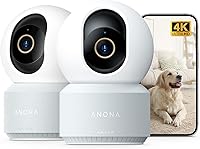
Anona 4K UHD Indoor Camera: Best for 4K indoor detail
- 4K UHD with 8x zoom
- 360 pan and 110 tilt
- Auto-tracking
- Person, pet and baby crying detection
- Dual-band Wi-Fi 6
- MicroSD up to 512 GB
A 2-pack indoor pan-tilt camera with 4K detail and dual-band Wi-Fi, aimed at renters who want sharper views of pets, kids or entry areas.
Pros
- 4K detail and 8x zoom
- Dual-band Wi-Fi
- Two cameras in the pack
Cons
- Indoor use only
- MicroSD card not included
The Anona 4K UHD Indoor Camera suits renters who want sharper detail in a nursery, pet area or entry.
The 2-pack gives you two views, such as one for a crib area and one for a living room, without buying a second pack.
4K UHD video with 8x zoom brings distant details into focus.
That helps when you need to tell what a pet is holding or who is at a door from a shelf across the room.
The camera pans 360 and tilts 110, and auto-tracking follows a moving object.
AI detection covers person, pet and baby crying, with a notification in the phone app.
Dual-band Wi-Fi 6 lets you switch between 2.4 GHz and 5 GHz for the best signal.
That choice can help in apartments where the router is near one band or the other.
Local storage uses a microSD card up to 512 GB, not included, or Anona Cloud with AES-128 encryption.
Trade-off: this is an indoor camera, so it does not replace an outdoor balcony or door camera.
You also need to buy microSD cards for local recording.
Tapo 1080P Indoor Security Camera: Best simple indoor camera
- 1080P FHD
- 110 degree field of view
- Night vision up to 30 ft
- Two-way audio with built-in siren
- Motion, person and baby crying detection
- MicroSD up to 512 GB
A straightforward wired indoor camera for one room, with clear 1080P video and free AI detection alerts.
Pros
- Simple fixed view for one room
- Built-in siren
- Local storage option
Cons
- No pan or tilt
- Indoor use only
The Tapo C100 suits a renter who needs one simple indoor view and does not want pan-tilt controls.
Its fixed bullet design points at a door, hallway, pet crate or desk spot and stays aimed there.
1080P FHD video and a 110 degree field of view cover a typical small room from a shelf or corner mount.
Night vision up to 30 ft uses an integrated IR system for dark rooms.
Free AI detection sends instant push notifications for motion or a person.
Baby crying detection lets you use it as a baby camera monitor, and the built-in siren with two-way audio can deter an intruder or comfort a pet.
You can store footage on a microSD card up to 512 GB, not included, or subscribe to Tapo Care for cloud storage.
Tapo Care offers a 30-day video history and adds motion tracking and baby crying detection benefits.
It works with Alexa and Google Home.
The camera also supports RTSP and ONVIF for integration with an NVR system.
Trade-off: there is no pan or tilt, so it cannot follow a pet across a studio.
Choose a pan-tilt pick if one camera must cover more than one zone.
Blink Mini 2K+: Best compact plug-in for shelves
- 2K video with up to 4x zoom
- Night vision
- Enhanced audio with noise cancellation
- Person and vehicle detection with optional plan
- Plug-in with stand and mounting kit
- Works with Alexa
A compact plug-in camera that sits on a shelf or mounts in minutes, with sharper 2K video for small apartment rooms.
Pros
- Compact size for tight spaces
- Includes stand and mounting kit
- Can be used as a Blink doorbell chime
Cons
- Outdoor use needs a separate weather resistant adapter
- Smart detection needs an optional plan
The Blink Mini 2K+ suits renters who want a small camera that disappears on a shelf, dresser or bookshelf.
It is a third-generation compact plug-in camera with 2K video and up to 4x zoom.
Sharper 2K resolution helps you read details in a small room that 1080P can blur, such as a pet toy or a package near a door.
Improved audio with noise cancellation makes two-way talk clearer.
Person and vehicle detection come with an optional Blink Subscription Plan, sold separately.
Cloud storage also uses that plan, with a free 30-day trial noted for new users.
It includes a stand, USB cable, power adapter and mounting kit, so setup can be shelf or wall based.
Installation takes just minutes with the included kit.
It can also act as a plug-in chime for a Blink Video Doorbell.
That pairing helps if you already use Blink gear at the entry.
Trade-off: outdoor use needs the separate Weather Resistant Power Adapter.
If you want local storage as the main option, other picks here use microSD cards.
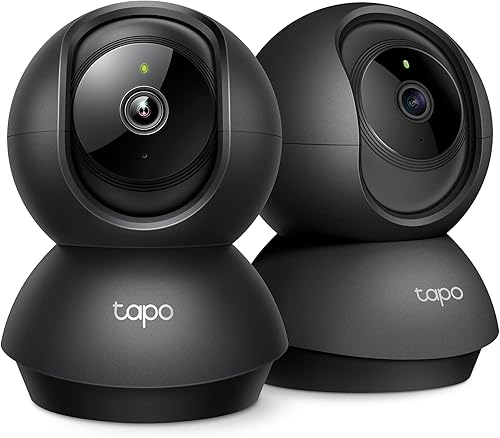
Tapo 2K Pan Tilt Security Camera: Best 2-pack pan-tilt for two rooms
- 2K HD
- 360 horizontal and 114 vertical pan and tilt
- Motion, person and baby crying detection
- Night vision with IR sensor
- Two-way audio and siren
- MicroSD up to 512 GB
A 2-pack pan-tilt indoor camera that lets you cover two rooms or two ends of one layout without buying two separate packs.
Pros
- 2K video in a pan-tilt design
- Two cameras in the pack
- Device sharing for family viewing
Cons
- Indoor use only
- MicroSD cards not included
The Tapo C211 2-pack suits renters with two rooms to watch, such as a bedroom and living room, or two ends of an open layout.
You get two pan-tilt cameras in one pack.
Each camera gives 2K HD video with 360 horizontal and 114 vertical pan and tilt.
That range lets you aim at a door, sofa and pet area from one mount point and adjust the view in the app.
Motion, person and baby crying detection send instant notifications with no additional fee for baby monitor use.
Device sharing lets two family members monitor the feed.
Local storage uses a microSD card up to 512 GB, not included, for continuous recording.
Tapo Care cloud storage saves 30-day video history and adds motion tracking and other benefits.
Rich notifications and video summary are listed as added benefits with that plan.
Trade-off: these are indoor cameras, and you need to buy microSD cards for local recording.
A single fixed camera is simpler if you only need one steady view.
AOQEE 2K Cameras for Home Security: Best budget 2-pack for indoor or outside
- 2K Ultra HD
- Color night vision
- IP65 waterproof
- 105 degree field of view
- Two-way talk and motion detection
- TF card up to 128GB
A 2-pack indoor and outdoor camera with color night vision and IP65 waterproofing for a balcony, door or window area.
Pros
- IP65 for outdoor spots
- Color night vision
- Two cameras for two spots
Cons
- 2.4G Wi-Fi only
- TF card not included
The AOQEE C1 2-pack suits renters who need an indoor and outdoor camera on a budget for a door, balcony or window.
The IP65 waterproof design handles outdoor weather when mounted in a suitable spot.
2K Ultra HD video with color night vision gives colorful images at night, not just black and white.
The 105 degree field of view suits a doorway, yard edge, garage or balcony rail view.
Two-way talk uses a noise-canceling microphone and speaker.
Motion detection sends a phone app notification, and a built-in siren can deter an intruder.
Storage options are a TF card up to 128GB, not included, or cloud storage with a 30-day trial.
Both support 24/7 continuous recording, and the camera works with Alexa.
White light can be turned on at night through the light and night vision settings.
Wall mount and ceiling mount options help you fit a small balcony or entry area.
Trade-off: it connects to 2.4G Wi-Fi only and needs wired power, as it is not a battery camera.
Manual focus means you should check sharpness after mounting.
LaView Security Cameras 4pcs: Best 4-pack for several rooms
- 1080P HD with 2.1MP live view
- Night vision up to 33 ft
- Motion detection and two-way audio
- 84 degree field of view
- MicroSD up to 128GB
- Share with up to 20 people
A 4-pack wired indoor camera set for renters who want one view for the entry, living room, bedroom and pet area.
Pros
- Four cameras for four spots
- Web access in addition to phone app
- Sharing for up to 20 people
Cons
- 2.4GHz Wi-Fi only
- Indoor use only
The LaView 4-pack suits renters who want coverage in several rooms at once, such as entry, kitchen, living room and bedroom.
Four wired cameras let you assign one fixed view per spot.
1080P HD video with a 2.1MP live view and night vision up to 33 ft cover dark rooms.
The 84 degree field of view is narrower than wide-angle picks, so aim each camera directly at the area you want to watch.
Motion detection with smart alerts and two-way audio with noise cancellation help you check in and talk to family or pets.
You can share access with up to 20 people and view up to 9 simultaneous live feeds.
Web access in a browser adds a viewing option beyond the phone app.
Local storage uses a microSD slot up to 128GB per camera for continuous recording.
Cloud storage includes a 30-day US trial based on AWS servers in the US.
Trade-off: it uses 2.4GHz Wi-Fi only, with 5GHz not supported, and it is indoor only.
Four fixed views are less flexible than one pan-tilt camera in a studio.
eufy Security 4K Indoor Camera E30: Best 4K indoor camera with no monthly fee
- 4K Ultra-Clear with 24/7 recording
- 360 panoramic view
- AI pet detection and smart auto tracking
- Color night vision with built-in spotlight
- Local storage with SD card, no monthly fee for core functions
- Works with HomeKit, Alexa and Google Assistant
A 4K indoor pan-tilt camera with on-device AI detection and local storage, for renters who want detail without a required subscription.
Pros
- 4K recording with auto tracking
- No monthly fee for full core functions
- HomeKit support at up to 1080P
Cons
- 2.4 GHz Wi-Fi only
- SD card sold separately
The eufy E30 suits renters who want 4K indoor detail and local storage with no monthly fee for core functions.
It is a pan-tilt indoor camera for a nursery, pet area or living room.
4K Ultra-Clear recording with 24/7 recording captures more detail than 1080P picks.
A 360 panoramic view and Quick Focus Tap in the app let you switch focus by tapping an area on screen.
On-device AI distinguishes humans, pets, audio cues and crying sounds.
Smart auto tracking follows a person or pet when detected, which helps in an open apartment layout.
Color night vision with a built-in spotlight switches between color and infrared night vision.
The spotlight can also act as a deterrent.
Local storage uses an SD card, sold separately, and full core functionality needs no monthly fee.
It works with HomeKit, Alexa and Google Assistant, with HomeKit limited to 1080P.
It is also compatible with HomeBase 3, but not HomeBase 2.
Trade-off: it supports 2.4 GHz Wi-Fi only, and it is indoor only.
The SD card is an extra purchase.
Compare the top picks side by side
The table below compares resolution, placement and storage so you can match a camera to your apartment layout.
Fixed cameras win for one steady view, and pan-tilt cameras win for open rooms.
| Product | Best for | Video Resolution | Placement | Local Storage | Our score |
|---|---|---|---|---|---|
| WYZE Cam OG Indoor/Outdoor Security Camera | indoor and outdoor apartment use | 1080p | Indoor, Outdoor | MicroSD up to 256 GB | 9.7 |
| Kasa 1080p Indoor Pan/Tilt Wired Security Camera | pet and baby pan-tilt checks | 1080p | MicroSD up to 256 GB | 9.7 | |
| Anona 4K UHD Indoor Camera | 4K indoor detail | 4K UHD | MicroSD up to 512 GB | 9.6 | |
| Tapo 1080P Indoor Security Camera | simple indoor camera | 1080P | MicroSD up to 512 GB | 9.5 | |
| Blink Mini 2K+ | compact plug-in for shelves | 2K | Indoor; outdoor with separate adapter | 9.5 | |
| Tapo 2K Pan Tilt Security Camera | 2-pack pan-tilt for two rooms | 2K | MicroSD up to 512 GB | 9.4 | |
| AOQEE 2K Cameras for Home Security | budget 2-pack for indoor or outside | 2K | Indoor, Outdoor | TF card up to 128 GB | 9.3 |
| LaView Security Cameras 4pcs | 4-pack for several rooms | 1080P | MicroSD up to 128 GB | 9.3 | |
| eufy Security 4K Indoor Camera E30 | 4K indoor camera with no monthly fee | 4K | SD card, sold separately | 8.7 |
How do I choose a security camera for a small apartment?
The right camera for a small apartment is the one that fits your view, power outlet and lease rules.
Start with the job, then match resolution and storage to that job.
Indoor, outdoor, or both?
Most apartments need indoor coverage first.
Add outdoor coverage only for a door, balcony or window you are allowed to watch.
Our best security cameras for indoor and outdoor use guide explains the placement split.
If your main risk is a ground-floor window, our best indoor window security camera guide focuses on window views.
For a balcony or front door, choose an IP65 model from this list.
Fixed or pan-tilt?
A fixed camera is best for a door, hallway or pet spot because the view never drifts.
A pan-tilt camera is best for a studio or open living area where one mount must check several zones.
Pet and baby checks often favor pan-tilt or auto-tracking.
Entry checks often favor fixed views, because a camera that turns away can miss the door.
Wired, wireless or plug-in?
These picks are plug-in or wired, which suits apartments with outlets near shelves and doors.
Battery cameras help where there is no outlet, but they need charging and may have slower alerts.
Check the outlet location before you buy.
A camera on a shelf across the room from power may need a longer cable or a different spot.
Renter-friendly mounting options
Shelf, stand and adhesive options avoid drilling in most leases.
Wall screws may need landlord approval, and outdoor mounts on a balcony may need approval too.
Use a stand or shelf mount first, then test the view.
A small shift in height can change whether a camera sees a door lock, pet crate or hallway.
How to map zones before you mount
List each zone in order of importance, such as entry first, then pet area, then hallway.
Assign one camera per zone when you can, because a fixed view is easier to trust than a moving head.
If one pan-tilt camera must cover two zones, set patrol points or preset positions for each stop.
Test each preset at night, since infrared night vision can change how far a doorway or crate appears.
Note where bright windows sit, because backlight can hide faces or details at the lock.
Keep a short written map with outlet locations, cable runs and Wi-Fi signal notes for each spot.
That map helps you move a camera later without guessing or drilling first.
What storage should I use in a security camera for an apartment?
Local microSD storage is best for renters who want to avoid ongoing fees.
Cloud storage is best when you want off-camera backup and longer history.
Local cards record at the camera and keep working during internet outages.
You need to buy a card, format it in the app and check that it is not full.
Cloud plans store clips off site and often add AI alerts and snapshots.
The trade-off is a monthly or yearly fee, so compare the free tier and trial length.
Several picks here offer both.
Choose local as your main option if fees matter, and add cloud only if you need backup outside the apartment.
Do I need a hidden or decoy camera for an apartment?
A visible camera is usually better for deterrence, because a siren, spotlight or visible lens signals that the area is watched.
A hidden camera may help you record a known area, but it cannot deter anyone.
If you want a low-profile option for a shelf, look at size and color first.
If you want to understand decoy options, read What Is a Decoy Security Camera, and What It Does?.
Our guide to What Is a Hidden Security Camera, and Why It Matters? explains privacy and placement limits.
Never place a camera where neighbors or guests have a reasonable expectation of privacy.
How should I place a security camera in an apartment?
Place the camera where it sees the lock, the room entry and the area you care about, not the ceiling.
Test the live view at night and during the day before you fix the mount.
For an entry, aim at chest height toward the door and hallway.
For pets, aim at the crate, food bowl and resting area.
For windows, aim along the glass and sill, not straight out at the street.
Keep the camera away from bright windows and direct sunlight inside, which can wash out the image.
Check Wi-Fi signal at the exact spot, because a corner shelf may have weaker signal than the router area.
For outdoor apartment views, our best outdoor security camera for apartment guide covers balcony and door placement.
Confirm lease rules before any outdoor mount.
What Wi-Fi and setup checks matter for renters?
Most picks here use 2.4 GHz Wi-Fi only.
That band reaches farther through walls, which helps in apartments, but it can be slower than 5 GHz.
Dual-band models, such as the Anona, let you switch bands for the best signal.
If a camera will not connect, move your phone to the 2.4 GHz network during setup and confirm the password.
Update the app and camera firmware before you rely on alerts.
Then walk the room to test motion zones, night vision and two-way audio.
Set sensitivity so hallway traffic, TV motion and pets do not flood your phone.
Motion zones help you focus alerts on the door, crate or valuables area.
Verdict: which best security cameras for apartments should you buy?
Pick the WYZE Cam OG if you need one camera for indoor and outdoor spots.
Pick the Kasa EC71 or Tapo C211 if pets, babies or open layouts need pan-tilt coverage.
Pick the Tapo C100 or Blink Mini 2K+ if you want one simple fixed view for a single room.
Pick the LaView 4-pack if four rooms each need their own fixed view.
For the top pick in one line, the WYZE Cam OG gives the best mix of size, color night vision, local recording and indoor or outdoor use for most renters.
Check your lease, test the view and choose storage before you mount.
Our top 3 picks at a glance
-
1
Best for indoor and outdoor apartment use
WYZE Cam OG Indoor/Outdoor Security Camera
9.7/10 our score
See it on Amazon -
2
Best for pet and baby pan-tilt checks
Kasa 1080p Indoor Pan/Tilt Wired Security Camera
9.7/10 our score
See it on Amazon -
3
Frequently asked questions
What is the best security camera for an apartment with no drilling?
A plug-in camera on a shelf, stand or adhesive mount works best when drilling is not allowed. Look for a compact fixed or pan-tilt model with 2.4 GHz Wi-Fi and local storage.
Check your lease before using wall screws or outdoor mounts.
Can I use an outdoor security camera on an apartment balcony?
Yes, if your lease allows it and the camera is rated for outdoor use. Choose an IP65 model and confirm power access and Wi-Fi signal there.
Keep the view aimed at your own door, balcony or window, not a neighbor's private space.
Do I need a subscription for a security camera in an apartment?
Not always. Several picks here record locally on a microSD card with no subscription required for local storage.
Cloud plans add longer history and extra alerts, so compare what each brand includes before you buy.
Should I get a pan-tilt or fixed camera for a small apartment?
Pan-tilt helps in open layouts where one camera must check two areas. Fixed cameras work better for a single door, hallway or pet spot because the view stays put.
Small rooms often need fewer cameras with fixed views.
Can a security camera work as a pet or baby monitor in an apartment?
Yes. Look for two-way audio, night vision and baby crying or pet detection if that is your main use.
A pan-tilt model can follow movement, while a fixed model gives a steady view of a crate, crib area or feeding spot.