9 Best Indoor Security Cameras with Local Storage (November 2026)
The best indoor security cameras with local storage include the eufy Security 4K Indoor Cam S350 for detailed whole-room views, the youkey Magnetic Indoor Security Camera Wireless for renters and wire-free placement, and the Kasa 1080p Indoor Pan/Tilt Wired Security Camera for large local storage capacity.
On this page (4 sections)
The best indoor security camera with local storage is the eufy Security 4K Indoor Cam S350 for detailed views, strong zoom and wide room coverage.
It combines a 4K wide-angle camera with a 2K telephoto camera in one unit. That pairing lets you watch the whole room while also checking smaller details in the same view.
The 8× hybrid zoom is a key reason for its overall lead here. You can lean toward a detail from farther away instead of settling for a distant wide shot.
Its 360° coverage also helps in rooms where one fixed angle would miss too much. Pan, tilt and tracking can follow movement rather than leaving you to guess where activity went.
The youkey is better for wire-free placement and a simpler start. Its built-in storage means there is no separate memory card to buy before you can record locally.
The Kasa is a strong wired option with 256 GB microSD support. That larger stated capacity may suit buyers who want to keep recordings longer before replacing them.
Local storage means your recordings stay on hardware at home rather than depending on cloud recording. That can give you more control over where footage is kept and how long you can keep it.
Still, local storage does not remove the need to check other parts of the setup. You need to look at power, Wi-Fi, storage limits, app access and privacy controls before choosing.
A wired camera suits a fixed spot and continuous monitoring. A battery camera suits renters, temporary placement and rooms where running a cable would be awkward.
Resolution also matters in daily use, not just on paper. Higher detail can help you recognise a face, read an object or check what a child or pet is holding.
If you need several cameras, compare our guide to the best security cameras with local storage and the best local storage security camera system.
For a broader explanation of private recording, read What Is a Local Only Security Camera System?.
Our picks at a glance
-
1
 Best for detailed whole-room views
eufy Security 4K Indoor Cam S350
9.7/10 our score
See it on Amazon -
2
 Best for renters and wire-free placement
youkey Magnetic Indoor Security Camera Wireless
9.7/10 our score
See it on Amazon -
3
 Best for large local storage capacity
Kasa 1080p Indoor Pan/Tilt Wired Security Camera
9.7/10 our score
See it on Amazon
- 4
 Check it
REOLINK 4MP 2K Indoor Camera E1
Best for Reolink local-storage setups - 5
 Check it
Tapo 2K Pan Tilt Security Camera
Best for two-room coverage - 6
 Best for indoor and outdoor flexibilityCheck it
- 7
 Check it
Tapo 1080P Indoor Security Camera
Best for simple 1080p monitoring - 8
 Check it
eufy Security 4K Indoor Camera E30
Best for 24/7 4K recording - 9
 Check it
Geeni Vivid Indoor Smart Security Camera
Best for basic room monitoring
The best indoor security camera with local storage for each need
The best choice depends on how you want to store footage and where the camera will sit. Wired cameras suit continuous monitoring, while the battery-powered youkey is easier to move between rooms.
We compared resolution, local storage options, viewing range, power type, privacy controls and indoor-use features against the needs of someone searching for an indoor security camera with local storage. Our score weighs specs, features and buyer feedback against what you're shopping for.
eufy Security 4K Indoor Cam S350: Best for detailed whole-room views
- 4K wide-angle and 2K telephoto cameras
- 8× hybrid zoom
- 360° coverage
- microSD storage up to 128 GB
Dual cameras show a wide room view and zoomed detail at the same time. It suits indoor monitoring where 360° coverage, local recording and close-up views matter.
Pros
- 4K and 2K dual-camera setup
- 8× hybrid zoom
- 360° coverage and auto tracking
Cons
- microSD card is not included
- HomeKit is not supported
The eufy Security 4K Indoor Cam S350 is the most complete pick for a room where you want both a full view and close detail. Its 4K wide-angle and 2K telephoto cameras work together, so you can view the room and zoomed detail on one screen.
The 8× hybrid zoom is useful when a wide view is not enough. The camera also provides 360° coverage, auto tracking and auto-zoom presets for frequently checked areas.
Local recording uses a microSD card up to 128 GB, or a HomeBase S380. The card is not included.
The camera is wired, supports 2.4 GHz and 5 GHz Wi-Fi, and can be freestanding, screwed in or attached with a self-adhesive option.
Its privacy mode turns the camera away, which gives you a physical way to block the view. HomeKit is not supported, and HomeBase 3 compatibility requires firmware 3.3.2.6 or later.
Choose the S350 when video detail and room coverage matter most. It is especially suited to baby, pet or senior monitoring where you may need to check a small object from across the room.
youkey Magnetic Indoor Security Camera Wireless: Best for renters and wire-free placement
- Built-in 8GB storage
- 6400mAh battery
- 2K video
- Magnetic mounting
Built-in storage removes the need for a separate memory card, while the battery and magnetic base make room-to-room placement simple. It also supports Alexa and Google Assistant.
Pros
- Built-in 8GB storage
- Wire-free battery power
- Magnetic mounting
Cons
- Built-in storage is smaller than the largest microSD options
- Battery charging is part of ownership
The youkey Magnetic Indoor Security Camera Wireless is the best fit when you want local storage without a separate card. Its built-in 8GB eMMC storage saves footage locally, and the camera includes subscription-free playback.
A 6400mAh battery powers the wire-free design. PIR smart wake-up records human or pet movement, which matches a camera placed where constant recording would use more battery.
The magnetic base works on a metal surface, while the included mounting screw kit supports a non-metal surface. That makes the camera easy to move between rooms without leaving screw holes when the magnetic base is suitable.
The camera records in 2K and includes two-way audio, night vision and app privacy control. It works with Alexa and Google Assistant, and it supports 2.4 GHz and 5 GHz Wi-Fi 6.
The product data also describes IP65 weatherproofing and covered-patio, garage and entryway use. For a strictly indoor buyer, those details mainly show that the camera can be moved beyond a living room if your setup changes.
Choose youkey if you rent, move the camera often or do not want to buy a microSD card. Choose a wired camera instead if your priority is long-term continuous recording.
Kasa 1080p Indoor Pan/Tilt Wired Security Camera: Best for large local storage capacity
- 1080p video
- 360° horizontal and 113° vertical coverage
- microSD support up to 256 GB
- 2.4 GHz Wi-Fi
The EC71 combines pan and tilt movement with continuous recording to a microSD card up to 256 GB. It fits homes that want a wired indoor camera with wide room coverage.
Pros
- 256 GB microSD support
- 360° pan and 113° tilt
- Motion tracking and baby crying detection
Cons
- Uses 2.4 GHz Wi-Fi
- microSD card is not included
The Kasa 1080p Indoor Pan/Tilt Wired Security Camera is a practical choice for a room that needs broad movement coverage and a larger local card. It supports continuous recording to a microSD card up to 256 GB.
The EC71 pans across 360° horizontally and tilts through 113° vertically. Patrol Mode checks selected regions at intervals, while motion tracking follows moving objects or people.
It records 1080p video and provides night vision up to 30 ft. Motion, person and baby crying detection can send alerts, and two-way audio supports remote conversations with people or pets in the room.
The camera connects through 2.4 GHz Wi-Fi and needs the included power adapter. It can work with Alexa and Google Home displays, so you can view the live stream on a compatible screen.
The microSD card is not included, and cloud storage remains an optional path. Pick Kasa when you want a wired indoor camera with a clear local-storage limit and pan/tilt coverage.
REOLINK 4MP 2K Indoor Camera E1: Best for Reolink local-storage setups
- 4MP 2K video
- Up to 512GB microSD support
- 355° pan and motion tracking
- Reolink NVR and Home Hub support
The E1 offers several local recording paths, including a large microSD card, Reolink NVR and Reolink Home Hub products. Its 355° pan range and motion tracking help follow activity indoors.
Pros
- Up to 512 GB microSD support
- NVR and Home Hub options
- Privacy mode
Cons
- Does not support RTSP or ONVIF
- 2.4 GHz Wi-Fi only
The REOLINK 4MP 2K Indoor Camera E1 suits buyers who want local storage that can grow beyond a typical small card. It supports microSD cards up to 512 GB, along with Reolink NVR and Home Hub options.
Its 4MP 2K video gives more detail than 1080p, while the 355° pan range and motion tracking help cover a room from one position. The camera also includes night vision, two-way talk and cry detection alerts.
The E1 is a plug-in Wi-Fi camera with a 5V 1A power adapter and 1.5 m power cable. It connects through 2.4 GHz Wi-Fi and can stand freely or use the included mounting hardware.
Privacy Mode blocks the camera view and mutes audio. The app allows up to 10 invited users, with up to 4 people viewing live at the same time.
One key trade-off is compatibility: the product data states that the camera does not support RTSP or ONVIF. Choose it when you want the Reolink app, microSD recording, NVR or Home Hub options within that ecosystem.
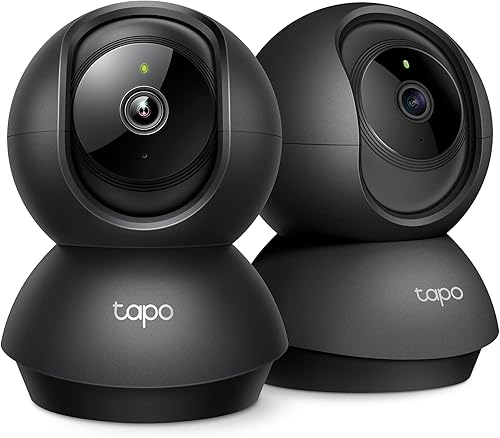
Tapo 2K Pan Tilt Security Camera: Best for two-room coverage
- 2K video
- 2-pack
- 360° horizontal and 114° vertical coverage
- microSD support up to 512 GB
This 2-pack gives you two indoor pan and tilt cameras for separate rooms. Each camera supports local microSD recording up to 512 GB and works with Alexa and Google Assistant.
Pros
- Two cameras in one package
- Large 512 GB microSD capacity
- 360° pan and 114° tilt
Cons
- microSD cards are not included
- Check card compatibility before buying
The Tapo 2K Pan Tilt Security Camera is the strongest fit when you need coverage in two indoor rooms. This 2-pack includes two Tapo C211 cameras, and each supports local recording to a microSD card up to 512 GB.
Each camera provides 2K video, 360° horizontal movement and 114° vertical movement. Motion, person and baby crying detection can send alerts, while the app provides access to the live feed and recordings.
The cameras connect wirelessly through 2.4 GHz Wi-Fi and work with Alexa and Google Assistant. Two-way audio, night vision and a built-in siren add communication and alert options for a nursery, pet area or living room.
The microSD cards are not included. Tapo also advises checking its compatibility information before buying a card, which is worth doing because storage support can depend on the camera and card type.
Choose this pack when two rooms matter more than a single premium camera. If you only need one camera, a single-camera pick may be simpler to place and manage.
WYZE Cam v4: Best for indoor and outdoor flexibility
- 2.5K QHD video
- 120° field of view
- Color night vision
- microSD support up to 512 GB
The WYZE Cam v4 brings 2.5K video, a 120° view and local recording to a compact camera. Its indoor and outdoor rating makes it useful when one camera may move between locations.
Pros
- 2.5K QHD resolution
- Color night vision and spotlight
- 512 GB microSD support
Cons
- 2.4 GHz Wi-Fi only
- microSD card is sold separately
The WYZE Cam v4 is a flexible choice for buyers who may use the same camera indoors or outdoors. It records 2.5K QHD video through a 120° field of view and supports local recording to a microSD card up to 512 GB.
Color night vision uses a Starlight Sensor and a 72-lumen spotlight. Motion can also activate the spotlight and a 100 dB siren, giving the camera a visible and audible response when used in an appropriate location.
The camera is IP65 rated and operates from -4°F to 113°F. For indoor use, that weather protection matters mainly if you may later move the camera to a covered outdoor area, garage or entryway.
It connects to 2.4 GHz Wi-Fi and supports Alexa, Google Assistant and IFTTT. The app includes activity zones and a multi-camera dashboard, while two-way audio supports conversations with visitors or family.
The microSD card is sold separately. Choose WYZE when you want 2.5K detail, broad placement flexibility and a large local-storage ceiling in one compact camera.
Tapo 1080P Indoor Security Camera: Best for simple 1080p monitoring
- 1080p video
- 117° field of view
- 30 ft night vision
- microSD support up to 512 GB
The Tapo C101 keeps the setup focused on indoor monitoring, motion alerts, two-way audio and local microSD recording. Its 117° view works well for a room, desk or pet area.
Pros
- 512 GB microSD support
- 30 ft night vision
- Built-in siren and two-way audio
Cons
- Requires constant power
- 1080p resolution is lower than several picks here
The Tapo 1080P Indoor Security Camera is a good match for simple room monitoring with local recording. It supports microSD cards up to 512 GB, while its 1080p video keeps the camera focused on common indoor tasks.
The C101 has a 117° field of view and infrared night vision up to 30 ft. Motion, person and baby crying detection can send push notifications, and the built-in siren gives you another way to respond to activity.
Two-way audio lets you speak through the app. The camera also works with Alexa and Google Assistant for viewing on a compatible display.
This is a wireless Wi-Fi camera, but it is not battery powered. It requires a constant power connection through the included DC adapter, so plan the outlet and cable path before mounting it.
Choose the C101 when 1080p is enough and you want a large stated microSD capacity. If you need higher detail or pan and tilt movement, the 2K and 4K models above offer more room to zoom or reposition the view.
eufy Security 4K Indoor Camera E30: Best for 24/7 4K recording
- 4K recording
- 360° panoramic view
- AI tracking
- Color night vision with spotlight
The E30 is a wired indoor camera built around 4K recording, 360° viewing and 24/7 recording. It adds color night vision, a spotlight and on-device detection for people, pets and crying sounds.
Pros
- 4K recording
- 24/7 recording
- HomeKit support
Cons
- HomeKit resolution is limited to 1080p
- SD card is sold separately
The eufy Security 4K Indoor Camera E30 is built for buyers who want 4K recording and 24/7 monitoring from a single indoor camera. It combines a 360° panoramic view with AI tracking for people and pets.
The wired camera includes color night vision, a spotlight, infrared night vision, two-way audio and detection for humans, pets, audio cues and crying sounds. Those features make it suitable for a nursery, pet area or room that needs continuous coverage.
Local storage uses an SD card, which is sold separately. The camera works with HomeKit, Alexa and Google Assistant, although HomeKit resolution is limited to 1080p.
The E30 supports freestanding placement and includes a wall mount, positioning sticker, screw pack, USB cable and USB adapter. It uses 2.4 GHz Wi-Fi, so check your network before placing it.
Choose the E30 when 24/7 recording, 4K video and smart-home support matter more than a dual-camera zoom system. The S350 is the better fit if you want wide and telephoto views at once.
Geeni Vivid Indoor Smart Security Camera: Best for basic room monitoring
- HD live streaming
- Motion alerts
- Two-way audio
- Night vision
The Geeni Vivid is a compact indoor camera for live viewing, motion alerts and two-way audio. Its flexible stem supports shelf, desk or wall placement in rooms such as kitchens, offices and living rooms.
Pros
- Compact flexible placement
- Two-way audio
- Night vision
Cons
- The data does not state a maximum local storage capacity
- HD resolution is less detailed than the 2K and 4K picks
The Geeni Vivid Indoor Smart Security Camera is the simplest pick for basic indoor monitoring. It provides HD live streaming, motion alerts, two-way audio and night vision from a compact camera.
Its flexible stem supports shelf, desk or wall placement. The camera is designed for indoor rooms such as a kitchen, living room, office or classroom, and it works with smartphones and tablets.
The product data describes both cloud and local storage but does not state a maximum local capacity. That makes it important to confirm the storage method and card requirements before choosing it for long recording histories.
The Geeni Vivid uses wireless Wi-Fi and includes motion-only alerts. It is a better fit for checking a room or pet area than for buyers who need 4K detail, a large stated storage limit or advanced pan and tilt.
Choose it when compact placement and two-way audio matter most. Move up to Tapo, REOLINK, WYZE or eufy when storage capacity and video detail are higher priorities.
How to choose an indoor camera with local storage
Choose the storage hardware first, then match the camera's resolution and power type to your room. A camera with built-in memory is simple, while a microSD camera gives you more capacity choices but adds a card to the setup.
Should you choose built-in storage or a microSD card?
Built-in storage is easiest when you want the camera to work without buying a separate card. The youkey includes 8GB of eMMC storage, so it is the most direct option for renters or simple room monitoring.
MicroSD storage gives you more capacity choices. The REOLINK E1, Tapo C211, WYZE Cam v4 and Tapo C101 support cards up to 512 GB, while Kasa supports up to 256 GB and the eufy S350 supports up to 128 GB.
Check whether the camera records continuously or mainly after motion. Higher resolution and 24/7 recording can use storage faster, so a large card is more useful when you plan to keep recordings for longer periods.
Do you need 1080p, 2K or 4K video?
1080p is enough for a general room view, while 2K gives you more detail for faces, pets and smaller objects. 4K is most useful when you want to crop or zoom into a wide view.
The Kasa and Tapo C101 provide 1080p video. The REOLINK E1 and Tapo C211 use 2K, while the eufy S350 and eufy E30 provide 4K options.
Resolution is only part of the choice. A pan and tilt camera can reposition the view, while a wide field of view may show more of a room without movement.
Is a wired or battery camera better indoors?
Wired cameras are better for a fixed position and continuous recording because they stay connected to power. Battery cameras are easier to move but need charging, and their recording behavior may focus on detected activity to conserve power.
The youkey is the battery-powered option here, with a 6400mAh battery and magnetic mounting. The other cameras use wired power or a power adapter, so plan the outlet and cable route before installation.
If you are comparing indoor and outdoor placement, our guide to Indoor vs Outdoor Security Cameras, Explained Simply covers the main differences. For outdoor models, see the best outdoor security camera with local storage.
How much camera movement do you need?
Pan and tilt helps when one camera must cover several parts of a room. The Kasa provides 360° horizontal and 113° vertical movement, while the Tapo C211 provides 360° horizontal and 114° vertical movement.
The REOLINK E1 offers a 355° pan range and motion tracking. The eufy S350 and E30 provide 360° coverage, with the S350 adding dual-camera zoom and the E30 adding panoramic viewing.
A fixed camera can be simpler if the room layout is stable. Choose movement when the camera needs to follow a pet, check a crib or cover several doorways from one position.
Local-storage setup and care
Set up local recording by placing the camera where it can see the room without the lens being blocked. A clear view matters more than a high shelf if furniture or door frames cut off the angles you care about.
Connect the camera to power if your model needs it, then add compatible storage before you test recording. Check playback in the app so you know files are saving where you expect them to save.
Keep the camera firmware and app updated so storage and privacy controls work as expected. Updates can also affect Wi-Fi handling, playback and the way alerts are delivered to your phone.
Use a card that matches the camera stated capacity and compatibility guidance. Some models list a maximum size, and using a card outside that guidance can create avoidable problems.
Before relying on important recordings, make a short test clip and play it back from the start. Confirm that the time, view and sound are clear enough for the job you bought the camera to do.
Check how the camera handles full storage before it becomes a problem. You may want to review older clips regularly and clear space in an orderly way rather than waiting for recording to stop.
Keep the camera away from direct glare and place it where the lens has a clear view. Bright windows behind a subject can wash out detail, while a steady indoor position usually gives a more usable picture.
Think about height and angle during setup, especially for pan and tilt models. A position that looks fine on a live view may still miss low areas such as a crib, pet bed or floor near a doorway.
Use privacy mode when available, and treat it as part of normal care rather than an extra feature. Turning the view away or off when the room is in private use can reduce unnecessary recording.
Protect the app account with a strong password and keep sign-in details to yourself. Review which people can access live video, because shared access is convenient but it should still stay deliberate.
For a wireless model, check the Wi-Fi signal at the final mounting point before you finish. A camera can have local storage and still need a stable connection for alerts, live viewing and app control.
Keep the lens clean with a soft dry cloth and avoid sprays that could damage the surface. Dust and fingerprints are small issues until they start softening the image at night.
Plan cable routes for wired models so power leads stay out of walkways. For battery models, keep the charging routine simple and regular so a flat battery does not leave a room unmonitored without you noticing.
Regular playback checks make it easier to find a clip quickly and to notice if storage is filling faster than expected. Folder habits matter over time, even in a single room.
If the camera is used for a baby, pet or senior, test two-way audio from the final spot. Also test night vision after dark rather than trusting a daytime setup.
Finally, revisit placement when the room changes. New furniture, a moved bed or a different pet routine can make the old angle less useful.
Which indoor local-storage camera should you buy?
Pick the eufy Security 4K Indoor Cam S350 if you want the strongest mix of detail, dual cameras, zoom and 360° coverage.
It is the best fit when one room needs both a full view and a close look at activity. The dual-camera design helps you keep context while checking smaller details that a wide view alone might lose.
Choose the youkey for built-in storage, battery power and renter-friendly magnetic placement. It suits buyers who want to avoid buying a separate card and who may move the camera between rooms.
The youkey also fits covered or temporary spots where a wired lead would be awkward. Its wire-free design makes placement flexible, although battery care becomes part of regular ownership.
Choose Kasa for a wired 1080p camera with 256 GB microSD support. That capacity gives a wired setup more room for local recording than the smaller stated limits in this roundup.
Choose REOLINK E1 for 2K video and several Reolink local-storage paths. It may suit buyers who want microSD recording alongside NVR or Home Hub options in one ecosystem.
If two rooms need coverage, the Tapo C211 2-pack is the clearest fit. Two cameras can watch separate spaces at once instead of forcing one pan and tilt unit to choose between rooms.
For indoor and outdoor flexibility, the WYZE Cam v4 deserves a look. Its 2.5K video, color night vision and large stated microSD capacity make it useful when placement may change.
For simple 1080p monitoring, the Tapo C101 keeps the focus on a fixed room view. It suits a desk, pet area or nursery corner where pan and tilt movement is not needed.
The eufy E30 is worth considering for 24/7 4K recording in one wired camera. For basic room checks, the Geeni Vivid is the simplest option, with live viewing, motion alerts and two-way audio.
Match the choice to how you will actually monitor the room and how often you record. Continuous recording and higher resolution can use space faster, so a larger card may be worth the extra thought.
For more cameras designed around local recording, compare the best wireless security cameras with local storage.
Our top 3 picks at a glance
-
1
Best for detailed whole-room views
eufy Security 4K Indoor Cam S350
9.7/10 our score
See it on Amazon -
2
Best for renters and wire-free placement
youkey Magnetic Indoor Security Camera Wireless
9.7/10 our score
See it on Amazon -
3
Best for large local storage capacity
Kasa 1080p Indoor Pan/Tilt Wired Security Camera
9.7/10 our score
See it on Amazon
Frequently asked questions
What is the best indoor security camera with local storage?
The eufy Security 4K Indoor Cam S350 is the strongest overall choice here because it combines 4K and 2K dual cameras, 8× hybrid zoom, 360° coverage and local microSD storage up to 128 GB. Choose the REOLINK E1 or Tapo C211 if you need a larger stated microSD capacity.
Do indoor security cameras with local storage need Wi-Fi?
Most cameras in this roundup use Wi-Fi for app access, alerts and live viewing, while the recording itself is saved to a microSD card or built-in storage. Local storage does not automatically mean the camera works without a network connection, so check the camera's connection method before buying.
How much local storage does an indoor security camera need?
Choose capacity based on resolution, recording schedule and how often you review or replace recordings. The cameras here range from built-in 8GB storage to stated microSD support up to 512GB.
Higher-resolution or continuous recording can use storage faster than motion-only recording.
Are local-storage security cameras private?
Local storage keeps recordings on hardware at home instead of requiring every clip to be stored online, but privacy still depends on the camera, app, network and account settings. Use strong account security, update the camera app and enable privacy modes when available.