How to Connect a Security Camera to Your Phone
To connect a security camera to your phone, install the camera's app, connect the camera to power or its base, and follow the in-app pairing steps. Your phone and camera may need the same Wi-Fi network during setup.
On this page (9 sections)
- How do you connect a security camera to your phone?
- What do you need before setup?
- How does a camera base change phone setup?
- Can you connect a security camera that connects to phone over Wi-Fi?
- How do you connect a Blink camera and doorbell to your phone?
- What should you check if the camera will not pair?
- Where should you place a phone-connected camera?
- Can wired cameras connect to a phone?
- What is the best way to connect a security camera to your phone?
To connect a security camera to your phone, install the correct camera app, add the camera or base, connect it to power and Wi-Fi as directed, then finish pairing in the app. Once setup is complete, the app may let you view live video, receive alerts, and use other features supported by that camera.
The exact steps vary by brand. A wireless camera may connect directly to your home network, while a multi-camera system may use a base that connects to your router.
How do you connect a security camera to your phone?
Download the camera's official app and follow its add-device setup. Keep the camera, phone, router, and any included base close enough to complete pairing without a weak signal.
Use this general order:
- Charge or power the camera as directed.
- Install the camera app on your phone.
- Create or sign in to the required account.
- Tap the option to add a camera or system.
- Enter your Wi-Fi details if the app asks for them.
- Scan a setup code or follow the pairing prompt.
- Name the camera by location, such as porch or driveway.
- Test live view and alerts before mounting the camera.
If you are comparing wireless options, our guide to best wireless security cameras can help you compare systems designed for app-based viewing.
What do you need before setup?
You need a compatible smartphone, the camera app, a working power source, and the network or base required by the camera. Read the quick-start instructions before mounting the camera, because some systems need setup indoors first.
Check your Wi-Fi name and password before you begin. Also allow the app to use the phone permissions it needs for setup, notifications, Bluetooth, or local network access.
Keep the camera near the router during pairing if the instructions use direct Wi-Fi. After setup, move it to the intended location and test live view again.
How does a camera base change phone setup?
A camera base gives several cameras one central connection to your router and app. This can reduce the need to pair every camera directly to your home Wi-Fi.
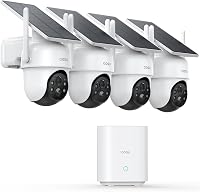
The aosu D1 Classic 4-Cam Kit uses an aosuBase that connects to your router's LAN port with an Ethernet cable. The cameras connect wirelessly to the base, and the system comes pre-paired.
The aosu app can show up to 4 live camera feeds at the same time. The base stores event-based recordings in its built-in 32GB storage, and the system does not require a subscription for that local storage.
Choose this type of system if you want several outdoor cameras managed in one app. The trade-off is that the cameras are designed to work with the included aosuBase, so the base becomes part of the setup.
Its integrated solar panel is designed to use about 3 hours of direct sunlight each day to help keep the camera charged. Mount each camera upright with 3 screws, and keep the panel clear of shade for better charging.
Can you connect a security camera that connects to phone over Wi-Fi?
Yes, a security camera that connects to phone usually uses its app for setup and remote viewing. The camera still needs power and a network connection, while your phone needs internet access when you view it away from home.
Look for the camera's stated connectivity method before buying. The aosu system uses wireless communication between the cameras and base, while the base connects to the router with Ethernet.
A phone app can make remote viewing simple, but it also means your alerts and live view depend on the camera's network path. Test the camera from both home Wi-Fi and mobile data before relying on notifications.
For outdoor placements, see best outdoor wireless security cameras and check the mounting location for signal, sunlight, and weather exposure.
How do you connect a Blink camera and doorbell to your phone?
Connect the Blink system through the Blink app, then add the included Sync Module Core and cameras as directed. The bundle combines Outdoor 4 cameras with a Wired Doorbell 2K+ and uses the app for live view, alerts, night vision, and two-way audio.
The 3-camera bundle includes 3 Outdoor 4 cameras, 1 Wired Doorbell 2K+, and 1 Sync Module Core. It also includes 6 AA Energizer lithium batteries for the Outdoor 4 cameras, mounting kits, a USB-C cable, and a power cord for the module.
The doorbell can connect to existing doorbell wiring so it can sound within your home. The Outdoor 4 cameras use the included AA Energizer lithium batteries and are designed for wireless installation.
This bundle suits households that want a doorbell camera plus 3 outdoor camera locations in one Blink app. Outdoor 4 provides 1080p video, while the Wired Doorbell 2K+ provides 2K video.
The 5-camera bundle uses the same camera and doorbell types but adds 2 Outdoor 4 cameras. It includes 10 AA Energizer lithium batteries for those cameras, along with the Sync Module Core, mounting kits, USB-C cable, and power cord.
Choose this version when you need more Outdoor 4 camera locations. Its main trade-off is size: you will manage 5 outdoor cameras and 1 doorbell in the app, so use clear names such as side gate, garage, and rear yard.
Both Blink bundles support live view, night vision, two-way audio, and Alexa connections. Smart detection features such as person or vehicle alerts are part of a Blink plan sold separately.
What should you check if the camera will not pair?
Start with power, Wi-Fi, app permissions, and the camera's setup mode. Most pairing problems come from one of those four areas.
Check these points:
- Confirm the camera or base is powered on.
- Re-enter the Wi-Fi password carefully.
- Move the phone and camera closer to the router or base.
- Allow the app's requested permissions.
- Close and reopen the app.
- Restart the camera, base, and phone.
- Repeat the pairing process from the beginning.
If the camera was already connected to another account or network, follow the brand's reset instructions before trying again. A reset can remove prior network settings, so use it only when the normal connection steps do not work.
For Apple households, compare best HomeKit security cameras and confirm that the camera supports the Apple setup you plan to use. Outdoor Apple-compatible options are covered in best outdoor HomeKit security cameras.
Where should you place a phone-connected camera?
Place the camera where it has a clear view, stable power, and a reliable connection to its network or base. Avoid mounting it before you confirm live view and alerts from the final location.
For a solar camera, check direct sunlight at the panel during the day. For a battery camera, make sure you can reach it when the batteries need attention.
Aim the camera to cover the needed area without pointing directly at bright lights. Use simple location names in the app so alerts are easy to understand.
A camera should support a security plan rather than replace basic physical protection. For an outward-opening door, read how to barricade a door that opens outward.
A decoy device has a different purpose, explained in What Is a Decoy Security Camera, and What It Does?, while privacy concerns are covered in What Is a Hidden Security Camera, and Why It Matters?.
Can wired cameras connect to a phone?
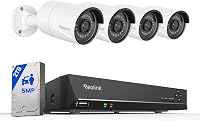
Yes, a wired camera system can connect to a phone through its network recorder or app. The camera cable handles the camera connection, while the recorder or network device provides app access.
Cable length, connector type, recorder support, and network access all matter. If you are considering a wired installation, compare best security cameras that use Cat5 cable before running cable through walls.
Wired systems can suit fixed camera positions, while wireless systems may be easier to install without routing cable. The better choice depends on the building, camera locations, power access, and how much installation work you want to do.
What is the best way to connect a security camera to your phone?
Pick a direct app-based camera for a simple single-camera setup, a base system for several cameras, or a doorbell bundle when front-door coverage is part of the plan.
The aosu D1 Classic 4-Cam Kit fits a multi-camera setup with a pre-paired base, local storage, and 4-camera live view in its app. The 3-camera Blink bundle fits homes that need a 2K doorbell plus 3 Outdoor 4 cameras.
The 5-camera Blink bundle adds 2 more Outdoor 4 locations.
Before mounting anything, complete setup indoors, test live view, check alerts, and confirm that the final location still has the required power and network connection. That simple check can prevent a difficult reinstall later.
Frequently asked questions
Can any security camera connect to a phone?
No. The camera needs a supported phone app or another compatible connection method.
Check whether the camera works with your phone's operating system, then confirm the setup needs Wi-Fi, a base, or existing doorbell wiring before you install it.
Does my phone need to be on the same Wi-Fi as the camera?
Usually, your phone and camera need the same Wi-Fi network during setup. After pairing, remote viewing may work through the camera's app when your phone is away from home, provided the camera has power, network access, and any required account settings.
Why won't my security camera connect to my phone?
Common causes include a wrong Wi-Fi password, weak signal, missing app permissions, low power, or an incomplete pairing step. Restart the camera and app, check the network, update the app if needed, and repeat the manufacturer's setup process.
Can I connect more than one security camera to my phone?
Yes, some camera systems let one app manage several cameras. The number depends on the system.
The aosu D1 Classic 4-Cam Kit connects up to 4 cameras to one base, while the Blink bundles include 3 or 5 Outdoor 4 cameras plus one doorbell.