9 Best Security Cameras for Cars (November 2026)
The best car security cameras include the ZMOPO 360 View 4 Channel Dash Cam for full vehicle coverage, the SUVCON Dash Cam Front and Rear for simple three-channel coverage, and the PRUVEEO 360° 4 Channel Dash Cam Front for GPS route records.
On this page (5 sections)
The best camera for car security is the ZMOPO 360 View 4 Channel Dash Cam because it records front, rear, left, right and inside views at the same time. That coverage helps when an incident does not happen straight ahead.
Choose Topexplore if you need remote 4G access, or the 70mai T800E if 4K front footage matters most. Where your car spends its time should guide that choice.
A dash cam can record damage, suspicious movement or a collision while parked. It can also give you a clearer record of a road event than memory alone.
The right setup depends on whether you need front-only evidence, coverage around the whole vehicle, cabin footage, GPS records or remote phone access. No single camera is best for every driver.
Front-only models keep wiring simple. Multi-channel models add value when doors, side panels and rear quarters are part of the risk, and cabin cameras matter for rideshare drivers and family vehicles.
GPS adds location, speed and route details that can help explain when and where something happened. Local Wi-Fi lets you check clips near the car, while 4G can let you check in from farther away when service is available.
More cameras also fill a card faster, so included and maximum storage are worth checking. Parking mode needs separate thought, as some cameras record while parked only with extra wiring.
For wireless access, compare our guide to the best wireless security camera for car. If you need to watch a driveway or parking area instead of mounting a camera inside the car, see our best outdoor security camera guide.
Our picks at a glance
-
1

-
2
 Best for simple three-channel coverage
SUVCON Dash Cam Front and Rear
9.6/10 our score
See it on Amazon -
3

- 4
 Check it
E-YEEGER Dash Cam Front and Rear
Best for a compact dual-camera setup - 5
 Check it
70mai 4K Dash Cam Front and Rear
Best for high-resolution daily driving - 6
 Best for discreet front recordingCheck it
- 7
 Check it
70mai A810 Lite 4K Dash Cam Front
Best for 4G-ready connectivity - 8
 Check it
Topexplore 4G LTE Dash Cam Front
Best for remote parked-car checks - 9
 Check it
VROAVIE 360° View 4 Channel Mirror Dash
Best for a mirror-style display
Which camera is best for car security?
The best camera for car security depends on the area you need to record. Four-channel models cover more sides, dual-camera models balance coverage and setup, and 4G models are designed for remote viewing away from the car.
Start with the direction of risk. A front camera suits road incidents, a rear camera helps with parking bumps, and side cameras watch doors and adjacent spaces.
Cabin coverage is more useful for rideshare work, teen drivers, family trips and vehicles carrying passengers or valuables. A sharper front camera helps with plates and signs, while cabin and side views may not need the same detail.
Night recording should be checked as its own feature. Infrared lights help inside a dark car, and HDR or WDR can help balance headlights against dark areas.
Storage needs rise with each added camera, and a card for one channel may fill quickly with four. Local Wi-Fi is for nearby viewing, while 4G relies on cellular coverage, a SIM and any data service required.
Parking mode depends on power, not just software, as some models need a hardwire kit. We compared camera direction, resolution, storage, night recording, parking features, connectivity and setup needs.
Our score weighs specs, features and buyer feedback against what you're shopping for.
| Product | Best for | Coverage | Storage | Parking mode | Our score |
|---|---|---|---|---|---|
| ZMOPO 360 View 4 Channel Dash Cam | full vehicle coverage | Front, rear, left, right and inside | 128GB included; supports up to 256GB | Requires optional ACC hardwire kit | 9.7 |
| SUVCON Dash Cam Front and Rear | simple three-channel coverage | Front, rear and inside | 32GB included; supports up to 32GB | 9.6 | |
| PRUVEEO 360° 4 Channel Dash Cam Front | GPS route records | Front, rear, left, right and inside | 128GB included; supports up to 256GB | Requires separate ACC hardwire kit | 9.4 |
| E-YEEGER Dash Cam Front and Rear | a compact dual-camera setup | Front and rear | Card required; supports 32GB to 256GB | Requires compatible Type-C hardwire kit | 9.2 |
| 70mai 4K Dash Cam Front and Rear | high-resolution daily driving | Front, rear and inside | 64GB included; supports up to 512GB | Compatible hardwire kit required | 9.0 |
| Veement 1296P Dash Cam Front | discreet front recording | Front | Card required; supports up to 256GB | 8.7 | |
| 70mai A810 Lite 4K Dash Cam Front | 4G-ready connectivity | Front and rear | 64GB included; supports up to 512GB | UP03, UP05 or UP06 hardwire kit required | 8.5 |
| Topexplore 4G LTE Dash Cam Front | remote parked-car checks | Front and inside | 32GB included | 8.2 | |
| VROAVIE 360° View 4 Channel Mirror Dash | a mirror-style display | Front, rear, left and right | 128GB capacity | 7.9 |
Best cameras for cars, ranked by coverage and access
These picks are ranked from highest score to lowest score. The top models focus on broad vehicle coverage, while the lower-ranked options suit narrower needs such as front-only recording, remote access or a mirror display.
ZMOPO 360 View 4 Channel Dash Cam: Best for full vehicle coverage
- 4 Full HD 1080P cameras
- Front, rear, left, right and inside views
- 128GB card included
- 5GHz Wi-Fi and night vision
Four cameras cover the vehicle from multiple directions, while the included 128GB card supports longer recording. Parking mode requires a separate ACC hardwire kit.
Pros
- 360-degree four-channel coverage
- 128GB card included
- 5GHz Wi-Fi
Cons
- Parking mode needs extra hardware
- GPS logger is optional
ZMOPO is the strongest overall choice for drivers who want to document activity around the entire vehicle. Its four Full HD 1080P cameras record front, rear, left and right views at the same time, and the adjustable front cameras can also be used for interior footage.
The included 128GB microSD card gives the four-channel system room for longer recording than the 32GB options below. It supports cards up to 256GB, while loop recording removes the oldest clips that have not been protected when storage fills.
Night vision, 8 infrared lights and WDR help balance dark areas and bright light. The 5GHz Wi-Fi connection works with an iOS or Android app for nearby viewing and downloads, but it doesn't provide remote surveillance.
Parking mode requires the optional ACC hardwire kit. GPS also requires a separate logger, so choose ZMOPO for its coverage first, not for built-in remote tracking.
Choose it for full vehicle coverage, especially when side activity matters as much as road footage.
SUVCON Dash Cam Front and Rear: Best for simple three-channel coverage
- 1296P front camera
- Front, rear and cabin recording
- 32GB card included
- G-sensor and 24-hour parking monitor
SUVCON adds cabin footage to front and rear recording without the extra side cameras found on four-channel picks. Its 32GB card and plug-and-play setup keep the first installation simple.
Pros
- Front, rear and cabin views
- 32GB card included
- Simple controls
Cons
- No side-camera coverage
- Smaller maximum card capacity
SUVCON suits drivers who want front, rear and cabin recording without side cameras. Its 1296P front camera, 150-degree cabin camera and 150-degree waterproof rear camera reduce blind spots around the car.
That layout fits daily commuting, family use and rideshare trips where the inside matters. The rear camera covers activity behind the car that a front-only model would miss.
The 32GB card is included, and loop recording can save clips in 1- or 3-minute intervals. Shorter clips can be easier to find and share after an event.
A built-in G-sensor detects sudden impact or vibration and locks emergency footage so it is not overwritten. That helps if the car is bumped while parked or during a sudden stop.
Four infrared lights support the cabin camera in low light, though cabin lighting and window reflections still affect visibility. The IPS screen makes basic checks simpler before you hide cables or finish mounting.
The windshield mount, rear cable and USB power support a plug-and-play setup, so route the rear cable clear of seats and moving parts. Its main trade-off is storage and coverage, as it supports up to 32GB and has no left or right views.
Choose it for a simple three-channel setup with a cabin view and included storage.
PRUVEEO 360° 4 Channel Dash Cam Front: Best for GPS route records
- Four 1080P cameras
- Built-in GPS and Wi-Fi
- 128GB card included
- Adjustable front lenses
PRUVEEO combines four-direction coverage with built-in GPS, making it useful when route, speed and location details matter after an incident.
Pros
- Built-in GPS
- Four-channel recording
- 128GB card included
Cons
- Parking mode needs a separate kit
- Requires external power
PRUVEEO is a close alternative to ZMOPO for drivers who want four-direction recording plus built-in GPS. Four 1080P cameras capture front, rear, left and right views, and one lens can be aimed toward the inside of the car.
That flexibility suits drivers who park in tight spaces or carry passengers. Side views help near doors, and an inward view can cover the cabin without a separate camera.
The built-in GPS records speed, location and route information for playback. Those details can help you place an incident on a map after the drive ends.
Wi-Fi supports video downloads to iOS and Android phones. It is best for checking clips near the vehicle rather than watching the car from home.
Loop recording and collision locking help keep important clips from being overwritten. Locking matters most when an impact happens and you want the exact clip kept.
The included 128GB V30 microSD card supports up to 256GB. Larger storage gives four channels more time before older unprotected files are replaced.
The camera has no built-in battery, so it needs external power during use. That is normal for many dash cams, but it should be part of your setup plan.
Parking mode requires a separate 3A smart ACC hardwire kit. Without that kit, parked recording will not work as intended.
Choose it for built-in route records when you want broad coverage without buying a separate GPS logger.
E-YEEGER Dash Cam Front and Rear: Best for a compact dual-camera setup
- 2.5K front and 1080P rear recording
- 2-inch IPS screen
- WDR night vision
- Supports up to 256GB
E-YEEGER is a practical front-and-rear choice when you want a small screen and higher front resolution without cabin or side cameras.
Pros
- 2.5K front recording
- Compact 2-inch screen
- 256GB maximum card size
Cons
- Memory card not included
- No phone app
E-YEEGER fits drivers who want front and rear footage in a smaller dual-camera system. The front camera records at 2.5K, the rear camera records at 1080P, and the 170-degree front lens covers a broad view ahead.
WDR night vision helps balance headlights and dark areas in tunnels, parking lots and other changing light. The 2-inch IPS screen lets you check the view and settings directly, and the 360-degree suction mount allows angle changes.
A memory card isn't included, but the camera supports cards from 32GB to 256GB. Parking monitoring and time-lapse recording require a compatible Type-C hardwire kit.
There is no phone app, so you access saved videos from the card. That makes E-YEEGER less convenient for quick wireless sharing, but it keeps the system focused and simple.
Choose it for compact front-and-rear recording with higher front resolution and direct controls.
70mai 4K Dash Cam Front and Rear: Best for high-resolution daily driving
- 4K front, 1080P rear and 1080P inside
- Built-in GPS
- Wi-Fi 6 and voice control
- 64GB card included
The 70mai T800E gives you 4K front footage plus rear and interior cameras. Wi-Fi 6, GPS and voice control suit drivers who manage recordings from a phone.
Pros
- 4K front camera
- 512GB maximum card size
- GPS and Wi-Fi 6
Cons
- Parking monitoring needs a hardwire kit
- Larger 16-ounce unit
The 70mai T800E is the best fit when 4K front video and broad phone features matter. It records 4K in front, 1080P inside and 1080P at the rear, giving rideshare and family drivers three recording zones.
The sharper front view suits drivers who want road details in daily traffic. Rear and cabin views add context for parking, queues and passenger activity.
Built-in GPS records location, speed and route details. That can help with a trip log or with explaining where an incident happened.
Wi-Fi 6 supports phone transfers, while voice control can take photos, start recording or lock important footage without reaching for the screen. Hands-free control is a plus for busy drives.
The included 64GB card supports up to 512GB, which is the largest maximum capacity in this group. Larger cards reduce how often you need to manage protected clips.
Night recording uses HDR and switchable infrared for the interior camera, and a supercapacitor is used instead of a traditional battery. Switchable infrared lets you choose how the cabin looks at night.
Parking monitoring works with a compatible hardwire kit. Plan that purchase if parked coverage is a main reason for buying.
The larger 16-ounce unit and three-camera wiring require more installation planning than a front-only model. Check the rear camera routing before you fix cables in place.
Choose it for high-resolution evidence and large storage support, especially for frequent driving or rideshare use.
Veement 1296P Dash Cam Front: Best for discreet front recording
- 1296P front recording
- 170-degree lens
- Local Wi-Fi app
- Supports up to 256GB
Veement keeps the setup focused on forward footage. Its local Wi-Fi app helps you preview and download clips without removing the card.
Pros
- Small front-only setup
- Local Wi-Fi app
- 256GB maximum card size
Cons
- No rear or cabin camera
- Memory card not included
Veement is designed for drivers who only need to record what happens ahead. Its 1296P front camera, 170-degree lens, F1.7 aperture and 6-layer glass lens focus on road details and low-light footage.
That narrow focus suits commuters who want a simple camera for traffic, school runs and longer road trips. It avoids the extra wiring needed for rear or cabin cameras.
The wide lens covers more than one lane. A larger aperture can help at night, although headlights and reflections still shape the final image.
Local Wi-Fi connects the camera to the VeeCar app for live preview, playback, downloads and sharing. The connection is local, so it does not provide internet access or remote viewing from home.
The camera supports up to 256GB, but a card is not included. Use a supported card and format it in the camera before regular use.
It also needs continuous USB-C power and a separate setup for parking mode. Check the power route so the cable does not cross controls or airbag areas.
Choose it for a discreet front camera when you do not need coverage behind or beside the car.
70mai A810 Lite 4K Dash Cam Front: Best for 4G-ready connectivity
- 4K front and 1080P rear recording
- 4G LTE support
- GPS and Wi-Fi 6
- 64GB card included
The A810 Lite adds 4G LTE support to a 4K front and 1080P rear system. It suits drivers who want app control, GPS and a compact windshield mount.
Pros
- 4K front recording
- 4G LTE support
- Supercapacitor design
Cons
- Parking mode needs a hardwire kit
- Remote features depend on cellular service
The 70mai A810 Lite combines 4K front and 1080P rear recording with 4G LTE support, GPS, Wi-Fi 6 and voice control. Its compact carbon-black body is designed for windshield mounting behind the rearview mirror.
That shape suits drivers who want a camera that stays out of the main view. A compact unit can be easier to place without blocking the road ahead.
The included 64GB card supports up to 512GB. Extra capacity helps when both front and rear cameras record for long periods.
HDR, a large F1.55 aperture and night-vision features help with dark roads, rain and headlight glare. Those features aim to keep plates and road details readable in changing light.
GPS records speed, route and location for review. Voice control can help you take a photo or lock footage while keeping attention on driving.
The camera offers G-sensor parking detection and time-lapse parking recording. G-sensor mode focuses on impacts, while time-lapse keeps a lighter record of long parked periods.
A UP03, UP05 or UP06 hardwire kit is required for parked monitoring, and cellular features depend on compatible service. Confirm the kit and service needs before you expect remote use.
The supercapacitor supports operation in changing temperatures. It also avoids the battery concerns found in some other designs.
Choose it for a compact 4G-ready system with high-resolution front footage and rear coverage.
Topexplore 4G LTE Dash Cam Front: Best for remote parked-car checks
- 2K front and 1080P cabin recording
- 4G remote live view
- GPS tracking and instant alerts
- 32GB card included
Topexplore is the clearest fit for remote monitoring because it uses 4G LTE instead of local Wi-Fi. It can send alerts and provide live view when the vehicle has compatible cellular coverage.
Pros
- Remote live view
- GPS tracking
- Instant app alerts
Cons
- Data service may be needed
- Only front and cabin views
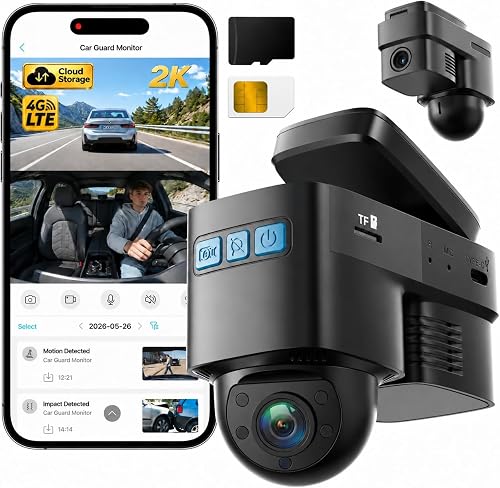
Topexplore is the best choice here for remote parked-car checks. Its 4G LTE connection can provide live front and cabin view, GPS location, instant app alerts and two-way communication when the vehicle has compatible cellular coverage.
That remote access is the main difference from a local Wi-Fi camera. You can check the car from home or work if the cellular signal is strong enough.
The front camera records in 2K, while the cabin camera records in 1080P with 4 infrared lights. The front view helps with plates and signs, and the cabin view helps inside the vehicle.
Radar detection, AI human detection and impact detection can trigger alerts during parked activity. A 32GB card is included for local recording, and cloud backup can keep eligible event clips available without removing the card.
The included OBD-II power cable supports parking mode in many compatible vehicles. Check compatibility before installation so the power route works as expected.
After the included trial periods, you can use a compatible Verizon, AT&T or T-Mobile 4G SIM with carrier data, or continue with the offered data plan. Remote features depend on cellular service, and a car in a weak-signal area may not stream as smoothly.
Choose it when remote access matters more than four-direction coverage.
VROAVIE 360° View 4 Channel Mirror Dash: Best for a mirror-style display
- Four 1080P cameras
- 12-inch mirror display
- GPS module and Wi-Fi
- 128GB card included
VROAVIE replaces the usual dash-cam screen with a 12-inch mirror-style display and adds detached side cameras. It suits drivers who want four-channel coverage with a larger viewing surface.
Pros
- Four-channel coverage
- 12-inch display
- GPS module included
Cons
- Parking mode needs extra hardwire kit
- Heavier 1.3-pound design
VROAVIE suits drivers who want four-channel coverage in a mirror-style design. The system records front, rear, left and right views at 1080P and uses a 12-inch LCD mirror display for a larger viewing surface.
The larger screen can make it easier to check views and settings. It also changes the look of the dash compared with a small windshield camera.
The package includes the mirror camera, GPS module, rear camera kit, left and right side camera kit, straps, a microSD card and installation tools. Having the side kits in the box simplifies planning.
Its rearview mirror mount avoids drilling and attaches to the original mirror with straps. That approach suits drivers who do not want to cut or drill trim.
Built-in Wi-Fi supports app viewing and downloads, while the GPS module records location, speed, time and routes. Wi-Fi is for nearby use, and GPS helps place events on a map.
Parking modes include time-lapse and collision detection, but both require the extra hardwire kit. Time-lapse saves space, while collision mode focuses on recorded events.
The 1.3-pound design is heavier than the smaller windshield cameras. Check mirror fit and strap tension before driving.
Side cameras need careful placement so they cover doors without pointing at the car body. Test each angle before you tighten straps and route cables.
Choose it for a large mirror display and four-channel coverage if the added installation work fits your vehicle.
How should you choose a car camera for security?
Choose a car camera by coverage first, then check power, storage and access. A camera that records only the front cannot document a side scrape or activity near the rear door, while a four-channel system needs more wiring and memory.
Do you need front, rear, cabin or side cameras?
A front camera records road events and impacts ahead. Add a rear camera if rear-end incidents matter, a cabin camera for rideshare or interior activity, and side cameras when you want coverage near doors and adjacent parking spaces.
The ZMOPO, PRUVEEO and VROAVIE models offer four-channel coverage. SUVCON and the 70mai T800E add front, rear and inside views, while E-YEEGER and A810 Lite focus on front and rear.
For a camera mounted near a building instead of inside the car, a best door security camera may cover the approach more effectively.
What is the difference between local Wi-Fi and 4G?
Local Wi-Fi helps you connect to the camera when you're near the car. It can make video downloads easier, but it doesn't let you watch the vehicle from home.
4G LTE supports remote access over cellular service. Topexplore is the clearest remote-monitoring option, while the 70mai A810 Lite includes 4G LTE support and requires compatible service for those features.
How does parking mode get power?
Parking mode needs power after the ignition is off. Several cameras here require a separate ACC or hardwire kit, while Topexplore includes an OBD-II power cable for compatible vehicles.
Check your vehicle's power options before buying. A camera can support parking mode in its software but still need extra wiring to keep recording while parked.
If your car is stored in a garage, our guide to the best garage security camera covers cameras that watch the surrounding space rather than the vehicle interior.
How much storage should you use?
More cameras create more footage, so four-channel systems benefit from larger cards. ZMOPO and PRUVEEO include 128GB cards, the 70mai models include 64GB, and SUVCON and Topexplore include 32GB.
Loop recording keeps the camera running by overwriting older clips that have not been protected. Lock important footage after an incident and check the card regularly so protected files don't fill the available space.
Should you choose a standalone camera or a full system?
A standalone car camera is easier to install and suits one vehicle. A broader home setup can connect cameras, alarms and recording equipment across a property.
Read Standalone Camera vs Security System, and Why It Matters if you're deciding between one camera and a wider security plan. A What Is a Hybrid Security Camera System? guide can help if you want wired and wireless devices together.
What should you check before installing a car camera?
Install the camera where it does not block your view, route cables so they do not interfere with controls, and confirm steady power. Test the front, rear, cabin and side angles before hiding the cables.
Start with a dry fit. Hold each camera in place, sit in the driver seat and check that the view is clear.
Place the front camera high and centered where possible for a useful road view.
Check the rear camera from the driver seat and from behind the car. Make sure it is not blocked by a headrest, wiper or window tint.
For cabin views, aim the lens at the seats and doors you care about most. For side views, confirm the camera sees the door area rather than mostly the bodywork.
Keep cables away from pedals, steering parts and airbag zones. Loose cables can move during driving and distract you at the wrong moment.
Use clips or trim tools to hold cables in place. Leave a little slack where doors or seats move.
Use a supported microSD card and format it according to the camera instructions. Insert the card with the car off if the manual asks for that step, then start the car and confirm recording begins.
Check the date, time and GPS settings if your model uses them. Wrong details can make later review harder.
For night recording, review clips in a dark parking area. Test in a quiet spot before you rely on the camera after dark, and adjust the angle if headlights wash out the road ahead.
If the vehicle is near a window, a window security camera with night vision can add another viewing angle from inside the building. If you are comparing brands for a larger home setup, see our best Swann security cameras guide.
Which car security camera should you buy?
Pick ZMOPO if you want the broadest four-channel coverage and a 128GB card. That pick suits drivers who want front, rear, left, right and inside views in one system.
Pick SUVCON for a simpler front, rear and cabin setup. It keeps the camera count lower while still covering the inside of the vehicle.
Pick Topexplore when remote 4G alerts and live view are more important than side cameras. It is the clearest fit for checking a parked car from away.
Choose the 70mai T800E for 4K front footage, large card support and phone features. It suits frequent drivers and rideshare use.
Choose Veement for a focused front-only camera. It is a cleaner choice when rear and cabin coverage are not needed.
Choose the 70mai A810 Lite for compact 4G-ready front and rear recording. It suits drivers who want GPS, Wi-Fi 6 and voice control in a small unit.
Choose VROAVIE if a mirror display is part of your preferred setup. Its larger screen and detached side cameras suit a different dash layout.
Before you buy, match the camera to your parking spot, power route and storage needs. The best pick is the one you will install correctly and check regularly.
Our top 3 picks at a glance
-
1
-
2
Best for simple three-channel coverage
SUVCON Dash Cam Front and Rear
9.6/10 our score
See it on Amazon -
3
Frequently asked questions
What is the best camera for car security?
The ZMOPO 360 View 4 Channel Dash Cam is the best camera for car security when broad coverage is your priority. It records front, rear, left, right and inside views, includes a 128GB card and supports Wi-Fi access.
Parking mode needs an optional ACC hardwire kit.
Can a security camera for a car record while parked?
Yes, several car cameras here support parking monitoring, but the power setup matters. ZMOPO, PRUVEEO, E-YEEGER, 70mai and VROAVIE need a separate hardwire kit for parked recording, while Topexplore uses OBD-II power for continued monitoring in compatible vehicles.
Is a dash cam the same as a car security camera?
A dash cam is a type of car security camera, but coverage and remote access vary. Front-only models record the road, while multi-channel models add rear, cabin or side views.
Topexplore adds 4G live view and alerts, while local Wi-Fi models work near the vehicle.
Do car cameras need Wi-Fi?
No. A car camera can record to a microSD card without Wi-Fi.
Wi-Fi helps you preview or download footage nearby, while 4G LTE enables remote access when the camera has compatible cellular coverage and the required SIM or data service.
How much storage does a car security camera need?
Choose storage based on the number of cameras and how often you save clips. The 4-channel ZMOPO and PRUVEEO models include 128GB cards, while smaller systems include 32GB or 64GB.
Loop recording overwrites older footage that has not been protected when storage fills.